
 100% FREE ACCESS
12th Standard Syllabus & Materials
12th Standard
TN 12th Maths Applications of Matrices and Determinants Sample Question Papers Study Material - QB365 Set A
NEW12th Standard
TN 12th Computer Applications மின்னணு தரவு பரிமாற்றம் Sample Question Papers Study Material - QB365 Set A
NEW12th Standard
TN 12th Computer Applications மின் - வணிக பாதுகாப்பு அமைப்புகள் Sample Question Papers Study Material - QB365 Set A
NEW12th Standard
TN 12th Computer Applications மின்னணு செலுத்தல் முறைகள் Sample Question Papers Study Material - QB365 Set A
NEW12th Standard
TN 12th Computer Applications மின் - வணிகம் Sample Question Papers Study Material - QB365 Set A
NEW12th Standard
TN 12th Computer Applications திறந்த மூல கருத்துருக்கள் Sample Question Papers Study Material - QB365 Set A

Published on: 24/06/2021
QB365 provides detailed and simple solution for every Creative Questions in class 12 Computer Applications Subject. It will helps to get more idea about question pattern in every Creative questions with solution.
Download Tamil Nadu 12th Standard Computer Applications question papers, model tests, one-mark questions, important questions, and public exam papers in PDF format. Free study materials and answer keys for TN State Board students.
Questions + Answers key
Take MCQ Computer Applications Test
1.
Write some of the features of Open Source Hardware
2.
How to determine the type of Ethernet Cable?
3.
Write short note on. Var_dump( ) function with Example
4.
Write the steps to Draw Polygon
5.
What are the various options to save a document?
6.
Write the steps to split a textbox into two.
7.
How will you create a text box with the text tool?
8.
Differentiate copying and moving the text.
9.
How is Multimedia available in public places?
10.
How Multimedia is used in Entertainment?
11.
Write a short note on Resolver.
12.
Write notes on Flat name Space?
13.
Explain briefly about fwrite( ) function.
14.
Explain briefly about fread( ) function.
15.
Write the Validation rules for HTML input fields.
16.
Write a PHP program to display color names "using foreach" loop
17.
Write a php program to display 1 to 10 numbers using while loop
18.
What is Resource Sharing?
19.
Define Computer networking.
20.
Write a php program to check whether the given number is positive or negative.
21.
Write the rules for parameters.
22.
What is the use of SQL statements in PHP?
23.
Wha is MySQL?
24.
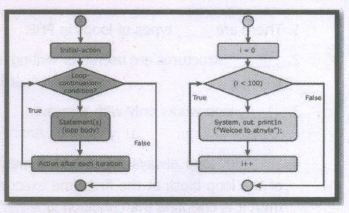
Draw the For loop Structure and Flow chart
25.
What are the disadvantages of Using Internet?
1.
(i) Remix
(ii) Remake
(iii) Remanufacture
(iv) Redistribute
(v) Resell
(vi) Study and Learn
2.
(i) Straight-through: The coloured wires are in the same sequence at both ends of the cable.
(ii) Cross-over: The first coloured wire at one end of the cable is the third coloured wire at the other end of the cable.
(iii) Roll-over: The coloured wires are in the opposite sequence at either end of the cable,
3.
(i) The var_dump( ) function is used to dump information about a variable.
(ii) This function displays structured information such as type and value of the given variable.
(iii) Arrays and objects are explored recursively with values indented to show structure.
Example:
\($\)x = "COMPUTER APPUCATION!";
\($\)x = null;
var dump(\($\)x);
?>
OUTPUT: NULL
4.
To draw a Polygon
1. Click on the Polygon tool from the toolbox. The cursor changes to a crosshair.
2. Click and drag anywhere on the screen. As you drag, a Polygon appears.
3. Release the mouse button when the Polygon is of the desired size
5.
1. Choose File> Save in the menu bar. (or)
2. The file name is given in the File name list box.
3. Then click on the Save button to save the document. The document is now saved and a file name appears in the title bar. Once a file is saved under a name, to save it again the name need not be entered again. The file can be saved simply by selecting the File > Save command or by clicking theSave button (or) clicking Ctrl + S in the keyboard.
6.
To split a text block into two
1. Place the cursor on the bottom handle, click and drag upwards. When you release the bottom handle will contain a red triangle.
2. Click once on this, and the cursor changes to a loaded text icon.
3. Position this where the second part of the text is to be, and click
7.
To create a text block with the text tool:
1. Select the text tool (T) from the toolbox. The pointer turns into an I -beam.
2. On an empty area of the page or pasteboard, do one of the following:
a. Click the l-beam where you want to insert text.
b. This creates a text block the width of the column or page. By default, the insertion point jumps to the left side of the text block.
3. Type the text you want. Unlike with a text frame, you do not see the borders of a text block until you click the text with the pointer tool.
8.
| Copying | Moving |
|---|---|
| Creating similar text in new location | Relocating the original text in a new location |
| Makes a duplicate text in another location | Transfers the Original text to another location |
| Will not affect the original content | Will delete the Original content |
| Keyboard shortcuts for cut and paste: ctrl + X ⟶ to Cut ctrl + V ⟶ to Paste |
Keyboard shortcuts for copy and paste: Ctrl + C ⟶ to Copy Ctrl + V ⟶ to Paste |
9.
(i) Multimedia is available in many public places like trade shows, libraries, railway stations, museums, malls, airports, banks, hotels and exhibitions in the form of kiosks.
(ii) The information presented in kiosk are enriched with animation, video, still pictures, graphics, diagrams, maps, audio and text. Banks uses kiosks in the form of ATM machines.
10.
(i) The remarkable advancement in the entertainment industry is due to the Multimedia Technololgy mainly.
(ii) This technology is needed in all mode of entertainment like radio, TV, online gaming, video on demand etc.
(iii) Video on demand or movies on demand is a service that provides movies to television sets ib an individual basis at homes.
(iv) Movies are stored in a central server and transmitted through a communication network.
11.
(i) Domain Name System is a client server application.
(ii) A host system need to map domain name to IP address or vice versa according to the call and that work is done by resolver .
(iii) Resolver either asks server to provide information about IP address.
(iv) If it doesn't find any information, then it sends the request to other servers and so on.
(v) Once the resolver receives the mapping, it checks whether it is an error or resolution (mapping) and provides result according to that
12.
(i) Flat name space is where the name is assigned to the IP address.
(ii) They do not have any specific structure .
(iii) In this flat namespace, some meaningful names are been given to IP address for accessing.
Disadvantage:
(i) Flat name Space cannot be used in large system. Because they need to be accessed and controlled centrally to avoid ambiguity and redundancy.
(ii) But it is difficult in flat name system. To avoid this major disadvantage hierarchical name space is used in large.
13.
PHP write a File:
The fwrite( ) function is used to write to a file.
Syntax:
fwrite($myfile, $txt);
Example:
< ?php
$myfile = fopen("new_schooLfile.
txt", "w'')
or die("Unable to open file!'');
$txt = "School Name\n";
fwrite($myfile, $txt);
$txt = "Student Name\n";
fwrite($myfile, $txt);
fclose($myfile);
? >
14.
PHP Read a File:
The fread ( ) function reads from an open file.
The file object comes from fopen function.
Syntax:
fread($file_Object,filesize("FileName''));
Example:
< ?php
fread ($myfiIe,filesize("Student. txt''));
? >
15.
Validation rules for HTML input field:
| Name (text Input) | : | Must contain letters and white-spaces |
| Email (Text Input) | : | Must contain @ and .strings |
| Website (Text Input) | : | Must contain a valid URL |
| Radio | : | Must be selectable minimum one value |
| Check Box | : | Must be checkable minimum one value |
| Drop Down menu | : | Must be selectable minimum one value |
16.
< ?php
scolors = array("red", "qreen", "blue'; "yellew'');
fereach (sectors as $value)
{
echo "svalue < br >";
}
? >
17.
< ?php
$x = 1;
while($x < = 10)
{
echo sx:
$x++;
}
? >
18.
(i) Resource sharing means one device accessed by many systems.
(ii) It allows all kind of programs, equipment's and available data to anyone via network to irrespective of the physical location of the resource of them.
(iii) Simply resource sharing is sharing such as printers, scanner, PDA, fax machine, and modems. For example, many computers can accessone printer if it is in networks.
19.
1. Computer networking is a technique of digital telecommunications network one that permits nodes to share its resources from one to another.
2. This computer networking exchanges the data as the main element.
3. These links were transferred over cable media like optic cables or wire or wireless media such as Bluetooth and WIFI.
20.
< ?php
$x = -12;
if ($x > 0)
{
echo "The number is positive";
}
else{
echo "The number is negative";
}
? >
21.
1. PHP Parameterized functions are the functions with parameters or arguments.
2. The parameter is also called as arguments, it is like variables.
Rules:
1. The arguments are mentioned after the function name and inside of the parenthesis.
2. There is no limit for sending arguments, just separate them with a comma notation.
22.
The SQL query statements are helping with PHP MySQL extension to achieve the objective of MySQL and PHP connection.
23.
(i) MySQL is the most popular Open Source Relational SQL Database Management System.
(ii) MySQL is one of the best RDBMS being used for developing various web-based software applications.
24.
25.
(i) Simply wasting the precious time on Internet by surfing, searching unwanted things.
(ii) unnecessary information is also there, why because anyone can post anything on their webpage, blogs.
(iii) Hackers and viruses can easily theft our more valuable information available in the Internet. There a lot of security issues are there in E-banking

12th Standard Syllabus & Materials
12th Standard
TN 12th Computer Applications வலையமைப்பு வடமிடல் Sample Question Papers Study Material - QB365 Set A
NEW12th Standard
TN 12th Computer Applications களப்பெயர் முறைமை (DNS) Sample Question Papers Study Material - QB365 Set A
NEW12th Standard
TN 12th Computer Applications வலையமைப்பு எடுத்துக்காட்டுகள் மற்றும் நெறிமுறைகள் Sample Question Papers Study Material - QB365 Set A
NEW12th Standard
TN 12th Computer Applications கணினி வலையமைப்பு ஓர் அறிமுகம் Sample Question Papers Study Material - QB365 Set A



Tamilnadu Stateboard 12th Standard Subjects

Maths

Chemistry

Physics

Biology

Computer Science

Business Maths and Statistics

Economics

Commerce

Accountancy

History
Computer Applications
Biology
Computer Technology
Computer Applications
Computer Science
Business Maths and Statistics
Commerce
Economics
Maths
Chemistry
Physics
Computer Technology
History
Accountancy

Tamil

English

French
Tamilnadu Stateboard Standards


