
 100% FREE ACCESS
12th Standard Syllabus & Materials
12th Standard
TN 12th Maths Applications of Matrices and Determinants Sample Question Papers Study Material - QB365 Set A
NEW12th Standard
TN 12th Computer Applications மின்னணு தரவு பரிமாற்றம் Sample Question Papers Study Material - QB365 Set A
NEW12th Standard
TN 12th Computer Applications மின் - வணிக பாதுகாப்பு அமைப்புகள் Sample Question Papers Study Material - QB365 Set A
NEW12th Standard
TN 12th Computer Applications மின்னணு செலுத்தல் முறைகள் Sample Question Papers Study Material - QB365 Set A
NEW12th Standard
TN 12th Computer Applications மின் - வணிகம் Sample Question Papers Study Material - QB365 Set A
NEW12th Standard
TN 12th Computer Applications திறந்த மூல கருத்துருக்கள் Sample Question Papers Study Material - QB365 Set A

Published on: 13/05/2022
QB365 provides detailed and simple solution for every Creative Questions in class 12 Computer Applications Subject. It will helps to get more idea about question pattern in every Creative questions with solution.
latest Creative QuestionsDownload Tamil Nadu 12th Standard Computer Applications question papers, model tests, one-mark questions, important questions, and public exam papers in PDF format. Free study materials and answer keys for TN State Board students.
Questions + Answers key
Take MCQ Computer Applications Test
1.
Write short note on. Var_dump( ) function with Example
2.
What are the major the functions performed using SQL?
3.
Write a note on MySQL.
4.
What are the roles of Database administrator?
5.
Write hort note on Master Page
6.
Write the steps to Draw Polygon
7.
Write the steps to draw a line
8.
What are the various options to save a document?
9.
Write the steps to split a textbox into two.
10.
How will you create a text box with the text tool?
11.
Differentiate copying and moving the text.
12.
Write the steps to resize a text block
13.
How is Multimedia available in public places?
14.
How Multimedia is used in Entertainment?
15.
Explain briefly about fwrite( ) function.
16.
Explain briefly about fread( ) function.
17.
Write the Validation rules for HTML input fields.
18.
Sample PHP program to open and closing a file.
19.
Write a PHP program to display color names "using foreach" loop
20.
Write a php program to display 1 to 10 numbers using while loop
21.
Write a php program to check whether the given number is positive or negative.
22.
Write a PHP code to display "Have a nice weekend!" if the current day is Friday, otherwise it will output "Have a nice day!" using if-else statement.
23.
Write the rules for parameters.
24.
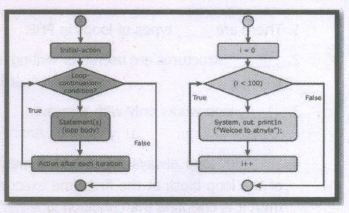
Draw the For loop Structure and Flow chart
1.
(i) The var_dump( ) function is used to dump information about a variable.
(ii) This function displays structured information such as type and value of the given variable.
(iii) Arrays and objects are explored recursively with values indented to show structure.
Example:
\($\)x = "COMPUTER APPUCATION!";
\($\)x = null;
var dump(\($\)x);
?>
OUTPUT: NULL
2.
Few major functions performed using SQL are listed below:
(i) Executes queries against a database.
(ii) Retrieves data from database.
(iii) Inserts and updates records in a database
(iv) Delete records from database
(v) Creates new databases and new tables in a database
3.
(i) MySQL is a database management system founded by Monty Widenius
(ii) MySQL is open source software that allows managing relational databases.
(iii) It also provides the flexibility of changing the source code as per the needs.
(iv) It runs on multiple platforms like Windows, Linux and is scalable, reliable and fast.
4.
(i) Database Administrators (DBA's) who takes care of configuration, installation, performance, security and data backup.
(ii) DBA's possess the skills on database design, database queries, RDMS, SQL and networking.
(iii) The primary task is the creation of new user and providing them with access rights.
5.
(i) Master Pages commonly contain repeating logos, page numbers, headers, and footers. They also contain non printing layout guides, such as column guides, ruler guides, and margin guides
(ii) A master item cannot be selected on a document page
(iii) You can create, modify, and delete objects on master pages just like any other objects, but you must do so from the master pages themselves
6.
To draw a Polygon
1. Click on the Polygon tool from the toolbox. The cursor changes to a crosshair.
2. Click and drag anywhere on the screen. As you drag, a Polygon appears.
3. Release the mouse button when the Polygon is of the desired size
7.
1. Select the Line tool from the toolbox. The cursor changes to a crosshair
2. Click and drag on the screen to draw your line. As you drag, a line appears.
3. Release the mouse button and the line will be drawn and selected, with sizing handles on either end. Resize the line by clicking and dragging the handles, if necessary.
8.
1. Choose File> Save in the menu bar. (or)
2. The file name is given in the File name list box.
3. Then click on the Save button to save the document. The document is now saved and a file name appears in the title bar. Once a file is saved under a name, to save it again the name need not be entered again. The file can be saved simply by selecting the File > Save command or by clicking theSave button (or) clicking Ctrl + S in the keyboard.
9.
To split a text block into two
1. Place the cursor on the bottom handle, click and drag upwards. When you release the bottom handle will contain a red triangle.
2. Click once on this, and the cursor changes to a loaded text icon.
3. Position this where the second part of the text is to be, and click
10.
To create a text block with the text tool:
1. Select the text tool (T) from the toolbox. The pointer turns into an I -beam.
2. On an empty area of the page or pasteboard, do one of the following:
a. Click the l-beam where you want to insert text.
b. This creates a text block the width of the column or page. By default, the insertion point jumps to the left side of the text block.
3. Type the text you want. Unlike with a text frame, you do not see the borders of a text block until you click the text with the pointer tool.
11.
| Copying | Moving |
|---|---|
| Creating similar text in new location | Relocating the original text in a new location |
| Makes a duplicate text in another location | Transfers the Original text to another location |
| Will not affect the original content | Will delete the Original content |
| Keyboard shortcuts for cut and paste: ctrl + X ⟶ to Cut ctrl + V ⟶ to Paste |
Keyboard shortcuts for copy and paste: Ctrl + C ⟶ to Copy Ctrl + V ⟶ to Paste |
12.
1. Click on the Pointer tool.
2. Click either the left or right corner handle on the bottom of the text block and drag. When you release the mouse button, the text in the text block will reflow to fit the new size of the text block
3. A red triangle in the bottom windowshade means there is more text in the text block than is visible on the page. Drag the windowshade handle down to show more text.
13.
(i) Multimedia is available in many public places like trade shows, libraries, railway stations, museums, malls, airports, banks, hotels and exhibitions in the form of kiosks.
(ii) The information presented in kiosk are enriched with animation, video, still pictures, graphics, diagrams, maps, audio and text. Banks uses kiosks in the form of ATM machines.
14.
(i) The remarkable advancement in the entertainment industry is due to the Multimedia Technololgy mainly.
(ii) This technology is needed in all mode of entertainment like radio, TV, online gaming, video on demand etc.
(iii) Video on demand or movies on demand is a service that provides movies to television sets ib an individual basis at homes.
(iv) Movies are stored in a central server and transmitted through a communication network.
15.
PHP write a File:
The fwrite( ) function is used to write to a file.
Syntax:
fwrite($myfile, $txt);
Example:
< ?php
$myfile = fopen("new_schooLfile.
txt", "w'')
or die("Unable to open file!'');
$txt = "School Name\n";
fwrite($myfile, $txt);
$txt = "Student Name\n";
fwrite($myfile, $txt);
fclose($myfile);
? >
16.
PHP Read a File:
The fread ( ) function reads from an open file.
The file object comes from fopen function.
Syntax:
fread($file_Object,filesize("FileName''));
Example:
< ?php
fread ($myfiIe,filesize("Student. txt''));
? >
17.
Validation rules for HTML input field:
| Name (text Input) | : | Must contain letters and white-spaces |
| Email (Text Input) | : | Must contain @ and .strings |
| Website (Text Input) | : | Must contain a valid URL |
| Radio | : | Must be selectable minimum one value |
| Check Box | : | Must be checkable minimum one value |
| Drop Down menu | : | Must be selectable minimum one value |
18.
i) Text(Notepad) file:
AJAX = Asynchronous JavaScript and XML
CSS = Cascading Style Sheets
HTML = Hyper Text Markup Language
PHP = PHP Hypertext: Preprocessor
SQL = Structured Query Language
SVG = Scalable Vector Graphics
XML = EXtensible Markup Language
ii) PHP File:
< ?php
$myfile = fopen("webdictionary.txt", "r'') or
die("Unable to open file!'');
echo fread( $myfile, filesize("webdictionary.
txt'')); fclose($myfile);
? >
iii) OUTPUT
AJAX = Asynchronous JavaScript and XML
CSS = Cascading Style Sheets
HTML = Hyper Text Markup Language
PHP = PHP Hypertext Preprocessor
SQL = Structured Query Language
SVG = Scalable Vector Graphics
XML = EXtensible Markup Language
19.
< ?php
scolors = array("red", "qreen", "blue'; "yellew'');
fereach (sectors as $value)
{
echo "svalue < br >";
}
? >
20.
< ?php
$x = 1;
while($x < = 10)
{
echo sx:
$x++;
}
? >
21.
< ?php
$x = -12;
if ($x > 0)
{
echo "The number is positive";
}
else{
echo "The number is negative";
}
? >
22.
< ?php·
$d=date("D'');
if($d=="Fri'')
{
echo"Have a nice weekend!";
}
Else
{
echo"Have a nice day!";
}
? >
23.
1. PHP Parameterized functions are the functions with parameters or arguments.
2. The parameter is also called as arguments, it is like variables.
Rules:
1. The arguments are mentioned after the function name and inside of the parenthesis.
2. There is no limit for sending arguments, just separate them with a comma notation.
24.

12th Standard Syllabus & Materials
12th Standard
TN 12th Computer Applications வலையமைப்பு வடமிடல் Sample Question Papers Study Material - QB365 Set A
NEW12th Standard
TN 12th Computer Applications களப்பெயர் முறைமை (DNS) Sample Question Papers Study Material - QB365 Set A
NEW12th Standard
TN 12th Computer Applications வலையமைப்பு எடுத்துக்காட்டுகள் மற்றும் நெறிமுறைகள் Sample Question Papers Study Material - QB365 Set A
NEW12th Standard
TN 12th Computer Applications கணினி வலையமைப்பு ஓர் அறிமுகம் Sample Question Papers Study Material - QB365 Set A



Tamilnadu Stateboard 12th Standard Subjects

Maths

Chemistry

Physics

Biology

Computer Science

Business Maths and Statistics

Economics

Commerce

Accountancy

History
Computer Applications
Biology
Computer Technology
Computer Applications
Computer Science
Business Maths and Statistics
Commerce
Economics
Maths
Chemistry
Physics
Computer Technology
History
Accountancy

Tamil

English

French
Tamilnadu Stateboard Standards


