
 100% FREE ACCESS
12th Standard Syllabus & Materials
12th Standard
TN 12th Computer Applications மின்னணு தரவு பரிமாற்றம் Sample Question Papers Study Material - QB365 Set A
NEW12th Standard
TN 12th Computer Applications மின் - வணிக பாதுகாப்பு அமைப்புகள் Sample Question Papers Study Material - QB365 Set A
NEW12th Standard
TN 12th Computer Applications மின்னணு செலுத்தல் முறைகள் Sample Question Papers Study Material - QB365 Set A
NEW12th Standard
TN 12th Computer Applications மின் - வணிகம் Sample Question Papers Study Material - QB365 Set A
NEW12th Standard
TN 12th Computer Applications திறந்த மூல கருத்துருக்கள் Sample Question Papers Study Material - QB365 Set A
NEW12th Standard
TN 12th Computer Applications வலையமைப்பு வடமிடல் Sample Question Papers Study Material - QB365 Set A

Published on: 28/02/2021
12th Standard English Medium Computer Science Reduced Syllabus Annual Exam Model Question Paper With Answer Key - 2021
Download Tamil Nadu 12th Standard Computer Science question papers, model tests, one-mark questions, important questions, and public exam papers in PDF format. Free study materials and answer keys for TN State Board students.
Questions + Answers key
Take MCQ Computer Science Test
1.
What is the output of the following program? import csv
d=csv.reader(open('c:\PYPRG\ch13\city.csv'))
next(d)
for row in d:
print(row)
if the file called “city.csv” contain the following details
chennai,mylapore
mumbai,andheri
chennai,mylapore
mumbai,andheri
chennai,mumba
chennai,mylapore,mumbai,andheri
2.
3.
Which of the following is the output of the following program?
class Student:
def __init__(self, name):
self.name=name
print (self.name)
S=Student(“Tamil”)
Error
Tamil
name
self
4.
Which of the following set operation includes all the elements that are in two sets but not the one that are common to two sets?
Symmetric difference
Difference
Intersection
Union
5.
If List=[17,23,41,10] then List.append(32) will result
[32,17,23,41,10]
[17,23,41,10,32]
[10,17,23,32,41]
[41,32,23,17,10]
6.
If List=[10,20,30,40,50] then List[2]=35 will result
[35,10,20,30,40,50]
[10,20,30,40,50,35]
[10,20,35,40,50]
[10,35,30,40,50]
7.
8.
Which statement is generally used as a placeholder?
continue
break
pass
goto
9.
Two main measures for the efficiency of an algorithm are
Processor and memory
Complexity and capacity
Time and space
Data and space
10.
The word comes from the name of a Persian mathematician Abu Ja’far Mohammed ibn-i Musa al Khowarizmi is called?
Flowchart
Flow
Algorithm
Syntax
11.
Which operator is also called as Comparative operator?
Arithmetic
Relational
Logical
Assignment
12.
Bundling two values together into one can be considered as
Pair
Triplet
single
quadrat
13.
Which of the following functions that retrieve information from the data type?
Constructors
Selectors
recursive
Nested
14.
The functions which cause side effects to the arguments passed are called
Impure function
Partial Functions
Dynamic Functions
Pure functions
15.
Which of the following is a unit of code that is often defined within a greater code structure?
Subroutines
Function
Files
Modules
16.
How the analysis of algorithms and performance evaluation can be divided?Explain.
17.
What is algorithmic solution?
18.
What is searching? Write its types.
19.
20.
Define Pseudo code.
21.
What is a Tuple? Give an example.
22.
23.
What is abstract data type?
24.
Write a Python program to execute the following c++ coding.
#include <iostream>
using namespace std;
int main()
{ cout<<“WELCOME”;
return(0);
}
The above C++ program is saved in a file welcome.cpp
25.
Write the different methods to read a File in Python.
26.
Explain the characteristics of DBMS.
27.
Explain the different types of relationship mapping.
28.
Explain recursive function with an example.
29.
Write a Python code to find the L.C.M. of two numbers.
30.
Explain the concept of Dynamic programming with suitable example.
31.
Discuss about Linear search algorithm.
32.
Discuss in detail about Tokens in Python.
33.
How will you access the multi-item. Explain with example.
34.
How will you frame the commands to work on database?
35.
Define Data Control Language and also list the command under this.
36.
List the types of DBMS users.
37.
Write a short note on Relational data model.
38.
Explain how a connect to be made to a database (Academy through python SQlite3.
39.
What are the ways to write a new or edit are existing CSV file in python?
40.
Give an example of an ADT for rational numbers.
41.
Write a note on Data Abstraction.
1.
(b)
mumbai,andheri
2.
(a)
3.
(b)
Tamil
4.
(a)
Symmetric difference
5.
(b)
[17,23,41,10,32]
6.
(c)
[10,20,35,40,50]
7.
(b)
8.
(c)
pass
9.
(c)
Time and space
10.
(c)
Algorithm
11.
(b)
Relational
12.
(a)
Pair
13.
(b)
Selectors
14.
(a)
Impure function
15.
(b)
Function
16.
Analysis of algorithms and performance evaluation can be divided into two different phases:
(i) A Priori estimates: This is a theoretical performance analysis of an algorithm. Efficiency of an algorithm is measured by assuming the external factors.
(ii) A Posterori testing: This is called performance measurement. In this analysis, actual statistics like running time and required for the algorithm executions are collected.
17.
An algorithm that yields expected output for a valid input is called an algorithmic solution
18.
A searching algorithm is the step-by step procedure used to locate specific data among a collection of data. There are two types of searching are.
(i) Linear Search
(ii) Binary Search
19.
20.
Pseudo code is an informal way of Programming language syntax.
21.
(i) A tuple is a comma-separated sequence of values surrounded with parentheses. Tuple is similar to a list.
(ii) The difference between the two is that you cannot change the elements of a tuple once it is assigned whereas in a list, elements can be changed
(iii) Example : colour = ('red', 'blue, 'Green')
22.
23.
(i) Abstract Data type (ADT) is a type (or class) for objects whose behavior is defined by a set of value and a set of operations.
(ii) The definition of ADT only mentions what operations are to be performed but not how these operations will be implemented.
24.
Execution Steps:
//save above file as welcome.cpp
#Now select File -> New in Notepad and type the Python program
#save the file as fun.py
#Program that compiles and executes a .cpp file
#Python fun.py- iC: |pyprg| welcome - file.cpp
Program:
import sys, os, getopt
def main (argv):
cpp_file="
exe_file="
opts, args = getopt.getopt(argv, "i:", ['ifile='])
for o a in opts
if o in ("-i, "--ifile"):
cpp_file=a+ .'cpp'
exe_file = a+ 'exe'
run (cpp_file, exe_file)
def run (cpp_file, exe_file):
print("Compiling" + Cpp_file)
os.system ('g++' + cpp_file+'_o'+exe_file)
print("Running" + exe_file)
print("---------------")
print
Os.system(exe_file)
print
if_name_=='_main_':
main (sys.argv [1:])
Output:
welcome.
25.
1. CSV file - data with default delimiter comma(,)
2. CSV file - data with space at the beginning.
3. CSV file - data with quotes
4. CSV file - data with custom Delimiters
1. CSV file - data with default delimiter comma(,):
The following program read a file called "Sample1.csv" with default delimiter comma (,) and print row by row.
Program:
#importing csv
import csv
#opening the csv file which is in different location with read mode
with opent('c.\\pyprg\\sample1.csv', 'r') as F:
#other way to open the file is f= ('C:\\pyprg\\ sample1.csv', 'r')
reader = csv.reader(F)
# printing each line of the Data row by row
print(row)
F.close()
Output:
['SNO', 'NAME', 'CITY']
['12101', 'RAM', 'CHENNAI']
['12102', 'LAVANYA', 'TIRUCHY']
['12103', 'LAKSHMAN', 'MADURAI']
2. CSV files - data with spaces at the beginning:
Consider the following file "Sample2.csv containing the following data when opened through notepad.
| Topic 1 | Topic 2 | Topic 3 |
| One, | two, | three, |
| Example 1, | Example 2, | Example 3, |
Program:
import csv
csv.register_dialect ['my Dialect', delimiters=', 'Skipinitialspace= True).
F = open ('c:\\Pyprgl\sample2.csv', 'r')
reader = CSV.reader (F, dialect = 'myDialect')
for row in reader:
print (row)
F.close()
Output:
['Topic 1', 'Topic 2', 'Topic 3']
['One', 'two', 'three']
['Example 1', 'Example 2', 'Example 3']
We can see in "Sample 2.csv" there are spaces after the delimiter due to which the output is also displayed with spaces.
These whitespaces can be removed, by registering new dialects using csv. register _dialect( ) class of csv module. A dialect describes the format of the csv file that is to be read. In dialects the Parameter "skipinitialspace" is used for removing whitespaces after the delimiter.
3. CSV File - Data with Quotes:
We can read the csv files with quotes, by registering new dialects using csv. register_dialect( ) class of csv module.
SNO, Quotes
1, "The Secret to getting ahead is getting started".
2, "Excellence is a continuous process and not an accident."
3, "Work hard dream big never give up and believe Yourself"
4, "Failure is the opportunity to begin again more intelligently".
5, "The successful warrior is the average man, with laser-like focus."
Program:
import cSv
csv.register_ dialect ('MyDialect', delimiter =, 'quoting = csv.QUOTE_ALL, skipinitialspace = True)
f=open ('c:\\Pyprg\\ quotes.csv', 'r')
reader = csv.reader (f, dialect = 'myDialect')
for row in reader:
print (row)
Output:
['SNO, 'Quotes']
['1', 'The secret to getting ahead is getting started'.]
['2', 'Excellence is a continuous process and not an accident'.]
['3', 'Work hard dream big never give up and believe yourself'.]
['4', 'Failure is the opportunity to begin again more intelligently':]
['5', 'The successful warrior is the average man with laser- like focus':]
4. CSV files with custom Delimiters:
We can read csv file having custom the delimiter by registering a new dialect with the help of csv.register_dialect( ).
In the following file called "sample4.csv", each column is separated with |(Pipe Symbol)
| Roll No | Name | City |
| 12101 | Arun | Chennai |
| 12102 | Meena | Kovai |
| 12103 | Ram | Nellai |
| 103 | Ayush | M |
| 104 | Abinandh | M |
Program:
import csv
Csv. register_dialect('myDialect', delimiter= '|')
with open (c:\\pyprg\sample 4.csv', 'r') as f:
reader = csv.reader (f, dialect = "my dialect")
for row is reader:
print (row)
f.close()
Output:
['Roll no', 'Name', 'City]
['12101', 'Arun', 'Chennai']
['12102', 'Meena', 'Kovai']
['12103', 'Ram', 'Nellai']
26.
Characteristics of Database Management System
| 1. Data stored into Table | Data is never directly stored into the database. Data is stored into tables, created inside the database. DBMS also allows to have relationship between tables which makes the data more meaningful and connected. |
| 2. Reduced Redundancy | In the modern world hard drives are very cheap, but earlier when hard drives were too expensive, unnecessary repetition of data in database was a big problem But DBMS follows Normalisation which divides the data in such a way that repetition is minimum. |
| 3. Date Consistency | On live data, it is being continuously updated and added, maintaining the consistency of data can become a challenge. But DBMS handles it by itself. |
| 4. Support Multiple user and Concurrent Access | DBMS allows multiple users to work on it( update, insert, delete data) at the same time and still manages to maintain the data consistency. |
| 5. Query Language | DBMS provides users with a simple query language, using which data can be easily fetched, inserted, deleted and updated in a database. |
| 6. Security | The DBMS also takes care of the security of data, protecting the data from unauthorized access. In a typical DBMS, we can create user accounts with different access permissions, using which we can easily secure our data by restricting user access. |
| 7. DBMS Supports Transactions | It allows us to better handle and manage data integrity in real world applications where multi-threading is extensively used. |
27.
Types of relationships:
(i) One-to-One Relationship
(ii) One-to-Many Relationship
(iii) Many-to-One Relationship
(iv) Many-to-Many Relationship
(i) One-to-One Relationship:
In One-to-One Relationship, one entity is related with : only one other entity. One row in a table is linked with only one row in another table and vice versa.
For example: A student can have only one exam number

(ii) One-to-Many Relationship.
In One-to- Many relationship, one entity is related to many other entities. One row in a table A is linked to many rows in a table B, but one row in a table B is linked to only one row in table A.
For example: One Department has many staff members.
.JPG)
(iii) Many-to-One Relationship:
In Manyto- One Relationship, many entities can be related with only one in the other entity.
For example:
A number of staff members working in one Department.
Multiple rows in staff members table is related with only one row in Department table.
.JPG)
(iv) Many-to-Many Relationship:
A manyto- many relationship occurs when multiple records in a table are associated with multiple records in another table.
(i) Example 1:
Customers and Product
Customers can purchase various products and Products can be purchased by many customers
(ii) Example 2:
Students and Courses
A student can register for many Courses and a Course may include many students
(iii) Example 3:
Books and Student.
Many Books in a Library are issued to many students.
.JPG)
28.
(i) When a function calls itself is known as recursion.
(ii) Recursion works like loop but sometimes it makes more sense to use recursion than loop.
(iii) You can convert any loop to recursion. A recursive function calls itself.
(iv) Imagine a process would iterate indefinitely if not stopped by some condition is known as infinite iteration.
(v) The condition that is applied in any recursive function is known as base condition.
(vi) A base condition is must in every recursive function otherwise it will continue to execute like an infinite loop.
Overview of how recursive function works:
(i) Recursive function is called by some external code.
(ii) If the base condition is met then the program gives meaningful output and exits.
(iii) Otherwise, function does some required processing and then calls itself to continue recursion.
Here is an exanmple of recursive function used to calculate factorial.
Example:
def fact(n):
if n == 0:
return 1
else:
return n * fact (n-1)
print (fact (0))
print (fact (5))
Output:
120
29.
Program:
def lcm(x, y):
if x>y:
greater = x
else:
greater = y
while (True):
if ((greater % x == 0) and (greater % y ==0))
lcm = greater
break
greater + = 1
return lcm
a = int (input ("Enter the first number:"))
b = int (input ("Enter the second number: "))
print ("The L.C.M of", a, "and", b, "is", lcm (a, b))
[OR]
Method II: (without using functions)
a = int (input ("Enter the first number:"))
b = int (input ("Enter the second number:"))
if a>b:
mini a
else:
min 1 = b
while (1):
if (min 1% a 0 and mini 1% b=0):
print ("LCM is:", mini)
break
mini = min 1+1
Output:
Enter the first number: 15
Enter the second number: 20
LCM is: 60
30.
(i) Dynamic programming is an algorithmic design method that can be used when the solution to a problem can be viewed as the result of a sequence of decisions.
(ii) Dynamic programming approach is similar to divide and conquer. The given problem is divided into smaller and yet smaller possible sub-problems.
(iii) Dynamic programming is used whenever problems can be divided into similar subproblems. so that their results can be reused to complete the process.
(iv) Dynamic programming approaches are used to find the solution in optimized way. For every inner subproblem, dynamic algorithm will try to check the results of the previously solved sub-problems.
(v) The solutions of overlapped sub-problems are combined in order to get a better solution.
Steps to doDynamic programming :
(i) The given problem will be divided into smaller overlapping sub-problems.
(ii) An optimum solution for the given problem can be achieved by using result of smaller sub-problem.
(iii) Dynamic algorithms uses Memoization
Fibonacci Series - An example :
(i) Fibonacci series generates the subsequent number by adding two previous numbers. Fibonacci series starts from two numbers -Fib 0 & Fib 1. The initial values of Fib 0 & Fib l can be taken as 0 and 1.
(ii) Fibonacci series satisfies the following conditions:
Fibn = Fiba-1 + Fiba-2
(iii) Hence, a Fibonacci series for the n value 8 can look like this
Fib8 = 0 1 1 2 3 5 8 13
Fibonaeci Iterative Algorithm with Dynamic programning approach : The following example shows a simple Dynamic programning approach for the generation ot Fibonacci series.
Initialize f0 = 0, f1 = 1.
Step- 1: Print the initial values of Fibonacci f0 and f1
Step- 2: Calculate Fibonacci fib \(\leftarrow \) f0+ f1
Step- 3: Assign f0 \(\leftarrow \) f1, f1 \(\leftarrow \) fib
Step- 4: Print the next consecutive value of Fibonacci fib
Step- 5: Go to step-2 and repeat until the specified number of terms generated
Example:
if we generate Fibonacci series up to 10 digits, the algorithm will generate the series as shown below:
The Fibonacci series is:
0 1 1 2 3 5 8 13 21 34 55.
31.
(i) Linear search also called sequential search is a sequential method for finding a particular value in a list.
(ii) This method checks the search element with each element in sequence until the desired element is found or the list is exhausted. In this searching algorithm, list need not be ordered.
procedure :
1. Traverse the array using for loop
2. In every iteration, compare the target search key value with the current value of the list.
(i) If the values do not match, move on to the next array element.
(ii) If the values match, display the current index and value of the array.
3. If no match is found, display the search element not found.
(iii) To search the number 25 in the array given below, a linear search will go step by step in a sequential order starting from the first element in the given array if the search element is found that index is returned otherwise the search is continued till the last index of the array. In this example number 25 is found at index number 3.
| index | 0 | 1 | 2 | 3 | 4 |
| values | 10 | 12 | 20 | 25 | 30 |
Example 1:
Input: values[] = {5, 34, 65, 12, 77, 35)
target = 77
Output: 4
Example 2:
Input: values[] = [101, 392, 1, 54, 32, 22, 90, 93) target = 200
Output: -1 (not found)
32.
Python breaks each logical line into a sequence of elementary lexical components known as Tokens. The normal token types are
(i) Identifiers,
(ii) Keywords,
(iii) Operators,
(iv) Delimiters and
(v) Literals.
(i) Identifiers:
1. An Identifier is a name used to identify a variable, function, class, module or object.
2. An identifier must start with an alphabet (A..Z or a..z) or underscore (-).
3. Identifiers may contain digits (0 .. 9).
4. Python identifiers are case sensitive i.e. uppercase and lowercase letters are distinct.
5. Identifiers must not be a python keyword.
6. Python does not allow punctuation character such as %,$, @ etc., within identifiers.
Example of valid identifiers.
Sum, total_marks, regno, num1.
Example of invalid identifiers
12 Name, name $, total-mark, continue.
Keywords:
Keywords are special words used by Python interpreter to recognize the structure of program. As these words have specific meaning for interpreter, they cannot be used for any other purpose.
| false | Class | finally | is | return |
| none | continue | for | lambda | try |
| true | def | from | nonlocal | while |
| and | del | global | not | with |
| as | elif | if | or | yield |
| assert | else | import | pass | |
| break | expect | in | raise |
Operators:
In computer programming languages operators are special symbols which represent computations, conditional matching etc. The value of an operator used is called operands. Operators are categorized as Arithmetic, Relational, Logical, Assignment etc. Value and variables when used with operator are known as operands.
i) Arithmetic operators
An arithmetic operator is a mathematical operator that takes two operands and performs a calculation on them. They are used for simple arithmetic. Most computer languages contain a set of such operators that can be used within equations to perform different types of sequential calculations.
Python supports the following Arithmetic operators.
.JPG)
ii) Relational or Comparative Operators
A Relational operator is also called as comparative operator which checks the relationship between two operands. If the relation is true, it returns True; otherwise it returns False.
Python supports following relational operators.
.JPG)
ii) Logical Operators
In Python, Logical operators are used to perform logical operations on the given relational expressions. There are three logical operators they are and, or and not.
.JPG)
iv) Assignment Operators
In Python, =is a simple assignment operator to assign values to variables Let a=5 and b=10 assigns the value.5 to a and 10 to b these two assignment statement can also be given as a,b=5,10 that assigns the value 5 and 10 on the right to the variables a and b respectively.
There are various compound operators in python Like +=,-=,*=,/=,%=,**= and // = are also available.
| Operator | Description | Example |
| Assume x = 10 | ||
| = | Assigns right side operands to left variable. | >>>X=10 >>>b="computer" |
| += | Added and, assign back the result to left operand i.e, x = 30 |
>>> x + = 20# x = x + 20 |
| -= | Subtracted and assign back the result to left operand i.e, x = 25 |
>>>x- = 5# x = x - 5 |
| *= | Multiplied and assign back the result to left operand ie, x = 125 |
>>>x* = 5# x = x*5 |
| /= | Divided and assign back the result to left operand i.e, x = 62.5 |
>>>x/ = 2# x = x/2 |
| %= | Taken modulus (Remainder) using two operands and assign the result to left assign the result to left | >>> x% = 3 # x = x%3 |
| **= | Performed exponential (power) calculation on operators and assign value to the left operand i.e, x = 6.25 |
>>>x**=2 |
| //= | Performed floor division on Operators and assign value to the left operand i.e, x= 2.0 |
>>>x// = 3 |
v) Conditional Operator
Ternary operator is also known as Conditional operator that evaluate something based on a condition being true or false. It simply allows testing a condition in a single line replacing the multiline if-else making the code compact. The syntax conditional operator is
Variable Name = [on_true] if [Test expression] else [on_false]
Example:
min = 50 if 49<50 else 70 # min = 50
min = 50 if 49>50 else 70 # min = 70
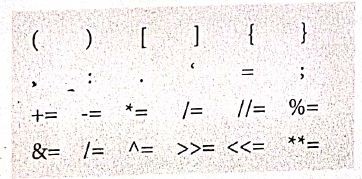
Delimiters:
Python uses the symbols and symbol Combinations as delimiters in expressions, lists, dictionaries and strings following are the delimiters.
Literals
Literal is a raw data given in a variable or constant. In python, there are various types of literals.
1) Numeric
2) String
3) Boolean
1) Numeric Literals
Numeric literals consists of digits and are immutable (unchangeable). Numeric literals can belong to 3 different numerical types Integer, float and complex.
2) String literals
In python a string literal is a sequence of characters surrounded by quotes. Python supports single, double and triple quotes for a string. A character literal is a single character surrounded by single or double quotes. The value with triple- quote "' "' is used to give multi-line string literal.
3) Boolean literals
A Boolean literal can have any of the two values: True or False.
4) Escape sequences
In python strings, the backslash "\" is a special character, also called the "escape" character. It is used in representing certain white space character: "\t" is a tab, "\n" is a newline, and "\r is a carriage return. For Example to print the message "It's raining"
The python command is
>> print ("It \'s raining")
It's raining
Python supports the following escape sequence characters.
| Escape sequence characters | Description | Example | Output |
| \\ | Backslash | >>> print('\\ test") | \test |
| \' | Single - quote | >>> print("Doesn\'t") | Doesn't |
| \'' | Double - quote | >>>print("\"'python\"") | "python" |
| \n | New line | Print ("python"\n","lang..") | Python lang. |
| \t | Tab | Prlnt ("python'","\t","lang.,") | Python lang |
33.
(i) The structure construct (In OOP languages it's called class construct) is used to represent multi-part objects where each part is named (given a name). Consider the following pseudo code:
Class Person:
creation()
first Name:=""
last Name:=""
id :=""
email :=""
The new data type Person is pictorially represented as
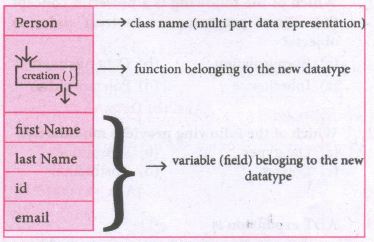
In the case of something more complex, like a person, we have a multí-item object where each item is a named thing: the first name, the last name, the id, and the email. One could use a list to represent a person:
Person = ['padmashri', 'Baskar', '994-222-1234', 'compsci@gmail.com']
| Let main() contains | |
| p1:=Person() | statement creates the object |
| first name:= "padmashri" | setting a field called firstName with value padamashri |
| last name:= "Baskar" | setting a field called last name with value Baskar |
| id:= "994-222-1234" | setting a field called id value 994-222-1234 |
| email="compsci@gmail.com" | setting a field called email with value compsci@gmail.com |
| -- output of firstName: Padmashri | |
(ii) The class (structure) construct defines the from for multi-part objects that represent a person.
(iii) Person is referred to as a class or a type, while pl is referred to as an object or an instance.
(iv) Here class Person as a Cookie cutter, and pl as a particular cookie, Using the cookie cutter you can make many cookies, Same way using class created many objects of that type.
(v) A class defines a data abstraction by grouping related data items. A class is not just data, it has functions defined within it, We say such functions are subordinate to the class because their job is to do thngs with the data of the class.
34.
The SQL provides a predetermined set of commands to work on databases.
| Keywords | They have a special meaning in SQL. They are understood as instructions. |
| Commands | They are instructions given by the user to the database also known as statements. |
| Clauses | They begin with a keyword and consist of keyword and argument. |
| Arguments | They are the values given to make the clause complete. |
35.
Data control language: A Data Control Language (DCL) is a programming language used to control the access of data stored in a database. It is used for controlling privileges in the database (Authorization). The privileges are required for performing all the database operations such as creating sequences, views of tables etc.
SQL commands which come under Data Control Language are:
| Grant | Grants permission to one or more users to perform specific tasks. |
| Revoke | Withdraws the access permission given by the GRANT statement. |
36.
(i) Database Administrators(DBA)
(ii) Application or software developers
(iii) End User
(iv) Database designers
37.
(i) The Relational Database model was first proposed by E.P. Codd in 1970. It is the most widespread data model used for database applications around the world.
(ii) The basic structure of data in relational model is tables (relations). All the information's related to a particular type is stored in rows of that table.
(iii) Hence tables are also known as relations in a relational model. A relation key is an attribute which uniquely identifies a particular tuple (row in a relation (tabler).
38.
# Python code to demonstrate table creation and insertions with SQL
# importing module
import sqlite3
# connecting to the database
connection = sqlite3.connect ("Academy.db")
# cursor
cursor = connection.cursor ( )
39.
(i) Creating A New Normal CSV File
(ii) Modifying An Existing File
(iii) Writing on a CSV File with Quotes
(iv) Writing on a CSV File with Custom Delimiters
(v) Writing on a CSV File with Lineterminator
(vi) Writing on a CSV File with Quotechars
(vii) Writing CSV File Into A Dictionary
(viii) Getting Data At Runtime And Writing In a File
40.
An ADT for rational numbers:
- - constructor
- - constructs a rational number with numerator n, denominator d
rational(n, d)
- - selector
number(x) \(\rightarrow \) returns the numerator of rational number x
denom(y) \(\rightarrow \) returns the denominator of rational number y
41.
(i) Data abstraction is supported by defining an abstract data type (ADT) which is a collection of constructors and selectors.
(ii) Constructors create an object, bundling together different pieces of information, while selectors extract individual pieces of information from the object.

12th Standard Syllabus & Materials
12th Standard
TN 12th Computer Applications களப்பெயர் முறைமை (DNS) Sample Question Papers Study Material - QB365 Set A
NEW12th Standard
TN 12th Computer Applications வலையமைப்பு எடுத்துக்காட்டுகள் மற்றும் நெறிமுறைகள் Sample Question Papers Study Material - QB365 Set A
NEW12th Standard
TN 12th Computer Applications கணினி வலையமைப்பு ஓர் அறிமுகம் Sample Question Papers Study Material - QB365 Set A
NEW12th Standard
TN 12th Computer Applications PHP-உடன் MySQL-ஐ இணைத்தல் Sample Question Papers Study Material - QB365 Set A



Tamilnadu Stateboard 12th Standard Subjects

Maths

Chemistry

Physics

Biology
Computer Science

Business Maths and Statistics

Economics

Commerce

Accountancy

History

Computer Applications
Biology
Computer Technology
Computer Applications
Computer Science
Business Maths and Statistics
Commerce
Economics
Maths
Chemistry
Physics
Computer Technology
History
Accountancy

Tamil

English

French
Tamilnadu Stateboard Standards
