
 100% FREE ACCESS
12th Standard Syllabus & Materials
12th Standard
TN 12th Computer Applications மின்னணு தரவு பரிமாற்றம் Sample Question Papers Study Material - QB365 Set A
NEW12th Standard
TN 12th Computer Applications மின் - வணிக பாதுகாப்பு அமைப்புகள் Sample Question Papers Study Material - QB365 Set A
NEW12th Standard
TN 12th Computer Applications மின்னணு செலுத்தல் முறைகள் Sample Question Papers Study Material - QB365 Set A
NEW12th Standard
TN 12th Computer Applications மின் - வணிகம் Sample Question Papers Study Material - QB365 Set A
NEW12th Standard
TN 12th Computer Applications திறந்த மூல கருத்துருக்கள் Sample Question Papers Study Material - QB365 Set A
NEW12th Standard
TN 12th Computer Applications வலையமைப்பு வடமிடல் Sample Question Papers Study Material - QB365 Set A

Published on: 27/02/2021
12th Standard English Medium Computer Science Reduced syllabus Creative Five Mark Question with Answer key - 2021(Public Exam )
Download Tamil Nadu 12th Standard Computer Science question papers, model tests, one-mark questions, important questions, and public exam papers in PDF format. Free study materials and answer keys for TN State Board students.
Questions + Answers key
Take MCQ Computer Science Test
1.
Explain TCL commands in detail.
2.
Explain ALTER command in detail.
3.
Explain the components of DBMS.
4.
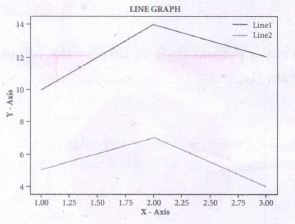
Write s python code to display to following plot.
Program
5.
Write a python program to find Fibonacci series of n terms using recursion.
6.
Explain different types arguments used in python with an example.
7.
Write a python program to execute the following C++ program.
/*. To check whether the number is palindrome or not using while Ioop.*/
// Now select File →New in Notepad and type the C++ program
#include < iostream >
using namespace std;
intmain ( )
{
int n, num, digit, rev = 0;
cout<< "Enter a positive number: ";
cin >>num;
n= num;
while(num)
{digit = num % 10;
rev = (rev * 10) + digit;
num = num / 10; }
cout<< "The reverse of the number is: " << rev <<endl;
if(n == rev)
cout< < "The number is a palindrome";
else
cout << "The number is not a palindrome";
return 0;
}
// Save this file as pali_cpp.cpp
8.
Write a program to store product and its cost price. Display all the available products and prompt to enter quantity of all the products. Finally generate a bill which displays the total amount to be paid.
9.
Write a program to calculate area and circumference of a circle.
10.
Write a program in python to display he following output.
1
2 2
3 3 3
4 4 4 4
5 5 5 5 5
11.
Explain Jump statement in python.
12.
How will you write Dictionary into CSV file with custom dialects?
13.
Write a program to read CSV file with user Defined Delimiter into a Dictionary.
14.
Write a program to read a specific column in a CSV file.
15.
Write a program that generate a set of prime numbers and another set of even numbers. Demonstrate the result of union. intersection. difference and symmetric difference operations.
16.
Explain the detail about some important list function with an example.
(i) copy ()
(ii) count ()
(iii) index ()
(iv) reverse ()
17.
Explain remove (), pop () and clear () used in list with an example.
18.
How will you access elements of a list using for loop? Explain with an example.
19.
Explain the sorting algorithm that uses n-1 number passes to get the final sorted list.
20.
Define efficiency of an algorithm? How the efficiency of an algorithm was determined?
21.
Explain the concept access control.
22.
Explain the representation of Abstract datatype using rational numbers.
23.
Write a program that has a list of positive and negative numbers. Create a new tuple that has only positive numbers from the list.
24.
Write a program to generate in the Fibonacci series and store it in a list. Then find the sum of all values.
25.
Write a python program to read marks of six subjects and to print the marks scored in each subject and show the total marks.
1.
TCL commands:
(i) COMMIT command: The COMMIT command is used to permanently save any transaction to the database. When any DML commands like INSERT. UPDATE. DELETE commands are used. the changes made by these commands are not permanent. It is marked permanent only after the COMMIT command is given from the SQL prompt. Once the COMMIT command is given. the changes made cannot be rolled back. The COMMIT command is used as COMMIT;
(ii) ROLLBACK command:
The ROLLBACK command restores the database to the last committed. state. It is used with SAVEPOINT command to jump to a particular savepoint location. The syntax for the ROLLBACK command is: ROLLBACK TO save point name;
(iii) SAVEPOINT command:
The SAVEPOINT command is used to temporarily save a transaction so that you can rollback to the point whenever required. The different states of our table can be saved at anytime using different names and the rollback to that state can be done using the ROLLBACK command.
SAVEPOINT savepoint_name;
2.
ALTER Command:
(i) The ALTER command is used to alter the table structure like adding a column, renaming the existing column, change the data type of any column or size of the column or delete the column from the table. It is used in the following way:
(ii) ALTER TABLE <table-name>
(iii) To add a new column "Address" of type 'char' to the Student table, the command is used as
(iv) ALTER TABLE Student ADD Address char;
To modify, existing column of table, the ALTER TABLE command can be used with MODIFY clause like wise:
(v) ALTER < table-name > MODIFY < column-name > < data type > < size >;
ALTER TABLE Student MODIFY Address char (25);
(vi) The above command will modify the address column of the Student table to now hold 25 characters.
(vii) The ALTER command can be used to rename an existing column in the following way:
(viii) ALTER < table-name > RENAME old-column- name TO new-column-name;
(ix) For example to rename the column Address to City, the command is used as :
(x) ALTER TABLE Student RENAME Address TO City;
(xi) The ALTER command can also be used to remove a column or all columns. for example to remove a particular column, the DROP COLUMN is used with the ALTER TABLE to remove a particular field, the command can be used as:
ALTER < table-name > DROP COLUMN < column-name >;
(xii) To remove the column City from the Student table, the command is used as :
ALTER TABLE Student DROP COLUMN City;
3.
The Database Management System can be divided into five major components as follows:
(i) Hardware
(ii) Software
(iii) Data
(iv) Procedures / Methods
(v) Database Access Languages
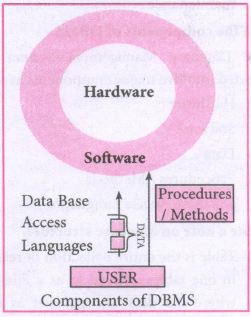
(i) Hardware: The computer, hard disk, I/O channels for data, and any other physical component involved in storage of data
(ii) Software: This main component is a program that controls everything. The DBMS software is capable of understanding the Database Access Languages and interprets into database commands for execution.
(iii) Data: It is that resource for which DBMS is designed. DBMS creation is to store and utilize data.
(iv) Procedures/Methods: They are general instructions to use a database management system such as installation of DBMS, manage databases to take backups, report generation, etc
(v) DataBase Access Languages: They are the languages used to write commands to access, insert, update and delete data stored in any database.
Examples of popular DBMS: Dbase, FoxPro
4.
Program:
import matplotlib.pyplot as plt
x = [1,2,3]
Y = [5,7,4]
x2 = [1,2,3]
y2 = [10,14,12]
plt.plot(x, y, Iabel='Line 1')
plt.plot(x2, y2, Iabel='Line 2')
pIt.xlabel('X -Axis')
pIt.yIabel('Y- Axis')
pIt.title('LINE GRAPH')
plt.legend ( )
plt.show ( )
5.
# program to find fibonacci series
def fibo (n):
if n < = 1:
return n
else:
return (fibo (n - 1) + fibo (n - 2))
n = int (input ("Enter How manu terms"))
for i in range (n):
print (fibo (i))
6.
(i) Required Arguments:
"Required Arguments" are the arguments passed to a function in correct positional order. Here, the number of arguments in the function call should match exactly with the function definition. Atleast one parameter to prevent syntax errors to get the required output.
(ii) Example:
def printstring(str):
print ("Example - Required arguments")
print (str)
return
# Now you can call printstring() function
printstring ("Welcome")
Output:
Example - Required arguments
Welcome
(iii) When the above code is executed, it produces the following error.
Traceback (most recent call last):
File "Req-arg.py", line 10, in
printstring()
TypeError: printstring() missing 1 required positional argument: 'str'
(iv) Instead of printstring() in the above code if we use printstring ("Welcome") then the output is
Output:
Example - Required arguments
Welcome
Keyword Arguments:
Keyword arguments will invoke the function after the parameters are recognized by their parameter names. The value of the keyword argument is matched with the parameter name and so, one can also put arguments in improper order (not in order).
(ii) Example:
def printdata (name):
print ("Example-1 Keyword arguments")
print ("Name :":name)
return
# Now you can call printdatat() function
printdata(name = "Gshan")
(iii) When the above code is executed, it produces the following output:
Output:
Example-1 Keyword arguments
Name:Gshan
Default Arguments:
In Python the default argument is an argument that takes a default value if no value is provided in the function call. The following example uses default arguments, that prints default salary when no argument is passed.
Example:
def printinfo( name, salary = 3500):
print ("Name: ", name)
print ("Salary: ", salary)
return
printinfo("Mani")
(iii) When the above code is executed, it produces the following output
Output:
Name: Mani
Salary: 3500
(iv) When the above code is changed as print info("Ram,":2000) it produces the following output:
Output:
Name: Ram
Salary: 2000
Syntax - Variable-Length Arguments:
(i) def function_name(*args):
function_body
return_statement
(ii) Example:
def printnos (*nos):
for n in nos:
print(n)
return
# now invoking the printnos() function
print ('Printing two values')
printnos (1,2)
print ('Printing three values')
printnos (10,20,30)
Output:
Printing two values
1
2
Printing three values
10
20
30
7.
# Save the File as pali.py . Program that compiles and executes a .cpp file
# Python c:\pyprg\pali.py -i c:\pyprg\pali_cpp import sys, os, getopt
def main(argv):
cpp_file ="
exe_file = "
opts, args= getopt.getopt(argv, "i:",['ifile='])
for o, a in opts:
if o in ("-i", "--ifile"):
cpp_file = a + '.cpp'
exe_file = a + '.exe'
run(cpp_file, exe_file)
def run(cpp_file, exe_file):
print("Compiling" + cpp_file)
os.system('g++' + cpp_file + '-o' + exe_file)
print("Running" + exe_file)
print("-----------------")
print
os.system(exe_file)
print
if __name__ =='__main__': # program starts executing from here
main(sys.argv[ 1:])
8.
class MyStore:
_prod_code= []
_prod_name= []
_ cost_price= []
_prod_quant= []
def getdata(self):
self.p = int(input("Enter no. of products you need to store: "))
for x in range(self.p):
self._prod_code.
append(int(input("Enter Product Code: ")))
self._prod_name.append(str(input("Enter Product Name: ")))
self._ cost_price.append(int(input("Enter Cost price: ")))
def display(self):
print("Stock in Stores")
print(" ---------------------------------- ")
print("Product Code \t Product Name \t Cost Price")
print(" ------------------------------------- ")
for x in range(self.p):
print(self._prod_code[x], "\t\t", self._prod_name[x], "\t\t", self._cos_ price [x])
print(" ---------------------------------")
def print_bill(self):
total_price = 0
for x in range( self.p):
q=int(input("Enter the quantify for the product code %d : "%self._ prod_code [x]))
self._prod_quant.append(q)
total_price = total_price +self._cost_
price[x]*self._prod_quant[x]
print(" Invoice Receipt ")
print(" --------------------------------------")
print("Product Code\t Product Name\t
Cost Price\t Quantity \t Total Amount")
print(" ------------------------------------ ")
for x in range(self.p):
print(self._prod_code[x], "\t\t", self._prod_name[x], "\t\t",
self._cost_price[x], "\t\t", self._prod_quant[x], "\t\t",
self._pro d_ quan t [x] *self._cost_price [x])
print(" -----------------------------------")
print(" Total Amount = ", total_price)
9.
class Circle:
pi=3.14
def _init_(self.radius):
self.radius=radius
def area(self):
return Circle. pi*(self.radius**2)
def circumference(self):
return 2*Circle.pi*self.radius
r=int(input("Enter Radius: "))
Ce=Circle(r)
print("The Area =",C.area())
print("The Circumference =", Cxircumferencet())
10.
for i in range (1,6):
for j in range (1, i+1)
print (i, end =' ')
print (end = '\n')
i+ = 1
11.
The jump statement in Python, is used to unconditionally transfer the control from one part of the program to another. There are three keywords to achieve jump statements in Python: break, continue, pass. The following flowchart illustrates the use of break and continue.
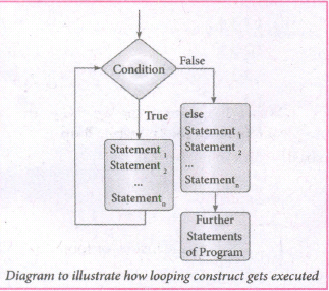
(i) break statement: The break statement terminates the loop containing it. Control of the program flows to the statement immediately after the body of the loop. A while or for loop will iterate till the condition is tested false, but one can even transfer the control out of the loop (terminate) with help of break statement. When the break statement is executed, the control flow of the program comes out of the loop and starts executing the segment of code after the loop structure. If break statement is inside a nested loop (loop inside another loop), break will terminate the innermost loop.
Syntax:
break
(ii) Continue statement: Continue statement unlike the break statement is used to skip the remaining part of a loop and start with next iteration.
Syntax:
continue
(iii) Pass statement: pass statement is generally used as a placeholder. When we have a loop or function that is to be implemented in the future and not now, we cannot develop such functions or loops with empty body segment because the interpreter would raise an error. So, to avoid this we can use pass statement to construct a body that does nothing.
Syntax:
pass
12.
import csv
csv.register_dialect('myDialect', delimiter = '|', quoting=csv.QUOTE_ALL)
with open('c:\\pyprg\\ch13\\ grade.csv', 'w') as csvfile:
fieldnames = ['Name', 'Grade']
writer = csv.DictWriter(csvfile,
fieldnames=fieldnames. dialect ="myDialect")
writer.writeheader()
writer.writerows([{'Grade': 'B', 'Name': Anu'},
{'Grade': 'A', 'Name': 'Beena',},
{Grade': 'C', 'Name': 'Tarun'}])
print("writing completed")
13.
import csv
csv.register_dialect('myDialect',delimiter = '|',skipinitialspace= True)
filename = 'c:\\pyprg\\ch13\\sample8.csv'
with open(filename, 'r') as csvfile:
reader = csv.DictReader(csvfile, dialect='myDialect')
for row in reader:
print(diet(row))
csvfile.close ( )
14.
Import csv
#opening the csv file which is in different location with read mode
f=open("c:\\pyprg\\ch13ample5.csv",'r')
#reading the File with the help of csv.reader( )
readFile=csv.reader(f)
#printing the selected column
for col in readFile:
print col[0],col[3]
f.close ( )
Sample5.csv File in Excel
15.
Program:
even=set([x*2 for x in range(1, 11)])
primes=set()
for i in range(2,20):
j=2
f=0
while j<i/2:
if i%j==0:
f=1
j+=1
if f==0;
primes.add(i)
print("Even Numbers:", even)
print("Prime Numbers:", primes)
print("Union:", even.union(primes)
print('Intersection:", even.intersection(primes))
print("Difference: ", even.difference(primes))
print("Symmetric Difference:" , even.symmetric_difference(primes)
Output:
Even Numbers: {2, 4, 6, 8, 10, 12, 14, 16, 18, 20]
Prime Numbers: {2, 3, 4,5, 7, 11, 13, 17, 19}
Union: {12, 3,4,5, 6,7, 8, 10, 11, 12, 13, 14, 16, 17, 18, 19, 20}
Intersection: {2, 4}
Difference:{6, 8, 10, 12, 14, 16, 18, 20}
Symmetric Difference: {3, 5, 6, 7, 8, 10, 11, 12, 13, 14, 16, 17, 18, 19, 20}
16.
(i) copy ( ): Returns a copy of the list.
Syntax: List.copy( )
Example:
MyList=[12, 12,36]
x = MyList.copy()
print(x)
Output:
[12, 12, 36]
(ii) count () : Returns the number of similar elements present in the last.
Syntax: List.count(value)
Example:
MyList=[36 ,12 ,12]
x = MyList.count(12)
print(x)
Output:
(iii) index ( ): Returns the index value of the first recurring element.
Syntax: Listindex(element)
Example:
MyList=[36 ,12 ,12]
x = MyListindex(12)
print(x)
Output:
0
(iv) reverse ( ): Reverses the order of the element in the list.
Syntax: List.reverse( )
Example:
MyList=[36, 23, 12]
MyList.reverse()
print(MyList)
Output:
[12, 23, 36]
17.
remove ( ):
(i) The remove( ) function can also be used to delete one or more elements if the index value is not known.
(ii) Syntax:
List.remove(element) # to delete a particular element
(iii) Example:
> > > MyList= [12,89,34,'Kannan', 'Gowri sankar', 'Lenin']
> > > print(MyList)
[12, 89, 34, 'Karman', 'Gowrisankar', 'Lenin')
> > > MyList.remove(89)
> > > print(MyList)
[12, 34, 'Karman', 'Gowrisankar', 'Lenin']
pop ():
(i) pop() function can also be used to delete an element using the given index value. pope ) function deletes and returns the last element of a list if the index is not given.
(ii) pop() function is used to delete a particular element using its index value, as soon as the element is deleted.
(iii) The pop( ) function shows the element which is deleted. pope ) function is used to delete only one element from a list. Remember that, del statement deletes multiple elements.
(iv) Syntax: List.pop(index of an element)
(v) Example:
> > > MyList.pop(1)
34
> > > print(MyList)
[12, 'Kannan', 'Gowrisankar', 'Lenin')
clear ():
(i) The function clear( ) is used to delete all the elements in list, it deletes only the elements and retains the list
(ii) clear() function removes only the elements and retains the list. When you try to print the list which is already cleared, an empty square bracket is displayed without any elements, which means the list is empty.
(iii) Syntax:
List.clear( )
Example:
> > > MyList.clear( )
> > > print(MyList)
[ ]
18.
(i) In Python, 'for loop' is used to access all the elements in a list one by one. This is just like the for keyword in other programming language such as C++.
(ii) Syntax:
for index_var in list:
print (index_var)
(iii) Here, dex_var represents the index value of each element in the list. Python reads this "for" statement like English: "For (every) element in (the list of) list and print (the name of the) list items"
(iv) Example:
Marks=[23,45, 67, 78,98]
for x in Marks:
print(x)
Output:
23
45
67
78
98
(v) In the above example, Marks list has 5 elements; each element is indexed from 0 to 4.
(vi) The Python reads the for loop and print statements like English: "For (every) element (represented as (x) in (the list of) Marks and print (the values of the) elements.
19.
(i) Insertion sort is a simple sorting algorithm. It works by taking elements from the list one by one and inserting then in their correct position in to a new sorted list.
(ii) This algorithm builds the final sorted array at the end. This algorithm uses n-1 number of passes to get the final sorted list as per the pervious algorithm as we have discussed.
Pseudo for Insertion sort:
Step 1 - If it is the first element, it is already sorted.
Step 2 - Pick next element
Step 3 - Compare with all elements in the sorted sub-list
Step 4 - Shift all the elements in the sorted sublist that is greater than the value to be sorted Step 5 - Insert the value Step 6 - Repeat until list is sorted.
20.
(i) Computer resources are limited that should be utilized efficiently. The efficiency of an algorithm is defined as the number of computational resources used by the algorithm.
(ii) An algorithm must be analyzed to determine its resource usage. The efficiency of an algorithm can be measured based on the usage of different resources.
(iii) For maximum efficiency of algorithm we wish to minimize resource usage. The important resources such as time and space complexity cannot be compared directly, so time and space complexity could be considered for an algorithmic efficiency.
Method for determining Efficiency:
(i) The efficiency of an algorithm depends on how efficiently it uses time and memory space.
(ii) The time efficiency of an algorithm is measured by different factors. For example, write a program for a defined algorithm, execute it by using any programming language, and measure the total time it takes to run.
(iii) The execution time that you measure in this case would depend on a number of factors such as: -
1. Speed of the machine
2. Compiler and other system Software tools
3. Operating System
4. Programming language used
5. Volume of data required
(iv) However, to determine: how efficiently an algorithm solves a given problem, you would like to determine how the execution time is affected by the nature of the algorithm.
(v) Therefore, we need to develop fundamental laws that determine the efficiency of a program in terms of the nature of the underlying algorithm.
21.
(i) Access control is a security technique that regulates who or what can view or use resources in a computing environment.
(ii) It is a fundamental concept in security that minimizes risk to the object.
(iii) In other words access control is a selective restriction of access to data. IN Object oriented programming languages it is implemented through access modifiers.
(iv) Classical object-oriented languages, such as C++ and Java. control the access to class members by public, private and protected keywords.
(v) Private members of a class are denied access from the outside the class. They can be handled only from within the class.
(vi) Public members (generally methods declared in a class) are accessible from outside the class. The object of the same class is required to invoke a public method. This arrangement of private instance variables and public methods ensures the principle of data encapsulation.
(vii) Protected members of a class are accessible from within the class and are also available to its sub-classes. No other process is permitted access to it. This enables specific resources of the parent class to be inherited by the child class.
(viii) Python doesn't have any mechanism that effectively restricts access to any instance variable or method. Python prescribes a convention of prefixing the name of the variable or method with single or double underscore to emulate the behaviour of protected and private access specifiers.
(ix) All members in a Python class are public by default. whereas by default in C++ and java they are private. Any member can be accessed from outside the class environment in Python which is not possible in C++ and java.
22.
(i) The basic idea of data abstraction is to structure programs so that they operate on abstract data. That is, our programs should use data in such a way, as to make as few assumptions about the data as possible.
(li) At the same time, a concrete data representation is defined as an independent part of the program.
(iii) Any program consist of two parts. The two parts of a program are, the part that operates on abstract data and the part that defines a concrete representation, is connected by a small set of functions that implement abstract data in terms of the concrete representation.
(iv) To illustrate this technique, let us consider an example to design a set of functions for manipulating rational numbers.
(v) Example: A rational number is a ratio of integers, and rational numbers constitute an important sub-class of real numbers. A rational number such as 8/3 or 19/23 is typically written as : < numerator > /< denominator >
(vi) where both the < numerator > and <denominator>
(vii) However, you can create an exact representation for rational numbers by combining together the numerator and denominator.
(viii) As we know from using functional abstractions, we can start programming productively before you have an implementation of some parts of our program.
(ix) Let us begin by assuming that you already have a way of constructing a rational number from a numerator and a denominator. You also assume that, given a rational number, you have a way of selecting its numerator and its denominator component.
23.
Program:To create a tuple having positive numbers.
Numbers = (5, -8, 6, 8, -4, 3, 1)
Positive = ( )
for i in Numbers:
if i > 0:
Positive += (i)
print("Positive Numbers: ", Positive)
Output:
Positive Numbers: (5, 6, 8, 3, 1)
24.
Program:
a=-1
b=1
n=int(input("Enter no. of terms: "))
i=0
sum=0
Fibo=[]
while i
Fibo.append(s)
sum+es
a=b
b=s
i+s = 1
print("Fibonacci series upto "+ str(n) +" terms is : " + str(Fibo))
print("The sum of Fibonacci series: ",sum)
Output:
Enter no. of terms: 10
Fibonacci series upto 10 terms is: [0, 1, 1, 2, 3, 5, 8, is, 21, 34]
The sum of Fibonacci series: 88
25.
Program:
marks=[]
subjects=['Tamil', 'English', 'Physics', 'Chemistry', 'Comp.Science', 'Maths']
for i in range(6):
m=int(input("Enter Mark ="))
marks.append(m)
for j in range(len(marks)):
print(" { }. { }Mark = { } ".format(j1+,subjects [j],marks [j]))
print("Total Marks = ", sum(marks))
Output:
Enter Mark = 45
Enter Mark = 98
Enter Mark = 76
Enter Mark = 28
Enter Mark = 46
Enter Mark = 15
1. Tamil Mark =45
2. English Mark = 98
3. Physics Mark = 76
4. Chemistry Mark = 28
5. Compo Science Mark =46
6. Maths Mark = 15
Total Marks = 308

12th Standard Syllabus & Materials
12th Standard
TN 12th Computer Applications களப்பெயர் முறைமை (DNS) Sample Question Papers Study Material - QB365 Set A
NEW12th Standard
TN 12th Computer Applications வலையமைப்பு எடுத்துக்காட்டுகள் மற்றும் நெறிமுறைகள் Sample Question Papers Study Material - QB365 Set A
NEW12th Standard
TN 12th Computer Applications கணினி வலையமைப்பு ஓர் அறிமுகம் Sample Question Papers Study Material - QB365 Set A
NEW12th Standard
TN 12th Computer Applications PHP-உடன் MySQL-ஐ இணைத்தல் Sample Question Papers Study Material - QB365 Set A



Tamilnadu Stateboard 12th Standard Subjects

Maths

Chemistry

Physics

Biology
Computer Science

Business Maths and Statistics

Economics

Commerce

Accountancy

History

Computer Applications
Biology
Computer Technology
Computer Applications
Computer Science
Business Maths and Statistics
Commerce
Economics
Maths
Chemistry
Physics
Computer Technology
History
Accountancy

Tamil

English

French
Tamilnadu Stateboard Standards
