
 100% FREE ACCESS
12th Standard Syllabus & Materials
12th Standard
TN 12th Maths Applications of Matrices and Determinants Sample Question Papers Study Material - QB365 Set A
NEW12th Standard
TN 12th Computer Applications மின்னணு தரவு பரிமாற்றம் Sample Question Papers Study Material - QB365 Set A
NEW12th Standard
TN 12th Computer Applications மின் - வணிக பாதுகாப்பு அமைப்புகள் Sample Question Papers Study Material - QB365 Set A
NEW12th Standard
TN 12th Computer Applications மின்னணு செலுத்தல் முறைகள் Sample Question Papers Study Material - QB365 Set A
NEW12th Standard
TN 12th Computer Applications மின் - வணிகம் Sample Question Papers Study Material - QB365 Set A
NEW12th Standard
TN 12th Computer Applications திறந்த மூல கருத்துருக்கள் Sample Question Papers Study Material - QB365 Set A

Published on: 27/02/2021
12th Standard English Medium Computer Science Reduced Syllabus Five Mark important Questions - 2021(Public Exam )
Download Tamil Nadu 12th Standard Computer Science question papers, model tests, one-mark questions, important questions, and public exam papers in PDF format. Free study materials and answer keys for TN State Board students.
Questions + Answers key
Take MCQ Computer Science Test
1.
Write a python program to check whether the given string is palindrome or not.
2.
Explain different types arguments used in python with an example.
3.
Write a python program to execute the following C++ program.
Transpose of a matrix(2 D array) C++ program:
#include < iostream >
using namespace std;
int main ( )
{
int a[3][3], i, j;
for(i=0; i< 3; i++)
{
for(j=0; j<3; j++)
{cout<< "enter the value for
array["<< i+ 1<< "]"<< " ["<< j+ 1<< "] :";
cin >>a[i][j];
}
}
system ("cIs");
cout<< "\n\nOriginal Array\n";
for(i=0; i<3; i++) {
for(j=0; j<3; j++ )
cout<< a[i][j]«' ';
cout<< endl; }
cout<< "\n\n The Transpose of Matrix\n";
for (int i = 0; i < 3; i++)
{
for (int j = 0; j < 3; j++)
cout<< a[j][i]<< ' ';
cout<< endl;
}
return 0;
}
// Save this file as trans_cpp.cpp
4.
Write a python program to execute the following C++ program.
/*. To check whether the number is palindrome or not using while Ioop.*/
// Now select File →New in Notepad and type the C++ program
#include < iostream >
using namespace std;
intmain ( )
{
int n, num, digit, rev = 0;
cout<< "Enter a positive number: ";
cin >>num;
n= num;
while(num)
{digit = num % 10;
rev = (rev * 10) + digit;
num = num / 10; }
cout<< "The reverse of the number is: " << rev <<endl;
if(n == rev)
cout< < "The number is a palindrome";
else
cout << "The number is not a palindrome";
return 0;
}
// Save this file as pali_cpp.cpp
5.
Write a program to accept a string and print the number of uppercase, lowercase, vowels, consonants and spaces in the given string.
6.
Write a python program to check and print if the given number is odd or even using class.
7.
Write a program in python to display the following output.
1
1 2
1 2 3
1 2 3 4
1 2 3 4 5
8.
Write a program to read the CSV file through python using reader ( ) method.
9.
Explain remove (), pop () and clear () used in list with an example.
10.
How will access all elements of a list? Write the execution table example.
11.
Explain the selection sort Algorithm with an example.
12.
Explain complexity of an algorithm.
13.
Explain the representation of Abstract datatype using rational numbers.
14.
hat is the use of HAVING clause. Give an example python script
15.
What are the components of SQL? Write the commands in each.
16.
Explain the different types of relationship mapping.
17.
Explain the different set operations supported by python with suitable example.
18.
What is nested tuple? Explain with an example.
19.
Explain recursive function with an example.
20.
Explain the following built-in functions.
(a) id ()
(b) chr ()
(c) round ()
(d) type ()
(e) pow ()
21.
Write a program to display all 3 digit odd numbers.
22.
What is Binary search? Discuss with example
23.
Explain input() and print() functions with examples.
24.
Identify in the following program
| let rec gcd a b:= if b <> 0 then gcd b (a mod b) else return a: |
i) Name of the function
ii) Identify the statement which tells it is a recursive function
iii) Name of the argument variable
iv) Statement which invoke the function recursively
v) Statement which terminates the recursion
25.
Write a program using a function that returns the area and circumference of a circle whose radius is passed as an argument. Two values using tuple assignment.
1.
str1 = input ("Enter a string:")
str2 ="
index=-1
for i in str1:
str2 += str1[index]
index -=1
print ("'The given string = {} \n The Reversed string = {}".format(str1, str2))
if (str1==str2):
print ("Hence, the given string is Palindrome")
else:
print ("Hence, the given is not a palindrome")
Output:1
Enter a string: malayalam
The given string = malayalam
The Reversed string = malayalam
Hence, the given string is Palindrome
Output: 2
Enter a string: welcome
The given string = welcome
The Reversed string = emoclew
Hence, the given string is not a palindrome
2.
(i) Required Arguments:
"Required Arguments" are the arguments passed to a function in correct positional order. Here, the number of arguments in the function call should match exactly with the function definition. Atleast one parameter to prevent syntax errors to get the required output.
(ii) Example:
def printstring(str):
print ("Example - Required arguments")
print (str)
return
# Now you can call printstring() function
printstring ("Welcome")
Output:
Example - Required arguments
Welcome
(iii) When the above code is executed, it produces the following error.
Traceback (most recent call last):
File "Req-arg.py", line 10, in
printstring()
TypeError: printstring() missing 1 required positional argument: 'str'
(iv) Instead of printstring() in the above code if we use printstring ("Welcome") then the output is
Output:
Example - Required arguments
Welcome
Keyword Arguments:
Keyword arguments will invoke the function after the parameters are recognized by their parameter names. The value of the keyword argument is matched with the parameter name and so, one can also put arguments in improper order (not in order).
(ii) Example:
def printdata (name):
print ("Example-1 Keyword arguments")
print ("Name :":name)
return
# Now you can call printdatat() function
printdata(name = "Gshan")
(iii) When the above code is executed, it produces the following output:
Output:
Example-1 Keyword arguments
Name:Gshan
Default Arguments:
In Python the default argument is an argument that takes a default value if no value is provided in the function call. The following example uses default arguments, that prints default salary when no argument is passed.
Example:
def printinfo( name, salary = 3500):
print ("Name: ", name)
print ("Salary: ", salary)
return
printinfo("Mani")
(iii) When the above code is executed, it produces the following output
Output:
Name: Mani
Salary: 3500
(iv) When the above code is changed as print info("Ram,":2000) it produces the following output:
Output:
Name: Ram
Salary: 2000
Syntax - Variable-Length Arguments:
(i) def function_name(*args):
function_body
return_statement
(ii) Example:
def printnos (*nos):
for n in nos:
print(n)
return
# now invoking the printnos() function
print ('Printing two values')
printnos (1,2)
print ('Printing three values')
printnos (10,20,30)
Output:
Printing two values
1
2
Printing three values
10
20
30
3.
//Now select File⟶New in Notepad and type the Python program
# Save the File as transpose.py. Program that compiles and executes a .cpp file
# Python tanspose.py -i trans_cpp
Python Program:
import sys, os, getopt
def main(argv):
cpp_file = "
exe_file = "
opts,args = getopt.getopt(argv, "i:",['ifile='])
for o, a in opts:
if o in ("-i", "< -ifile"):
cpp_file = a + '.cpp'
exe_file = a + '.exe'
run(cpp_file, exe_file)
defrun( cpp _file, exe_file):
print("Compiling" + cpp_file)
'os.system ('g++' + cpp_file + '-o' + exe_file)
print("Running" + exe_file)
print(" -------------------")
print
os.system( exe_file)
print
if __name__ =='__main__"
main( sys.argv[ 1:])
4.
# Save the File as pali.py . Program that compiles and executes a .cpp file
# Python c:\pyprg\pali.py -i c:\pyprg\pali_cpp import sys, os, getopt
def main(argv):
cpp_file ="
exe_file = "
opts, args= getopt.getopt(argv, "i:",['ifile='])
for o, a in opts:
if o in ("-i", "--ifile"):
cpp_file = a + '.cpp'
exe_file = a + '.exe'
run(cpp_file, exe_file)
def run(cpp_file, exe_file):
print("Compiling" + cpp_file)
os.system('g++' + cpp_file + '-o' + exe_file)
print("Running" + exe_file)
print("-----------------")
print
os.system(exe_file)
print
if __name__ =='__main__': # program starts executing from here
main(sys.argv[ 1:])
5.
Class String:
def _init_(self):
self.uppercase=()
self.lowercase=()
self.vowels=()
self.consonants=()
self.spaces=()
self.string= " "
def getstr (self):
self.string=str(input("Enter a String: "))
def count_upper(self):
for ch in self.string:
if (ch.isupper()):
self.uppercase+= 1
def count_Iowert(self):
for ch in self.string:
if (ch.islower()):
self.lowercase+= 1
def count_vowels(self):
for ch in self.string:
if (ch in ('A', 'a', 'e', 'E', 'i', 'I', 'o', 'O', 'u', 'U')):
self.vowels+=1
def count_consonants(self):
for ch in self.string:
if (ch not in ('A', 'a', 'e', 'E', 'i', 'I', 'o', 'O', 'u', 'U')):
self.consonants+= 1
def count_space(self):
for ch in self.string:
if (ch==" ''):
self.spaces+= 1
def execute(self):
self.count_upper()
self.count_lower ()
self.count_vowels ()
self.count_consonants()
self.count_space()
def display(self):
print("The given string contains ...")
print("%d Uppercase letters"%self. uppercase)
print("%d Lowercase letters"%self. lowercase)
print("%d Vowels"%self.vowels)
print("%d Consonants"%self.consonants)
print("%d Spaces"%self.spaces)
S = String()
S.getstr()
S.execute()
S.display()
Output:
Enter a string: Welcome To Learn Computer Science
The given string contains...
5 Uppercase letters
24 Lowercase letters
13 vowels
20 consonants
4 Spaces
6.
class Odd_Even:
even = 0 #class varaiable
def check(self, num):
if num%2==0:
print(num," is Even number")
else:
print(num," is Odd number")
n=Odd Even()
x = int(input("Enter a value:"))
n.check(x)
when we execute this program, Python accepts the value entered by the user and passes it to the method check through object.
Output:1
Enter a value: 4
4 is Even number
Output: 2
Enter a value: 5
5 is Odd number
7.
i=1
while (i < = 6):
for j in range (1,i):
print (j,end='\t')
print (end='\n')
i+=1
Output:
1
1 2
1 2 3
1 2 3 4
1 2 3 4 5
8.
import csv
csv.register_dialect('myDialect', delimiter = ',',skipinitialspace = True)
F=open('c:\\pyprg\\sample2.csv', 'r')
reader = csv.reader(F, dialect = 'myDialect')
for row in reader:
print(row)
F.close( )
9.
remove ( ):
(i) The remove( ) function can also be used to delete one or more elements if the index value is not known.
(ii) Syntax:
List.remove(element) # to delete a particular element
(iii) Example:
> > > MyList= [12,89,34,'Kannan', 'Gowri sankar', 'Lenin']
> > > print(MyList)
[12, 89, 34, 'Karman', 'Gowrisankar', 'Lenin')
> > > MyList.remove(89)
> > > print(MyList)
[12, 34, 'Karman', 'Gowrisankar', 'Lenin']
pop ():
(i) pop() function can also be used to delete an element using the given index value. pope ) function deletes and returns the last element of a list if the index is not given.
(ii) pop() function is used to delete a particular element using its index value, as soon as the element is deleted.
(iii) The pop( ) function shows the element which is deleted. pope ) function is used to delete only one element from a list. Remember that, del statement deletes multiple elements.
(iv) Syntax: List.pop(index of an element)
(v) Example:
> > > MyList.pop(1)
34
> > > print(MyList)
[12, 'Kannan', 'Gowrisankar', 'Lenin')
clear ():
(i) The function clear( ) is used to delete all the elements in list, it deletes only the elements and retains the list
(ii) clear() function removes only the elements and retains the list. When you try to print the list which is already cleared, an empty square bracket is displayed without any elements, which means the list is empty.
(iii) Syntax:
List.clear( )
Example:
> > > MyList.clear( )
> > > print(MyList)
[ ]
10.
(i) Loops are used to access all elements from a list. The initial value of the loop must be zero. Zero is the beginning index value of a list.
(ii) Example:
Marks = [10, 23, 41, 75]
i = 0
while i < 4:
print (Marks[i])
i = i + 1
Output:
10
23
41
75
(iii) In the above example, Marks list contains four integer elements i.e., 10, 23, 41, 75. Each element has an index value from 0. The index value of the elements are 0, 1, 2, 3 respectively.
(iv) Here, the while loop is used to read all the elements. The initial value of the loop is zero, and the test condition is < 4, as long as the test condition is true, the loop executes and prints the corresponding output
(iv) During the first iteration, the value of i is zero, where the condition is true. Now, the following statement print (Marks [i] gets executed and prints the value of Marks [0] element ie. 10.
(v) The next statement i = i + 1 increments the value of i from 0 to 1. Now, the flow of control shifts to the while statement for
(vi) checking the test condition. The process repeats to print the remaining elements of Marks list until the test condition of while loop becomes false. The following table shows that the execution of loop and the value to be print.
| Iteration | i | while i < 4 |
print (Marks[i]) | i = i + 1 |
| 1 | 0 | 0< 4 True | Marks [0] =10 | 0+1=1 |
| 2 | 1 | 1 < 4 True | Marks [1]=23 | 1+1=2 |
| 3 | 2 | 2 < 4 True | Marks [2]=41 | 2+1=3 |
| 4 | 3 | 3 < 4 True | Marks [3]=75 | 3+1=4 |
| 5 | 4 | 4 < 4 False |
11.
(i) The selection sort is a simple sorting algorithm that improves on the performance of bubble sort by making only one exchange for every pass through the list.
(ii) This algorithm will first find the smallest elements in array and swap it with the element in the first position of an array, then it will find the second smallest element and swap that element with the element in the second position, and it will continue until the entire array is sorted in respective order.
(iii) This algorithm repeatedly selects the next smallest element and swaps in into the right place for every pass. Hence it is called selection sort.
Pseudo code:
(i) Start from the first element i.e., index-(), we search the smallest element in the array, and replace it with the element in the first position.
(ii) Now we move on to the second element position, and look for smallest element present in the sub-array, from starting index to till the last index of sub - array.
(iii) Now replace the second smallest identified in step-2 at the second position in the or original array, or also called first position in the sub array.
(iv) This is repeated, until the array is completely sorted.
(v) Let's consider an array with values {13, 16, 11, 18, 14, 15}
(vi) Below, we have a pictorial representation of how selection sort will sort the given array respective order.
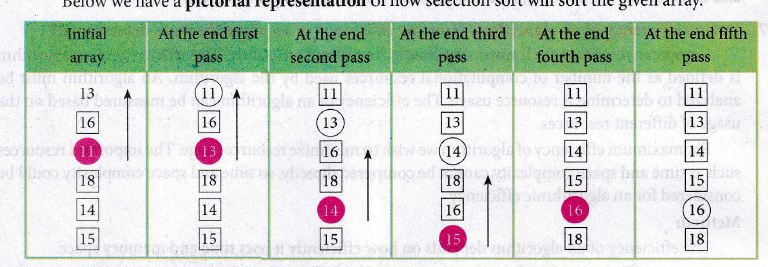
(i) In the first pass, the smallest element will be 11, so it will be placed at the first position.
(ii) After that, next smallest element will be searched from an array.
(iii) Then leaving the first element, next smallest element will be searched. It get 13 as smallest, so it will be placed at the second position.
(iv) Then leaving 11 and 13. It will search for the next smallest element and put it at third position and keep doing this until array is sorted.
(v) Finally, it will get the sorted array end of the pass.
12.
Suppose A is an algorithm and n is the size of input data, the time and space used by the algorithm A are the two main factors, which decide the efficiency of A.
(i) Time Factor: Time is measured by counting the number of key operations like comparisons in the sorting algorithm.
(ii) Space Factor: Space is measured by the maximum memory space required by the algorithm. The complexity of an algorithm f (n) gives the running time and/or the storage space required by the algorithm in terms of n as the size of input data.
(iii) Time Complexity: The Time complexity of an algorithm is given by the number of steps taken by the algorithm to complete the process.
(iv) Space Complexity: Space complexity of an algorithm is the amount of memory required to run to its completion. The space required by an algorithm is equal to the sum of the following two components:
A fixed part is defined as the total space required to store certain data and variables for an algorithm. For example, simple variables and constants used in an algorithm.
A variable part is defined as the total space required by variables, which sizes depends on the problem and its iteration. For example: recursion used to calculate factorial of a given value n.
13.
(i) The basic idea of data abstraction is to structure programs so that they operate on abstract data. That is, our programs should use data in such a way, as to make as few assumptions about the data as possible.
(li) At the same time, a concrete data representation is defined as an independent part of the program.
(iii) Any program consist of two parts. The two parts of a program are, the part that operates on abstract data and the part that defines a concrete representation, is connected by a small set of functions that implement abstract data in terms of the concrete representation.
(iv) To illustrate this technique, let us consider an example to design a set of functions for manipulating rational numbers.
(v) Example: A rational number is a ratio of integers, and rational numbers constitute an important sub-class of real numbers. A rational number such as 8/3 or 19/23 is typically written as : < numerator > /< denominator >
(vi) where both the < numerator > and <denominator>
(vii) However, you can create an exact representation for rational numbers by combining together the numerator and denominator.
(viii) As we know from using functional abstractions, we can start programming productively before you have an implementation of some parts of our program.
(ix) Let us begin by assuming that you already have a way of constructing a rational number from a numerator and a denominator. You also assume that, given a rational number, you have a way of selecting its numerator and its denominator component.
14.
HAVING clause is used to filter data based on7the group functions. This is similar to WHERE condition but can be used , only with group functions. Group functions cannot be used in WHERE Clause but can be used in HAVING clause.
Example:
import sqlite3
connection = sqlite3.connect("Academy.db")
cursor = connection.cursorO
cursor.execute("SELECT GENDER,COUNT(GENDER) FROM Student GROUP BY GENDER HAVING COUNT( GENDER> 3")
result = cursor.fetchall( )
co = [i[o] for i in cursor. description]
print(co)
print(result)
Output:
['gender', 'COUNT(GENDER)']
[('M', 5)]
15.
SQL commands are divided into five categories:
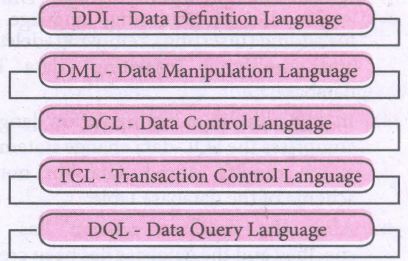
Data Definition Language:
(i) The Data Definition Language (DDL) consist of SQL statements used to define the database structure or schema.
(ii) It simply deals with descriptions of the database schema and is used to create and modify the structure of database objects in databases.
(iii) The DDL provides a set of definitions to specify the storage structure and access methods used by the database system.
DDL performs the following functions:
(i) It should identify the type of data division such as data item, segment, record and database file.
(ii) It gives a unique name to each data item type, record type, file type and data base.
(iii) It should specify the proper data type.
(iv) It should define the size of the data item.
(v) It may define the range of values that a data item may use.
(vi) It may specify privacy locks for preventing unauthorized data entry.
Commands:
| CREATE | To create tables in the database. |
| ALTER | Alters the structure of the database |
| DROP | Data tables from database. |
| TRUNCATE | Remove all records from a table, also release the space occupied bv those records. |
Data Manipulation Language:
This is a computer programming language used for adding, removing and modifying data in a database. This language comprises the SQL-data change statements, which modify stored data but not the schema of the database table
Data Manipulation includes
(i) Insertion of new information into the database
(ii) Retrieval of information stored in a database
(iii) Deletion of information from the database.
(iv) Modification of data stored in the database
The DML is basically of two types:
Procedural DML - Requires a user to specify what data is needed and how to get it.
Non-Procedural DML - Requires a user to specify what data is needed without Specifying how to get it.
Commands:
| INSERT | Inserts data into a table |
| UPDATE | Updates the existing data within a table |
| DELETE | Deletes all records from a table, but not the space occupied by them. |
Data Control Language:
(i) A Data Control Language (DCL) is a programming language used to control the access of data stored in a database. It is used for controlling privileges in the database (Authorization).
(ii) The privileges are required for performing all the database operations such as creating sequences, views of tables etc.
Commands:
| GRANT | Grants permission to one or more users to perform specific tasks. |
| REVOKE | Withdraws the access permission given by the GRANT statement. |
Transactional Control Language:
Transactional control language (TCL) commands are used to manage transactions in the database. These are used to manage the changes made to the data in a table by DML statements.
Commands:
| COMMIT | Saves any transaction into the database permanently. |
| ROLL BACK | Restores the database to last commit state. |
| SAVE POINT | Temporarily save a transaction so that you can rollback. |
Data query language:
The Data Query Language consist of commands used to query or retrieve data from a database. One such SQL command in Data Query Language is
| SELECT | It displays the records from the table. |
16.
Types of relationships:
(i) One-to-One Relationship
(ii) One-to-Many Relationship
(iii) Many-to-One Relationship
(iv) Many-to-Many Relationship
(i) One-to-One Relationship:
In One-to-One Relationship, one entity is related with : only one other entity. One row in a table is linked with only one row in another table and vice versa.
For example: A student can have only one exam number

(ii) One-to-Many Relationship.
In One-to- Many relationship, one entity is related to many other entities. One row in a table A is linked to many rows in a table B, but one row in a table B is linked to only one row in table A.
For example: One Department has many staff members.
.JPG)
(iii) Many-to-One Relationship:
In Manyto- One Relationship, many entities can be related with only one in the other entity.
For example:
A number of staff members working in one Department.
Multiple rows in staff members table is related with only one row in Department table.
.JPG)
(iv) Many-to-Many Relationship:
A manyto- many relationship occurs when multiple records in a table are associated with multiple records in another table.
(i) Example 1:
Customers and Product
Customers can purchase various products and Products can be purchased by many customers
(ii) Example 2:
Students and Courses
A student can register for many Courses and a Course may include many students
(iii) Example 3:
Books and Student.
Many Books in a Library are issued to many students.
.JPG)
17.
The python supports the set operations such as Union, Intersection, difference and Symmetric difference.
i) Union:
It includes all elements from two or more sets
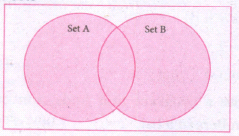
In python, the operator Iis used to union of two sets. The function union ( ) is also used to join two sets in python.
Example:
Program to Join (Union) two sets using union operator
set_A={2,4,6,8}
set_B={'A', 'B', 'C', 'D'}
U_set=set_A l set_B
print (U _set)
Output:
{2, 4, 6, 8, 'A', 'D', 'C', 'B'}
Example:
Program to Join (Union) two sets using union function.
set_A={2,4,6,8}
set_B={'A', 'B', 'C', 'D'}
set_ U=set_ A.Union(set_ B)
print(set_U)
Output:
{'D', 2, 4, 6, 8, 'B', 'C', 'A'}
ii) Intersection:
(i) It includes the common elements in two sets
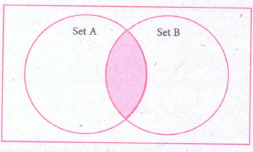
The operator & is used to intersect two sets in python. The function intersection( ) is also used to intersect two sets in python.
Example:
Program to insert two sets using intersection operator
set_A={'A', 2, 4, 'D'}
set_B={'A', 'B', 'C', 'D'}
print(set_A & set_B)
Output:
{'A', 'D'}
Example:
Program to insect two sets using intersection function
set_A={'A', 2, 4, 'D'}
set_B={'A', 'B', 'C', 'D'}
print( set_A.intersection(set_B))
Output:
{'A', 'D'}
iii) Difference
It includes all elements that are in first set (say set A) but not in the second set (say set B)
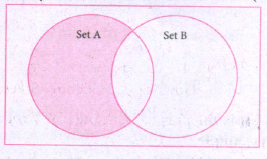
The minus (-) operator is used to difference set operation in python. The function difference() is also sed to difference operation.
Example:
Program to difference of two sets using minus operator
set_A={'A', 2, 4, 'D'}
set_B={'A', 'B', 'C', 'D'}
print(set_A - set B)
Output
{2,4}
Example:
Program to difference of two sets using difference function
set_A={'A', 2, 4, 'D'}
set_B={'A', 'B', 'C', 'D'}
print(set_A.difference( set_B))
Output:
{2,4}
iv) Symmetric difference:
It includes all the elements that are in two sets (say sets A and B) but not the one that are common to two sets.
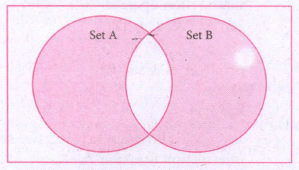
The caret (^) operator is used to symmetric difference set operation in python. The function symmetric_difference( ) is also used to do the same operation.
Example:
Program to symmetric difference of two sets using caret operator
set_A={'A', 2, 4, 'D'}
set_B={'A', 'B', 'C', 'D'}
print(set_A ^ set_B)
Output:
{2, 4, 'B', 'C'}
Example:
Program to difference of two sets using symmetric difference function
set_A={'A', 2, 4, 'D'}
set_B={'A', 'B', 'C', 'D'}
print( se_A.symmetric_ difference (set_B))
Output:
{2, 4, 'B', 'C'}
18.
In Python, a tuple can be defined inside another tuple; called Nested tuple. In a nested tuple, each tuple is considered as an element. The for loop will be useful to access all the elements in a nested tuple.
Example:
Toppers = (("Vinodini", "XII-F", 98.7), ("Soundarya", "XII-H", 97.5),
("Tharani", "XII-F", 95.3), ("Saisri", "XII-G", 93.8))
for i in Toppers:
print(i)
Output:
('Vinodini', 'XII-F', 98.7)
('Soundarya', 'XII-H', 97.5)
('Tharani', 'XII-F', 95.3)
('Saisri', 'XII-G', 93.8)
19.
(i) When a function calls itself is known as recursion.
(ii) Recursion works like loop but sometimes it makes more sense to use recursion than loop.
(iii) You can convert any loop to recursion. A recursive function calls itself.
(iv) Imagine a process would iterate indefinitely if not stopped by some condition is known as infinite iteration.
(v) The condition that is applied in any recursive function is known as base condition.
(vi) A base condition is must in every recursive function otherwise it will continue to execute like an infinite loop.
Overview of how recursive function works:
(i) Recursive function is called by some external code.
(ii) If the base condition is met then the program gives meaningful output and exits.
(iii) Otherwise, function does some required processing and then calls itself to continue recursion.
Here is an exanmple of recursive function used to calculate factorial.
Example:
def fact(n):
if n == 0:
return 1
else:
return n * fact (n-1)
print (fact (0))
print (fact (5))
Output:
120
20.
| Function | Description | Syntax | Example |
| (a) id() | id () Return the "identity" of an objects i.e. The address of the object in memory. Note: The address of x and y may differ in your system. |
id(object) | x = 15 y = 'a' print('address of x is :',id(x)) print ('address of y is :',id (y)) Output: address of x is: 1357486752 address of y is: 13480736 |
| (b) Chr() | Returns the Unicode character for the given ASCII value. This function is inverse of ord() function. | Chr(i) | c=65 d=43 print(chr(c)) print(chr(d)) Output: A + |
| (c) round() | Returns the nearest integer to its input. 1. First argument(number) is used to specify the value to be rounded. |
round (number, [ndigits]) | x = 17.9 y = 22.2 z = -18.3 print('x value is rounded to', round(x)) print('y value ic rounded to', round(y)) print ('z value is rounded to', round(z)) |
| (d) type() | Returns the type of object for the given single object. Note: This function used with single object parameter. |
type(object) | x = 15.2 y = 'a' s = true print(type(x)) print(type(y)) print(type(s)) Output: < class 'float' > < class 'str' > < class 'bool' > |
| (e) pow() | Returns the computation of ab i.e. (a**b) a raised to the power of b. | pow(a, b) | a = 5 b = 2 c = 3.0 print(pow(a, b)) print(pow(a, c)) print(pow(a + b, 3)) Output: 25 125.0 343 |
21.
for i in range (100, 1000):
if a%2==1:
print b
Output :
101,103,105,107,...........,997,999
22.
Binary Search:
Binary search also called half-interval search algorithm. It finds the position of a search element within a sorted array. The binary search algorithm can be done as a divide- and -conquer search algorithm and executes in logarithmic time.
Pseudo Code:
Start with the middle element:
(i) If the search element is equal to the middle element of the array i.e., the middle value = number of elements in array/2, then return the index of the middle element.
(ii) If not, then compare the middle element with the search value,
(iii) If the search element is greater than the number in the middle index, then select the elements to the right side of the middle index, and go to Step-1.
(iv) If the search element is less than the number in the middle index, then select the elements to the left side of the middle index, and start with Step-1.
(v) When a match is found, display success message with the index of the element matched.
(vi) If no match is found for all comparisons, then display unsuccessful message.
Binary Search Working principles :
(i) List of elements in an array must be sorted first for Binary search. The following example describes the step by step operation of binary search.
(ii) Consider the following array of elements, the array. is being sorted so itenables to do the binary searçh algorithm. Let us assume that the search element is 60 and we need to search the location or index of search element 60 using binary search.

(iii) First, we find index of middle element of. the array byusing this formula:
mid = low + (high - low) /2
(iv) Here it is, 0 + (9-0)/2=4 (fractional part ignored). So, 4 is thè mid value of the array.

(v) Now compare the search element with the value stored at mid value location 4. The value stored at location or index 4 is 50, which is not match with search element. As the search value 60 is greater than 50.

(vi) Now we change our low to mid+1 and find the new mid value again using the formula.
low = mid + 1
mid = low + (high - low) / 2
(vii) Our new mid is 7 now. We compare the value stored at location 7 with our target value 60.

(viii) The value stored at location or index 7 is not a match with search element, rather it is more than what we are looking for. So, the search element must be in the lower part from the current mid value location.

(ix) The search element still not found. Hence, we calculated the mid again by using the formula.
high = mid -1
mid = low +(high - low)/2
Now the mid value is 5.

(x) Now we compare the value stored at location 5 with our search element. We found that it is a match.

(xi) We can conclude that the search element 60 is found at locationor index 5. For example if we take the search element as 95, For this value this binary search algorithm return unsucessful result.
23.
1. The print () Function:
ln Python, the print() function is used to display result on the screen. The syntax for print ( ) is as follows:
Example:
print ("String to be displayed as output")
print (variable)
print ("String to be displayed as output", variable)
print ("String1", variable, "string 2", variable, "String 3",....)
Example:
>>> print("Welcome to python Programming'")
welcome to Python Programoming
>>>x = 5
>>> y = 6
>>> z= X+Y
>>> print (z)
>>> print ("The sum =", z)
The sum = 11
>>>print ("The sum of", x, "and", y, "is", z)
The sum of 5 and 6 is 11.
The print () evaluates the expression before printing it on the monitor. The print () displays an entire statement which is specified within print(). Comma(,) is used as a separator in print () to print more than one item.
input () function:
In Python, input) function is used to accept data as input at run time. The syntax for input () function is
Syntax:
Variable = input ("prompt String')
Where, prompt string in the Syntax is a statement or message to the user, to knowwhat input can be given.
If a prompt string is used, it is displayed on the monitor; the user can provide expected data from the input device. The input() takes whatever is typed from the Keyboard and stores the entered data in the given Variable. If prompt string is not given in input() no message is displayed on the screen, then, the user will not know what is to be typed as input.
Example 1:
input () with prompt String
>>>City=input ("Enter your city:")
Enter your city: Madurai
>>>print ("I am from", city)
I am from Madurai
Example 2:
input() without prompt string
>>> city = input ()
Rajarajan
>>>print ("I am from", city)
I am from Rajarajan
in Example 2, the input () is not having any pronmpt string, thus the user will not know what is to be typed as input. If the user inputs irrelevant data as given in the above example then the output will be unexpected. So, to make your program more interactive, provide prompt string with input (). The input () accepts all data as string or characters but not as numbers. Ifa numerical value is entered, the input values should be explicitly converted into numeric data type. The int) function is used to convert string data as integer data explicitly.
Example 3:
X=int (input ("Enter Number 1:"))
Y= int (input ("Enter Number 2:" ))
print ("The Sum =", x + y)
Output:
Enter Number 1: 34
Enter Number 2:56
The Sum =90.
24.
(i) gcd
(ii) let rec gcd
(iii) a, b
(iv) gcd(a mod b)
(v) return a
25.
Program:
pi = 3.14
def Circle(r):
return (pi*r*r, 2*pi*r)
radius = float(input("Enter the Radius: "))
(area, circum) = Circle(radius)
print ("Area of the circle = ", area)
print ("Circumference of the circle = ", circum)
Output:
Enter the Radius: 5
Area of the circle = 78.5
Circumference of the circle = 31.400000000000002

12th Standard Syllabus & Materials
12th Standard
TN 12th Computer Applications வலையமைப்பு வடமிடல் Sample Question Papers Study Material - QB365 Set A
NEW12th Standard
TN 12th Computer Applications களப்பெயர் முறைமை (DNS) Sample Question Papers Study Material - QB365 Set A
NEW12th Standard
TN 12th Computer Applications வலையமைப்பு எடுத்துக்காட்டுகள் மற்றும் நெறிமுறைகள் Sample Question Papers Study Material - QB365 Set A
NEW12th Standard
TN 12th Computer Applications கணினி வலையமைப்பு ஓர் அறிமுகம் Sample Question Papers Study Material - QB365 Set A



Tamilnadu Stateboard 12th Standard Subjects

Maths

Chemistry

Physics

Biology
Computer Science

Business Maths and Statistics

Economics

Commerce

Accountancy

History

Computer Applications
Biology
Computer Technology
Computer Applications
Computer Science
Business Maths and Statistics
Commerce
Economics
Maths
Chemistry
Physics
Computer Technology
History
Accountancy

Tamil

English

French
Tamilnadu Stateboard Standards
