
 100% FREE ACCESS
12th Standard Syllabus & Materials
12th Standard
TN 12th Maths Applications of Matrices and Determinants Sample Question Papers Study Material - QB365 Set A
NEW12th Standard
TN 12th Computer Applications மின்னணு தரவு பரிமாற்றம் Sample Question Papers Study Material - QB365 Set A
NEW12th Standard
TN 12th Computer Applications மின் - வணிக பாதுகாப்பு அமைப்புகள் Sample Question Papers Study Material - QB365 Set A
NEW12th Standard
TN 12th Computer Applications மின்னணு செலுத்தல் முறைகள் Sample Question Papers Study Material - QB365 Set A
NEW12th Standard
TN 12th Computer Applications மின் - வணிகம் Sample Question Papers Study Material - QB365 Set A
NEW12th Standard
TN 12th Computer Applications திறந்த மூல கருத்துருக்கள் Sample Question Papers Study Material - QB365 Set A

Published on: 27/02/2021
12th Standard English Medium Computer Science Reduced Syllabus Three Mark important Questions With Answer Key - 2021(Public Exam )
Download Tamil Nadu 12th Standard Computer Science question papers, model tests, one-mark questions, important questions, and public exam papers in PDF format. Free study materials and answer keys for TN State Board students.
Questions + Answers key
Take MCQ Computer Science Test
1.
Write the output of the following statements.
(i) print (len ("Corporation"))
(ii) print ("school", Capitalize ())
(iii) print ("Welcome" center (15, '*'))
2.
Write a note on DBMS or write a note on a software that allows us to create, define and manipulate database.
3.
Write a note on (i) min (), (ii) max (), (iii) sum ().
4.
Write a note of return statement.
5.
Write a note on "Required arguments".
6.
How will you create CSV normal file?
7.
Write a note on dictionary comprehension.
8.
What is the output for the following code?
9.
Write the different factors in which the time efficiency of an algorithm its measured
10.
What are the rules followed while defining python identifier?
11.
Write a short note on comment statement.
12.
Fill up the blanks to get the following output from Python code given.
Output:
Enter Number 1: 34
Enter Number 2: 70
The Sum = 104
Code:
X = \(\overset { (1) }{ \_ \_ \_ \_ \_ } \) (input ("Enter Number 1:"))
Y = \(\overset { (2) }{ \_ \_ \_ \_ \_ } \) (\(\overset { (3) }{ \_ \_ \_ \_ \_ } \) ("Enter Number 2 :"))
\(\overset { (4) }{ \_ \_ \_ \_ \_ } \) ("The sum =", \(\overset { (5) }{ \_ \_ \_ \_ \_ } \))
13.
Write the function of the following
(i) Ctrl + N
(ii) Ctrl + S
(iii) F5
14.
Write a short note an syntax for function types.
15.
Write any three uses of data visualization.
16.
What is the use of Where Clause.Give a python statement Using the where clause.
17.
What are the applications of scripting language?
18.
Write a Python program to read a CSV file with default delimiter comma (,).
19.
Write a note on open() function of python. What is the difference between the two methods?
20.
Write a note on different types of DBMS users.
21.
What is the role of DBA?
22.
Write a short about the followings with suitable example:
(a) capitalize( )
(b) swapcase( )
23.
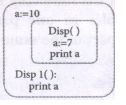
24.
Wha happens if you modify a variable outside the function? Give an example.
25.
Mention the characteristics of Interface.
1.
(i) 11
(ii) School
(iii) * * * * Welcome * * * *
2.
(i) A DBMS is a soft ware that allows us to create, define and manipulate database, allowing users to store, process and analyze data easily.
(ii) DBMS provides us with an interface or a tool, to perform various operations to create a database, storing of data and for updating data, etc.
(iii) DBMS also provides protection and security to the databases. It also maintains data consistency in case of multiple users.
3.
| S.No | Function | Description | Syntax | Example |
| (i) | min () | Returns the minimum value in a list. | min (list) | MyList = [21,76,98,23] print ('Minimum of MyList :', min (MyList)) Output: Minimum of MyList : 21 |
| (ii) | max () | Returns the maximum value in a list. | max (list) | MyList = [21,76,98,23] print ('Maximum of MyList :', max(MyList)) Output: Maximum of Mylist :98 |
| (iii) | sum () | Returns the sum of values in a list. | sum (list) | MyList = [21,76,98,23] print ('Sum of MyList :', sum (MyList)) Output: Sum of MyList: 218 |
4.
The return statement:
(i) The return statement causes your function to exit and returns a value to its caller. The it point of functions in general is to take inputs and return something.
(ii) The return statement is used when a function is ready to return a value to its caller. So, only one return statement is executed at run time even though the function contains multiple return statements.
(iii) Any number of 'return' statements are allowed in a function definition but only one of them is executed at run time.
5.
(i) "Required Arguments" are the arguments passed to a function in correct positional order. Here, the number of arguments in the function call should match exactly with the function definition.
(ii) Atleast one parameter to prevent syntax errors to get the required output.
(iii) Example:
def printstring(str):
print ("Example - Required arguments")
print (str)
return
# Now you can call printstring() function
printstring ("Welcome")
Output:
Example - Required arguments
Welcome
6.
To create a CSV file in Notepad,
(i) First open a new file using
File ⟶New or ctrl +N.
(ii) Then enter the data separating each value with a comma and each row with a new line.
(iii) For example consider the following details
Topic1, Topic2, Topic3
one, two, three
Example1, Example2, Example3
(iv) Save this content in a file with the extension.csv.
7.
(i) In Python, comprehension is another way of creating dictionary. The following is the syntax of creating such dictionary.
(ii) Syntax:
Diet = { expression for variable in sequence [if condition] }
(iii) The if condition is optional and if specified, only those values in the sequence are evaluated using the expression which satisfy the condition.
(iv) Example:
Diet = {x : 2 * x for x in range(1,10)}
Output of the above code is
{1: 2, 2: 4, 3: 6, 4: 8, 5: 10, 6: 12, 7: 14, 8: 16, 9: 18}
8.
MyList = [2, 4, 5, 8, 10]
print ("MyList elements before update ... ")
for x in MyList:
print (x)
MyList[2] = 6
print ("MyList elements after updation ... ")
for y in MyList:
print (y)
Output:
MyList elements before update ...
2
4
5
8
10
MyList elements after updation ...
2
4
6
8
10
9.
The execution time that you measure in this case would depend on a number of factors such as:
(i) Speed of the machine
(ii) Compiler and other system Software tools
(iii) Operating System
(iv) Programming language used
(v) Volume of data required
10.
(i) An identifier must start with an alphabet (A..Z or a..z) or underscore (_)..
(ii) Identifiers may contain digits (0 .. 9).
(iii) Python identifiers are case sensitive i.e. uppercase and lowercase letters are distinct. (iv) Identifiers must not be a python keyword.
(v) Python does not allow punctuation character such as %,$, @ etc., within identifiers.
11.
(i) In Python, comments begin with hash symbol (#). The lines that begins with # are considered as comments and ignored by the Python interpreter.
(ii) Comments may be single line or no multilines. The multiline comments should be enclosed within a set of # as given below.
# It is Single line Comment
# It is multiline comment
which contains more than one line #
12.
(1) int
(2) int
(3) input
(4) print
(5) x + y
13.
(i) to open Python shell window.
(ii) to save the Python file.
(iii) to run the Python program.
14.
The syntax for function types
x\(\rightarrow \)y
x1 \(\rightarrow \)x2\(\rightarrow \)y
x1 \(\rightarrow \) .... \(\rightarrow \)x n\(\rightarrow \)y
The 'x' and 'y' are variables indicating types. The type x \(\rightarrow \) y is the type of a function that gets an input of type 'x' and returns an output of type 'y'. Where as x1\(\rightarrow \) x2 -\(\rightarrow \) y is a type of a function that takes two inputs, the first input is of type 'x1' and the second input of type 'x1', and returns an output of type 'y'. Likewise x1 \(\rightarrow \)...\(\rightarrow \)x n\(\rightarrow \)y has type 'x' as input of n arguments and 'y' type as output.
15.
(i) Data Visualization help users to analyze and interpret the data easily.
(ii) It makes complex data understandable and usable.
(iii) Various Charts in Data Visualization helps to show relationship in the data for one or more variables.
16.
The WHERE clause is used to extract only those records that fulfill a specified condition. In this example we are going to display the different grades scored by male students from "student table.
import sqlite3
connection = sqlite3.connect ("Academy.db")
cursor = connection.cursor()
cursor.execute ("SELECT DISTINCT (Grade) FROM student where gender = "M")
result = cursor.fetchall()
print(* result, sep ="\n")
Output:
('B,')
('A,')
('C,')
('D,')
17.
(i) To automate certain tasks in a program
(ii) Extracting information from a data set
(iii) Less code intensive as compared to traditional programming language
(iv) can bring new functions to applications and glue complex systems together
(v) Conjuction with other programming languages HTML, Java, C++.
18.
Program: To read a csv file with comma (,)
#importing csv
import csv
#opening the csv file which is in different location with read mode
with open('c:\\Pyprg\ \sample1.csv', 'r') as F:
#other way to open the file is
f=('C:\\pyprg\\sample1.csv', 'r')
reader = csv.reader(F))
#printing each line of the Data row by row.
print (row)
F. close( )
Output:
['SNO','NAME', 'CITY']
['12101', 'RAM', 'CHENNAI']
['12102', 'LAVANYA' "TIRUCHY']
['12103', 'LAKSHMAN', 'MADURAI']
19.
(i) Python has a built-in function open() to open a file. This function returns a file object also called a handle, as it is used to read or modify the file accordingly.
For Example:
>>>f = open ("sample.txt") #open file in current directory # f is file object
>>> f = open ('c:\\Pyprg\ch13 sample5.csv') # specifying full path
(ii) The default is reading in text mode. In this mode, while reading from the file the data would be in the format of strings.
(iii) On the other hand, binary mode returns bytes and this is the mode to be used when dealing with non-text files like image or exe files.
20.
Database Administrators:
Database Administrator or DBA is the one who manages the complete database management system. DBA takes care of the security of the DBMS, managing the license keys, managing user accounts and access etc.
Application Programmers or software Developers:
This user group is involved in developing and designing the parts of DBMS.
End User:
All modern applications, web or mobile, store user data. Applications are programmed in such a way that they collect user data and store the data on DBMS systems running on their server. End users are the one who store, retrieve, update and delete data.
Database designers:
Database designers are responsible for identifying the data to be stored in the database for choosing appropriate structures to represent and store the data.
21.
Database Administrator or DBA is the one who manages the complete database management system. DBA takes care of the security of the DBMS, managing the license keys, managing user accounts and access etc.
22.
| Syntax | Description | Example |
| (a) capitalize() | Used to capitalize the first character of the string | >>> city="chennai" >>> print(city, capitalize( )) Chennai |
| (b) swapcase( ) | It will change case of every character to its opposite case vice-versa. | >>> strl="tAmilL NaDu" >>>print(strl.swapcase( )) TaMIl nAdU |
23.
24.
The most popular groups of side effects is modifying the variable outside of function.
For example:
let y: = 0
(int) inc (int) x
y: =y+x;
return (y)
In the above example the value of y get changed inside the function definition due to which the result will change each time.
25.
(i) The class template specifies the interfaces to enable an object to be created and operated properly.
(ii) An object's attributes and behaviour is controlled by sending functions to the object.

12th Standard Syllabus & Materials
12th Standard
TN 12th Computer Applications வலையமைப்பு வடமிடல் Sample Question Papers Study Material - QB365 Set A
NEW12th Standard
TN 12th Computer Applications களப்பெயர் முறைமை (DNS) Sample Question Papers Study Material - QB365 Set A
NEW12th Standard
TN 12th Computer Applications வலையமைப்பு எடுத்துக்காட்டுகள் மற்றும் நெறிமுறைகள் Sample Question Papers Study Material - QB365 Set A
NEW12th Standard
TN 12th Computer Applications கணினி வலையமைப்பு ஓர் அறிமுகம் Sample Question Papers Study Material - QB365 Set A



Tamilnadu Stateboard 12th Standard Subjects

Maths

Chemistry

Physics

Biology
Computer Science

Business Maths and Statistics

Economics

Commerce

Accountancy

History

Computer Applications
Biology
Computer Technology
Computer Applications
Computer Science
Business Maths and Statistics
Commerce
Economics
Maths
Chemistry
Physics
Computer Technology
History
Accountancy

Tamil

English

French
Tamilnadu Stateboard Standards
