
 100% FREE ACCESS
12th Standard Syllabus & Materials
12th Standard
TN 12th Computer Applications மின்னணு தரவு பரிமாற்றம் Sample Question Papers Study Material - QB365 Set A
NEW12th Standard
TN 12th Computer Applications மின் - வணிக பாதுகாப்பு அமைப்புகள் Sample Question Papers Study Material - QB365 Set A
NEW12th Standard
TN 12th Computer Applications மின்னணு செலுத்தல் முறைகள் Sample Question Papers Study Material - QB365 Set A
NEW12th Standard
TN 12th Computer Applications மின் - வணிகம் Sample Question Papers Study Material - QB365 Set A
NEW12th Standard
TN 12th Computer Applications திறந்த மூல கருத்துருக்கள் Sample Question Papers Study Material - QB365 Set A
NEW12th Standard
TN 12th Computer Applications வலையமைப்பு வடமிடல் Sample Question Papers Study Material - QB365 Set A

Published on: 13/05/2022
QB365 provides detailed and simple solution for every book back questions in class 12 Computer Science subject.It will helps to get more idea about question pattern in every book back questions with solution.
latest Book back QuestionsDownload Tamil Nadu 12th Standard Computer Science question papers, model tests, one-mark questions, important questions, and public exam papers in PDF format. Free study materials and answer keys for TN State Board students.
Questions + Answers key
Take MCQ Computer Science Test
1.
Explain the various buttons in a matplotlib window.
2.
Explain in detail the types of pyplots using Matplotlib.
3.
Write a Python script to create a table called ITEM with following specification.
Add one record to the table.
Name of the database :- ABC
Name of the table :- Item
Column name and specification :-
| I code | :- | Integer and act as primary key |
| Item Name | :- | Character with length 25 |
| Rate | :- | Integer |
| Record to be added | :- | 1008, Monitor, 15000 |
4.
hat is the use of HAVING clause. Give an example python script
5.
Write the syntax for getopt( ) and explain its arguments and return values.
6.
7.
Explain each word of the following command.
Python
8.
Write the different methods to read a File in Python.
9.
Tabulate the different mode with its meaning.
10.
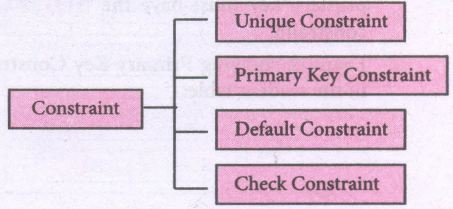
Write a SQL statement to create a table for employee having any five fields and create a table constraint for the employee table.
11.
Construct the following SQL statements in the student table-
(i) SELECT statement using GROUP BY clause.
(ii) SELECT statement using ORDER BY clause.
12.
13.
Explain the different operators in Relational algebra with suitable examples.
14.
Explain the different types of relationship mapping.
15.
Write a menu driven program to add or delete stationary items. You should use dictionary to store items and the brand.
16.
Explain the different set operations supported by python with suitable example.
17.
What is the purpose of range( )? Explain with an example.
18.
Explain about string operators in python with suitable example.
19.
Explain the scope of variables with an example.
20.
Write a program to display all 3 digit odd numbers.
21.
Write a detail note on if..else..elif statement with suitable example.
22.
Explain the Bubble sort algorithm with example.
23.
What is Binary search? Discuss with example
24.
Explain input() and print() functions with examples.
25.
Identify in the following program
| let rec gcd a b:= if b <> 0 then gcd b (a mod b) else return a: |
i) Name of the function
ii) Identify the statement which tells it is a recursive function
iii) Name of the argument variable
iv) Statement which invoke the function recursively
v) Statement which terminates the recursion
1.
(i) Home Button \(\rightarrow \) The Home Button will help one to begun navigating the chart. If you ever want to return back to the original view, you can click on this.
(ii) Forward/Back buttons \(\rightarrow \) These buttons can be used like the Forward and Back buttons in browser. Click these to move back to the previous point you were at, or forward again.
(iii) Pan Axis \(\rightarrow \) This cross-looking button allows you to click it, and then click and drag graph around.
(iv) Zoom \(\rightarrow \) The Zoom button lets you click on it, then click and drag a square would like to zoom into specifically. Zooming in will require a left click and drag. Zoom out with a right click and drag.
(v) Configure Subplots\(\rightarrow \) This button allows you to configure various spacing options with figure and plot.
(vi) Save Figure \(\rightarrow \)This button will allow you to save figure in various forms
2.
Line Chart:
(i) A Line Chart or Line Graph is a type of chart which displays information as a series of data points called 'markers' connected by straight line segments.
(ii) A Line Chart is often used to visualize a trend in data over intervals of time - a time series - thus the line is often drawn chronologically.
Example:
import matplotlib.pyplot as plt
years = [2014, 2015, 2016, 2017, 2018]
total_populations = [8939007, 8954518, 8960387, 8956741, 8943721]
plt. plot ("years, total_populations)
pit. title ("Year vs Population in India")
plt.xlabel ("Year")
pIt.ylabel ("Total Population")
plt.showt (1)
In this program,
Plt.titlet( ) \(\rightarrow\) specifies title to the graph
Plt.xlabelt) \(\rightarrow\) specifies label for X-axis
Plt.ylabel() \(\rightarrow\) specifies label for Y-axis
Output:
.JPG)
Bar Chart:
(i) A Bar Plot (or BarChart) is one of the most common type of plot. It shows the relationship between a numerical variable and a categorical variable
(ii) Bar chart represents categorical data with rectangular bars. Each bar has a height corresponds to the value it represents. The bars can be plotted vertically or horizontally.
(iii) It's useful when we want to compare a given numeric value on different categories. To make a bar chart with Matplotlib, we can use the plt.bar() function.
Example:
import matplotlib.pyplot as plt
# Our data
labels = ["TAMIL", "ENGLISH", "MATHS", "PHYSICS", "CHEMISTRY", "CS"]
usage = [79.8,67.3,77.8,68.4,70.2,88.5]
# Generating the y positions.
y_positions = range (len(labels))
# Creating our bar plot
plt.bar (y_positions, usage)
plt.xticks (y_positions, labels)
plt.ylabel ("RANGE")
plt.title ("MARKS")
plt.show( )
Output:
.JPG)
Labels → specifies labels for the bars.
Usage → Assign values to the labels specified.
Xticks → Display the tick marks along the x - axis at the values represented. Then specify the ladel for each tick mark.
Range → Create sequence of numbers.
Pie Chart:
(i) Pie Chart is probably one of the most common type of chart. It is a circular graphic which is divided into slices to illustrate numerical proportion.
(ii) The point of a pie chart is to show the relationship of parts out of a whole. To make a Pie Chart with Matplotlib, we can use the plt.pief) function.
(iii) The autopct parameter allows us to display the percentage value using the Python string formatting.
Example:
import matplotlib.pyplot as plt
sizes = [89, 80, 90, 100, 75]
labels = ["Tamil", "English", "Maths", "Science", "Social"]
plt.pie (sizes, labels = labels, autopct = "%.2f")
plt.axes().set aspect ("equal")
plt.show( )
Output:
.JPG)
3.
Program:
import mysql db
db = mysqldb.connect ("local host", "user", "123", "organization'")
cursor = db.cursor()
item table creation
database: ABC, table: Item, lcode: int, ItemName: Char
Rate: int. Record: 1008, Monitor: 15000
cursor.execute ("Create table item(icode int, item Name char (25), Rate int"));
db.close
cursor. execute ("insert into item values ("1008", 'Monitor', '15000" ));
db.commit()
4.
HAVING clause is used to filter data based on7the group functions. This is similar to WHERE condition but can be used , only with group functions. Group functions cannot be used in WHERE Clause but can be used in HAVING clause.
Example:
import sqlite3
connection = sqlite3.connect("Academy.db")
cursor = connection.cursorO
cursor.execute("SELECT GENDER,COUNT(GENDER) FROM Student GROUP BY GENDER HAVING COUNT( GENDER> 3")
result = cursor.fetchall( )
co = [i[o] for i in cursor. description]
print(co)
print(result)
Output:
['gender', 'COUNT(GENDER)']
[('M', 5)]
5.
getopt() method returns value consisting of two elements. Each of these values are stored separately in two different list opts and args. opts contains list of splitted strings like made, path and args contains any string if at all not splitted because of wrong path or mode. args will be an empty array if there is no error in splitting strings by getopt().
Example:
The Python code which is going to execute the C++ file p4 in command line will have the getopt() method.
Syntax:
opts, args = getopt.getopt (argv, "i:", ['ifile ='])
where opts contains ('-i','c:\\pyprg\\p4')]]
-i:- option nothing but mode should be followed by
'c:\\pyprg\\p4' value nothing but the absolute path of C++ file,
Since the entire command-line commands are parsed and no leftover arguments, the second argunent args will be empty[].
6.
7.
Python < filename.py > - < i > <C++ filename without cpp extension>
| Python | Keyword to execute the Python program from command-line |
| filename.py- i | Name of the Python program to executed input mode |
| C++ filename without cpp extension | Name of C++ file to be compiled and executed |
For example type Python pycpp.py - i pali in the command prompt and press enter key. If the compilation is successful we will get the desired output. Otherwise the error will be displayed.
8.
1. CSV file - data with default delimiter comma(,)
2. CSV file - data with space at the beginning.
3. CSV file - data with quotes
4. CSV file - data with custom Delimiters
1. CSV file - data with default delimiter comma(,):
The following program read a file called "Sample1.csv" with default delimiter comma (,) and print row by row.
Program:
#importing csv
import csv
#opening the csv file which is in different location with read mode
with opent('c.\\pyprg\\sample1.csv', 'r') as F:
#other way to open the file is f= ('C:\\pyprg\\ sample1.csv', 'r')
reader = csv.reader(F)
# printing each line of the Data row by row
print(row)
F.close()
Output:
['SNO', 'NAME', 'CITY']
['12101', 'RAM', 'CHENNAI']
['12102', 'LAVANYA', 'TIRUCHY']
['12103', 'LAKSHMAN', 'MADURAI']
2. CSV files - data with spaces at the beginning:
Consider the following file "Sample2.csv containing the following data when opened through notepad.
| Topic 1 | Topic 2 | Topic 3 |
| One, | two, | three, |
| Example 1, | Example 2, | Example 3, |
Program:
import csv
csv.register_dialect ['my Dialect', delimiters=', 'Skipinitialspace= True).
F = open ('c:\\Pyprgl\sample2.csv', 'r')
reader = CSV.reader (F, dialect = 'myDialect')
for row in reader:
print (row)
F.close()
Output:
['Topic 1', 'Topic 2', 'Topic 3']
['One', 'two', 'three']
['Example 1', 'Example 2', 'Example 3']
We can see in "Sample 2.csv" there are spaces after the delimiter due to which the output is also displayed with spaces.
These whitespaces can be removed, by registering new dialects using csv. register _dialect( ) class of csv module. A dialect describes the format of the csv file that is to be read. In dialects the Parameter "skipinitialspace" is used for removing whitespaces after the delimiter.
3. CSV File - Data with Quotes:
We can read the csv files with quotes, by registering new dialects using csv. register_dialect( ) class of csv module.
SNO, Quotes
1, "The Secret to getting ahead is getting started".
2, "Excellence is a continuous process and not an accident."
3, "Work hard dream big never give up and believe Yourself"
4, "Failure is the opportunity to begin again more intelligently".
5, "The successful warrior is the average man, with laser-like focus."
Program:
import cSv
csv.register_ dialect ('MyDialect', delimiter =, 'quoting = csv.QUOTE_ALL, skipinitialspace = True)
f=open ('c:\\Pyprg\\ quotes.csv', 'r')
reader = csv.reader (f, dialect = 'myDialect')
for row in reader:
print (row)
Output:
['SNO, 'Quotes']
['1', 'The secret to getting ahead is getting started'.]
['2', 'Excellence is a continuous process and not an accident'.]
['3', 'Work hard dream big never give up and believe yourself'.]
['4', 'Failure is the opportunity to begin again more intelligently':]
['5', 'The successful warrior is the average man with laser- like focus':]
4. CSV files with custom Delimiters:
We can read csv file having custom the delimiter by registering a new dialect with the help of csv.register_dialect( ).
In the following file called "sample4.csv", each column is separated with |(Pipe Symbol)
| Roll No | Name | City |
| 12101 | Arun | Chennai |
| 12102 | Meena | Kovai |
| 12103 | Ram | Nellai |
| 103 | Ayush | M |
| 104 | Abinandh | M |
Program:
import csv
Csv. register_dialect('myDialect', delimiter= '|')
with open (c:\\pyprg\sample 4.csv', 'r') as f:
reader = csv.reader (f, dialect = "my dialect")
for row is reader:
print (row)
f.close()
Output:
['Roll no', 'Name', 'City]
['12101', 'Arun', 'Chennai']
['12102', 'Meena', 'Kovai']
['12103', 'Ram', 'Nellai']
9.
| Python file modes | Description |
|---|---|
| 'r' | open a file for reading (default) |
| 'w' | Open a file for writing. Creates a new file if it does not exist or truncates the file if it exists. |
| 'x' | Open a file for exclusive creation. If the file already exists, the operation fails. |
| 'a' | Open for appending at the end of the file without truncating it. Creates a new file if it does not exist. |
| 't' | Open in text mode. default |
| 'b' | Open in binary mode. |
| '+' | Open a file for updating (reading and Writing) |
10.
Table constraint:
Table constraint apply to a group of one or more columns. The Syntax tor a table created with Constraint is given as below:
CREATE TABLE <table_name>
(<column name> <datatype>[<size>]
<column constraint>,
(<column name> <data type> [<size>]
<column constraint).....
<table constraint>(<column name>, [<column name>..........])............);
Following is an example for employee table with "NOT NULL' column constraint. This constraint enforces a field to always contain a value.
CREATE TABLE employee (No int NOT NULL PRIMARY KEY,
NAME varchar(50), Age int (10), Address varchar(50)
PhoneNo int(10), Pincode int (6) PRIMARY KEY (NAME, PhoneNo);
The above command creates a table "employee" in which the field No of integer type is defined NOT NULL, which means this field must have values. The field NAME is of char type. The fields NAME, PhoneNo, have table constraint.
11.
1. SELECT * FROM student WHERE gender = Male GROUP BY gender;
2. SELECT * FROM student WHERE Age > 18 ORDER BY DESC;
12.
13.
Relational Algebra is divided into various groups
Unary Relational Operations.
(i) SELECT (symbol: σ)
(ii) PROJECT ( symbol: π)
Relational Algebra Operations from Set Theory:
(i) UNION (U)
(ii) INTERSECTION (∩)
(iii) DIFFERENCE (-)
(iv) CARTESIAN PRODUCT (X)
SELECT (symbol: σ)
(i) General from σ (R) with a relation R and a condition C on the attributes of R
(ii) The SELECT operation is used for selecting a subset with tuples according to a given condition.
(iii) Select filters out all tuples that do not satisfy C
STUDENT:
| Studio | Name | Course | Year |
|---|---|---|---|
| CS1 | Kannan | Big Data | II |
| CS2 | Gowri Shankar | R language | I |
| CS3 | Lenin | Big Data | I |
| CS4 | Padmaja | Python Programming | I |
σ course = "Big Data" (STUDENT)
| Studio | Name | Course | Year |
|---|---|---|---|
| CS1 | Kannan | Big Data | II |
| 2 | Lenin | Big Data | I |
PROJECT (symbol: II)
(i) The projection eliminates all attributes of the input relation but those mentioned in the projection list.
(ii) The projection method defines a relation that contains a vertical subset of Relation.
Example: 1
IIcourse (STUDENT)
Result:
| Course |
| Big Data |
| R language |
| Python Programming |
Example 2
IIstudent,course (STUDENT)
Result:
| Stud no | Course |
| CS1 | Big Data |
| CS2 | R language |
| CS3 | Big Data |
| CS4 | Python Programming |
UNION (Symbol: U)
(i) It includes all tuples that are in tables A or in B. It also eliminates duplicates. Set A Union Set B would be expressed as A U B
Example 3:
| Table A | |
|---|---|
| Studio | Name |
| CS1 | Kannan |
| CS2 | Lenin |
| CS3 | Padmaja |
| Table A | |
|---|---|
| Studio | Name |
| CS1 | Kannan |
| CS2 | Gowrishakaran |
| CS3 | Lenin |
Result:
| Table A | |
|---|---|
| Studio | Name |
| CS1 | Kannan |
| CS2 | Gowri Shakaran |
| CS3 | Lenin |
| CS4 | Padmaja |
SET DIFFERENCE (Symbol: -)
(i) The result of A - B, is a relation which includes all tuples that are in A but not in B.
(ii) The attribute name of A has to match with the attribute name in B.
Example: 4
using Table B Example 3
Result:
| Table A - B | |
|---|---|
| CS4 | Padmaja |
INTERSECTION (symbol: ∩) A ∩ B:
(i) Defines a relation consisting of a set of all tuple that are in both in A and B. However, A and.B must be union-compatible.
Example: 5
Using Table in Example 3
Result:
| Table A - B | |
|---|---|
| CS1 | Kannan |
| CS3 | Lenin |
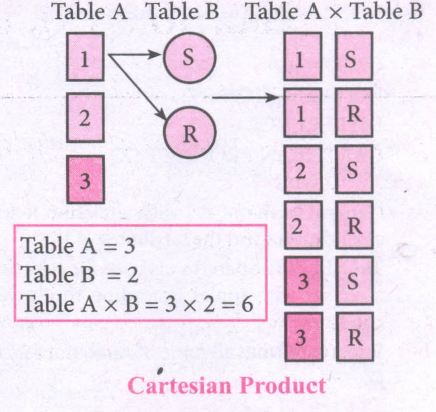
PRODUCT OR CARTESIAN PRODUCT (Symbol: X)
(i) Cross product is a way of combining two relations. The resulting relation contains, both relations being combined.
(ii) A x B means A times B, where the relation A and B have different attributes.
(iii) This type of operation is helpful to merge columns from two relations.
.JPG)
.JPG)
14.
Types of relationships:
(i) One-to-One Relationship
(ii) One-to-Many Relationship
(iii) Many-to-One Relationship
(iv) Many-to-Many Relationship
(i) One-to-One Relationship:
In One-to-One Relationship, one entity is related with : only one other entity. One row in a table is linked with only one row in another table and vice versa.
For example: A student can have only one exam number

(ii) One-to-Many Relationship.
In One-to- Many relationship, one entity is related to many other entities. One row in a table A is linked to many rows in a table B, but one row in a table B is linked to only one row in table A.
For example: One Department has many staff members.
.JPG)
(iii) Many-to-One Relationship:
In Manyto- One Relationship, many entities can be related with only one in the other entity.
For example:
A number of staff members working in one Department.
Multiple rows in staff members table is related with only one row in Department table.
.JPG)
(iv) Many-to-Many Relationship:
A manyto- many relationship occurs when multiple records in a table are associated with multiple records in another table.
(i) Example 1:
Customers and Product
Customers can purchase various products and Products can be purchased by many customers
(ii) Example 2:
Students and Courses
A student can register for many Courses and a Course may include many students
(iii) Example 3:
Books and Student.
Many Books in a Library are issued to many students.
.JPG)
15.
class Mystore:
_prod_code = [ ]
_prod_name = [ ]
_cost price = [ ]
_prod quant = [ ]
def getdata(self):
selt.p= int (input ("Enter no. of products you need to store:"))
for x in range (self.p):
self._prod_code. append (int (input ("Enter Product Code:")))
self._prod_name. append (str (input ("Enter Product Name:"))
self._ cost_price. append (int (input ("Enter cost price:"))
def display (self):
print ("stock in stores")
print ("---------------------")
print ("Product Code\t Product name\t cost price")
print ("------------------")
for x in range (self.p):
print (self._prod_code [x], "\t\t", self._prod_name [x], "It \t", self._cost price [x])
print ("------------------------------")
def print_bill (self):
total_price =0
for x in range (self.p):
q= int(input("Enter the quantity for the product code %d:" %self._prod_code [x]))
self. Prod_quant.append (q)
total_price = total_price + self. _cost_price|x]* self._prod_quant [x]
print ("Invoice Receipt")
print ("---------------")
print ("Product Code\t Product Name\t Cost Price\t Quantity\t Total Amount")
print ("----------------")
for x in range (self.p):
print (self._Prod_code [x), "\t \t", self_prod-name[x], "\t \t",
self._cost_price[x], "\t \t", self._prod-quant [x], "\t \t",
self._prod_quant[x]*self._cost price [x])
print ("-------------------")
print ("Total Amount =", total_price")
S=Mystore ()
S.getdata ()
S.display ()
S.print_bill ()
Output:
Enter no. of products you need to store: 5
Enter Product code: 101
Enter Product Name: Notebook
Enter cost price: 25
Enter Product code: 201
Enter Product Name: pencil
Enter cost price: 35
Enter Product code: 301
Enter Product Name: Pen
Enter cost price: 35
Enter Product code: 401
Enter Product Name: Colour Pencils
Enter cost price: 50
Enter Product code: 501
Enter Product Name: Sketches
Enter cost price: 120
Stock in stores
| Product Code | Product Name | Cost Price |
| 101 | Notebook | 25 |
| 201 | Pencil | 35 |
| 301 | Pen | 35 |
| 401 | Colour pencils | 50 |
| 501 | Sketches | 120 |
Enter the quantity for the product code 101:10
Enter the quantity for the product code 201:15
Enter the quantity for the product code 301:10
Enter the quantity for the product code 401:20
Enter the quantity for the product code 501:10
Invoice Receipt
| Product Code | Product Name | Cost Price | Quantity | Total Amount |
| 101 | Notebook | 25 | 10 | 250 |
| 201 | Pencil | 35 | 15 | 525 |
| 301 | Pen | 35 | 10 | 350 |
| 401 | Colour pencils | 50 | 20 | 1000 |
| 501 | Sketches | 120 | 10 | 1200 |
| Total amount = 3325 |
16.
The python supports the set operations such as Union, Intersection, difference and Symmetric difference.
i) Union:
It includes all elements from two or more sets
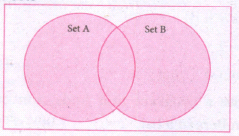
In python, the operator Iis used to union of two sets. The function union ( ) is also used to join two sets in python.
Example:
Program to Join (Union) two sets using union operator
set_A={2,4,6,8}
set_B={'A', 'B', 'C', 'D'}
U_set=set_A l set_B
print (U _set)
Output:
{2, 4, 6, 8, 'A', 'D', 'C', 'B'}
Example:
Program to Join (Union) two sets using union function.
set_A={2,4,6,8}
set_B={'A', 'B', 'C', 'D'}
set_ U=set_ A.Union(set_ B)
print(set_U)
Output:
{'D', 2, 4, 6, 8, 'B', 'C', 'A'}
ii) Intersection:
(i) It includes the common elements in two sets
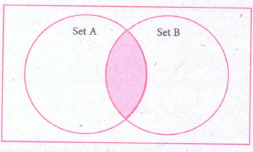
The operator & is used to intersect two sets in python. The function intersection( ) is also used to intersect two sets in python.
Example:
Program to insert two sets using intersection operator
set_A={'A', 2, 4, 'D'}
set_B={'A', 'B', 'C', 'D'}
print(set_A & set_B)
Output:
{'A', 'D'}
Example:
Program to insect two sets using intersection function
set_A={'A', 2, 4, 'D'}
set_B={'A', 'B', 'C', 'D'}
print( set_A.intersection(set_B))
Output:
{'A', 'D'}
iii) Difference
It includes all elements that are in first set (say set A) but not in the second set (say set B)
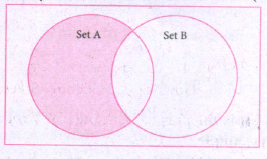
The minus (-) operator is used to difference set operation in python. The function difference() is also sed to difference operation.
Example:
Program to difference of two sets using minus operator
set_A={'A', 2, 4, 'D'}
set_B={'A', 'B', 'C', 'D'}
print(set_A - set B)
Output
{2,4}
Example:
Program to difference of two sets using difference function
set_A={'A', 2, 4, 'D'}
set_B={'A', 'B', 'C', 'D'}
print(set_A.difference( set_B))
Output:
{2,4}
iv) Symmetric difference:
It includes all the elements that are in two sets (say sets A and B) but not the one that are common to two sets.
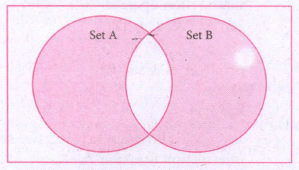
The caret (^) operator is used to symmetric difference set operation in python. The function symmetric_difference( ) is also used to do the same operation.
Example:
Program to symmetric difference of two sets using caret operator
set_A={'A', 2, 4, 'D'}
set_B={'A', 'B', 'C', 'D'}
print(set_A ^ set_B)
Output:
{2, 4, 'B', 'C'}
Example:
Program to difference of two sets using symmetric difference function
set_A={'A', 2, 4, 'D'}
set_B={'A', 'B', 'C', 'D'}
print( se_A.symmetric_ difference (set_B))
Output:
{2, 4, 'B', 'C'}
17.
The range( ) is a function used to generate a series of values in Python. Using range( ) function, you can create list with series of values. The range( ) function has three arguments.
Syntax:
range (start value, end value, step value)
where,
(i) start value - beginning value of series. Zero is the default beginning value.
(ii) end value - upper limit of series. Python takes the ending value as upper limit - l.
(iii) step value - It is an optional argument, which is used to generate different interval of values.
Example:
Generating whole numbers upto 10.
for x in range (1,11):
print(x)
Output:
1
2
3
4
5
6
7
8
9
10
Creating a list with series of values :
(i) Using the range( ) function, a list can be created with series of values, To convert the result of range( ) function into list, one more function called list ( ). The list ( ) function makes the result of range ( ) as a ist.
(ii) Syntax: List_Varibale = list ( range ( ))
(iii) Example
Generating first 10 even numbers
for x in range (2, 11, 2):
print (x)
Output:
2
4
6
8
10
(iv) In the above code, list( ) function takes the result of range( ) as Even_List elements. Thus, Even_List list has the elements of first five even numbers. Similarly, we can create any serie of values using range( ) function. The following example explains how to create a list with squares of first 10 natural numbers.
Example : Generating squares of first 10 natural numbers
for x in range(1,11) :
S=x**2
squares.append(s)
print (squares)
Output : [1, 4, 9, 16, 25, 36, 49, 64, 81, 100)
18.
String Operators:
Python provides the following operators for string operations. These operators are useful to manipulate string.
(i) Concatenation (+):
Joining of two or more strings is called as Concatenation. The plus (+) operator is used to concatenate strings in python.
Example:
>>> "welcome" + "Python"
'welcome python'
(ii) Append (+ =):
Adding more strings at the end of an existing string is known as append. The operator += is used to append a new string with an existing string.
Example:
>>> str1 = "welcome to"
>>> str1 + = "Learn Python"
>>> print (str1)
Welcome to Learn Python
(iii) Repeating (*):
The multiplication operator (*) is used to display a string in multiple number of times.
Example:
>>> str1= "welcome "
>>> print (str1 *4)
Welcome Welcome Welcome Welcome
(iv) String slicing:
Slice is a substring of a main string.
A substring can be taken from the original string by using [ ] operator and index or subscript values. Thus [ ] is also known as slicing operator. Using slice operator, we have to slice one or more substrings from a main string.
General format of slice operation:
str[start:end]
Where start is the beginning index and end is the last index value of a character in the string. Python takes the end value less than one from the actual index specified.
Example: I
Slice a single character from a string
>>>str 1 = "THIRUKKURAL"
>>>print (str 1 [0])
T
(v) Stride when slicing string:
Example :
>>>str1 = "Welcome to learn python"
>>>print(str1[::-2])
Output :
nhy re teolW
19.
Scope of variable refers to the part of the program, where it is accessible, i.e., area where the variables refer (use). The scope holds the current set of variables and their values. The two types of scopes-local scope and global scope.
Local Scope: A variable declared inside the function's body is known as local variable.
Rules of local variable:
(i) A variable with local scope can be accessed only within the function that it is created in.
(ii) When a variable is created inside the function the variable becomes local to it.
(iii) A local variable only exists while the function is executing.
(iv) The formal parameters are also local to function.
(v) Example: Create a Local Variable
def loc():
y=0 # local scope
print(y)
loc()
Output:
0
Global Scope: A variable, with global scope can be used anywhere in the program. It can be created by defining a variable outside the scope of any function.
Rules of global Keyword:
The basic rules for global keyword in Python are:
(i) When we define a variable outside a function, it's global by default. You don't have to use global keyword.
(li) We use global keyword to modify the value of the global variable inside a function.
(iii) Use of global keyword outside a function has no effect.
Example: Accessing global Variable From Inside a Function
c = 1 # global variable
def add():
print(c)
add()
Output:
1
20.
for i in range (100, 1000):
if a%2==1:
print b
Output :
101,103,105,107,...........,997,999
21.
Nested if..elif..else statement :
(i) When we need to construct a chain of if statement(s) then 'elif' clause can be used instead of 'if else'.
(ii) Syntax:
if < condition - 1>:
statements-block 1
elif < condition - 2>:
statements-block 2
else:
statements-block n
(iii) In the syntax of if..elif ..else mentioned above, condition -1 is tested if it is true then statements-block 1 is executed, otherwise, the control checks condition-2, if it is true statements-block 2 is executed and even if it fails statements-block n mentioned in else part is executed.
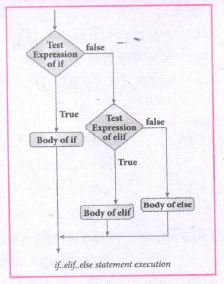
(iv) 'elif' clause combines if..else-if ..else statements to one if..elif ... else. 'elif' can be considered to be abbreviation of 'else if'. In an 'if' statement there is no limit of 'elif' clause that can be used, but an 'else' clause if used should be placed at the end.
(v) Example: # Program to illustrate the use of nested if statement
| Average | Grade |
| > = 80 and above | A |
| > = 70 and < 80 | B |
| > = 60and < 70 | C |
| > = 50 and < 60 | D |
| Otherwise | E |
m1 = int (input("Enter mark in first subject:"))
m2 = int (input("Enter mark in second subject:"))
avg = (m1+m2)/2
if avg > =80:
print ("Grade : A")
elif avg > =70 and avg < 80:
print ("Grade : B")
elif avg > =60 and avg < 70:
print ("Grade : C")
elif avg > =50 and avg < 60:
print ("Gradec: D")
else:
print("Grade : E")
Output 1:
Enter mark in first subject : 34
Enter mark in second subject : 78
Grade : D
Output 2:
Enter mark in first Subject : 67
Enter mark in second subject : 73
Grade: B
22.
Bubble sort algorithm:
(i) Bubble sort algorithm simple sorting algorithm. The algorithm starts at the beginning of the list of values stored in an array. It compares each pair of adjacent elements and swaps them if they are in the unsorted order.
(ii) This comparison and passed to be continued until no swaps are needed, which indicates that the list of values stored in an array is sorted. The algorithm is a comparison sort, is named for the way smaller elements "bubble" to the top of the list.
(iii) Although the algorithm is simple, it is too slow and less efficient when compared to insertion sort and other sorting methods.
(iv) Assume list is an array of n elements. The swap function swaps the values of the given array elements.
Procedure :
(i) Start with the first element i.e., index = 0, compare the current element with the next element of the array.
(ii) If the current element is greater than the next element of the array, swap them.
(iii) If the current element is less than the next or right side of the element, move to the next element. Go to Step 1 and repeat until the end of the index is reached.
(iv) Let's consider an array with values {15, 11, 16, 12, 14, 13} Below, we have a pictorial representation of how bubble sort will sort the given array.
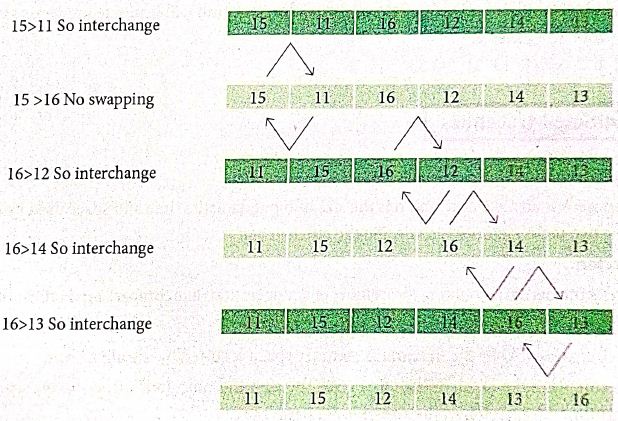
(v) The above pictorial example is for iteration-d. Similarly, remaining iteration can be done. The final iteration will give the sorted array. At the end of all the iterations we will get the sorted values in an array as given below:
| 11 | 12 | 13 | 14 | 15 | 16 |
23.
Binary Search:
Binary search also called half-interval search algorithm. It finds the position of a search element within a sorted array. The binary search algorithm can be done as a divide- and -conquer search algorithm and executes in logarithmic time.
Pseudo Code:
Start with the middle element:
(i) If the search element is equal to the middle element of the array i.e., the middle value = number of elements in array/2, then return the index of the middle element.
(ii) If not, then compare the middle element with the search value,
(iii) If the search element is greater than the number in the middle index, then select the elements to the right side of the middle index, and go to Step-1.
(iv) If the search element is less than the number in the middle index, then select the elements to the left side of the middle index, and start with Step-1.
(v) When a match is found, display success message with the index of the element matched.
(vi) If no match is found for all comparisons, then display unsuccessful message.
Binary Search Working principles :
(i) List of elements in an array must be sorted first for Binary search. The following example describes the step by step operation of binary search.
(ii) Consider the following array of elements, the array. is being sorted so itenables to do the binary searçh algorithm. Let us assume that the search element is 60 and we need to search the location or index of search element 60 using binary search.

(iii) First, we find index of middle element of. the array byusing this formula:
mid = low + (high - low) /2
(iv) Here it is, 0 + (9-0)/2=4 (fractional part ignored). So, 4 is thè mid value of the array.

(v) Now compare the search element with the value stored at mid value location 4. The value stored at location or index 4 is 50, which is not match with search element. As the search value 60 is greater than 50.

(vi) Now we change our low to mid+1 and find the new mid value again using the formula.
low = mid + 1
mid = low + (high - low) / 2
(vii) Our new mid is 7 now. We compare the value stored at location 7 with our target value 60.

(viii) The value stored at location or index 7 is not a match with search element, rather it is more than what we are looking for. So, the search element must be in the lower part from the current mid value location.

(ix) The search element still not found. Hence, we calculated the mid again by using the formula.
high = mid -1
mid = low +(high - low)/2
Now the mid value is 5.

(x) Now we compare the value stored at location 5 with our search element. We found that it is a match.

(xi) We can conclude that the search element 60 is found at locationor index 5. For example if we take the search element as 95, For this value this binary search algorithm return unsucessful result.
24.
1. The print () Function:
ln Python, the print() function is used to display result on the screen. The syntax for print ( ) is as follows:
Example:
print ("String to be displayed as output")
print (variable)
print ("String to be displayed as output", variable)
print ("String1", variable, "string 2", variable, "String 3",....)
Example:
>>> print("Welcome to python Programming'")
welcome to Python Programoming
>>>x = 5
>>> y = 6
>>> z= X+Y
>>> print (z)
>>> print ("The sum =", z)
The sum = 11
>>>print ("The sum of", x, "and", y, "is", z)
The sum of 5 and 6 is 11.
The print () evaluates the expression before printing it on the monitor. The print () displays an entire statement which is specified within print(). Comma(,) is used as a separator in print () to print more than one item.
input () function:
In Python, input) function is used to accept data as input at run time. The syntax for input () function is
Syntax:
Variable = input ("prompt String')
Where, prompt string in the Syntax is a statement or message to the user, to knowwhat input can be given.
If a prompt string is used, it is displayed on the monitor; the user can provide expected data from the input device. The input() takes whatever is typed from the Keyboard and stores the entered data in the given Variable. If prompt string is not given in input() no message is displayed on the screen, then, the user will not know what is to be typed as input.
Example 1:
input () with prompt String
>>>City=input ("Enter your city:")
Enter your city: Madurai
>>>print ("I am from", city)
I am from Madurai
Example 2:
input() without prompt string
>>> city = input ()
Rajarajan
>>>print ("I am from", city)
I am from Rajarajan
in Example 2, the input () is not having any pronmpt string, thus the user will not know what is to be typed as input. If the user inputs irrelevant data as given in the above example then the output will be unexpected. So, to make your program more interactive, provide prompt string with input (). The input () accepts all data as string or characters but not as numbers. Ifa numerical value is entered, the input values should be explicitly converted into numeric data type. The int) function is used to convert string data as integer data explicitly.
Example 3:
X=int (input ("Enter Number 1:"))
Y= int (input ("Enter Number 2:" ))
print ("The Sum =", x + y)
Output:
Enter Number 1: 34
Enter Number 2:56
The Sum =90.
25.
(i) gcd
(ii) let rec gcd
(iii) a, b
(iv) gcd(a mod b)
(v) return a

12th Standard Syllabus & Materials
12th Standard
TN 12th Computer Applications களப்பெயர் முறைமை (DNS) Sample Question Papers Study Material - QB365 Set A
NEW12th Standard
TN 12th Computer Applications வலையமைப்பு எடுத்துக்காட்டுகள் மற்றும் நெறிமுறைகள் Sample Question Papers Study Material - QB365 Set A
NEW12th Standard
TN 12th Computer Applications கணினி வலையமைப்பு ஓர் அறிமுகம் Sample Question Papers Study Material - QB365 Set A
NEW12th Standard
TN 12th Computer Applications PHP-உடன் MySQL-ஐ இணைத்தல் Sample Question Papers Study Material - QB365 Set A



Tamilnadu Stateboard 12th Standard Subjects

Maths

Chemistry

Physics

Biology
Computer Science

Business Maths and Statistics

Economics

Commerce

Accountancy

History

Computer Applications
Biology
Computer Technology
Computer Applications
Computer Science
Business Maths and Statistics
Commerce
Economics
Maths
Chemistry
Physics
Computer Technology
History
Accountancy

Tamil

English

French
Tamilnadu Stateboard Standards


