
 100% FREE ACCESS
12th Standard Syllabus & Materials
12th Standard
TN 12th Computer Applications மின்னணு தரவு பரிமாற்றம் Sample Question Papers Study Material - QB365 Set A
NEW12th Standard
TN 12th Computer Applications மின் - வணிக பாதுகாப்பு அமைப்புகள் Sample Question Papers Study Material - QB365 Set A
NEW12th Standard
TN 12th Computer Applications மின்னணு செலுத்தல் முறைகள் Sample Question Papers Study Material - QB365 Set A
NEW12th Standard
TN 12th Computer Applications மின் - வணிகம் Sample Question Papers Study Material - QB365 Set A
NEW12th Standard
TN 12th Computer Applications திறந்த மூல கருத்துருக்கள் Sample Question Papers Study Material - QB365 Set A
NEW12th Standard
TN 12th Computer Applications வலையமைப்பு வடமிடல் Sample Question Papers Study Material - QB365 Set A

Published on: 03/06/2021
QB365 provides detailed and simple solution for every book back questions in class 12 Computer Science subject.It will helps to get more idea about question pattern in every book back questions with solution.
Download Tamil Nadu 12th Standard Computer Science question papers, model tests, one-mark questions, important questions, and public exam papers in PDF format. Free study materials and answer keys for TN State Board students.
Questions + Answers key
Take MCQ Computer Science Test
1.
Explain the representation of Abstract datatype using rational numbers.
2.
Consider the following table Supplier and item .Write a python script for (i) to (ii)
| SUPPLIER | ||||
| Suppno | Name | City | Icode | SuppQty |
| S001 | Prasad | Delhi | 1008 | 100 |
| S002 | Anu | Bangalore | 1010 | 200 |
| S003 | Shahid | Bangalore | 1008 | 175 |
| S004 | Akila | Hydrabad | 1005 | 195 |
| S005 | Girish | Hydrabad | 1003 | 25 |
| S006 | Shylaja | Chennai | 1008 | 180 |
| S007 | Lavanya | Mumbai | 1005 | 325 |
i) Display Name, City and Itemname of suppliers who do not reside in Delhi.
ii) Increment the SuppQty of Akila by 40
3.
Write the Python script to display all the records of the following table using fetchmany()
| Icode | ItemName | Rate |
| 1003 | Scanner | 10500 |
| 1004 | Speaker | 3000 |
| 1005 | Printer | 8000 |
| 1008 | Monitor | 15000 |
| 1010 | Mouse | 700 |
4.
Write the syntax for getopt( ) and explain its arguments and return values.
5.
6.
Write a Python program to write a CSV File with custom quotes.
7.
Write the different methods to read a File in Python.
8.
Write a SQL statement to create a table for employee having any five fields and create a table constraint for the employee table.
9.
What are the components of SQL? Write the commands in each.
10.
Consider the following employee table. Write SQL commands for the qtns.(i) to (v).
| EMP CODE | NAME | DESIG | PAY | ALLOWANCE |
| S1001 | Hariharan | Supervisor | 29000 | 12000 |
| P1002 | Shaji | Operator | 10000 | 5500 |
| P1003 | Prasad | Operator | 12000 | 6500 |
| C1004 | Manjima | Clerk | 8000 | 4500 |
| M1005 | Ratheesh | Mechanic | 20000 | 7000 |
(i) To display the details of all employees in descending order of pay.
(ii) To display all employees whose allowance is between 5000 and 7000.
(iii) To remove the employees who are mechanic.
(iv) To add a new row.
(v) To display the details of all employees who are operators.
11.
12.
Differentiate DBMS and RDBMS.
13.
Explain the different types of relationship mapping.
14.
Write a menu driven program to add or delete stationary items. You should use dictionary to store items and the brand.
15.
What is nested tuple? Explain with an example.
16.
What is the purpose of range( )? Explain with an example.
17.
Explain about string operators in python with suitable example.
18.
Explain the scope of variables with an example.
19.
Write a program to display all 3 digit odd numbers.
20.
Write a detail note on if..else..elif statement with suitable example.
21.
Explain the concept of Dynamic programming with suitable example.
22.
What is Binary search? Discuss with example
23.
Explain input() and print() functions with examples.
24.
Write any five benefits in using modular programming.
25.
Identify in the following program
| let rec gcd a b:= if b <> 0 then gcd b (a mod b) else return a: |
i) Name of the function
ii) Identify the statement which tells it is a recursive function
iii) Name of the argument variable
iv) Statement which invoke the function recursively
v) Statement which terminates the recursion
1.
(i) The basic idea of data abstraction is to structure programs so that they operate on abstract data. That is, our programs should use data in such a way, as to make as few assumptions about the data as possible.
(li) At the same time, a concrete data representation is defined as an independent part of the program.
(iii) Any program consist of two parts. The two parts of a program are, the part that operates on abstract data and the part that defines a concrete representation, is connected by a small set of functions that implement abstract data in terms of the concrete representation.
(iv) To illustrate this technique, let us consider an example to design a set of functions for manipulating rational numbers.
(v) Example: A rational number is a ratio of integers, and rational numbers constitute an important sub-class of real numbers. A rational number such as 8/3 or 19/23 is typically written as : < numerator > /< denominator >
(vi) where both the < numerator > and <denominator>
(vii) However, you can create an exact representation for rational numbers by combining together the numerator and denominator.
(viii) As we know from using functional abstractions, we can start programming productively before you have an implementation of some parts of our program.
(ix) Let us begin by assuming that you already have a way of constructing a rational number from a numerator and a denominator. You also assume that, given a rational number, you have a way of selecting its numerator and its denominator component.
2.
(i) Program to Display Name, city and Item Name of suppliers who do not reside in Delhi:
import mysqldb
db = mysqlkdb.Connect ("Supplier.db")
cursor = db.cursor()
cursor. execute ("'SELECT NAME, CITY, ICode FROM Supplier WHERE CITY <> "Delh")
db. commit()
result=cursor.fetchall()
print ("result, sep = "\n")
db. close()
(ii) Program to Increment the suppQty of Akila by 40:
import mysqldb
db = mysqldb.Connect ("ltem.db"')
cursor = db.cursor()
cursor. execute ("UPDATE Item SET Name = 'Akila' WHERE SuppQty = 235)
db. commit()
cursor. execute ("SELECT * FROM Item")
result = cursor.fetchall()
print ("result, sep ="\n")
db. close()
3.
Creating database:
Sql_command = " "
CREATE TABLE Hardware (
lcode INTEGER PRIMARY KEY.
ltem_Name VARCHAR(20),
Rate DEClMAL(5,2));" "
Program: To display the records using fetchmany()
import sqlite3
connection = sqlite3.connect ("Material.db")
cursor = connection.cursor()
cursor. execute ("SELECT * FROM Hardware")
print("fetching first 5 records:")
result = cursor.fetchmany(5)
print(result)
Output:
fetching first 5 records:
[(1003, 'Scanner', "10500'), (1004, 'Speaker', '3000'), (1005, 'Printer', '8000'), (1008, 'Monitor', '15000'),
(1010, 'Mouse', '700')]
4.
getopt() method returns value consisting of two elements. Each of these values are stored separately in two different list opts and args. opts contains list of splitted strings like made, path and args contains any string if at all not splitted because of wrong path or mode. args will be an empty array if there is no error in splitting strings by getopt().
Example:
The Python code which is going to execute the C++ file p4 in command line will have the getopt() method.
Syntax:
opts, args = getopt.getopt (argv, "i:", ['ifile ='])
where opts contains ('-i','c:\\pyprg\\p4')]]
-i:- option nothing but mode should be followed by
'c:\\pyprg\\p4' value nothing but the absolute path of C++ file,
Since the entire command-line commands are parsed and no leftover arguments, the second argunent args will be empty[].
5.
6.
We can write the csv file with quotes, by registering new dialects using csv.register_dialect() class of csv module.
Program:
import csv
info = [['SNO: 'Person: 'DOB'],
['1', 'Madhu,' '18/12/2001'],
['2', 'Sowmya', '19/2/1998'],
['3', 'Sangeetha', '20/3/1999'],
['4', 'Eshwar', '21/4/2000'],
['5', 'Anand', '22/5/2001']]
csv.register_dialect('MyDialect',quoting=csv.QUOTE_ALL)
with open('c:\\pyprg\\ch13\\person.csv', 'w') as f:
writer = csv.writer(f, dialect='myDialect')
for row in info:
writer. writerow(row)
f.close()
Output
file: "Person.csv"
"SNO","Person", "DOB", "1", "Madhu", "18/12/2001"
"2, "Sowmya", "19/2/1998", "3", "Sangeetha",
"20/3/1999", "4", "Eshwar", "21/4/2000"
"5", "Anand", "22/5/2001".
7.
1. CSV file - data with default delimiter comma(,)
2. CSV file - data with space at the beginning.
3. CSV file - data with quotes
4. CSV file - data with custom Delimiters
1. CSV file - data with default delimiter comma(,):
The following program read a file called "Sample1.csv" with default delimiter comma (,) and print row by row.
Program:
#importing csv
import csv
#opening the csv file which is in different location with read mode
with opent('c.\\pyprg\\sample1.csv', 'r') as F:
#other way to open the file is f= ('C:\\pyprg\\ sample1.csv', 'r')
reader = csv.reader(F)
# printing each line of the Data row by row
print(row)
F.close()
Output:
['SNO', 'NAME', 'CITY']
['12101', 'RAM', 'CHENNAI']
['12102', 'LAVANYA', 'TIRUCHY']
['12103', 'LAKSHMAN', 'MADURAI']
2. CSV files - data with spaces at the beginning:
Consider the following file "Sample2.csv containing the following data when opened through notepad.
| Topic 1 | Topic 2 | Topic 3 |
| One, | two, | three, |
| Example 1, | Example 2, | Example 3, |
Program:
import csv
csv.register_dialect ['my Dialect', delimiters=', 'Skipinitialspace= True).
F = open ('c:\\Pyprgl\sample2.csv', 'r')
reader = CSV.reader (F, dialect = 'myDialect')
for row in reader:
print (row)
F.close()
Output:
['Topic 1', 'Topic 2', 'Topic 3']
['One', 'two', 'three']
['Example 1', 'Example 2', 'Example 3']
We can see in "Sample 2.csv" there are spaces after the delimiter due to which the output is also displayed with spaces.
These whitespaces can be removed, by registering new dialects using csv. register _dialect( ) class of csv module. A dialect describes the format of the csv file that is to be read. In dialects the Parameter "skipinitialspace" is used for removing whitespaces after the delimiter.
3. CSV File - Data with Quotes:
We can read the csv files with quotes, by registering new dialects using csv. register_dialect( ) class of csv module.
SNO, Quotes
1, "The Secret to getting ahead is getting started".
2, "Excellence is a continuous process and not an accident."
3, "Work hard dream big never give up and believe Yourself"
4, "Failure is the opportunity to begin again more intelligently".
5, "The successful warrior is the average man, with laser-like focus."
Program:
import cSv
csv.register_ dialect ('MyDialect', delimiter =, 'quoting = csv.QUOTE_ALL, skipinitialspace = True)
f=open ('c:\\Pyprg\\ quotes.csv', 'r')
reader = csv.reader (f, dialect = 'myDialect')
for row in reader:
print (row)
Output:
['SNO, 'Quotes']
['1', 'The secret to getting ahead is getting started'.]
['2', 'Excellence is a continuous process and not an accident'.]
['3', 'Work hard dream big never give up and believe yourself'.]
['4', 'Failure is the opportunity to begin again more intelligently':]
['5', 'The successful warrior is the average man with laser- like focus':]
4. CSV files with custom Delimiters:
We can read csv file having custom the delimiter by registering a new dialect with the help of csv.register_dialect( ).
In the following file called "sample4.csv", each column is separated with |(Pipe Symbol)
| Roll No | Name | City |
| 12101 | Arun | Chennai |
| 12102 | Meena | Kovai |
| 12103 | Ram | Nellai |
| 103 | Ayush | M |
| 104 | Abinandh | M |
Program:
import csv
Csv. register_dialect('myDialect', delimiter= '|')
with open (c:\\pyprg\sample 4.csv', 'r') as f:
reader = csv.reader (f, dialect = "my dialect")
for row is reader:
print (row)
f.close()
Output:
['Roll no', 'Name', 'City]
['12101', 'Arun', 'Chennai']
['12102', 'Meena', 'Kovai']
['12103', 'Ram', 'Nellai']
8.
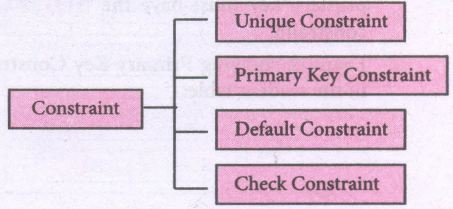
Table constraint:
Table constraint apply to a group of one or more columns. The Syntax tor a table created with Constraint is given as below:
CREATE TABLE <table_name>
(<column name> <datatype>[<size>]
<column constraint>,
(<column name> <data type> [<size>]
<column constraint).....
<table constraint>(<column name>, [<column name>..........])............);
Following is an example for employee table with "NOT NULL' column constraint. This constraint enforces a field to always contain a value.
CREATE TABLE employee (No int NOT NULL PRIMARY KEY,
NAME varchar(50), Age int (10), Address varchar(50)
PhoneNo int(10), Pincode int (6) PRIMARY KEY (NAME, PhoneNo);
The above command creates a table "employee" in which the field No of integer type is defined NOT NULL, which means this field must have values. The field NAME is of char type. The fields NAME, PhoneNo, have table constraint.
9.
SQL commands are divided into five categories:
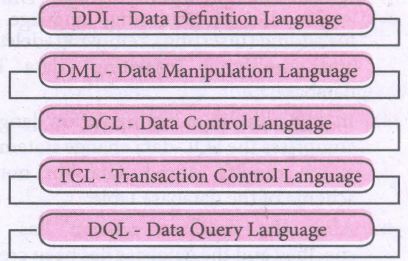
Data Definition Language:
(i) The Data Definition Language (DDL) consist of SQL statements used to define the database structure or schema.
(ii) It simply deals with descriptions of the database schema and is used to create and modify the structure of database objects in databases.
(iii) The DDL provides a set of definitions to specify the storage structure and access methods used by the database system.
DDL performs the following functions:
(i) It should identify the type of data division such as data item, segment, record and database file.
(ii) It gives a unique name to each data item type, record type, file type and data base.
(iii) It should specify the proper data type.
(iv) It should define the size of the data item.
(v) It may define the range of values that a data item may use.
(vi) It may specify privacy locks for preventing unauthorized data entry.
Commands:
| CREATE | To create tables in the database. |
| ALTER | Alters the structure of the database |
| DROP | Data tables from database. |
| TRUNCATE | Remove all records from a table, also release the space occupied bv those records. |
Data Manipulation Language:
This is a computer programming language used for adding, removing and modifying data in a database. This language comprises the SQL-data change statements, which modify stored data but not the schema of the database table
Data Manipulation includes
(i) Insertion of new information into the database
(ii) Retrieval of information stored in a database
(iii) Deletion of information from the database.
(iv) Modification of data stored in the database
The DML is basically of two types:
Procedural DML - Requires a user to specify what data is needed and how to get it.
Non-Procedural DML - Requires a user to specify what data is needed without Specifying how to get it.
Commands:
| INSERT | Inserts data into a table |
| UPDATE | Updates the existing data within a table |
| DELETE | Deletes all records from a table, but not the space occupied by them. |
Data Control Language:
(i) A Data Control Language (DCL) is a programming language used to control the access of data stored in a database. It is used for controlling privileges in the database (Authorization).
(ii) The privileges are required for performing all the database operations such as creating sequences, views of tables etc.
Commands:
| GRANT | Grants permission to one or more users to perform specific tasks. |
| REVOKE | Withdraws the access permission given by the GRANT statement. |
Transactional Control Language:
Transactional control language (TCL) commands are used to manage transactions in the database. These are used to manage the changes made to the data in a table by DML statements.
Commands:
| COMMIT | Saves any transaction into the database permanently. |
| ROLL BACK | Restores the database to last commit state. |
| SAVE POINT | Temporarily save a transaction so that you can rollback. |
Data query language:
The Data Query Language consist of commands used to query or retrieve data from a database. One such SQL command in Data Query Language is
| SELECT | It displays the records from the table. |
10.
(i) SELECT * FROM Employee ORDER BY PAY DESC;
(ii) SELECT * FROM Employee WHERE ALLOWANCE
BETWEEN 5000 AND 7000;
(iii) DELETE FROM Employee WHERE DESIG='Mechanic';
(iv) ALTER TABLE employee ADD Age Varchar(50);
(v) SELECT * FROM Employee WHERE DESIG='Operator';
11.
12.
| Basis of Comparison | DBMS | RDBMS |
|---|---|---|
| Expansion | Database Management System | Relational Database Management System |
| Data storage | Navigational model ie data by linked records | Relational model (in tables). ie data in tables as row and column |
| Data redundancy | Exhibit | Not Present |
| Normalization | Not performed | RDBMS uses normalization to reduce redundancy |
| Data access | Consumes more time | Faster, compared to DBMS. |
| Keys and indexes | Does not use. | used to establish relationship. Keys are used in RDBMS. |
| Transaction management | Inefficient, Error prone and insecure | Efficient and secure |
| Distributed Databases | Not supported | Supported by RDBMS. |
| Example | Dbase, FoxPro. | SQL server, Oracle, mysql, MariaDB, SQLite. |
13.
Types of relationships:
(i) One-to-One Relationship
(ii) One-to-Many Relationship
(iii) Many-to-One Relationship
(iv) Many-to-Many Relationship
(i) One-to-One Relationship:
In One-to-One Relationship, one entity is related with : only one other entity. One row in a table is linked with only one row in another table and vice versa.
For example: A student can have only one exam number

(ii) One-to-Many Relationship.
In One-to- Many relationship, one entity is related to many other entities. One row in a table A is linked to many rows in a table B, but one row in a table B is linked to only one row in table A.
For example: One Department has many staff members.
.JPG)
(iii) Many-to-One Relationship:
In Manyto- One Relationship, many entities can be related with only one in the other entity.
For example:
A number of staff members working in one Department.
Multiple rows in staff members table is related with only one row in Department table.
.JPG)
(iv) Many-to-Many Relationship:
A manyto- many relationship occurs when multiple records in a table are associated with multiple records in another table.
(i) Example 1:
Customers and Product
Customers can purchase various products and Products can be purchased by many customers
(ii) Example 2:
Students and Courses
A student can register for many Courses and a Course may include many students
(iii) Example 3:
Books and Student.
Many Books in a Library are issued to many students.
.JPG)
14.
class Mystore:
_prod_code = [ ]
_prod_name = [ ]
_cost price = [ ]
_prod quant = [ ]
def getdata(self):
selt.p= int (input ("Enter no. of products you need to store:"))
for x in range (self.p):
self._prod_code. append (int (input ("Enter Product Code:")))
self._prod_name. append (str (input ("Enter Product Name:"))
self._ cost_price. append (int (input ("Enter cost price:"))
def display (self):
print ("stock in stores")
print ("---------------------")
print ("Product Code\t Product name\t cost price")
print ("------------------")
for x in range (self.p):
print (self._prod_code [x], "\t\t", self._prod_name [x], "It \t", self._cost price [x])
print ("------------------------------")
def print_bill (self):
total_price =0
for x in range (self.p):
q= int(input("Enter the quantity for the product code %d:" %self._prod_code [x]))
self. Prod_quant.append (q)
total_price = total_price + self. _cost_price|x]* self._prod_quant [x]
print ("Invoice Receipt")
print ("---------------")
print ("Product Code\t Product Name\t Cost Price\t Quantity\t Total Amount")
print ("----------------")
for x in range (self.p):
print (self._Prod_code [x), "\t \t", self_prod-name[x], "\t \t",
self._cost_price[x], "\t \t", self._prod-quant [x], "\t \t",
self._prod_quant[x]*self._cost price [x])
print ("-------------------")
print ("Total Amount =", total_price")
S=Mystore ()
S.getdata ()
S.display ()
S.print_bill ()
Output:
Enter no. of products you need to store: 5
Enter Product code: 101
Enter Product Name: Notebook
Enter cost price: 25
Enter Product code: 201
Enter Product Name: pencil
Enter cost price: 35
Enter Product code: 301
Enter Product Name: Pen
Enter cost price: 35
Enter Product code: 401
Enter Product Name: Colour Pencils
Enter cost price: 50
Enter Product code: 501
Enter Product Name: Sketches
Enter cost price: 120
Stock in stores
| Product Code | Product Name | Cost Price |
| 101 | Notebook | 25 |
| 201 | Pencil | 35 |
| 301 | Pen | 35 |
| 401 | Colour pencils | 50 |
| 501 | Sketches | 120 |
Enter the quantity for the product code 101:10
Enter the quantity for the product code 201:15
Enter the quantity for the product code 301:10
Enter the quantity for the product code 401:20
Enter the quantity for the product code 501:10
Invoice Receipt
| Product Code | Product Name | Cost Price | Quantity | Total Amount |
| 101 | Notebook | 25 | 10 | 250 |
| 201 | Pencil | 35 | 15 | 525 |
| 301 | Pen | 35 | 10 | 350 |
| 401 | Colour pencils | 50 | 20 | 1000 |
| 501 | Sketches | 120 | 10 | 1200 |
| Total amount = 3325 |
15.
In Python, a tuple can be defined inside another tuple; called Nested tuple. In a nested tuple, each tuple is considered as an element. The for loop will be useful to access all the elements in a nested tuple.
Example:
Toppers = (("Vinodini", "XII-F", 98.7), ("Soundarya", "XII-H", 97.5),
("Tharani", "XII-F", 95.3), ("Saisri", "XII-G", 93.8))
for i in Toppers:
print(i)
Output:
('Vinodini', 'XII-F', 98.7)
('Soundarya', 'XII-H', 97.5)
('Tharani', 'XII-F', 95.3)
('Saisri', 'XII-G', 93.8)
16.
The range( ) is a function used to generate a series of values in Python. Using range( ) function, you can create list with series of values. The range( ) function has three arguments.
Syntax:
range (start value, end value, step value)
where,
(i) start value - beginning value of series. Zero is the default beginning value.
(ii) end value - upper limit of series. Python takes the ending value as upper limit - l.
(iii) step value - It is an optional argument, which is used to generate different interval of values.
Example:
Generating whole numbers upto 10.
for x in range (1,11):
print(x)
Output:
1
2
3
4
5
6
7
8
9
10
Creating a list with series of values :
(i) Using the range( ) function, a list can be created with series of values, To convert the result of range( ) function into list, one more function called list ( ). The list ( ) function makes the result of range ( ) as a ist.
(ii) Syntax: List_Varibale = list ( range ( ))
(iii) Example
Generating first 10 even numbers
for x in range (2, 11, 2):
print (x)
Output:
2
4
6
8
10
(iv) In the above code, list( ) function takes the result of range( ) as Even_List elements. Thus, Even_List list has the elements of first five even numbers. Similarly, we can create any serie of values using range( ) function. The following example explains how to create a list with squares of first 10 natural numbers.
Example : Generating squares of first 10 natural numbers
for x in range(1,11) :
S=x**2
squares.append(s)
print (squares)
Output : [1, 4, 9, 16, 25, 36, 49, 64, 81, 100)
17.
String Operators:
Python provides the following operators for string operations. These operators are useful to manipulate string.
(i) Concatenation (+):
Joining of two or more strings is called as Concatenation. The plus (+) operator is used to concatenate strings in python.
Example:
>>> "welcome" + "Python"
'welcome python'
(ii) Append (+ =):
Adding more strings at the end of an existing string is known as append. The operator += is used to append a new string with an existing string.
Example:
>>> str1 = "welcome to"
>>> str1 + = "Learn Python"
>>> print (str1)
Welcome to Learn Python
(iii) Repeating (*):
The multiplication operator (*) is used to display a string in multiple number of times.
Example:
>>> str1= "welcome "
>>> print (str1 *4)
Welcome Welcome Welcome Welcome
(iv) String slicing:
Slice is a substring of a main string.
A substring can be taken from the original string by using [ ] operator and index or subscript values. Thus [ ] is also known as slicing operator. Using slice operator, we have to slice one or more substrings from a main string.
General format of slice operation:
str[start:end]
Where start is the beginning index and end is the last index value of a character in the string. Python takes the end value less than one from the actual index specified.
Example: I
Slice a single character from a string
>>>str 1 = "THIRUKKURAL"
>>>print (str 1 [0])
T
(v) Stride when slicing string:
Example :
>>>str1 = "Welcome to learn python"
>>>print(str1[::-2])
Output :
nhy re teolW
18.
Scope of variable refers to the part of the program, where it is accessible, i.e., area where the variables refer (use). The scope holds the current set of variables and their values. The two types of scopes-local scope and global scope.
Local Scope: A variable declared inside the function's body is known as local variable.
Rules of local variable:
(i) A variable with local scope can be accessed only within the function that it is created in.
(ii) When a variable is created inside the function the variable becomes local to it.
(iii) A local variable only exists while the function is executing.
(iv) The formal parameters are also local to function.
(v) Example: Create a Local Variable
def loc():
y=0 # local scope
print(y)
loc()
Output:
0
Global Scope: A variable, with global scope can be used anywhere in the program. It can be created by defining a variable outside the scope of any function.
Rules of global Keyword:
The basic rules for global keyword in Python are:
(i) When we define a variable outside a function, it's global by default. You don't have to use global keyword.
(li) We use global keyword to modify the value of the global variable inside a function.
(iii) Use of global keyword outside a function has no effect.
Example: Accessing global Variable From Inside a Function
c = 1 # global variable
def add():
print(c)
add()
Output:
1
19.
for i in range (100, 1000):
if a%2==1:
print b
Output :
101,103,105,107,...........,997,999
20.
Nested if..elif..else statement :
(i) When we need to construct a chain of if statement(s) then 'elif' clause can be used instead of 'if else'.
(ii) Syntax:
if < condition - 1>:
statements-block 1
elif < condition - 2>:
statements-block 2
else:
statements-block n
(iii) In the syntax of if..elif ..else mentioned above, condition -1 is tested if it is true then statements-block 1 is executed, otherwise, the control checks condition-2, if it is true statements-block 2 is executed and even if it fails statements-block n mentioned in else part is executed.
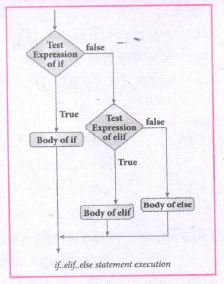
(iv) 'elif' clause combines if..else-if ..else statements to one if..elif ... else. 'elif' can be considered to be abbreviation of 'else if'. In an 'if' statement there is no limit of 'elif' clause that can be used, but an 'else' clause if used should be placed at the end.
(v) Example: # Program to illustrate the use of nested if statement
| Average | Grade |
| > = 80 and above | A |
| > = 70 and < 80 | B |
| > = 60and < 70 | C |
| > = 50 and < 60 | D |
| Otherwise | E |
m1 = int (input("Enter mark in first subject:"))
m2 = int (input("Enter mark in second subject:"))
avg = (m1+m2)/2
if avg > =80:
print ("Grade : A")
elif avg > =70 and avg < 80:
print ("Grade : B")
elif avg > =60 and avg < 70:
print ("Grade : C")
elif avg > =50 and avg < 60:
print ("Gradec: D")
else:
print("Grade : E")
Output 1:
Enter mark in first subject : 34
Enter mark in second subject : 78
Grade : D
Output 2:
Enter mark in first Subject : 67
Enter mark in second subject : 73
Grade: B
21.
(i) Dynamic programming is an algorithmic design method that can be used when the solution to a problem can be viewed as the result of a sequence of decisions.
(ii) Dynamic programming approach is similar to divide and conquer. The given problem is divided into smaller and yet smaller possible sub-problems.
(iii) Dynamic programming is used whenever problems can be divided into similar subproblems. so that their results can be reused to complete the process.
(iv) Dynamic programming approaches are used to find the solution in optimized way. For every inner subproblem, dynamic algorithm will try to check the results of the previously solved sub-problems.
(v) The solutions of overlapped sub-problems are combined in order to get a better solution.
Steps to doDynamic programming :
(i) The given problem will be divided into smaller overlapping sub-problems.
(ii) An optimum solution for the given problem can be achieved by using result of smaller sub-problem.
(iii) Dynamic algorithms uses Memoization
Fibonacci Series - An example :
(i) Fibonacci series generates the subsequent number by adding two previous numbers. Fibonacci series starts from two numbers -Fib 0 & Fib 1. The initial values of Fib 0 & Fib l can be taken as 0 and 1.
(ii) Fibonacci series satisfies the following conditions:
Fibn = Fiba-1 + Fiba-2
(iii) Hence, a Fibonacci series for the n value 8 can look like this
Fib8 = 0 1 1 2 3 5 8 13
Fibonaeci Iterative Algorithm with Dynamic programning approach : The following example shows a simple Dynamic programning approach for the generation ot Fibonacci series.
Initialize f0 = 0, f1 = 1.
Step- 1: Print the initial values of Fibonacci f0 and f1
Step- 2: Calculate Fibonacci fib \(\leftarrow \) f0+ f1
Step- 3: Assign f0 \(\leftarrow \) f1, f1 \(\leftarrow \) fib
Step- 4: Print the next consecutive value of Fibonacci fib
Step- 5: Go to step-2 and repeat until the specified number of terms generated
Example:
if we generate Fibonacci series up to 10 digits, the algorithm will generate the series as shown below:
The Fibonacci series is:
0 1 1 2 3 5 8 13 21 34 55.
22.
Binary Search:
Binary search also called half-interval search algorithm. It finds the position of a search element within a sorted array. The binary search algorithm can be done as a divide- and -conquer search algorithm and executes in logarithmic time.
Pseudo Code:
Start with the middle element:
(i) If the search element is equal to the middle element of the array i.e., the middle value = number of elements in array/2, then return the index of the middle element.
(ii) If not, then compare the middle element with the search value,
(iii) If the search element is greater than the number in the middle index, then select the elements to the right side of the middle index, and go to Step-1.
(iv) If the search element is less than the number in the middle index, then select the elements to the left side of the middle index, and start with Step-1.
(v) When a match is found, display success message with the index of the element matched.
(vi) If no match is found for all comparisons, then display unsuccessful message.
Binary Search Working principles :
(i) List of elements in an array must be sorted first for Binary search. The following example describes the step by step operation of binary search.
(ii) Consider the following array of elements, the array. is being sorted so itenables to do the binary searçh algorithm. Let us assume that the search element is 60 and we need to search the location or index of search element 60 using binary search.

(iii) First, we find index of middle element of. the array byusing this formula:
mid = low + (high - low) /2
(iv) Here it is, 0 + (9-0)/2=4 (fractional part ignored). So, 4 is thè mid value of the array.

(v) Now compare the search element with the value stored at mid value location 4. The value stored at location or index 4 is 50, which is not match with search element. As the search value 60 is greater than 50.

(vi) Now we change our low to mid+1 and find the new mid value again using the formula.
low = mid + 1
mid = low + (high - low) / 2
(vii) Our new mid is 7 now. We compare the value stored at location 7 with our target value 60.

(viii) The value stored at location or index 7 is not a match with search element, rather it is more than what we are looking for. So, the search element must be in the lower part from the current mid value location.

(ix) The search element still not found. Hence, we calculated the mid again by using the formula.
high = mid -1
mid = low +(high - low)/2
Now the mid value is 5.

(x) Now we compare the value stored at location 5 with our search element. We found that it is a match.

(xi) We can conclude that the search element 60 is found at locationor index 5. For example if we take the search element as 95, For this value this binary search algorithm return unsucessful result.
23.
1. The print () Function:
ln Python, the print() function is used to display result on the screen. The syntax for print ( ) is as follows:
Example:
print ("String to be displayed as output")
print (variable)
print ("String to be displayed as output", variable)
print ("String1", variable, "string 2", variable, "String 3",....)
Example:
>>> print("Welcome to python Programming'")
welcome to Python Programoming
>>>x = 5
>>> y = 6
>>> z= X+Y
>>> print (z)
>>> print ("The sum =", z)
The sum = 11
>>>print ("The sum of", x, "and", y, "is", z)
The sum of 5 and 6 is 11.
The print () evaluates the expression before printing it on the monitor. The print () displays an entire statement which is specified within print(). Comma(,) is used as a separator in print () to print more than one item.
input () function:
In Python, input) function is used to accept data as input at run time. The syntax for input () function is
Syntax:
Variable = input ("prompt String')
Where, prompt string in the Syntax is a statement or message to the user, to knowwhat input can be given.
If a prompt string is used, it is displayed on the monitor; the user can provide expected data from the input device. The input() takes whatever is typed from the Keyboard and stores the entered data in the given Variable. If prompt string is not given in input() no message is displayed on the screen, then, the user will not know what is to be typed as input.
Example 1:
input () with prompt String
>>>City=input ("Enter your city:")
Enter your city: Madurai
>>>print ("I am from", city)
I am from Madurai
Example 2:
input() without prompt string
>>> city = input ()
Rajarajan
>>>print ("I am from", city)
I am from Rajarajan
in Example 2, the input () is not having any pronmpt string, thus the user will not know what is to be typed as input. If the user inputs irrelevant data as given in the above example then the output will be unexpected. So, to make your program more interactive, provide prompt string with input (). The input () accepts all data as string or characters but not as numbers. Ifa numerical value is entered, the input values should be explicitly converted into numeric data type. The int) function is used to convert string data as integer data explicitly.
Example 3:
X=int (input ("Enter Number 1:"))
Y= int (input ("Enter Number 2:" ))
print ("The Sum =", x + y)
Output:
Enter Number 1: 34
Enter Number 2:56
The Sum =90.
24.
(i) Less code to be written.
(ii) A single procedure can be developed for reuse, eliminating the need to retype the code many times.
(iii) Programs can be designed more easily because a small teana deals with only a
small part of the entire code.
(iv) Modular programming allowS many programmers to collaborate on the same
application.
(v) The code is stored across multiple files.
(vi) Code is short, sirnple and easy to understand.
(vii) Errors can easily be identified, as they are localized to a subroutine or function.
(viii) The same code can be used in man applications.
(ix) The scoping of variables can easily be controlled.
25.
(i) gcd
(ii) let rec gcd
(iii) a, b
(iv) gcd(a mod b)
(v) return a

12th Standard Syllabus & Materials
12th Standard
TN 12th Computer Applications களப்பெயர் முறைமை (DNS) Sample Question Papers Study Material - QB365 Set A
NEW12th Standard
TN 12th Computer Applications வலையமைப்பு எடுத்துக்காட்டுகள் மற்றும் நெறிமுறைகள் Sample Question Papers Study Material - QB365 Set A
NEW12th Standard
TN 12th Computer Applications கணினி வலையமைப்பு ஓர் அறிமுகம் Sample Question Papers Study Material - QB365 Set A
NEW12th Standard
TN 12th Computer Applications PHP-உடன் MySQL-ஐ இணைத்தல் Sample Question Papers Study Material - QB365 Set A



Tamilnadu Stateboard 12th Standard Subjects

Maths

Chemistry

Physics

Biology
Computer Science

Business Maths and Statistics

Economics

Commerce

Accountancy

History

Computer Applications
Biology
Computer Technology
Computer Applications
Computer Science
Business Maths and Statistics
Commerce
Economics
Maths
Chemistry
Physics
Computer Technology
History
Accountancy

Tamil

English

French
Tamilnadu Stateboard Standards


