
 100% FREE ACCESS
12th Standard Syllabus & Materials
12th Standard
TN 12th Computer Applications மின்னணு தரவு பரிமாற்றம் Sample Question Papers Study Material - QB365 Set A
NEW12th Standard
TN 12th Computer Applications மின் - வணிக பாதுகாப்பு அமைப்புகள் Sample Question Papers Study Material - QB365 Set A
NEW12th Standard
TN 12th Computer Applications மின்னணு செலுத்தல் முறைகள் Sample Question Papers Study Material - QB365 Set A
NEW12th Standard
TN 12th Computer Applications மின் - வணிகம் Sample Question Papers Study Material - QB365 Set A
NEW12th Standard
TN 12th Computer Applications திறந்த மூல கருத்துருக்கள் Sample Question Papers Study Material - QB365 Set A
NEW12th Standard
TN 12th Computer Applications வலையமைப்பு வடமிடல் Sample Question Papers Study Material - QB365 Set A

Published on: 13/05/2022
QB365 provides detailed and simple solution for every Creative Questions in class 12 Computer Science Subject. It will helps to get more idea about question pattern in every Creative questions with solution.
latest Creative QuestionsDownload Tamil Nadu 12th Standard Computer Science question papers, model tests, one-mark questions, important questions, and public exam papers in PDF format. Free study materials and answer keys for TN State Board students.
Questions + Answers key
Take MCQ Computer Science Test
1.
___________ function may modify the arguments which are passed to them.
Friend
pure
Impure
None of these
2.
Impure functions with the same set of arguments get the ______ return value.
Same
Different
Zero
None of the above
3.
_______ function does not take any arguments and it does not return any value.
Friend
Pure
Impure
let
4.
_______ function remove the redundant extra calls.
Pure
Impure
Friend
None of the above
5.
The mathematical function Sin (0) always results _______.
1
0
-1
1/2
6.
_____ are not treated as definitions.
Subroutine
Expression
Statement
Algorithm
7.
________ bind values to names.
Subroutine
Algorithm
Statement
Definitions
8.
__________ as the basic building blocks of computer programs.
Function
Algorithm
Subroutines
None of these
9.
Evaluation of__________ functions does not cause any side effects to its output?
Impure
pure
Recursive
built-in
10.
Strlen is an example________function.
user defined
impure
pure
recursive
11.
In object oriented programs, how the object is processed and executed is__________
Implementation
Interface
recursion
function
12.
Explicitly_________the types can help with debugging.
defining
annotating
informing
computing
13.
_______are the variables in a function definition.
Arguments
Parameters
Identifiers
Operators
14.
Subroutines are called as________
Algorithm
Interface
Parameters
Function
15.
In which type of function the return type does not solely depends on its argument passed?
Pure
Parameterized
Impure
Monochromatize
16.
In which type of function the return type is solely depends on its argument passed?
pure
impure
parameterized
monochromatize
17.
Which of the following is an example of impure function?
Strlent( )
randomt( )
sqrfi( )
puref( )
18.
Which of the following is an instance created from the class?
parameter
function
subroutines
object
19.
Which of the following is a description of all functions in object oriented programming language?
Implementation
parameter
Interface
Arugument
20.
A function definition which call itself is called
user defined function
built-in function
derived function
recursive function
21.
The recursive function is defined using the keyword
let
let rec
name
infer
22.
The function definition is introduced by the keyword
def
rec
let
infer
23.
Which of the following are the values which are passed to a function definition?
Parameters
Algorithm
Data types
Arguments
24.
Which of the following contains a set a code that works an many kinds of input and produces a concrete output?
Function
Algorithm
Arguments
Language
25.
What must the used when a bulk of statements to be repeated for many number of times?
Algorithm
Program
Subroutines
Parameters
26.
Which of the following are expressed using statements of a programming language?
Functions
Algorithm
Interface
Implementation
27.
The functions which cause side effects to the arguments passed are called
Impure function
Partial Functions
Dynamic Functions
Pure functions
28.
The functions which will give exact result when same arguments are passed are called
Impure functions
Partial Functions
Dynamic Functions
Pure functions
29.
Which of the following carries out the instructions defined in the interface?
Operating System
Compiler
Implementation
Interpreter
30.
Which of the following defines what an object can do?
Operating System
Compiler
Interface
Interpreter
31.
Which of the following are mandatory to write the type annotations in the function definition?
{ }
( )
[ ]
< >
32.
The values which are passed to a function definition are called
Arguments
Subroutines
Function
Definition
33.
The variables in a function definition are called as
Subroutines
Function
Definition
Parameters
34.
35.
Which of the following is a unit of code that is often defined within a greater code structure?
Subroutines
Function
Files
Modules
36.
The small sections of code that are used to perform a particular task is called
Subroutines
Files
Pseudo code
Modules
37.
Write the processing skills of SQL.
38.
Write a python program to print the following pattern
*
**
***
****
*****
39.
Write a python program to find Fibonacci series of n terms using recursion.
40.
Explain different types arguments used in python with an example.
41.
Write a python program to execute the following C++ program
To implement Multilevel Inheritance:
// C++ program to implement Multilevel Inheritance
// Now select File ⟶New in Notepad and type the C++ program
c++ Program.
#include < iostream >
using namespace std;
// base class
class Vehicle
{
public:
Vehicle ( )
{
cout<< "This is a Vehicle" << endl;
}
};
class threeWheeler: public Vehicle
{ public:
three Wheeler ( )
{
cout << "Objects with 3 wheels are vehicles" << endl;
}
};
// sub class derived from two base classes
class Auto: public threeWheeler{
public:
Auto ( )
{
cout<< "Auto has 3 Wheels"<< endl;
};
// main function
int main ( )
{
//creating object of sub class will invoke the constructor of base classes
Auto obj;
return 0;
}
// Save this file as inheri_cpp.cpp
42.
Write a python program to execute the following C++ program.
Transpose of a matrix(2 D array) C++ program:
#include < iostream >
using namespace std;
int main ( )
{
int a[3][3], i, j;
for(i=0; i< 3; i++)
{
for(j=0; j<3; j++)
{cout<< "enter the value for
array["<< i+ 1<< "]"<< " ["<< j+ 1<< "] :";
cin >>a[i][j];
}
}
system ("cIs");
cout<< "\n\nOriginal Array\n";
for(i=0; i<3; i++) {
for(j=0; j<3; j++ )
cout<< a[i][j]«' ';
cout<< endl; }
cout<< "\n\n The Transpose of Matrix\n";
for (int i = 0; i < 3; i++)
{
for (int j = 0; j < 3; j++)
cout<< a[j][i]<< ' ';
cout<< endl;
}
return 0;
}
// Save this file as trans_cpp.cpp
43.
Explain the commands for wrapping C++ code.
44.
Write a program to store product and its cost price. Display all the available products and prompt to enter quantity of all the products. Finally generate a bill which displays the total amount to be paid.
45.
Write a program in python to display he following output.
1
2 2
3 3 3
4 4 4 4
5 5 5 5 5
46.
Explain Jump statement in python.
47.
Write a program to read CSV file with a line Terminator.
48.
How will you sort more than one column in a CSV file? Explain with an example.
49.
Write a program to read the CSV file with user defined delimiter.
50.
Write a program to read the CSV file through python using reader ( ) method.
51.
Write a program that generate a set of prime numbers and another set of even numbers. Demonstrate the result of union. intersection. difference and symmetric difference operations.
52.
Explain with an example how will you return multiple values in tuples.
53.
Write a program to create a list of numbers in the range 1 to 10. Then delete all the even numbers from the list and print the final list.
54.
Explain the detail about some important list function with an example.
(i) copy ()
(ii) count ()
(iii) index ()
(iv) reverse ()
55.
Write a program to create a list of numbers in the range 1 to 10. Then delete all the odd numbers from the list and print the final list.
56.
How will access all elements of a list? Write the execution table example.
57.
Differentiate Algorithm and program
58.
Explain complexity of an algorithm.
59.
Explain the concept access control.
60.
Write a program that has a list of positive and negative numbers. Create a new tuple that has only positive numbers from the list.
61.
Write a python program to read prices of 5 items in a list and then display sum of all the prices, product of all the prices and find the average.
1.
(c)
Impure
2.
(b)
Different
3.
(c)
Impure
4.
(a)
Pure
5.
(b)
0
6.
(b)
Expression
7.
(d)
Definitions
8.
(c)
Subroutines
9.
(b)
pure
10.
(c)
pure
11.
(a)
Implementation
12.
(b)
annotating
13.
(b)
Parameters
14.
(d)
Function
15.
(c)
Impure
16.
(a)
pure
17.
(a)
Strlent( )
18.
(d)
object
19.
(c)
Interface
20.
(d)
recursive function
21.
(b)
let rec
22.
(c)
let
23.
(a)
Parameters
24.
(a)
Function
25.
(c)
Subroutines
26.
(b)
Algorithm
27.
(a)
Impure function
28.
(d)
Pure functions
29.
(c)
Implementation
30.
(c)
Interface
31.
(b)
( )
32.
(a)
Arguments
33.
(d)
Parameters
34.
(c)
35.
(b)
Function
36.
(a)
Subroutines
37.
The various processing skills of SQL are:
(i) Data Definition Language (DDL): The SQL DDL provides commands for defining relation schemas (structure), deleting relations, creating indexes and modifying relation schemas.
(ii) Data Manipulation Language (DML): The SQL DML includes commands to insert, delete, and modify tuples in the database.
(iii) Embedded Data Manipulation Language: The embedded form of SQL is used in high level programming languages.
(iv) View Definition: The SQL also includes commands for defining views of tables.
(v) Authorization: The SQL includes commands for access rights to relations and views of tables.
(vi) Integrity: The SQL provides forms for integrity checking using condition.
(vii) Transaction control: The SQL includes commands for file transactions and control over transaction processing.
38.
strl=' * '
i=1
while i< = 5:
print (strl*i)
i+=1
39.
# program to find fibonacci series
def fibo (n):
if n < = 1:
return n
else:
return (fibo (n - 1) + fibo (n - 2))
n = int (input ("Enter How manu terms"))
for i in range (n):
print (fibo (i))
40.
(i) Required Arguments:
"Required Arguments" are the arguments passed to a function in correct positional order. Here, the number of arguments in the function call should match exactly with the function definition. Atleast one parameter to prevent syntax errors to get the required output.
(ii) Example:
def printstring(str):
print ("Example - Required arguments")
print (str)
return
# Now you can call printstring() function
printstring ("Welcome")
Output:
Example - Required arguments
Welcome
(iii) When the above code is executed, it produces the following error.
Traceback (most recent call last):
File "Req-arg.py", line 10, in
printstring()
TypeError: printstring() missing 1 required positional argument: 'str'
(iv) Instead of printstring() in the above code if we use printstring ("Welcome") then the output is
Output:
Example - Required arguments
Welcome
Keyword Arguments:
Keyword arguments will invoke the function after the parameters are recognized by their parameter names. The value of the keyword argument is matched with the parameter name and so, one can also put arguments in improper order (not in order).
(ii) Example:
def printdata (name):
print ("Example-1 Keyword arguments")
print ("Name :":name)
return
# Now you can call printdatat() function
printdata(name = "Gshan")
(iii) When the above code is executed, it produces the following output:
Output:
Example-1 Keyword arguments
Name:Gshan
Default Arguments:
In Python the default argument is an argument that takes a default value if no value is provided in the function call. The following example uses default arguments, that prints default salary when no argument is passed.
Example:
def printinfo( name, salary = 3500):
print ("Name: ", name)
print ("Salary: ", salary)
return
printinfo("Mani")
(iii) When the above code is executed, it produces the following output
Output:
Name: Mani
Salary: 3500
(iv) When the above code is changed as print info("Ram,":2000) it produces the following output:
Output:
Name: Ram
Salary: 2000
Syntax - Variable-Length Arguments:
(i) def function_name(*args):
function_body
return_statement
(ii) Example:
def printnos (*nos):
for n in nos:
print(n)
return
# now invoking the printnos() function
print ('Printing two values')
printnos (1,2)
print ('Printing three values')
printnos (10,20,30)
Output:
Printing two values
1
2
Printing three values
10
20
30
41.
//Now select File ➝ New in Notepad and type the Python program
# Save the File as classpy.py
# Python classpy.py -i inheri_cpp command to execute c++ program
Python Program:
import sys, os, getopt
def main (argv):
cpp_file ="
exe_file ="
opts.args= getopt.getopt (argv, "i:",['ifile='])
for o, a in opts:
1ifile. ("'-"1", --ifile"):
cpp_file = a + '.cpp'
exe_file = a + '.exe'
run (cppfile, exe_file)
def run(cpp_file, exe_file):
print ("Compiling" + cpp_file)
os.system ('g++ ' + cpp_file + '-o' + exe_file)
print ("Running" + exe_file)
print ("------------------- ")
print
os.system (exe_file)
print
if __name__ =='__main__"
main (sys.argv[1:])
42.
//Now select File⟶New in Notepad and type the Python program
# Save the File as transpose.py. Program that compiles and executes a .cpp file
# Python tanspose.py -i trans_cpp
Python Program:
import sys, os, getopt
def main(argv):
cpp_file = "
exe_file = "
opts,args = getopt.getopt(argv, "i:",['ifile='])
for o, a in opts:
if o in ("-i", "< -ifile"):
cpp_file = a + '.cpp'
exe_file = a + '.exe'
run(cpp_file, exe_file)
defrun( cpp _file, exe_file):
print("Compiling" + cpp_file)
'os.system ('g++' + cpp_file + '-o' + exe_file)
print("Running" + exe_file)
print(" -------------------")
print
os.system( exe_file)
print
if __name__ =='__main__"
main( sys.argv[ 1:])
43.
commands for wrapping C++ code:
if___name___ =='___main___':
main(sys.argv[ 1:])
_name_ (A Special variable) in Python:
(i) Since there is no main ( ) function in Python, when the command to run a Python program is given to the interpreter, the code that is at level 0 indentation is to be executed.
(ii) However, before doing that, interpreter will define a few special variables. __name___ is one such special variable which by default stores the name of the file. If the source file is executed as the main program, the interpreter sets the ___name___ variable to have a value as "___main___".
(iii) __name__ is a built-in variable which evaluates to the name of the current module. Thus it can be used to check whether the current script is being run on its own.
(iv) For example consider the following:
if ___name___ ==' ___main___':
main (sys.argv[1:])
(v) if the command line Python program itself is going to execute first, then _main_ contains the name of that Python program and the Python special variable _name_ also contain the Python program name.
(vi) If the condition is true it calls the main which is passed with C++ file as argument.
44.
class MyStore:
_prod_code= []
_prod_name= []
_ cost_price= []
_prod_quant= []
def getdata(self):
self.p = int(input("Enter no. of products you need to store: "))
for x in range(self.p):
self._prod_code.
append(int(input("Enter Product Code: ")))
self._prod_name.append(str(input("Enter Product Name: ")))
self._ cost_price.append(int(input("Enter Cost price: ")))
def display(self):
print("Stock in Stores")
print(" ---------------------------------- ")
print("Product Code \t Product Name \t Cost Price")
print(" ------------------------------------- ")
for x in range(self.p):
print(self._prod_code[x], "\t\t", self._prod_name[x], "\t\t", self._cos_ price [x])
print(" ---------------------------------")
def print_bill(self):
total_price = 0
for x in range( self.p):
q=int(input("Enter the quantify for the product code %d : "%self._ prod_code [x]))
self._prod_quant.append(q)
total_price = total_price +self._cost_
price[x]*self._prod_quant[x]
print(" Invoice Receipt ")
print(" --------------------------------------")
print("Product Code\t Product Name\t
Cost Price\t Quantity \t Total Amount")
print(" ------------------------------------ ")
for x in range(self.p):
print(self._prod_code[x], "\t\t", self._prod_name[x], "\t\t",
self._cost_price[x], "\t\t", self._prod_quant[x], "\t\t",
self._pro d_ quan t [x] *self._cost_price [x])
print(" -----------------------------------")
print(" Total Amount = ", total_price)
45.
for i in range (1,6):
for j in range (1, i+1)
print (i, end =' ')
print (end = '\n')
i+ = 1
46.
The jump statement in Python, is used to unconditionally transfer the control from one part of the program to another. There are three keywords to achieve jump statements in Python: break, continue, pass. The following flowchart illustrates the use of break and continue.
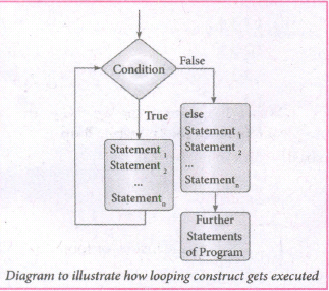
(i) break statement: The break statement terminates the loop containing it. Control of the program flows to the statement immediately after the body of the loop. A while or for loop will iterate till the condition is tested false, but one can even transfer the control out of the loop (terminate) with help of break statement. When the break statement is executed, the control flow of the program comes out of the loop and starts executing the segment of code after the loop structure. If break statement is inside a nested loop (loop inside another loop), break will terminate the innermost loop.
Syntax:
break
(ii) Continue statement: Continue statement unlike the break statement is used to skip the remaining part of a loop and start with next iteration.
Syntax:
continue
(iii) Pass statement: pass statement is generally used as a placeholder. When we have a loop or function that is to be implemented in the future and not now, we cannot develop such functions or loops with empty body segment because the interpreter would raise an error. So, to avoid this we can use pass statement to construct a body that does nothing.
Syntax:
pass
47.
import csv
Data = [['Fruit', 'Quantity'], ['Apple', '5'], ['Banana', '7']' ['Mango: '8']]
csv.register_dialect('mydialect; delimiter = '|', lineterminator = '\n')
with open('c:\\pyprg\\ch3\\line.csv', 'w') as f:
writer = csv.writer(f, dialect='myDialect')
writer.writerows(Data)
f.close ( )
48.
To sort by more than one column you can use itemgetter with multiple indices: operator. itemgetter (1,2).
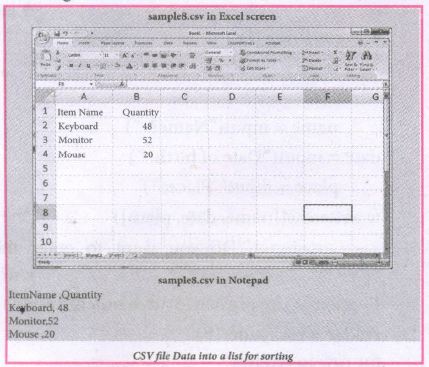
The following program do the task mentioned above using operator.itemgetter(col_no)
Example:
# Program to sort the entire row by using a specified column.
# declaring multiple header files
import csv, operator
#One more way to read the file
data = csv.reader(open('c:\\PYPRG\ \sample8.csv'))
next(data) #(to omit the header)
#using operator module for sorting multiple columns
sortedlist = sorted (data, key=operator.
itemgetter(1) # 1 specifies we want to sort
# according to second column for row in sortedlist:
print(row)
Output:
['Mouse', '20']
['Keyboard', '48']
['Monitor', '52']
49.
Import csv
csv.register_dialect('myDialect', delimiter = '|')
with open ('c:\\pyprg\\sample4.csv', 'r') as f:
reader = csv,reader(f, dialect='myDialect')
for row in reader:
print(row)
f.close( )
50.
import csv
csv.register_dialect('myDialect', delimiter = ',',skipinitialspace = True)
F=open('c:\\pyprg\\sample2.csv', 'r')
reader = csv.reader(F, dialect = 'myDialect')
for row in reader:
print(row)
F.close( )
51.
Program:
even=set([x*2 for x in range(1, 11)])
primes=set()
for i in range(2,20):
j=2
f=0
while j<i/2:
if i%j==0:
f=1
j+=1
if f==0;
primes.add(i)
print("Even Numbers:", even)
print("Prime Numbers:", primes)
print("Union:", even.union(primes)
print('Intersection:", even.intersection(primes))
print("Difference: ", even.difference(primes))
print("Symmetric Difference:" , even.symmetric_difference(primes)
Output:
Even Numbers: {2, 4, 6, 8, 10, 12, 14, 16, 18, 20]
Prime Numbers: {2, 3, 4,5, 7, 11, 13, 17, 19}
Union: {12, 3,4,5, 6,7, 8, 10, 11, 12, 13, 14, 16, 17, 18, 19, 20}
Intersection: {2, 4}
Difference:{6, 8, 10, 12, 14, 16, 18, 20}
Symmetric Difference: {3, 5, 6, 7, 8, 10, 11, 12, 13, 14, 16, 17, 18, 19, 20}
52.
(i) A function can return only one value at a time, but Python returns more than one value from a function. Python groups multiple values and returns them together.
(ii) Example: Program to return the maximum as well as minimum values in a list
def Min_Max(n):
a = max(n)
b = min(n)
return (a, b)
Num = (12, 65, 84, 1, 18, 85, 99)
(Max_Num, Min_Num) = Min_Max(Num)
print("Maximum value = ", Max_Num)
print("Minimum value = ", Min_Num)
(iii) Output:
Maximum value = 99
Minimum value = 1
53.
Program:
Num = []
for x in range(1, 11):
Num.append(x)
print("The list of numbers from 1 to 10 = ",Num)
for index, i in enumerate(Num):
if(i%2==0):
del Num[index]
print("The list after deleting even numbers = ", Num)
Output:
The list of numbers from 1 to 10 = [1, 2, 3, 4, 5, 6, 7, 8, 9, 10]
The list after deleting even numbers =. [1, 3, 5, 7, 9]
54.
(i) copy ( ): Returns a copy of the list.
Syntax: List.copy( )
Example:
MyList=[12, 12,36]
x = MyList.copy()
print(x)
Output:
[12, 12, 36]
(ii) count () : Returns the number of similar elements present in the last.
Syntax: List.count(value)
Example:
MyList=[36 ,12 ,12]
x = MyList.count(12)
print(x)
Output:
(iii) index ( ): Returns the index value of the first recurring element.
Syntax: Listindex(element)
Example:
MyList=[36 ,12 ,12]
x = MyListindex(12)
print(x)
Output:
0
(iv) reverse ( ): Reverses the order of the element in the list.
Syntax: List.reverse( )
Example:
MyList=[36, 23, 12]
MyList.reverse()
print(MyList)
Output:
[12, 23, 36]
55.
Program:
n=[]
for x in range (1, 11)
n = append (x)
for x, i in enumerate (n):
if(i %2! = 0):
del n [x]
print (n)
56.
(i) Loops are used to access all elements from a list. The initial value of the loop must be zero. Zero is the beginning index value of a list.
(ii) Example:
Marks = [10, 23, 41, 75]
i = 0
while i < 4:
print (Marks[i])
i = i + 1
Output:
10
23
41
75
(iii) In the above example, Marks list contains four integer elements i.e., 10, 23, 41, 75. Each element has an index value from 0. The index value of the elements are 0, 1, 2, 3 respectively.
(iv) Here, the while loop is used to read all the elements. The initial value of the loop is zero, and the test condition is < 4, as long as the test condition is true, the loop executes and prints the corresponding output
(iv) During the first iteration, the value of i is zero, where the condition is true. Now, the following statement print (Marks [i] gets executed and prints the value of Marks [0] element ie. 10.
(v) The next statement i = i + 1 increments the value of i from 0 to 1. Now, the flow of control shifts to the while statement for
(vi) checking the test condition. The process repeats to print the remaining elements of Marks list until the test condition of while loop becomes false. The following table shows that the execution of loop and the value to be print.
| Iteration | i | while i < 4 |
print (Marks[i]) | i = i + 1 |
| 1 | 0 | 0< 4 True | Marks [0] =10 | 0+1=1 |
| 2 | 1 | 1 < 4 True | Marks [1]=23 | 1+1=2 |
| 3 | 2 | 2 < 4 True | Marks [2]=41 | 2+1=3 |
| 4 | 3 | 3 < 4 True | Marks [3]=75 | 3+1=4 |
| 5 | 4 | 4 < 4 False |
57.
| Algorithm | Program |
|---|---|
| Algorithm helps to solve a given problem logically and it can be contrasted with the program | Program is an expression of algorithm in a programming language. |
| Algorithm can be categorized based on their implementation methods, design techniques etc | Algorithm can be implemented by structured or object oriented programming approach |
| There is no specific rules for algorithm writing but some guidelines should be followed. | Program should be written for the selected language with specific syntax |
| Algorithm resembles a pseudo code which can be implemented in any language | Program is more specific to a programming language |
58.
Suppose A is an algorithm and n is the size of input data, the time and space used by the algorithm A are the two main factors, which decide the efficiency of A.
(i) Time Factor: Time is measured by counting the number of key operations like comparisons in the sorting algorithm.
(ii) Space Factor: Space is measured by the maximum memory space required by the algorithm. The complexity of an algorithm f (n) gives the running time and/or the storage space required by the algorithm in terms of n as the size of input data.
(iii) Time Complexity: The Time complexity of an algorithm is given by the number of steps taken by the algorithm to complete the process.
(iv) Space Complexity: Space complexity of an algorithm is the amount of memory required to run to its completion. The space required by an algorithm is equal to the sum of the following two components:
A fixed part is defined as the total space required to store certain data and variables for an algorithm. For example, simple variables and constants used in an algorithm.
A variable part is defined as the total space required by variables, which sizes depends on the problem and its iteration. For example: recursion used to calculate factorial of a given value n.
59.
(i) Access control is a security technique that regulates who or what can view or use resources in a computing environment.
(ii) It is a fundamental concept in security that minimizes risk to the object.
(iii) In other words access control is a selective restriction of access to data. IN Object oriented programming languages it is implemented through access modifiers.
(iv) Classical object-oriented languages, such as C++ and Java. control the access to class members by public, private and protected keywords.
(v) Private members of a class are denied access from the outside the class. They can be handled only from within the class.
(vi) Public members (generally methods declared in a class) are accessible from outside the class. The object of the same class is required to invoke a public method. This arrangement of private instance variables and public methods ensures the principle of data encapsulation.
(vii) Protected members of a class are accessible from within the class and are also available to its sub-classes. No other process is permitted access to it. This enables specific resources of the parent class to be inherited by the child class.
(viii) Python doesn't have any mechanism that effectively restricts access to any instance variable or method. Python prescribes a convention of prefixing the name of the variable or method with single or double underscore to emulate the behaviour of protected and private access specifiers.
(ix) All members in a Python class are public by default. whereas by default in C++ and java they are private. Any member can be accessed from outside the class environment in Python which is not possible in C++ and java.
60.
Program:To create a tuple having positive numbers.
Numbers = (5, -8, 6, 8, -4, 3, 1)
Positive = ( )
for i in Numbers:
if i > 0:
Positive += (i)
print("Positive Numbers: ", Positive)
Output:
Positive Numbers: (5, 6, 8, 3, 1)
61.
Program:
items=[]
prod=1
for i in range(5):
print ("Enter price for item { } :
"Jormat(i+ 1))
p=int(input 0)
items.append(p)
for j in range(len(items)):
print("Price for item { } = Rs. { }"Jormat(j+ 1,items[j]))
prod = prod" items[j]
print("Sum of all prices- RS.",sum(items))
print("Product of all prices = RS.",prod)
print("Average of all prices = Rs.",sum(items)/
len(items))
Output:
Enter price for item 1 :
5
Enter price for item 2 :
10
Enter price for item 3 :
15
Enter price for item 4 :
20
Enter price for item 5 :
25
Price for item 1= Rs. 5
Price for item 2= Rs. 10
Price for item 3= Rs. 15
Price for item 4= Rs. 20
Price for item 5= Rs. 25
Sum of all prices= Rs. 75
Product of all prices= Rs. 375000
Average of all prices= Rs. 15.0

12th Standard Syllabus & Materials
12th Standard
TN 12th Computer Applications களப்பெயர் முறைமை (DNS) Sample Question Papers Study Material - QB365 Set A
NEW12th Standard
TN 12th Computer Applications வலையமைப்பு எடுத்துக்காட்டுகள் மற்றும் நெறிமுறைகள் Sample Question Papers Study Material - QB365 Set A
NEW12th Standard
TN 12th Computer Applications கணினி வலையமைப்பு ஓர் அறிமுகம் Sample Question Papers Study Material - QB365 Set A
NEW12th Standard
TN 12th Computer Applications PHP-உடன் MySQL-ஐ இணைத்தல் Sample Question Papers Study Material - QB365 Set A



Tamilnadu Stateboard 12th Standard Subjects

Maths

Chemistry

Physics

Biology
Computer Science

Business Maths and Statistics

Economics

Commerce

Accountancy

History

Computer Applications
Biology
Computer Technology
Computer Applications
Computer Science
Business Maths and Statistics
Commerce
Economics
Maths
Chemistry
Physics
Computer Technology
History
Accountancy

Tamil

English

French
Tamilnadu Stateboard Standards


