
 100% FREE ACCESS
12th Standard Syllabus & Materials
12th Standard
TN 12th Computer Applications மின்னணு தரவு பரிமாற்றம் Sample Question Papers Study Material - QB365 Set A
NEW12th Standard
TN 12th Computer Applications மின் - வணிக பாதுகாப்பு அமைப்புகள் Sample Question Papers Study Material - QB365 Set A
NEW12th Standard
TN 12th Computer Applications மின்னணு செலுத்தல் முறைகள் Sample Question Papers Study Material - QB365 Set A
NEW12th Standard
TN 12th Computer Applications மின் - வணிகம் Sample Question Papers Study Material - QB365 Set A
NEW12th Standard
TN 12th Computer Applications திறந்த மூல கருத்துருக்கள் Sample Question Papers Study Material - QB365 Set A
NEW12th Standard
TN 12th Computer Applications வலையமைப்பு வடமிடல் Sample Question Papers Study Material - QB365 Set A

Published on: 13/05/2022
QB365 provides detailed and simple solution for every book back questions in class 12 Computer Science subject.It will helps to get more idea about question pattern in every book back questions with solution.
latest Book back QuestionsDownload Tamil Nadu 12th Standard Computer Science question papers, model tests, one-mark questions, important questions, and public exam papers in PDF format. Free study materials and answer keys for TN State Board students.
Questions + Answers key
Take MCQ Computer Science Test
1.
Write a SQL statement to create a table for employee having any five fields and create a table constraint for the employee table.
2.
Construct the following SQL statements in the student table-
(i) SELECT statement using GROUP BY clause.
(ii) SELECT statement using ORDER BY clause.
3.
What are the components of SQL? Write the commands in each.
4.
Consider the following employee table. Write SQL commands for the qtns.(i) to (v).
| EMP CODE | NAME | DESIG | PAY | ALLOWANCE |
| S1001 | Hariharan | Supervisor | 29000 | 12000 |
| P1002 | Shaji | Operator | 10000 | 5500 |
| P1003 | Prasad | Operator | 12000 | 6500 |
| C1004 | Manjima | Clerk | 8000 | 4500 |
| M1005 | Ratheesh | Mechanic | 20000 | 7000 |
(i) To display the details of all employees in descending order of pay.
(ii) To display all employees whose allowance is between 5000 and 7000.
(iii) To remove the employees who are mechanic.
(iv) To add a new row.
(v) To display the details of all employees who are operators.
5.
1.
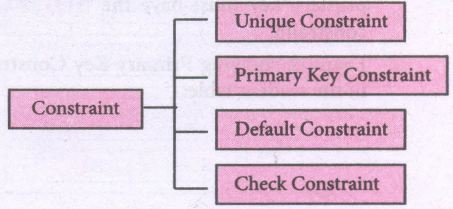
Table constraint:
Table constraint apply to a group of one or more columns. The Syntax tor a table created with Constraint is given as below:
CREATE TABLE <table_name>
(<column name> <datatype>[<size>]
<column constraint>,
(<column name> <data type> [<size>]
<column constraint).....
<table constraint>(<column name>, [<column name>..........])............);
Following is an example for employee table with "NOT NULL' column constraint. This constraint enforces a field to always contain a value.
CREATE TABLE employee (No int NOT NULL PRIMARY KEY,
NAME varchar(50), Age int (10), Address varchar(50)
PhoneNo int(10), Pincode int (6) PRIMARY KEY (NAME, PhoneNo);
The above command creates a table "employee" in which the field No of integer type is defined NOT NULL, which means this field must have values. The field NAME is of char type. The fields NAME, PhoneNo, have table constraint.
2.
1. SELECT * FROM student WHERE gender = Male GROUP BY gender;
2. SELECT * FROM student WHERE Age > 18 ORDER BY DESC;
3.
SQL commands are divided into five categories:
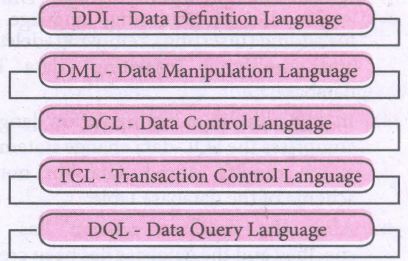
Data Definition Language:
(i) The Data Definition Language (DDL) consist of SQL statements used to define the database structure or schema.
(ii) It simply deals with descriptions of the database schema and is used to create and modify the structure of database objects in databases.
(iii) The DDL provides a set of definitions to specify the storage structure and access methods used by the database system.
DDL performs the following functions:
(i) It should identify the type of data division such as data item, segment, record and database file.
(ii) It gives a unique name to each data item type, record type, file type and data base.
(iii) It should specify the proper data type.
(iv) It should define the size of the data item.
(v) It may define the range of values that a data item may use.
(vi) It may specify privacy locks for preventing unauthorized data entry.
Commands:
| CREATE | To create tables in the database. |
| ALTER | Alters the structure of the database |
| DROP | Data tables from database. |
| TRUNCATE | Remove all records from a table, also release the space occupied bv those records. |
Data Manipulation Language:
This is a computer programming language used for adding, removing and modifying data in a database. This language comprises the SQL-data change statements, which modify stored data but not the schema of the database table
Data Manipulation includes
(i) Insertion of new information into the database
(ii) Retrieval of information stored in a database
(iii) Deletion of information from the database.
(iv) Modification of data stored in the database
The DML is basically of two types:
Procedural DML - Requires a user to specify what data is needed and how to get it.
Non-Procedural DML - Requires a user to specify what data is needed without Specifying how to get it.
Commands:
| INSERT | Inserts data into a table |
| UPDATE | Updates the existing data within a table |
| DELETE | Deletes all records from a table, but not the space occupied by them. |
Data Control Language:
(i) A Data Control Language (DCL) is a programming language used to control the access of data stored in a database. It is used for controlling privileges in the database (Authorization).
(ii) The privileges are required for performing all the database operations such as creating sequences, views of tables etc.
Commands:
| GRANT | Grants permission to one or more users to perform specific tasks. |
| REVOKE | Withdraws the access permission given by the GRANT statement. |
Transactional Control Language:
Transactional control language (TCL) commands are used to manage transactions in the database. These are used to manage the changes made to the data in a table by DML statements.
Commands:
| COMMIT | Saves any transaction into the database permanently. |
| ROLL BACK | Restores the database to last commit state. |
| SAVE POINT | Temporarily save a transaction so that you can rollback. |
Data query language:
The Data Query Language consist of commands used to query or retrieve data from a database. One such SQL command in Data Query Language is
| SELECT | It displays the records from the table. |
4.
(i) SELECT * FROM Employee ORDER BY PAY DESC;
(ii) SELECT * FROM Employee WHERE ALLOWANCE
BETWEEN 5000 AND 7000;
(iii) DELETE FROM Employee WHERE DESIG='Mechanic';
(iv) ALTER TABLE employee ADD Age Varchar(50);
(v) SELECT * FROM Employee WHERE DESIG='Operator';
5.

12th Standard Syllabus & Materials
12th Standard
TN 12th Computer Applications களப்பெயர் முறைமை (DNS) Sample Question Papers Study Material - QB365 Set A
NEW12th Standard
TN 12th Computer Applications வலையமைப்பு எடுத்துக்காட்டுகள் மற்றும் நெறிமுறைகள் Sample Question Papers Study Material - QB365 Set A
NEW12th Standard
TN 12th Computer Applications கணினி வலையமைப்பு ஓர் அறிமுகம் Sample Question Papers Study Material - QB365 Set A
NEW12th Standard
TN 12th Computer Applications PHP-உடன் MySQL-ஐ இணைத்தல் Sample Question Papers Study Material - QB365 Set A



Tamilnadu Stateboard 12th Standard Subjects

Maths

Chemistry

Physics

Biology
Computer Science

Business Maths and Statistics

Economics

Commerce

Accountancy

History

Computer Applications
Biology
Computer Technology
Computer Applications
Computer Science
Business Maths and Statistics
Commerce
Economics
Maths
Chemistry
Physics
Computer Technology
History
Accountancy

Tamil

English

French
Tamilnadu Stateboard Standards


