
 100% FREE ACCESS
12th Standard Syllabus & Materials
12th Standard
TN 12th Computer Applications மின்னணு தரவு பரிமாற்றம் Sample Question Papers Study Material - QB365 Set A
NEW12th Standard
TN 12th Computer Applications மின் - வணிக பாதுகாப்பு அமைப்புகள் Sample Question Papers Study Material - QB365 Set A
NEW12th Standard
TN 12th Computer Applications மின்னணு செலுத்தல் முறைகள் Sample Question Papers Study Material - QB365 Set A
NEW12th Standard
TN 12th Computer Applications மின் - வணிகம் Sample Question Papers Study Material - QB365 Set A
NEW12th Standard
TN 12th Computer Applications திறந்த மூல கருத்துருக்கள் Sample Question Papers Study Material - QB365 Set A
NEW12th Standard
TN 12th Computer Applications வலையமைப்பு வடமிடல் Sample Question Papers Study Material - QB365 Set A

Published on: 01/03/2021
12th Standard English Medium Computer Technology Reduced Syllabus Creative Two mark Question with Answer key - 2021(Public Exam)
Download Tamil Nadu 12th Standard Computer Technology question papers, model tests, one-mark questions, important questions, and public exam papers in PDF format. Free study materials and answer keys for TN State Board students.
Questions + Answers key
Take MCQ Computer Technology Test
1.
What is meant by start tab?
2.
What are the two states of panel?
3.
Name the icons in quick access toolbar?
4.
What is meant by title bar?
5.
Write about the search bar?
6.
List out some of the file related commands?
7.
What is meant by application button?
8.
Name some places where the AutoCAD is used?
9.
Who are the persons use auto cad software?
10.
What do you know about Autocad 2016?
11.
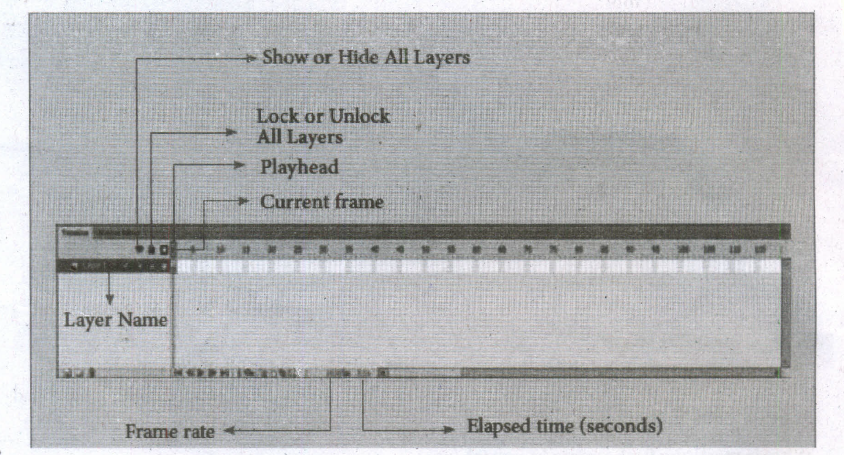
Draw neat diagram of timeline.
12.
How to display a frame's content on the Stage, you should move the play head to that frame in the Timeline?
13.
How will the the flash background appears in default?
14.
What is meant by pasteboard?
15.
What is meant by flash-created movies?
16.
What is meant by stage?
17.
How will you create a document?
18.
What Is Mean By Rigging?
19.
What Is A Ambient occlusion?
20.
What Is The Arc In Animation?
21.
What Is Animation?
22.
What Are Multimedia Hardwares?
23.
What Are Multimedia Software's?
24.
What Is Multimedia?
25.
How will you save a drawing?
26.
How will you create an ellipse?
27.
Name some flyout in shape tools?
28.
Name the shapes which can be drawn using corel draw?
29.
What is meant by flyout?
30.
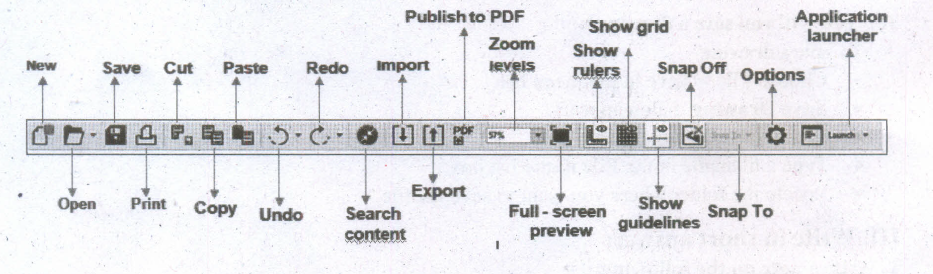
Mention the buttons and controls in standard toolbar?
31.
How will you start a corel draw using the shortcuts?
32.
Mention the any three terms in corel draw?
33.
What is meant by bitmaps?
34.
What is meant by corel draw?
35.
What is meant by gap tool?
36.
What is meant by content collector tool?
37.
What is meant by document window?
38.
Write a short note on tools panel?
39.
What is meant by control panel?
40.
What do you understand from the page layout software?
41.
What is meant by page layout software?
42.
In which family adobe lndesign software belongs?
43.
Write about threading text blocks?
44.
How will you rejoin the split block?
45.
What are the main components of the window?
46.
Name the menus in the pagemaker?
47.
How will you create a new document?
48.
Mention some popular DTP software?
49.
In which Ribbon control panel are the Arc and Circle buttons found?
50.
Define Animation and their features.
1.
(i) When you click the Start tab at any moment, you will get the AutoCAD 2016 Initial screen again.
(ii) Using it, you can start a new drawing, open an existing drawing, etc.
2.
Panels have two states-either docked or floating. By default all panels in the Ribbon are docked in their respective tab.
3.
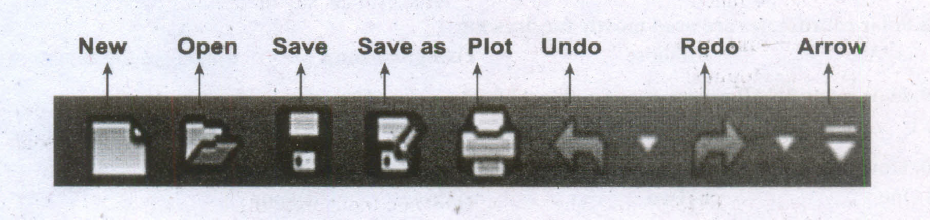
4.
The title bar contains the program name (Autodesk AutoCAD 2016) and the title of the current drawing.
5.
(i) The Search bar displays at the top of the Application menu.
(ii) It is used to search for any command.
6.
File-related commands such as
(i) creating a new file,
(ii) opening an existing file,
(iii) saving the current file, saving the current file under a new name and in a different folder,
(iv) exporting the current file to a different file format,
(v) printing and publishing the current file, etc.
7.
The Application menu appears when you click the red "A" called the Application Button.
8.
AutoCAD managers in a variety of industries, including the manufacturing, building, civil, and mapping industries.
9.
AutoCAD software is used by architects, CAD technicians, designers, engineers, project managers, and CAD.
10.
AutoCAD is a commercial Computer-Aided Design (CAD) and drafting software application. It is developed and marketed by Autodesk, Inc.
11.
12.
(i) Layers help you organize the artwork in your movie.
(ii) Each layer can contain a different image that appears on the Flash Stage.
(iii) To draw and edit objects on one layer without affecting objects on another layer of Timeline.
(iv) We can hide, lock, or show the contents of layers by clicking the dots in the layer under the layer option icons.
13.
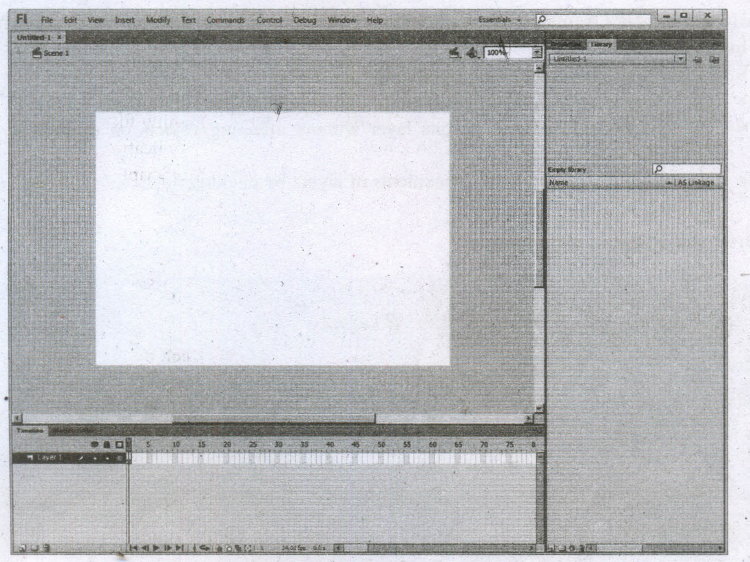
(i) By default, the Flash Stage appears white, but, you can change its background color from the Document settings dialog box using the Modify > Document (Ctrl +J) command.
(ii) To change the view of the Stage, Zoom in and out.
(iii) To help in positing the items on the Stage, you can use the grid, guides and rulers.
14.
i) The gray area surrounding the Stage in Flash is the Pasteboard.
ii) To create and edit objects in the pasteboard also but they will not be visible in the final movie.
iii) Only the graphical objects kept inside the stage are visible in the final movie.
15.
i) A theater stage, the Flash Stage is the area that viewers see when a movie is playing.
ii) The term movie refers to Flash-created movies.
16.
i) The white rectangle area in the middle of your workspace is called the Stage.
ii) All the animations, objects and scenes for a Flash movie are created, edited, placed and played back in the stage.
17.
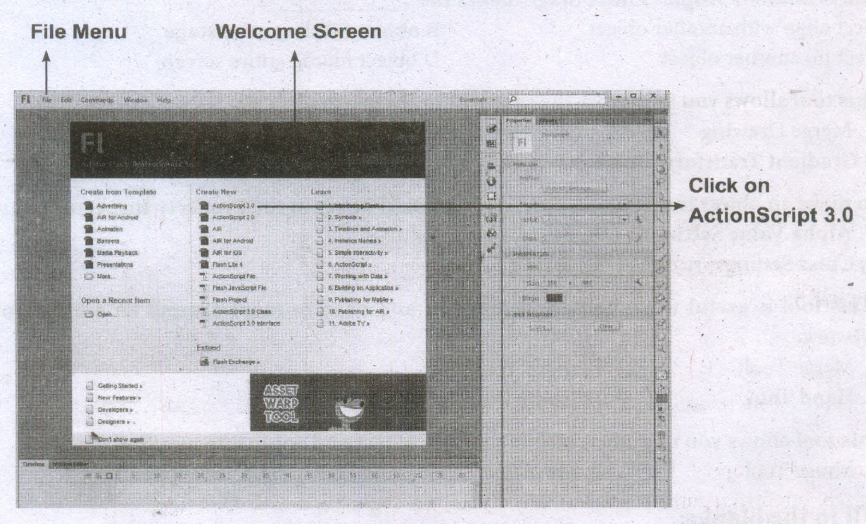
The Welcome Screen of the Flash is the launch pad for creating and opening files. It appears when Flash is first launched or when no documents are open in the application. From the Create New column in the middle of the Welcome Screen, click on Action Script 3.0.
2. From the File menu, choose File> New to create a new document.
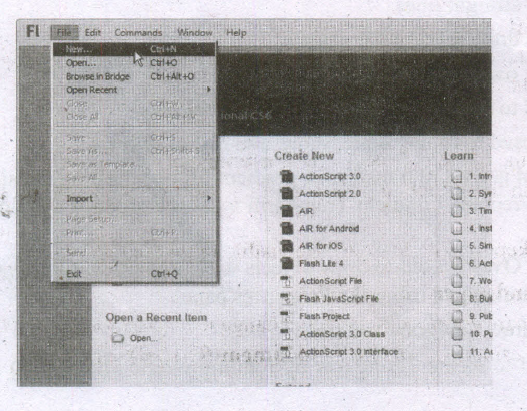
The New Document dialog box appears. Under the General tab, choose ActionScript 3.0.,and press OK to create a new document.
18.
(i) Rigging is a method of attaching bones or biped to a 'modeled character' or object in order to make them animate or 'perform' actions.
(ii) By attaching bones or biped the 'character' can walk, talk and make bodily movements.
19.
(i) Ambient occlusion is a shading method used in 3D computer graphics which helps add realism to local reflection models by taking into account.
(ii) Ambient occlusion is a method for simulating global illumination, while keeping a respectable ratio between results.
20.
The arc is known as a curve which determine the poses of the character, it is the most important concept for animation.
21.
Animation is the rapid display of a sequence of images of 2-D or 3-D artwork or model positions in order to create an illusion of movement.
22.
(i) Multimedia hardware basically consists of video and sound cards, and cd-rom drives.
(ii) To make it a little easier multimedia kits are available that include all the necessary hardware and software to upgrade your present computer(s).
23.
The software used to create multimedia experiences can be placed into 3 distinct categories:
(i) Audio Software
(ii) Graphics Software
(iii) Video Software
24.
Multimedia is simply multiple forms of media integrated together. Media can be text, graphics, audio, animation, video, data, etc
25.
To save a drawing
1. Choose File > Save in the menu bar.
2. Save Drawing dialog appears.
3. In the Save Drawing dialog box.
4. Type a filename in the File name list box.
5. Locate the folder where you want to save the file.
26.
Creating ellipses
(i) To draw an ellipse (also known as an oval), select the Ellipse tool in the toolbox. The mouse pointer changes to a crosshair with a small ellipse beneath it.
(ii) Click on anywhere in the drawing area and drag the mouse pointer.
(iii) Release the mouse button where you like the end of the ellipse.
27.
1. Shape
2. Smooth
3. Smear
4. Twirl
5. Attract
6. Repel
7. Smudge
8. Roughen
28.
1. Pick tool
2. Shape tool
3. Crop tool
4. Zoom tool
5. Freehand tool
29.
The toolbox contains a range of tools that can be used for specific drawing and editing tasks.
(i) Some tools are used to draw shapes, and other tools are used to apply colors, patterns, or
(ii) fills to objects, Some tools belong to flyouts.
(iii) They are groups of related tools.
(iv) A small arrow which is in the lower right comer of a toolbox button indicates that the tool belongs to a flyout.
(v) The last-used tool in the flyout appears on the button.
30.
31.
Using the Shortcut
(i) First, locate the CorelDRAW 2018 shortcut icon. This is a colourful balloon shaped icon with CorelDRAW 2018 written beneath it.
(ii) When you find it, position the mouse over the CorelDRAW 2018 icon and double click to open the CorelDRAW 2018.
32.
Object: An object is an element in a drawing such as an image, shape, line, text, curve, symbol, or layer.
Drawing: Drawing is the work you create in CorelDRAW, for example, custom artwork, logos, posters, and newsletters.
Vector graphic: Vector graphic is an image generated from mathematical descriptions that determine the position, length, and direction in which lines are drawn.
33.
(i) Bitmaps are also known as raster images.
(ii) They are composed of small squares called pixels.
(iii) Each pixel is mapped to a location in an image and has numerical colour values.
34.
CorelDraw (styled CorelDRAW) is a vector graphics application.
(i) It is developed and marketed by Corel Corporation.
(ii) Corel Corporation is a Canadian software company.
(iii) The latest version of CorelDRAW is CorelDraw Graphics Suite 2018.
(iv) It was released in April 10, 2018.
35.
(i) The Gap tool is used to adjust the spacing between objects. Press U to select the Gap tool, place the pointer between objects, and drag to change the gap between aligned objects.
(ii) Shift-drag to move the gap between only the two nearest objects; Ctrl-drag to resize the gap instead of moving it; Alt-drag to move the gap and objects in the same direction.
(iii) CtrI+Alt-drag to resize the gap and move the objects. Adding the Shift key to any combination affects only the two nearest objects.
36.
(i) When you select the Content Collector tool, click objects or stories to add them to the Content Conveyor at the bottom of the screen.
(ii) You can then use the Content Placer Tool to copy and link these objects from the Content Conveyer into another layout or document.
(iii) Press B to switch between the Content Collector and Content Placer tools.
37.
(i) The document window is the central area that represents the open InDesign document.
(ii) It resembles a piece of paper and is surrounded by a black border. The black border represents the page border.
38.
(i) The Tools panel contains the tools available in InDesign.
(ii) There are tools for creating objects, such as the Rectangle tool, tools for transforming objects, such as the Rotate tool, and tools for changing the page view and navigating the workspace, such as the Zoom tool and the Hand tool.
39.
(i) The Control panel is located directly beneath the Application bar and above the horizontal ruler.
(ii) Options in the Control panel change depending on what is selected in the document.
40.
(i) Adobe lnDesign is a page layout software program. Page layout software includes tools that allow you to easily position text and graphics on document pages.
(ii) For example, using InDesign, you could create a newsletter that includes articles and pictures on each page.
41.
lnDesign is a page layout software program used to design and produce documents that can be printed or used on the Web.
42.
Adobe InDesign CC 2019 is a part of the Adobe Creative Cloud family of software programs.
43.
(i) An text in PageMaker resides inside containers called text blocks.
(ii) A Text block can be connected to other text block so that the text in one text block can flow into another text block.
(iii) Text blocks that are connected in this way are threaded. The process of connecting text among Text blocks is called threading text. Text that flows through one or more threaded blocks is called a story.
44.
To rejoin the two text blocks
(i) Place the cursor on the bottom handle of the second text block, click and drag the bottom handle up to the top.
(ii) Then place the cursor on the bottom handle of the first text block, and click and drag the bottom handle down if necessary.
45.
The main components of the above window are Title bar, Menu bar, Toolbar, Ruler, Scroll bars and Text area .
46.
File, Edit, Layout, Type, Element, Utilities, View, Window, Help.
47.
To create a new document,
i) Choose File> New in the menu bar. (or) Press Ctrl + N in the keyboard. Now Document Setup dialog box appears.(Figure 1.3)
ii) Enter the appropriate settings for your new document in the Document Setup dialog box.
iii) Click on OK button.
48.
The popular DTP software are Adobe PageMaker, Adobe InDesign, QuarkXPress, etc
49.
Ribbon control panel are the Arc and Circle buttons found in ARC toul.
50.
(i) Animation is the process displaying still images so quickly so that they give the impression of continuous movement.
(ii) In animation the screen object is a vector image in animation.
(iii) Animations may be in two or three dimensional.

12th Standard Syllabus & Materials
12th Standard
TN 12th Computer Applications களப்பெயர் முறைமை (DNS) Sample Question Papers Study Material - QB365 Set A
NEW12th Standard
TN 12th Computer Applications வலையமைப்பு எடுத்துக்காட்டுகள் மற்றும் நெறிமுறைகள் Sample Question Papers Study Material - QB365 Set A
NEW12th Standard
TN 12th Computer Applications கணினி வலையமைப்பு ஓர் அறிமுகம் Sample Question Papers Study Material - QB365 Set A
NEW12th Standard
TN 12th Computer Applications PHP-உடன் MySQL-ஐ இணைத்தல் Sample Question Papers Study Material - QB365 Set A



Tamilnadu Stateboard 12th Standard Subjects

Maths

Chemistry

Physics

Biology

Computer Science

Business Maths and Statistics

Economics

Commerce

Accountancy

History
Computer Applications
Biology
Computer Technology
Computer Applications
Computer Science
Business Maths and Statistics
Commerce
Economics
Maths
Chemistry
Physics
Computer Technology
History
Accountancy

Tamil

English

French
Tamilnadu Stateboard Standards
