
 100% FREE ACCESS
12th Standard Syllabus & Materials
12th Standard
TN 12th Maths Applications of Matrices and Determinants Sample Question Papers Study Material - QB365 Set A
NEW12th Standard
TN 12th Computer Applications மின்னணு தரவு பரிமாற்றம் Sample Question Papers Study Material - QB365 Set A
NEW12th Standard
TN 12th Computer Applications மின் - வணிக பாதுகாப்பு அமைப்புகள் Sample Question Papers Study Material - QB365 Set A
NEW12th Standard
TN 12th Computer Applications மின்னணு செலுத்தல் முறைகள் Sample Question Papers Study Material - QB365 Set A
NEW12th Standard
TN 12th Computer Applications மின் - வணிகம் Sample Question Papers Study Material - QB365 Set A
NEW12th Standard
TN 12th Computer Applications திறந்த மூல கருத்துருக்கள் Sample Question Papers Study Material - QB365 Set A

Published on: 01/03/2021
12th Standard English Medium Computer Technology Reduced Syllabus Three mark Important Questions - 2021(Public Exam)
Download Tamil Nadu 12th Standard Computer Technology question papers, model tests, one-mark questions, important questions, and public exam papers in PDF format. Free study materials and answer keys for TN State Board students.
Questions + Answers key
Take MCQ Computer Technology Test
1.
What is meant by clear screen?
2.
What is meant by dynamic input?
3.
What is meant by status bar?
4.
How will you view the recent input?
5.
Name some places using in flash document?
6.
What is meant by gradient transform tool?
7.
Write about flash tool panel?
8.
What Is Phishing?
9.
What Do You Look For While Designing A Logo?
10.
What Is An Hdmi Optical Switch?
11.
What Are Wmv Files?
12.
Give the shortcuts of the following?
1. New
2. Open
3. Import
4. Export
5. Print
13.
What is meant by docker?
14.
Write about the variour types of tools for drawing graphic flames?
15.
How will open and close the tools panels?
16.
Mention the options in the zoom in veiw menu?
17.
What is meant by sage tool?
18.
How will you change a color?
19.
What is meant by formatting a document?
20.
Write a note about scrolking the document?
21.
Explain the use of the LINE Undo option.
22.
Write roles and responsibilities of Production team members.
23.
What are the two types of spirals? Explain.
24.
How do you link frames containing text?
25.
Mention three tools in PageMaker and write their keyboard shortcuts.
1.
Clean Screen
(i) The Clean Screen button hides most interface elements such as the Ribbon, and maximizes the drawing area to focus on the current drawing.
(ii) This button is at the lower right comer of the screen.
(iii) Choose the Clean Screen button again to restore the previous display state of the screen.
2.
Dynamic Input (F12)
(i) The Dynamic Input button in the status bar is used to turn the Dynamic Input on or off.
(ii) If the Dynamic Input mode is turned on, the x, y coordinates and prompts show when the cursor hairs are moved.
(iii) Using the F12 key, you can turn the Dynamic Input, on or off.
3.
The Status Bar which is located below the command line, and docked in the lower right corner of the window is called Application Status Bar.
4.
Recent Input
(i) AutoCAD remembers the last twenty commands and options you enter at the 'Command:' prompt, or select from a menu or toolbar.
(ii) Autodesk calls this "Recent Input."
(iii) If you prefer to see a list of the command history, right-click, and then select Recent Input from the shortcut menu.
5.
Products such as games, educational software, online advertisements and product demonstrations are referred to as applications.
6.
(i) It is used to transform a gradient fill by adjusting the size, direction, or center of the fill.
(ii) The Free and Gradient Transform tools are grouped within one icon on the Tools panel.
(iii) To see the menu containing grouped tools, click and hold the tool icon until the menu opens
7.
(i) The Flash Tools panel includes the tools you need to create, select, or edit graphics on the Stage.
(ii) The double, arrows at the top of the Tools panel are used to collapse the panel to icon only view, or to expand the panel and see all the tools.
(iii) By default, the toolbar is on the right side of your screen.
8.
(i) Phishing is a form of fraud.
(ii) Phishers pose as legitimate organizations in an email, over the phone, in person, on a website, or in a pop-up window to get you to disclose personal information, such as your credit and debit card numbers, account passwords, or Social Security number.
9.
A logo is the smallest entity that symbolizes a company.
(i) It is often treated as a marketing material.
(ii) Designing a logo for a company demands great observation and creativity.
(iii) A logo should be designed in such a way that a common man can easily relate it with the company.
(iv) It should be memorable and eye catching. It should help in growing the company name into a brand.
10.
(i) HDMI stands for High Definition Multimedia Interface.
(ii) HDMI is an audio video interface that is used to transmit both digital audio and video streams of data which are uncompressed and encrypted.
11.
WMV (Windows Media video) is a generic name for video encoding solutions developed by Microsoft.
(i) The format is a part of the Windows Media framework that also includes formats like Windows Media Audio (WMA), Advanced Systems Format (ASF) and High Definition Photo (HDP).
(ii) WMV files use the Microsoft container format and represent Microsoft's own version of MPEG-4 (Part 2) video encoding technology.
12.
1. New - Ctrl + N
2. Open - Ctrl + O
3. Import - Ctrl + I
4. Export - Ctrl + E
5. Print - Ctrl + P
13.
(i) A Docker window is so called because it is generally docked to all right edge of a main window.
(ii) To open two or more docker windows at a time these windows remain in a tabbed position and you can bring the desired window in front by clicking its tab.
14.
In InDesign, all imported images are contained within graphic frames. The Tools panel contains three tools for drawing graphic frames.
(i) Ellipse Frame - This tool lets you create oval and round frames.
(ii) Rectangle Frame - This tool lets you create rectangular and square frames.
(iii) Polygon Frame - This tool lets you create equilateral polygons frames.
15.
To open or close the Tools panel
(i) Choose Window > Tools to close the Tools panel. To reopen the Tools panel, choose Window > Tools again. (or)
(ii) Press Tab key (with any tool but the Type tool selected) to close all open panels, including the Tools panel. To reopen those panels, press Tab again.
(iii) We can also close a floating Tools panel by clicking its Close box.
16.
(i) The Zoom tool.
(ii) The zoom commands in the View menu: Zoom In, Zoom Out, Fit Page in Window, Fit Spread in Window, Actual Size, and Entire Pasteboard.
(iii) The Zoom Level pop-up menu in the left side of the application bar.
17.
The Page tool is used for creating different page sizes within a document.
(i) To create a different page size, press Shift+P to select the Page tool, and click the page in the layout to select it.
(ii) Then use the options in the Control page to change the page layout.
18.
(i) There are so many drawing tools in PageMaker.
(ii) Line tool, Rectangle tool, Ellipse tool and Polygon tool are four main drawing tools.
19.
(i) Formatting is the process of changing the general arrangement of text, i.e., improving the appearance of the text by using various fonts, fonts colors, and font styles.
(ii) A font is a set of letters, numbers or symbols in a certain style. Each font looks different from other fonts.
20.
(i) In PageMaker, there are two sets of scroll bars; one for up and down movement and the other for the left and right movement of the document.
(ii) Pagemaker's scroll bars work differently than those in a word processor.
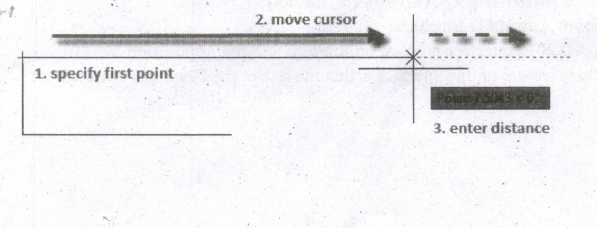
21.
The following prompts are displayed.
Specify first point
(i) Sets the starting point for the line.
(ii) Click a point location.
(iii) With object snaps or grid snap turned on, the points will be placed precisely.
(iv) You can also enter coordinates.
(v) If instead, you press Enter at the prompt, a new line starts from the endpoint of the most recently created line, polyline, or arc.
(vi) If the most recently created object is an arc, its endpoint defines the starting point of the line.
(viii) The line is tangent to the arc.
Specify next point
(i) Specifies the endpoint of the line segment.
(ii) You can also use polar and object snap tracking together with direct distance entry.
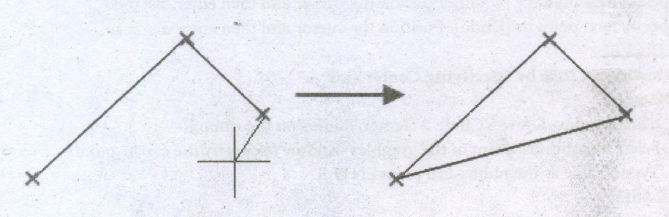
Close
Connects the first and last segments.
Undo
Removes the most recent segment of a line sequence.
22.
Production Manager
(i) In a multimedia production, the role of production manager is to define, and coordinate, the production of the multimedia project in time and with full quality.
(ii) The production manager should be an expertise in the technology expert, good at proposal writing, good communication skills and budget management skills.
(iii) Also must have experience in human resource management and act as an efficient team leader.
Content Specialist
(i) Content specialist is responsible for performing all research activities concerned with the proposed application's content.
(ii) Program content refers to projects information, graphics, data or facts presented through the multimedia production.
Script Writer
(i) Video and film scripts represents a linear sequence of events.
(ii) The script writer visualizes the concepts in three dimensional environments and if needed uses the virtual reality integration into the program.
23.
There are two types of spirals. They are
(i) Symmetrical spiral:
A Symmetrical spiral expands evenly so that the distance between each revolution is equal.
(ii) Logarithmic spiral:
A Logarithmic spiral expands with increasingly larger distances between revolutions.
24.
➝ Draw a second frame with the Frame tool of your choice.
➝ Click the first frame to select it.
➝ Click on the red triangle to load the text icon.
➝ Click the second frame. PageMaker flows the text into the second frame.(i)
25.
| S. No. | Tools | Keyboard Shortcut |
| 1 | Pointer Tool | F9 |
| 2 | Rotating Tool | Shift + F2 |
| 3 | Line Tool | Shift + F3 |
| 4 | Rectangle Tool | Shift + F4 |
| 5 | Ellipse Tool | Shift + F5 |
| 6 | Polygon Tool | Shift + F6 |

12th Standard Syllabus & Materials
12th Standard
TN 12th Computer Applications வலையமைப்பு வடமிடல் Sample Question Papers Study Material - QB365 Set A
NEW12th Standard
TN 12th Computer Applications களப்பெயர் முறைமை (DNS) Sample Question Papers Study Material - QB365 Set A
NEW12th Standard
TN 12th Computer Applications வலையமைப்பு எடுத்துக்காட்டுகள் மற்றும் நெறிமுறைகள் Sample Question Papers Study Material - QB365 Set A
NEW12th Standard
TN 12th Computer Applications கணினி வலையமைப்பு ஓர் அறிமுகம் Sample Question Papers Study Material - QB365 Set A



Tamilnadu Stateboard 12th Standard Subjects

Maths

Chemistry

Physics

Biology

Computer Science

Business Maths and Statistics

Economics

Commerce

Accountancy

History
Computer Applications
Biology
Computer Technology
Computer Applications
Computer Science
Business Maths and Statistics
Commerce
Economics
Maths
Chemistry
Physics
Computer Technology
History
Accountancy

Tamil

English

French
Tamilnadu Stateboard Standards
