
 100% FREE ACCESS
12th Standard Syllabus & Materials
12th Standard
TN 12th Maths Applications of Matrices and Determinants Sample Question Papers Study Material - QB365 Set A
NEW12th Standard
TN 12th Computer Applications மின்னணு தரவு பரிமாற்றம் Sample Question Papers Study Material - QB365 Set A
NEW12th Standard
TN 12th Computer Applications மின் - வணிக பாதுகாப்பு அமைப்புகள் Sample Question Papers Study Material - QB365 Set A
NEW12th Standard
TN 12th Computer Applications மின்னணு செலுத்தல் முறைகள் Sample Question Papers Study Material - QB365 Set A
NEW12th Standard
TN 12th Computer Applications மின் - வணிகம் Sample Question Papers Study Material - QB365 Set A
NEW12th Standard
TN 12th Computer Applications திறந்த மூல கருத்துருக்கள் Sample Question Papers Study Material - QB365 Set A

Published on: 23/06/2021
QB365 provides detailed and simple solution for every
Creative Questions in class 12 Computer Technology Subject.It will helps to get more idea about question pattern in every Creative questions with solution.
Download Tamil Nadu 12th Standard Computer Technology question papers, model tests, one-mark questions, important questions, and public exam papers in PDF format. Free study materials and answer keys for TN State Board students.
Questions + Answers key
Take MCQ Computer Technology Test
1.
Draw neat diagram of timeline.
2.
What is meant by pasteboard?
3.
What is meant by flash-created movies?
4.
What is meant by stage?
5.
How will you create a document?
1.
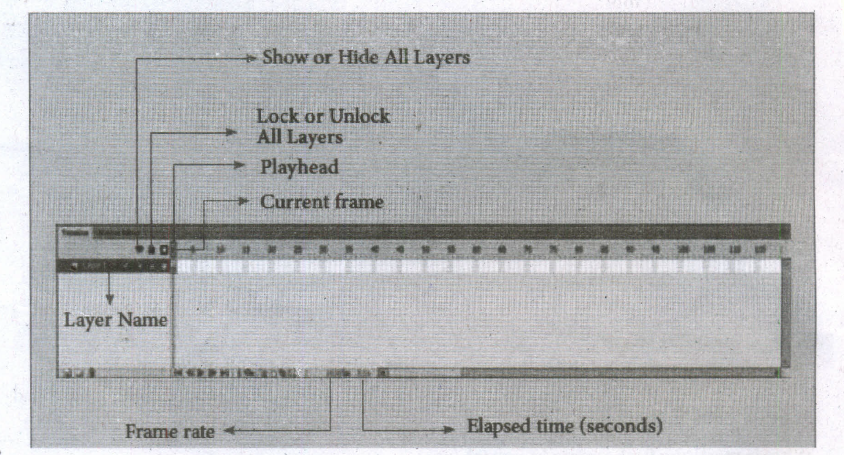
2.
i) The gray area surrounding the Stage in Flash is the Pasteboard.
ii) To create and edit objects in the pasteboard also but they will not be visible in the final movie.
iii) Only the graphical objects kept inside the stage are visible in the final movie.
3.
i) A theater stage, the Flash Stage is the area that viewers see when a movie is playing.
ii) The term movie refers to Flash-created movies.
4.
i) The white rectangle area in the middle of your workspace is called the Stage.
ii) All the animations, objects and scenes for a Flash movie are created, edited, placed and played back in the stage.
5.
The Welcome Screen of the Flash is the launch pad for creating and opening files. It appears when Flash is first launched or when no documents are open in the application. From the Create New column in the middle of the Welcome Screen, click on Action Script 3.0.
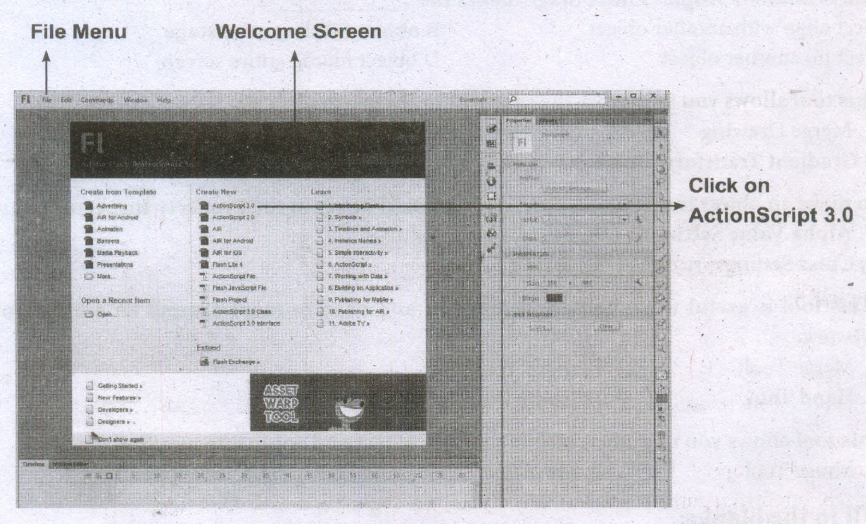
2. From the File menu, choose File> New to create a new document.
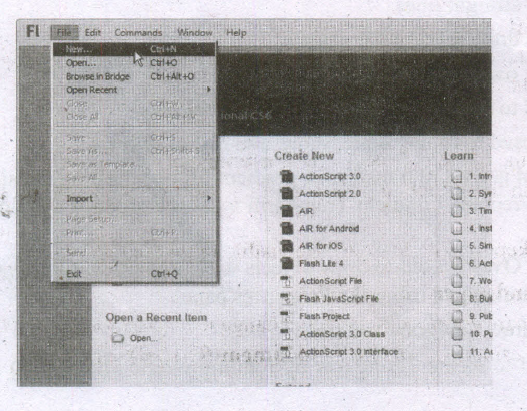
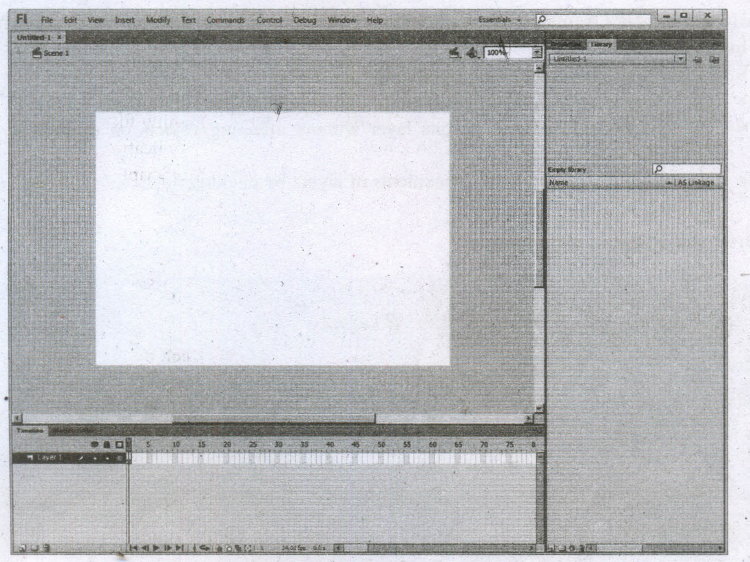
The New Document dialog box appears. Under the General tab, choose ActionScript 3.0.,and press OK to create a new document.

12th Standard Syllabus & Materials
12th Standard
TN 12th Computer Applications வலையமைப்பு வடமிடல் Sample Question Papers Study Material - QB365 Set A
NEW12th Standard
TN 12th Computer Applications களப்பெயர் முறைமை (DNS) Sample Question Papers Study Material - QB365 Set A
NEW12th Standard
TN 12th Computer Applications வலையமைப்பு எடுத்துக்காட்டுகள் மற்றும் நெறிமுறைகள் Sample Question Papers Study Material - QB365 Set A
NEW12th Standard
TN 12th Computer Applications கணினி வலையமைப்பு ஓர் அறிமுகம் Sample Question Papers Study Material - QB365 Set A



Tamilnadu Stateboard 12th Standard Subjects

Maths

Chemistry

Physics

Biology

Computer Science

Business Maths and Statistics

Economics

Commerce

Accountancy

History
Computer Applications
Biology
Computer Technology
Computer Applications
Computer Science
Business Maths and Statistics
Commerce
Economics
Maths
Chemistry
Physics
Computer Technology
History
Accountancy

Tamil

English

French
Tamilnadu Stateboard Standards


