
 100% FREE ACCESS
12th Standard Syllabus & Materials
12th Standard
TN 12th Maths Applications of Matrices and Determinants Sample Question Papers Study Material - QB365 Set A
NEW12th Standard
TN 12th Computer Applications மின்னணு தரவு பரிமாற்றம் Sample Question Papers Study Material - QB365 Set A
NEW12th Standard
TN 12th Computer Applications மின் - வணிக பாதுகாப்பு அமைப்புகள் Sample Question Papers Study Material - QB365 Set A
NEW12th Standard
TN 12th Computer Applications மின்னணு செலுத்தல் முறைகள் Sample Question Papers Study Material - QB365 Set A
NEW12th Standard
TN 12th Computer Applications மின் - வணிகம் Sample Question Papers Study Material - QB365 Set A
NEW12th Standard
TN 12th Computer Applications திறந்த மூல கருத்துருக்கள் Sample Question Papers Study Material - QB365 Set A

Published on: 13/05/2022
QB365 provides detailed and simple solution for every
Creative Questions in class 12 Computer Technology Subject.It will helps to get more idea about question pattern in every Creative questions with solution.
Download Tamil Nadu 12th Standard Computer Technology question papers, model tests, one-mark questions, important questions, and public exam papers in PDF format. Free study materials and answer keys for TN State Board students.
Questions + Answers key
Take MCQ Computer Technology Test
1.
What are the two states of panel?
2.
Name the icons in quick access toolbar?
3.
How to display a frame's content on the Stage, you should move the play head to that frame in the Timeline?
4.
How will the the flash background appears in default?
5.
What Is Mean By Rigging?
6.
What Is A Ambient occlusion?
7.
How will you create an ellipse?
8.
Name some flyout in shape tools?
9.
What is meant by content collector tool?
10.
What is meant by document window?
1.
Panels have two states-either docked or floating. By default all panels in the Ribbon are docked in their respective tab.
2.
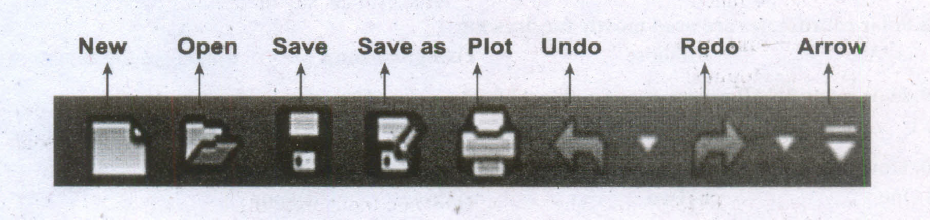
3.
(i) Layers help you organize the artwork in your movie.
(ii) Each layer can contain a different image that appears on the Flash Stage.
(iii) To draw and edit objects on one layer without affecting objects on another layer of Timeline.
(iv) We can hide, lock, or show the contents of layers by clicking the dots in the layer under the layer option icons.
4.
(i) By default, the Flash Stage appears white, but, you can change its background color from the Document settings dialog box using the Modify > Document (Ctrl +J) command.
(ii) To change the view of the Stage, Zoom in and out.
(iii) To help in positing the items on the Stage, you can use the grid, guides and rulers.
5.
(i) Rigging is a method of attaching bones or biped to a 'modeled character' or object in order to make them animate or 'perform' actions.
(ii) By attaching bones or biped the 'character' can walk, talk and make bodily movements.
6.
(i) Ambient occlusion is a shading method used in 3D computer graphics which helps add realism to local reflection models by taking into account.
(ii) Ambient occlusion is a method for simulating global illumination, while keeping a respectable ratio between results.
7.
Creating ellipses
(i) To draw an ellipse (also known as an oval), select the Ellipse tool in the toolbox. The mouse pointer changes to a crosshair with a small ellipse beneath it.
(ii) Click on anywhere in the drawing area and drag the mouse pointer.
(iii) Release the mouse button where you like the end of the ellipse.
8.
1. Shape
2. Smooth
3. Smear
4. Twirl
5. Attract
6. Repel
7. Smudge
8. Roughen
9.
(i) When you select the Content Collector tool, click objects or stories to add them to the Content Conveyor at the bottom of the screen.
(ii) You can then use the Content Placer Tool to copy and link these objects from the Content Conveyer into another layout or document.
(iii) Press B to switch between the Content Collector and Content Placer tools.
10.
(i) The document window is the central area that represents the open InDesign document.
(ii) It resembles a piece of paper and is surrounded by a black border. The black border represents the page border.

12th Standard Syllabus & Materials
12th Standard
TN 12th Computer Applications வலையமைப்பு வடமிடல் Sample Question Papers Study Material - QB365 Set A
NEW12th Standard
TN 12th Computer Applications களப்பெயர் முறைமை (DNS) Sample Question Papers Study Material - QB365 Set A
NEW12th Standard
TN 12th Computer Applications வலையமைப்பு எடுத்துக்காட்டுகள் மற்றும் நெறிமுறைகள் Sample Question Papers Study Material - QB365 Set A
NEW12th Standard
TN 12th Computer Applications கணினி வலையமைப்பு ஓர் அறிமுகம் Sample Question Papers Study Material - QB365 Set A



Tamilnadu Stateboard 12th Standard Subjects

Maths

Chemistry

Physics

Biology

Computer Science

Business Maths and Statistics

Economics

Commerce

Accountancy

History
Computer Applications
Biology
Computer Technology
Computer Applications
Computer Science
Business Maths and Statistics
Commerce
Economics
Maths
Chemistry
Physics
Computer Technology
History
Accountancy

Tamil

English

French
Tamilnadu Stateboard Standards


