
 100% FREE ACCESS
12th Standard Syllabus & Materials
12th Standard
TN 12th Maths Applications of Matrices and Determinants Sample Question Papers Study Material - QB365 Set A
NEW12th Standard
TN 12th Computer Applications மின்னணு தரவு பரிமாற்றம் Sample Question Papers Study Material - QB365 Set A
NEW12th Standard
TN 12th Computer Applications மின் - வணிக பாதுகாப்பு அமைப்புகள் Sample Question Papers Study Material - QB365 Set A
NEW12th Standard
TN 12th Computer Applications மின்னணு செலுத்தல் முறைகள் Sample Question Papers Study Material - QB365 Set A
NEW12th Standard
TN 12th Computer Applications மின் - வணிகம் Sample Question Papers Study Material - QB365 Set A
NEW12th Standard
TN 12th Computer Applications திறந்த மூல கருத்துருக்கள் Sample Question Papers Study Material - QB365 Set A

Published on: 10/09/2022
QB365 provides a detailed and simple solution for every Possible Book Back Questions in Class 12Computer Science Subject - Lists, Tuples, Sets and Dictionary , English Medium. It will help Students to get more practice questions, Students can Practice these question papers in addition to score best marks.
Download Tamil Nadu 12th Standard Computer Science question papers, model tests, one-mark questions, important questions, and public exam papers in PDF format. Free study materials and answer keys for TN State Board students.
Questions + Answers key
Take MCQ Computer Science Test
1.
Explain the different set operations supported by python with suitable example.
2.
What is nested tuple? Explain with an example.
3.
What is the purpose of range( )? Explain with an example.
4.
What the different ways to insert an element in a list. Explain with suitable example.
1.
The python supports the set operations such as Union, Intersection, difference and Symmetric difference.
i) Union:
It includes all elements from two or more sets
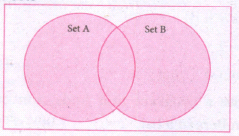
In python, the operator Iis used to union of two sets. The function union ( ) is also used to join two sets in python.
Example:
Program to Join (Union) two sets using union operator
set_A={2,4,6,8}
set_B={'A', 'B', 'C', 'D'}
U_set=set_A l set_B
print (U _set)
Output:
{2, 4, 6, 8, 'A', 'D', 'C', 'B'}
Example:
Program to Join (Union) two sets using union function.
set_A={2,4,6,8}
set_B={'A', 'B', 'C', 'D'}
set_ U=set_ A.Union(set_ B)
print(set_U)
Output:
{'D', 2, 4, 6, 8, 'B', 'C', 'A'}
ii) Intersection:
(i) It includes the common elements in two sets
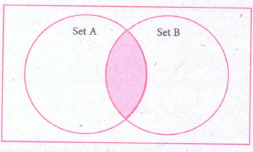
The operator & is used to intersect two sets in python. The function intersection( ) is also used to intersect two sets in python.
Example:
Program to insert two sets using intersection operator
set_A={'A', 2, 4, 'D'}
set_B={'A', 'B', 'C', 'D'}
print(set_A & set_B)
Output:
{'A', 'D'}
Example:
Program to insect two sets using intersection function
set_A={'A', 2, 4, 'D'}
set_B={'A', 'B', 'C', 'D'}
print( set_A.intersection(set_B))
Output:
{'A', 'D'}
iii) Difference
It includes all elements that are in first set (say set A) but not in the second set (say set B)
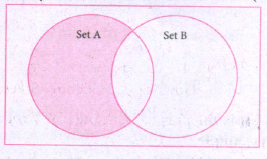
The minus (-) operator is used to difference set operation in python. The function difference() is also sed to difference operation.
Example:
Program to difference of two sets using minus operator
set_A={'A', 2, 4, 'D'}
set_B={'A', 'B', 'C', 'D'}
print(set_A - set B)
Output
{2,4}
Example:
Program to difference of two sets using difference function
set_A={'A', 2, 4, 'D'}
set_B={'A', 'B', 'C', 'D'}
print(set_A.difference( set_B))
Output:
{2,4}
iv) Symmetric difference:
It includes all the elements that are in two sets (say sets A and B) but not the one that are common to two sets.
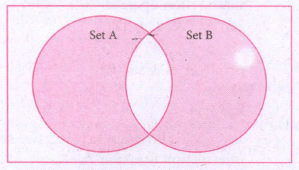
The caret (^) operator is used to symmetric difference set operation in python. The function symmetric_difference( ) is also used to do the same operation.
Example:
Program to symmetric difference of two sets using caret operator
set_A={'A', 2, 4, 'D'}
set_B={'A', 'B', 'C', 'D'}
print(set_A ^ set_B)
Output:
{2, 4, 'B', 'C'}
Example:
Program to difference of two sets using symmetric difference function
set_A={'A', 2, 4, 'D'}
set_B={'A', 'B', 'C', 'D'}
print( se_A.symmetric_ difference (set_B))
Output:
{2, 4, 'B', 'C'}
2.
In Python, a tuple can be defined inside another tuple; called Nested tuple. In a nested tuple, each tuple is considered as an element. The for loop will be useful to access all the elements in a nested tuple.
Example:
Toppers = (("Vinodini", "XII-F", 98.7), ("Soundarya", "XII-H", 97.5),
("Tharani", "XII-F", 95.3), ("Saisri", "XII-G", 93.8))
for i in Toppers:
print(i)
Output:
('Vinodini', 'XII-F', 98.7)
('Soundarya', 'XII-H', 97.5)
('Tharani', 'XII-F', 95.3)
('Saisri', 'XII-G', 93.8)
3.
The range( ) is a function used to generate a series of values in Python. Using range( ) function, you can create list with series of values. The range( ) function has three arguments.
Syntax:
range (start value, end value, step value)
where,
(i) start value - beginning value of series. Zero is the default beginning value.
(ii) end value - upper limit of series. Python takes the ending value as upper limit - l.
(iii) step value - It is an optional argument, which is used to generate different interval of values.
Example:
Generating whole numbers upto 10.
for x in range (1,11):
print(x)
Output:
1
2
3
4
5
6
7
8
9
10
Creating a list with series of values :
(i) Using the range( ) function, a list can be created with series of values, To convert the result of range( ) function into list, one more function called list ( ). The list ( ) function makes the result of range ( ) as a ist.
(ii) Syntax: List_Varibale = list ( range ( ))
(iii) Example
Generating first 10 even numbers
for x in range (2, 11, 2):
print (x)
Output:
2
4
6
8
10
(iv) In the above code, list( ) function takes the result of range( ) as Even_List elements. Thus, Even_List list has the elements of first five even numbers. Similarly, we can create any serie of values using range( ) function. The following example explains how to create a list with squares of first 10 natural numbers.
Example : Generating squares of first 10 natural numbers
for x in range(1,11) :
S=x**2
squares.append(s)
print (squares)
Output : [1, 4, 9, 16, 25, 36, 49, 64, 81, 100)
4.
Inserting elements in a list using insert ( ) :
(i) append ( ) function in Python is used to add more elements in a list. But, it includes elements at the end of a list.
(ii) If you want to include an element at your desired position, you can use insert ( ) function. The insert ( ) function is used to insert an element at any position of a list.
Syntax :
List.insert (position index, element)
Example :
>>> MyList=[34,98,47, Kannan,Gowrisankar','Lenin', 'Sreenivasan' ]
>>> print(MyList)
[34, 98, 47, 'Kannan', 'Gowrisankar', 'Lenin', 'Sreenivasan']
>>> MyList.insert(3, 'Ramakrishnan')
>>> print(MyList)
[34, 98, 47, 'Ramakrishnan', 'Kannan', 'Gowrisankar, 'Lenin', 'Sreenivasan']
Output : [34, 98, 47, 'Ramakrishnan', 'Kannan', 'Gowrisankar', 'Lenin', 'Sreenivasan']
(i) In the above cxample, insert( ) function inserts a new element 'Ramakrishnan' at the index value 3, ie. at the 4th position.
(ii) While inserting a new element in between the existing elements, at a particular location, the existing elements shifts one position to the right.

12th Standard Syllabus & Materials
12th Standard
TN 12th Computer Applications வலையமைப்பு வடமிடல் Sample Question Papers Study Material - QB365 Set A
NEW12th Standard
TN 12th Computer Applications களப்பெயர் முறைமை (DNS) Sample Question Papers Study Material - QB365 Set A
NEW12th Standard
TN 12th Computer Applications வலையமைப்பு எடுத்துக்காட்டுகள் மற்றும் நெறிமுறைகள் Sample Question Papers Study Material - QB365 Set A
NEW12th Standard
TN 12th Computer Applications கணினி வலையமைப்பு ஓர் அறிமுகம் Sample Question Papers Study Material - QB365 Set A



Tamilnadu Stateboard 12th Standard Subjects

Maths

Chemistry

Physics

Biology
Computer Science

Business Maths and Statistics

Economics

Commerce

Accountancy

History

Computer Applications
Biology
Computer Technology
Computer Applications
Computer Science
Business Maths and Statistics
Commerce
Economics
Maths
Chemistry
Physics
Computer Technology
History
Accountancy

Tamil

English

French
Tamilnadu Stateboard Standards
