
 100% FREE ACCESS
12th Standard Syllabus & Materials
12th Standard
TN 12th Maths Applications of Matrices and Determinants Sample Question Papers Study Material - QB365 Set A
NEW12th Standard
TN 12th Computer Applications மின்னணு தரவு பரிமாற்றம் Sample Question Papers Study Material - QB365 Set A
NEW12th Standard
TN 12th Computer Applications மின் - வணிக பாதுகாப்பு அமைப்புகள் Sample Question Papers Study Material - QB365 Set A
NEW12th Standard
TN 12th Computer Applications மின்னணு செலுத்தல் முறைகள் Sample Question Papers Study Material - QB365 Set A
NEW12th Standard
TN 12th Computer Applications மின் - வணிகம் Sample Question Papers Study Material - QB365 Set A
NEW12th Standard
TN 12th Computer Applications திறந்த மூல கருத்துருக்கள் Sample Question Papers Study Material - QB365 Set A

Published on: 22/08/2026
Download Tamil Nadu 12th Standard Computer Applications question papers, model tests, one-mark questions, important questions, and public exam papers in PDF format. Free study materials and answer keys for TN State Board students.
Questions + Answers key
Take MCQ Computer Applications Test
1.
Explain briefly the components of DNS.
2.
Explain the user-defined function with suitable examples.
3.
4.
Explain the components used in Ethernet cabling.
5.
Explain how the DNS is working.
6.
Classify and Explain the IP address and its classification.
7.
Discuss about OSI model with its layers
8.
Explain the Multidimensional Array.
9.
Explain operators in PHP with example.
10.
Discuss in detail about PHP data types.
11.
Root Name servers are maintained by
IANA
ICANN
WHOIS
DNS
12.
Which operator is called "identical"?
=
==
===
<>
13.
What is the extension of PHP file?
.html
.xml
.php
.ph
14.
ln DNS, the names are represented as ____ like structure.
tree
label
root
node
15.
______ is used between computers for sending and receiving file.
TCP/IP
HTTP
HTTPS
FTP
16.
What will be the output of the following PHP code?
<?php
\(\$\)x = "Srini";
\(\$\)y = "Vasan";
echo "\(\$\)x" + "\(\$\)y";
?>
Srini Vasan
Srini + Vasan
"Srini" + "Vasan"
0
17.
We can use ____________ to comment multiple lines?
/?
//
#
/**/
18.
In PHP, Variable name can never start with a _________
alphabet
number
both a and b
either a or b
19.
The serial port will send _____________ at one time.
2 bit
Null
1 bit
5 bit
20.
In IPv6 address, the 128 bits are divided into_______ blocks
4
16
4
5
21.
Second Generation of mobile system were based on _______transmission
Digital
Analog
Both (a) and (b)
None of these
22.
Which connector is used in the Ethernet cables?
RJ11
RJ21
RJ61
RJ45
23.
Which medium is used in the optical fibre cables to transmit data?
Microwave
Infra red
Light
Sound
24.
25.
A function in PHP starts with __
Function
__def
def
function
26.
How do you create an indexed array in PHP?
27.
Write short notes on built-in functions in PHP?
28.
What is 'Echo' statement used for? Give an example.
29.
What is PHP?
30.
What is Ethernet port?
31.
What is Name Server?
32.
What is mean by DNS?
33.
What is an IP address?
34.
List out the benefits of WiFi
35.
Expand (i) URL (ii) ICANN (iii) IANA (iv) DNS
36.
Write a note on URL and its types.
37.
Write the output for the following:
$arr = array(
array (1, 2, 3),
);
echo $arr[0][1];
38.
How do you call a function in PHP?
39.
Write a PHP code to display your name and your school address.
40.
Write about the rules for naming a variable in PHP?
41.
What are the types of Fibre optic cables?
42.
Write a note on crossover cables.
43.
Compare Internet, Intranet and Extranet.
1.
There are four important components in the Domain Name System. They are
1. Namespace
2. Name server
3. Zone
4. Resolver
1. Namespace:
(i) The domain names must be very unique and appropriate. The names should be selected from a name space. The name space can be organized in two ways
Flat namespace
Hierarchical name space
(ii) The Flat namespace is where the name is assigned to the IP address. They do not have any specific structure.
(iii) Hierarchical name space is where the name is made up of several parts.
(iv) The first part may represent the nature of the organization, the second part may represent the name of the organization, and the thìrd part may represent the department of the organization and so on.
2. Name Server :
Name Server is a main part ofthe Domain Name System (DNS). It is a software program that run on a physical system.
It has the DNS database consisting of domain names and their corresponding IP addresses. Name Server translates the domain name to IP address.
There is a need to store a large number of domain names for worldwide usage, So plenty of servers are used in the hierarchical manner.
3. Zone:
(i) The entire name space is divided into many different zones. Zone is a group of contiguous domains and sub domains.
(ii) If the zone has a single domain, then zone and domain are the same.
(iii) Every zone has the server which contains a database called zone file.
(iv) Using the zone file, the DNS server replies to the queries about hosts in its zone. There are two copies of zone files available, Master file and slave file.
4. Resolver:
The resolver is a program which is responsible for initiating the translation of a domain name into an IP address.
Since a resolver is stored in the host, There is no need of any protocol to form a connection between the resolver and the user program.
2.
A user defined function by using the 'function' keyword, followed by the name of the function and a set of parentheses.
The general syntax for creating a function in PHP:
Function definition (or declaration)
Syntax
function functionName([parameter list])
{
// code to be executed
}
Explanation:
(i) The 'function' keyword is used to define a function.
(ii) functionName is the name of the function.
It can be any valid PHP identifier, as long as it is not a reserved word.
(iii) parameter list is a comma-separated list of variables. These parameters are optional and we can have as many or as few as we like.
(iv) Inside the curly braces, we can put any code we want the function to execute.
This can include PHP statements, loops, conditions, and so on.
3.
4.
Ethernet cabling is the process of connecting the computers with other devices using Ethernet cables.
the four main components are used in Ethernet cabling components are
(i) Patch cable [Twisted pair]
(ii) RJ45 connector
(iii) Ethernet ports
(iv) Crimping tool.
(i) Patch Cable (Twisted Pair):
(i) These cables are generally made up of 8 wires in different colors. Four of them are solid colours, and the others are striped.
(ii) Ethernet cables are normally manufactured in several industrial standards such as Cat 3, Cat 5, Cat 6, Cat 6e and Cat 7. "Cat" simply stands for "Category," and the following number indicates the version.
(iii) Latest version denotes faster and higher frequencies, measured in Mhz.
(ii) RJ45 Connector:
(i) The RJ45 connector looks similar like a telephone jack but it looks a slightly wider. In RJ45 the "R" stands for the Registered Jack and the "45" simply refers to the interface standard.
(ii)The RJ45 connector is a small plastic cube. It has eight pins.
(iii) It is connected to each end of the Ethernet cable. It is also known as 8P8C connector.
(iii) Ethernet port:
(i) Ethernet port is an opening which is a part of an Ethernet card.It accepts RJ45 connector with Ethernet cable. It is also called as RJ45 jack.
(ii) It is found on personal computers, laptops routers, switches, hubs and modems.
(iii) Once you inject the plug into the port the two led lights will glow in the computer, one is green and another one is orange. The orange light will start blinking which indicates that the Internet is connected.
(iv) Crimping tool:
(i) Crimping is the process of joining two or more pieces of wire to hold each other.
(ii) The crimping tool is a physical tool which is used to connect the patch wire and the Ethernet connector.
(iii) The crimping looks like a small cutting handle with two mold of Ethernet port.
5.
DNS Works:
(i) When the user enters the URL in the browser, the system first checks it DNS cache for the corresponding IP address.
(ii) If the IP address is found in the cache, then the information is retrieved from cache.
(iii) If not, the system needs to query the resolver about the IP address from Internet Service Provider (ISP).
(iv) Each resolver has its own cache and if it is found in that then that information is retrieved.
(v) If not, then the query is passed to next domain server i.e., TLD (Top Level Domain) which reviews the request and direct the query to name servers associated with that specific domain.
(vi) Unitil the query is solved it is passed to next level domians. finally, the IP address is detected and the corresponding record is sent to the resolver.
(vii) Then the resolver returns the record back to the computer browser. Now the user can view the webpages for the detected IP address.

6.
IP Address:
(i) Internet Protocol (IP) address is simply the logical address in the network layer.
(ii) IP address is used to find the host system in the whole network. Due to increasing the number of systems in a network there is a need of more addresses. It leads to two addressing methods i.e., IPv4 and IPv6.
IPv4 address:
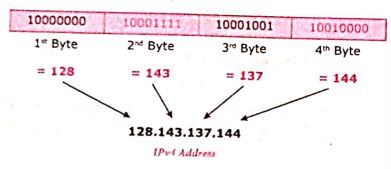
(i) The IPv4 address is a 32-bit unique address given to a computer on the network. So no two systems on the network can have the same IP address.
(ii) If the network has p connactions, then 'p' addresses should be there. An address space is the total number of addresses that can be made by that protocol (IP).
(iii) It is determined by the number of bits that the protocol use. If the protocol uses 'n' bits then the address space of that protocol would be '2nd' addresses.
(iv) So, the number of addresses that can be formed in IPv4 is 232. there are two ways to represent the IP address
(v) In binary notation the address is expressed as 32-bit binary values. For E.g. 0011100110001001 00111000 00000111
(vi) In dotted-decimal notation the address is written in decimal format separated by dots(.). For Eg: 128.143.137.144
IPv6 Address:
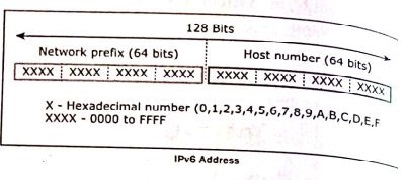
(i) The IPv6 address is a 128-bit unique address given to a computer system. The number of addresses that can be formed IPv6 is 2128.
(ii) In IPv6 address, the 128 bits are divide into eight 16-bits blocks. Each block then changed ito 4-digit Hexadecimal numbers separated by colon symbols.
(iii) E.g. 2001:0000:3231:DFE1:0063:0000:0000:FEFB.
7.
Open System Interconnection (OSI) model was found in the year 1934, general framework that enables network protocols along with software and systems to be developed based on general set of guidelines. It describes the standards for the inter-computer communication.
OSI Layers:
(i) Physical Layer: This is the 1st layer, it defines the electrical and physical specifications for devices.
(ii) Data Link Layer: It is the 2nd layer and it guarantees that the data transmitted are free of errors. This layer has simple protocols like "802.3 for Ethernet" and "802.11 for Wi-Fi".
(iii) Network Layer: It is the 3rd layer determining the path of the data packets. This layer is responsible for routing of data packets using IP Addressing.
(iv) Transport Layer: It is the 4th layer that guarantees the transportation/sending of data succeddfully. It includes the error checking operation.
(v) Session Layer: It is the 5th layer, identifies the established system session between different network entities. It controls dailogues between computers. For instance, while accessing a system remotely, session is created between your computer and the remote system.
(vi) Presentation Layer: It is the 6th layer that does the translation of data to the next layer (Prepare the data to the Application Layer). Encryption and decryption protocols occur in this layer such as, Secure Socket Layer (SSL).
(vii) Application Layer: It is the 7th layer, which acts as the user interface platform comprising of software within the system.
8.
Multidimensional Arrays:
Array containing one or more arrays is called multidimensional array. PHP accepts array with two, three four or more levels.
Example:
// A two-dimensional array
$student=array
(
array("Iniyan", 100, 96),
array("Kavin", 60, 59),
array("Nilani", 1313, 139)
);
echo $$student [0][0].": Tamil Mark: ".$student [0][1].". English mark: ".$student [0] [2]."< br >";
echo $$student [1][0].": Tamil Mark: ".$student [1][1].". English mark: ".$student [1] [2]."< br >";
echo $$student [2}[0].": Tamil Mark:".$student [2][1].".English mark: ".$student [2] [2]."< br >
? >
9.
An operator is a symbol that performs a given action on a value or group of values. The values the operation is performed upon are known as operands.
The types of operators in PHP are
(i) Arithmetic operators
(ii) Assignment operators
(iii) Comparison operators
(iv) Increment/Decrement operators
(v) Logical operators and
(vi) String operators
1. Arithmetic operators
Arithmetic operators are used to perform math operations, for example, addition, subtraction, multiplication, and division.
| Operator | Operator Name | Example | Output |
|---|---|---|---|
| + | Addition | 5+2 | 7 |
| - | Subtraction | 5-2 | 3 |
| * | Multiplication | 5*2 | 10 |
| / | Division | 5/2 | 2.5 |
| % | Modulus | 5%2 | 1 |
2. Assignment operators
The assignment operator is used to assign a value to a variable. The assignment operator takes the value of its right-hand operand and assigns it to its left-hand operand.
| Operator | Operator Name | Example | Output |
|---|---|---|---|
| = | Assignment operator | $a = 5; | 5 |
3. Comparison operators
Comparison operators are used to compare two values and determine whether a certain condition is true or false.
| Operator | Operator Name | Example | Output |
|---|---|---|---|
| > | Greater than | 5 > 2 | |
| < | less than | 5<2 | False |
| >= | Greater than or equal to | 5>= 2 | True |
| <= | Less than or equal to | 5<=2 | False |
| == | Equal to | 5==5 5 == 5.0 |
True False |
| === | Identical | 5===5 5===5.0 |
True False |
| != | Not equal | 5!=5 5!=6 |
True False |
| !== | Not identical | 5!==5 5!==5.0 |
True False |
4.Logical Operators:
Logical operators are used to perform logical operations on variables and values.
| Operator | Operator Name | Example | Output |
|---|---|---|---|
| && | Logical AND | (5>3) && (5>7) | False |
| II | Logical OR | (5>3) II (5>7) | True |
| xor | XOR | (5>3) xor (5>7) | True |
| ! | Logical NOT | ! (5>3) | False |
5. Increment and Decrement operators
In PHP, the increment operator ++ is used to increase the value of a variable by 1, and the decrement operator is used to decrease the value of a variable by 1. The increment and decrement operators can be used as either prefix or postfix operators.
| Operator | Name | Output |
|---|---|---|
| ++ (increment operator) |
++ $a Pre-increment | $x = ++ $a |
| ++ (increment operator) |
$a + + Post-increment | $x = $a ++ |
| -- (decrement operator) |
--$a Pre-decrement | $x = --$a |
| -- (decrement operator) |
$a-- Post-decrement | $x = $a-- |
6. String operator
String operators have concatenation operator(.) and concatenation assignment operator(-). Concatenation means adding one or more variables to an existing variable.
| Operator | Name | Example | Output |
|---|---|---|---|
| . (Dot) | Concatenation | $a = 'Hello'; $b = 'World'; $c= $a. $b; |
Hello World |
| .= (Dot equal to) | Concatenation | $a= 'Hello': $b = 'World'; $a .= $b; |
Hello World |
10.
PHP scripting language supports 13 primitive data types.
PHP supports the following data types.
(i) String
(ii) Integer
(iii) Float
(iv) Boolean
(v) Array
(vi) Object
(vii) NULL
(viii) Resource
(i) String
String is a collection of characters within the double quotes ("") or single quotes ().
Space is also considered as a character.
Example:
$x= "Computer Application";
$y='Computer Application';
(ii) Integer
Data type which contains non decimal numbers.
Example (i) $x=59135;
Example (ii)
$x = 59135;
var_dump($x);
The var_dump() function returns type and value about variables in PHP.
(iii) Float
Float is a data type which contains decimal numbers.
Example Sx=19.15;
$x = 19.15;
var_dump($x);
?>
(iv) Boolean
Boolean is a data type which returns two possible states, TRUE or FALSE.
Example:
$x = true;
$y = false;
echo $x;
echo $y;
(v) Array
Array is a data type which has multiple values in single variable.
Example:
$cars
= array("Computer", "Laptop", "Mobile");
var_dump(Scars);
?>
Output:
array(3) {[0]=> string(5) "Computer" [1]=>
string(3) "Laptop" [2]=> string(6) "Mobile"}
(vi) Object
Object is a data type which contains information about data and function inside the class.
Example:
class School {
function marks() {
$this->sec =
}
}
// create an object
$school_obj= new School ();
// show object properties
echo Sschool_obj ->sec;
?>
(vii) NULL
It is a special data type which contains a single value: NULL.
Example:
$x="COMPUTER APPLICATION!";
$x = null;
var_dump($x);
?>
Output: NULL
(viii) Resources
It is a specific variable, it has a reference to an external resource.
These variables hold specific handlers to handle files and database connections.
// Open a file for reading
$handle = fopen("note.txt", "r");
var_dump($handle);
echo "
";
// Connect to MySQL database server with default setting
$link= mysql_connect("localhost", "root", "");
var_dump($link);
?>
11.
(b)
ICANN
12.
(c)
===
13.
(c)
.php
14.
(a)
tree
15.
(d)
FTP
16.
(a)
Srini Vasan
17.
(d)
/**/
18.
(b)
number
19.
(c)
1 bit
20.
(b)
16
21.
(a)
Digital
22.
(d)
RJ45
23.
(c)
Light
24.
(a)
25.
(a)
Function
26.
We can create an indexed array in PHP.
(i) by enclosing a comma-separated list of values in square brackets (or)
(ii) by using the array() function.
27.
These are functions that are pre-defined in the PHP language and can be used to perform a variety of tasks, such as calculating the length of a string or sorting an array.
28.
In PHP the echo statement is used to output a string or other data to the screen. It is a simple and efficient way to display information to the user. The echo statement can be used in several different ways
To output a single string (String values must be enclosed in single or double quotes.)
Examples:
echo 'Hello world!':
To output multiple strings, separated by commas:
Examples:
echo "Hello, world!";
To output the value of a variable:
Examples:
$name="Kumar":
echo "My name is $name":
To output the result of an expression.
Examples:
$x = 10;
$y=20; echo $x + $y;
// Outputs '30"
To output multiple variables in the same echo statement, you can separate them with a comma.
Examples:
echo $x, $y, $z;
To concatenate (join) multiple strings together, you can use the concatenation operator (.).
Examples:
$name="Mani";
echo "My name is". $name;
To print multiple lines of text, you can use multiple echo statements.
Examples:
echo 'This string has multiple';
echo 'lines;
To output a string of text that contains a single quote, you can use double quotes to enclose the string.
Examples:
echo "It's a nice day today.";
29.
PHP is a server-side scripting language, which means that the code is executed on the server rather than in the user's browser. It is widely used for web development.
30.
The Ethernet port is the jack where the Ethernet cable is to be connected.
31.
(i) Name Servers are programs that run on a physical system and store all the zone data.
(ii) It provides to clients when queried by them.
32.
(i) DNS-Domain Name System
(ii) A method of referring to other host computers by using names rather than numbers.
33.
Internet Protocol (IP) address is simply the logical address in the network layer. IP address is also used to find the host system in the whole network.
34.
(i) It provides mobility.
(ii) It provides connection to Internet.
(iii) Flexibility of LAN.
(iv) Ensures connectivity.
(v) Low cost, high benefits.
35.
(i) URL - Uniform Resource Locator
(ii) ICANN - Internet Corporation for Assigned Name and Numbers
(iii) IANA - Internet Assigned Numbers Authority
(iv) DNS - Domain Name System
36.
(i) URL (Uniform Resource Locator) is the address of a document on the Internet. It is made up four parts: protocols, hostname, folder name and file name.
(ii) Each part has its own specific functions. Depending on the application, additional information can be added to the URL.
URL Types: The URL is divided into 2 types
(i) Absolute URL
(ii) Relative URL.
(i) Absolute URL: The absolute URL is the complete address of a document on the Internet.
(ii) Relative URL: The relative URL is the partial address of a document on the Internet. Relative URL contains only a file name or a file name with folder name.
37.
Output: 2
38.
Calling a function is another name for executing the function. A function is called simply by using the function name, along with an argument list, as a statement.
Syntax
functionName(); (or)
function Name(argument list);
39.
<?php
echo "Sathiya", "<br>";
echo "GHS SCHOOL","<br>";
echo "Ammampalayam", "<br>";
echo "Vellore", "<br>";
?>
40.
All variables in PHP follow certain syntactical rules
(i) A variable's name must start with a dollar sign ($), for example, $name
(ii) The variable's name can contain a combination of strings, numbers, and the underscore, for example, $my_report1.
(iii) The first character after the dollar sign must be either a letter or an underscore (it cannot be a number)..
(iv) Variable names in PHP are case- sensitive.This is a very important rule. It means that $name and $Name are entirely different variables.
41.
There are two types of fibre optic cables available.
One is single-mode and another is Multimode.
(i) Single-mode cables are used for long distance transmission and at a high cost.
(ii) Multimode cables are used for short distance transmission at a very low cost.
42.
(i) If you require a cable to connect two computers or Ethernet devices directly together without a hub, then you will need to use a Crossover cable instead.
(ii) Here, the pairs of Tx and Rx lines are crossed.
(iii) It means pin 1 & 2 of the plug on one end are connected with pin 3 & 6 of the plug on other end, and vice versa (3 & 6 to pin 1 & 2).
(iv) The easiest way to make a crossover cable is to make one end to T568A colour coding and the other end to T568B.
43.
Comparision between Internet, intranet and Extranet
| S.No | Internet | Intranet | Extranet |
| Meaning | Several Networks, small and big over the world, are connected together to form a Global network called the Internet. | Intranet is a website used by organizations to provide a place where employees can access company related information | Extranet is a private network using Internet technology to share part of business information with supplier's parthers and customers. |
| Applications | Download programs and files | Sharing of company policies/ rules and regulations | Online education/ training |
| Network accessibility | Public Access | Private Access | Private Access |

12th Standard Syllabus & Materials
12th Standard
TN 12th Computer Applications வலையமைப்பு வடமிடல் Sample Question Papers Study Material - QB365 Set A
NEW12th Standard
TN 12th Computer Applications களப்பெயர் முறைமை (DNS) Sample Question Papers Study Material - QB365 Set A
NEW12th Standard
TN 12th Computer Applications வலையமைப்பு எடுத்துக்காட்டுகள் மற்றும் நெறிமுறைகள் Sample Question Papers Study Material - QB365 Set A
NEW12th Standard
TN 12th Computer Applications கணினி வலையமைப்பு ஓர் அறிமுகம் Sample Question Papers Study Material - QB365 Set A



Tamilnadu Stateboard 12th Standard Subjects

Maths

Chemistry

Physics

Biology

Computer Science

Business Maths and Statistics

Economics

Commerce

Accountancy

History
Computer Applications
Biology
Computer Technology
Computer Applications
Computer Science
Business Maths and Statistics
Commerce
Economics
Maths
Chemistry
Physics
Computer Technology
History
Accountancy

Tamil

English

French
Tamilnadu Stateboard Standards


