100% FREE ACCESS
11th Standard CBSE Syllabus & Materials
11th Standard CBSE
CBSE 11th Economics PART-A - Presentation of Data - New Sample Question Papers Study Material - QB365 Set A
NEW11th Standard CBSE
CBSE 11th Economics PART-A - Organisation of Data - New Sample Question Papers Study Material - QB365 Set A
NEW11th Standard CBSE
CBSE 11th Economics PART-A - Collection of Data - New Sample Question Papers Study Material - QB365 Set A
NEW11th Standard CBSE
CBSE 11th Economics PART-A - Introduction to Economics and Statistics - New Sample Question Papers Study Material - QB365 Set A
NEW11th Standard CBSE
CBSE 11th Business Studies International Trade Sample Question Papers Study Material - QB365 Set A
NEW11th Standard CBSE
CBSE 11th Business Studies Evolution and Fundamentals of Business Sample Question Papers Study Material - QB365 Set A
Published on: 06/09/2019
Applications of Computers in Accounting
Download CBSE Class 11th Standard CBSE Accountancy question papers, sample papers, important questions, and previous year solved papers in PDF format. Get free study materials, NCERT solutions, and exam preparation resources for Class 11th Standard CBSE Accountancy
Questions + Answers key
Take MCQ Accountancy Test
1.
What are various data types in SQL? Explain.
2.
What is Structured Query Language (SQL)?
3.
State any two advantages of DBMS.
4.
What do you mean by DBMS?
5.
Mention any two disadvantages of manual accounting systems.
6.
What is meant by Central Processing Unit (CPU)?
7.
Mention any two types of software.
8.
Name three components of a Transaction Processing System.
9.
State the relationship between information and decision.
10.
Give three examples of a transaction processing system.
11.
Lists the distinctive advantages of a computer system over a manual system.
12.
Explain the Tailor-made software.
13.
Describe the various elements of a computer system and explain the distinctive features of a computer system and manual system.
14.
'An organization is a collection of interdependent decision-making units that exists to pursue organizational objectives.' In the light of this statement, explain the relationship between information and decision. Also explain the role of Transaction Processing System in facilitating the decision-making process in business-organization.
15.
Between Manual and Computerised Accounting system.
16.
Explain briefly any six advantages of computerized accounting system over the manual system.
17.
An appropriate accounting software for a small business organisation having only one single office location would be__________.
18.
A sequence of actions taken to transform the data into decision useful information is called________.
19.
Database is implemented using_____________.
20.
Language syntax is checked by software called as_________.
1.
()
The various data types available in SQL are numeric, character, integer, float, date and logical.
2.
()
Structured Query Language is a language that enables to create and operate on relational model of database.
3.
()
(i) The amount of redundancy in the stored data can be reduced.
(ii) No more data inconsistencies.
4.
()
A Database Management System is a computer application designed for the purpose of managing a large set of data.
5.
()
(i) Possibility of various types of errors
(ii) Time consuming
6.
()
Central Processing Unit (CPU) is the part of computer hardware that actually processes data, according to the instructions received by it.
7.
()
(i) Utility Software
(ii) Application Software
8.
Transaction Processing System (TPS) serve the organization at the operational level to perform and record the daily routine transaction which are very important to conduct business. Every transaction processing system has three components.
(i) Input
(ii) Processing
(iii) Output.

(i) Input includes the data collection and data entry.
(ii) Processing includes data editing, data validation, data manipulation and data storage.
(iii)Output includes information and reporting. Information Technology or Computer System works on principle GIGO i.e. Garbage In Garbage Out, so it is necessary that the input is accurate, complete and authorised. This can be done by automating the input.
9.
An organization is the collection of various interdependent decision-making units that works to achieve the common organizational goal. Every organization performs the same function i.e. accepting the input and providing them into output.
Information is one of the most important resources in today's growing business environment. Every organization depends upon its information system for the purpose of decision-making. All organizations pursue same objectives through the process of allocation of resources which is accomplished through the process of managerial decision-making. Information facilitates decision regarding allocation of resources and assists an organization to achieve its objectives.
An organization has various types of information system at various organizational levels:
(i) ESS i.e. Executive Support System:
It help in making decisions at the Strategic level through advanced graphics and communications.
(ii) MIS i.e. Management Information System:
These are the information systems at the management level of an organization that serve the functions of planning, controlling and decision making by providing routine summary and exception reports.
(iii) DSS Le.Decision Support System:
This information system is at the organizational management level that combine data and analysis reports to support the decision.
(iv) IPS i.e. Transactions Processing System:
These information system serve at the operational level. They perform and record the daily routine transaction which are necessary to conduct the business.
10.
Transaction processing system serves the organization at the operational level for which it records the daily routine transactions which are very important to conduct business.
Examples of Transaction Processing System.
(i) Payroll Application:
Earlier they were used to run on a computer system with punched card using batch processing. Nowadays, they are running using terminals and online processing.
(ii) ATM's:
Automatic Teller Machines use a number of specialized computer programs to handle bank transactions.
(iii) Order processing:
It collects and process order from customer through mail or telephone or staff. Once order taken invoicing, Nc receivable and stock control processing applications are started.
11.
Advantages of Computer System over a Manual System:
(i) Speed: It refers to the amount of time taken for accomplishing a task. Computer requires far less time than human beings in performing a task. Human beings takes second or minute as unit of time whereas computer has such a fast speed that the relevant unit of time is fraction of a second.
(ii) Accuracy: Manual system can never be perfect, it can make some mistakes always but the computers are extremely accurate. This operations are error free. Most of the errors in computer system occur because of bad programming erroneous data and deviation from procedures. These errors are caused by manual system and not by computer system.
(iii) Reliability: A man may fell mental and physical fatigue after long working hours but a computer never get tired like a human being. It can work continuously and does not suffer from lack of concentration and can perform the joys of repetitive nature any number of times, in exactly the same way.
(iv) Versatility: Manual system also has the versatile nature but in comparison with computer it is very less. Computer is capable of performing a wide variety of tasks of different nature, at the same time. It can be used in business, industry, scientific, statistical technological, communication and so on. Human being can do only limited no. of tasks.
(v) Storage or Memory: It comparison of manual system, computer system has large memory, it can store any volume of information or data for being processed. It can be stored in it on permanent basis. The information stored in it can also be recalled at any time when required.
(vi) Scientific System A Computer operates scientifically and never gets emotional while solving the problems like human beings. Thus, it is clear form the above discussion that computer systems outperform the manual system.
12.
Tailor-made software: Software which are developed after the discussion between the user and the developers. These software are used for special purpose. For example, software for security of data, etc.
Advantages of Tailor-made softwares:
(i) Suitable for large business houses.
(ii) Level of secrecy and authenticity is reliable.
(iii) Special training and knowledge is provided to the users.
(iv) Transactions are recorded properly with accuracy.
Limitations of Tailor-Made Softwares:
(i) Very Costly (high cost of installation and training).
(ii) Only large business houses can afford, small business houses cannot afford these software.
13.
A computer is an electronic machine, which operates on given instructions and processes the input data, to convent in into some output.
Elements of Computer System: A Computer System is a combination of six elements:
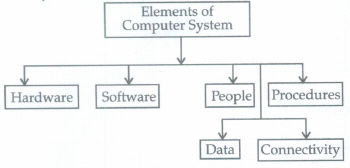
Distinct features of computer system and manual system:
(i) Speed
(ii) Accuracy
(iii) Reliability
(iv) Versatility
(v) Storage.
14.
'An organization is a collection of interdependent decision-making units that exists to pursue organizational objectives'. Every organization performs the same functions i.e. accepting the input and providing them into output.
Information is one of the most important resource in today's growing business environment.And most of the growing business houses are heavily investing in information system. Every organization depends upon its information system or the purpose of decision-making. All organization pursues some objectives through the process of allocation of resources, which is accomplished through the process of managerial decision-making. Information system facilitates decision regarding allocation of resources and assists an organization to achieve its goals.
An organization has various types of information system at various organizational levels:
(i) ESS i.e. Executive Support System: It helps in making decision at the strategic level through advanced graphics and communication.
(ii) MIS i.e. Management Information System: These are the information system at the management level of an organization that serve the functions of planning, controlling and decision making by providing routine summary and exception reports.
(iii) DSS i.e. Decision Support System: This information system is at the organizational management level that combines data and analyzing report to support the decision.
(iv) TPS i.e. Transaction Processing System: These information system serve at the operational level. They perform and record the daily routine transactions, which are very important to run the business.
Role of Transactions Processing System in Decision-Making Process in Business Organization: Transaction Processing System process the transaction. The purpose of TPS is to record, process validate and store transactions that occurs in the various fields of the business organization for subsequent retrieval for decision making purpose. The transactions may the internal or external. Internal transactions may be occurred when stores supplies materials for production. However, when sales department, sales goods to the market, external transaction occur. TPS follows six steps in processing a transaction:
(i) Collection and Entry of data: Data must be collected and entered into the system through input devices before it is processed.
(ii) Validation of data: It ensures the reliability and accuracy of input data by comparing with stored data. It checks for correction and if some error are found it corrects.
(iii) Manipulation of data: It performs the calculations for the transactions.
(iv) Storage of data: Processed actions are stored in transaction database.
(v) Information: Stored data is processed using the query facility to produced desired information.
(vi) Output or Report Generation: Lastly reports can be prepared on the basis of the information content according to decision usefulness of report.
TPS accepts complete transaction as input stores and retrieves the accounting data for processing as and when required for generating an accounting report as output.
TPS helps in decision-making of business organization by processing entire accumulated data to generate the desired results according to decision requirement. As we know that TPS serve the organization at the operational level and record and process the daily routine transactions. For decision-making, these daily routine transactions are very important. TPS can provide instant report for management for decision-making, like Stock Statement, Trial Balance, Trading and Profit and Loss Account, Balance Sheet, Value Added Tax (VAT), Payroll reports etc.
It becomes very easy for the management to take decision when it has all the reports in its hand. So we can say that the TPS provides great help for decision-making of business organization.
15.
The differences between Computerized accounting and Manual accounting are as follows:
(i) Manual accounting consists of journalizing and then posting of the same to ledgers whereas in computerized accounting system the journal entries are passed only and posting happens automatically.
(ii) Computerized accounting is subject to lesser possibility of errors as compared to manual errors.
(iii) Trial balance is required to be prepared in manual accounting to determine the arithmetical accuracy of the books of accounts whereas in computerized accounting the trial balance is automatically prepared.
(iv) Final accounts can be immediately prepared in computerized accounting at any point of time whereas in manual accounting final accounts can be prepared only after the period ends, which requires time as well.
16.
Here are the advantages of using computerized accounting software:
(i) Automation: Since all the calculations are handled by the software, computerized accounting eliminates many of the mundane and timeconsuming processes associated with manual accounting. For example, once issued, invoices are processed automatically making accounting less time-consuming.
(ii) Accuracy: This accounting system is designed to be accurate to the minutest detail. Once the data is entered into the system, all the calculations, including additions and subtractions, are done automatically by software.
(iii) Data Access: Using accounting software it becomes much easier for different individuals to access accounting data outside of the office,securely. This is particularly true if an online accounting solution is being used.
(iv) Reliability: Because the calculations are so accurate, the financial statements prepared by computers are highly reliable.
(v) Scalable: When a company grows, the amount of accounting necessary not only increases but becomes more complex. With computerized accounting, everything is kept straightforward because shifting through data using software is easier than shifting through a bunch of papers.
(vi) Speed: Using accounting software, the entire process of preparing accounts becomes faster. Furthermore, statements and reports can be generated instantly at the click of a button. Managers do not have to wait for hours, even days, to lay their hands on an important report.
(vii) Security: The latest data can be saved and stored in offsite locations so it is safe from natural and man-made disasters like earthquakes,fires,floods and terrorist attacks. In case of a disaster, the system can be quickly restored on other computers. This level of precaution is taken by Clever Accounting.
(viii) Cost-effective: Since using computerized accounting is more efficient than paper-based accounting, work will be done faster and time will be saved. When one considers, Clever Accounting, one of the latest online accounting solutions, which starts at a low monthly subscription, then computerized accounting really becomes a no-brainer.
(ix) Visuals: Viewing your accounts using a computer allows you to take advantage of the option to view your data in different formats. Youcan view data in tables and using different types of charts.
17.
()
Ready to use
18.
()
Data Processing
19.
()
DBMS
20.
()
Language processor

11th Standard CBSE Syllabus & Materials
11th Standard CBSE
CBSE 11th Business Studies Forms of Business Organisation Sample Question Papers Study Material - QB365 Set A
NEW11th Standard CBSE
CBSE 11th Business Studies Business, Trade and Commerce Sample Question Papers Study Material - QB365 Set A
NEW11th Standard CBSE
CBSE 11th Physics Waves Sample Question Papers Study Material - QB365 Set A
NEW11th Standard CBSE
CBSE 11th Physics Kinetic Theory Sample Question Papers Study Material - QB365 Set A



CBSE 11th Standard CBSE Subjects
CBSE Standards