
 100% FREE ACCESS
11th Standard Syllabus & Materials
11th Standard
TN 11th Tamil இயற்கை வேளாண்மை,சுற்றுச்சூழல் -செய்யுள் - மனோன்மணீயம் Important Questions And Answers Study Material - QB365 Set A
NEW11th Standard
TN 11th Tamil என்னுயிர் என்பேன் -துணைப்பாடம் - இசைத்தமிழர் இருவர் Important Questions And Answers Study Material - QB365 Set A
NEW11th Standard
TN 11th Tamil மொழி கலை -செய்யுள் - ஒவ்வொரு புல்லையும் Important Questions And Answers Study Material - QB365 Set A
NEW11th Standard
TN 11th Tamil பீடு பெற நில் - இலக்கணம் - பகுபத உறுப்புகள் Important Questions And Answers Study Material - QB365 Set A
NEW11th Standard
TN 11th Tamil பீடு பெற நில் - துணைப்பாடம் - வாடிவாசல் Important Questions And Answers Study Material - QB365 Set A
NEW11th Standard
TN 11th Tamil பீடு பெற நில் - செய்யுள் - குறுந்தொகை Important Questions And Answers Study Material - QB365 Set A

Published on: 01/08/2018
In this question paper, some of the important one mark, two and five marks questions from the chapter Working With Typical Operating System ( Windows & Linux) covered. The questions are prepared from the book back and previous year questions.
Teachers can prepared question paper with answer key within five minutes. Please Click Here for subscribe.
Download Tamil Nadu 11th Standard Computer Applications question papers, model tests, one-mark questions, important questions, and public exam papers in PDF format. Free study materials and answer keys for TN State Board students.
Questions + Answers key
Take MCQ Computer Applications Test
1.
The default name of folder created is _____
New
Folder
Folder new
New foldrer
2.
Which of the following is the another way of open a program?
Start ⟶ Run
Start ⟶ Program
Start ⟶ Apps
Start ⟶ File
3.
Which of the following windows version display 'This PC' icon?
Windows 95
Windows XP
Windows 7
None of these
4.
Which wildcard character used to substitute for a single character in a file name?
*
@
?
%
5.
Which wild card character used as substitute for zero or more characters in a file name?
*
?
@
+
6.
Which was the last windows based MS-DOS?
Windows 98
Windows ME
W2K
Windows XP
7.
In which version of windows, DOS gaming disappear?
95
ME
98
W2K
8.
Which windows version focused on multitasking?
95
98
XP
windows 7
9.
In which version of windows the mouse was introduced?
1
2
3
95
10.
Where will you select the option to log out suspend, restart, or shut down from the desktop of Ubuntu OS?
Session Indicator
Launcher
Files
Search
11.
Which is the default browser for Ubuntu?
Firefox
Internet Explorer
Chrome
Thunderbird
12.
Which is the default application for spreadsheets in Ubuntu? This is available in the software launcher?
Libre Office Writer
Libre Office Calc
Libre Office Impress
Libre Office Spreadsheet
13.
What is the meaning of "Hibernate" in Windows XP/Windows 7?
Restart the Computer in safe mode
Restart the Computer in hibernate mode
Shutdown the Computer terminating all the running applications
Shutdown the Computer without closing the running applications
14.
Which is the default folder for many Windows Applications to save your file?
My Document
My Pictures
Documents and Settings
My Computer
15.
From the options given below, choose the operations managed by the operating system.
Memory
Processes
Disks and I/O devices
all of the above
16.
Name any four icons in the Ubuntu OS desktop?
17.
In what way Ubuntu and other OS are similar?
18.
How will you log off from Ubuntu OS?
19.
Mention the different server distributions in Linux OS.
20.
What is the advantage of open source?
21.
Differentiate Save and save As option.
22.
Differentiate Files and Folders
23.
What is the use of a file extension?
24.
Differentiate Thunderbird and Firefox in Ubuntu OS.
25.
List out the major differences between Windows and Ubuntu OS.
26.
If you are working on multiple files at a time, sometimes the system may hang. What is the reason behind it? How can you reduce it?
27.
Explain the different ways of finding a file or Folder.
28.
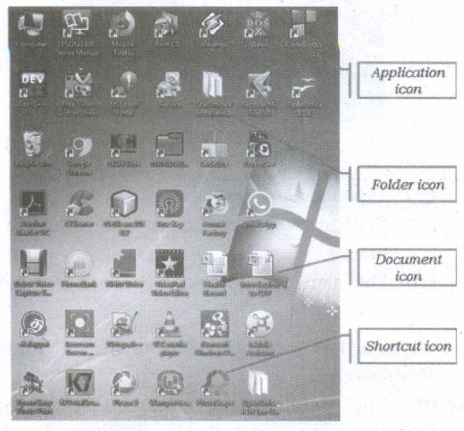
Explain the different types of icons of windows desktop
1.
(d)
New foldrer
2.
(a)
Start ⟶ Run
3.
(d)
None of these
4.
(c)
?
5.
(a)
*
6.
(b)
Windows ME
7.
(c)
98
8.
(a)
95
9.
(a)
1
10.
(a)
Session Indicator
11.
(a)
Firefox
12.
(b)
Libre Office Calc
13.
(d)
Shutdown the Computer without closing the running applications
14.
(a)
My Document
15.
(d)
all of the above
16.
(i) Amazon
(ii) Trash
(iii) Files
(iv) System Settings
17.
All the Operating system based on the concept of GUI (Graphical User Interface).
18.
Choose an option logout through the session indicator on the far right side of the top paner.
19.
The server distributions in Linux OS
(i) Ubuntu
(ii) CentOS
(iii) Red Hat
(iv) SUSE
(v) Fedora
20.
(i) The Open source software is free to use, distribute, and modify.
(ii) It has lower cost in most cases in only the fraction of the cost of their proprietary counter parts.
(iii) It is most secured as the code is accessable to everyone.
21.
"Save" option save a document in first time. "Save As" option save an already saved the document with a new name and also create a copy of already saved document with a new name obviously.
22.
| Files | Folders |
| File is the collection of records. | Folder is a collections of files. |
| Create a file : Start \(\rightarrow\)All Programs \(\rightarrow\) select application \(\rightarrow\) ok |
Create a folders: Right click \(\rightarrow\)New \(\rightarrow\) folder \(\rightarrow\)ok |
23.
File extension is used to know that in which the file is associated with.
24.
Five fox is a browser. Thunderbird is email client which can be used view emails received.
25.
| S.No | Ubuntu OS | Windows |
| 1. | Open-source (Licensing freedom) |
Closed source (Licensing Restriction |
| 2. | Online peer support | Paid-help-desk support |
| 3. | Full hardware support | Partial hardware support |
| 4. | Support CUI | No CUI support |
| 5. | Flexibility | Rigidity |
26.
(i) Due to low capacity of main memory (RAM) the system many hang while working with multiple files.
(ii) To reduce it increase the size of main memory and other reasons for hanging is over heating, driver corruption or errors, software errors and computer virus.
27.
Finding Files and Folders : You can use the search box on the Start menu to quickly search a particular folder or file in the computer or in a specific drive.
To find a file or folder:
(i) Click the Start button, the search box appears at the bottom of the start menu.
(ii) Type the name of the file or the folder you want to search. Even if you give the part of the file or folder name, it will display the list of files or folders starting with the specified name.
(iii) The files or the folders with the specified names will appear, if you click that file, it will directly open that file or the folder.
(iv) There is another option called "See more results" which appears above the search box.
(v) If you click it, it will lead you to a Search Results dialog box where you can click and open that file or the folder.
Searching Files or folders using Computer icon :
(i) Click Computer lcon from desktop or from Start menu.
(ii) The Computer disk drive screen will appear and at the top right corner of that screen, there is a search box option.
(iii) Type the name of the file or the folder you want to search. Even if you give the part of the file or folder name, it will display the list of files or folders starting with the specified name.
(iv) Just click and open that file or the folder.
28.
Application Icons:
(i) These icons are representing Software package's logo. Double-click over this icon, the related application gets invoked.
(ii) Shortcut Icons: These icons point to a particular application or file or folder. By double clicking over them the related application or file or folder will open. This represents the shortcut form to open a particular application.
(iii) Document Icons: Active document window which is a window within an application window is called as the document icon.

11th Standard Syllabus & Materials
11th Standard
TN 11th Tamil பீடு பெற நில் - செய்யுள் - காவடிச்சிந்து Important Questions And Answers Study Material - QB365 Set A
NEW11th Standard
TN 11th Tamil பீடு பெற நில் - உரைநடை - மலை இடப்பெயர்கள் : ஓர் ஆய்வு Important Questions And Answers Study Material - QB365 Set A
NEW11th Standard
TN 11th Tamil மாமழை போற்றுதும் - துணைப்பாடம் - யானை டாக்டர் Important Questions And Answers Study Material - QB365 Set A
NEW11th Standard
TN 11th Tamil மாமழை போற்றுதும் - செய்யுள் - ஐங்குறுநூறு Important Questions And Answers Study Material - QB365 Set A



Tamilnadu Stateboard 11th Standard Subjects

Maths

Commerce

Economics

Biology

Business Maths and Statistics

Accountancy

Computer Science

Physics

Chemistry
Maths
Biology
Economics
Physics
Chemistry

History
Business Maths and Statistics

Computer Science
Accountancy
Computer Applications
History
Computer Technology
Commerce
Computer Applications
Computer Technology

Tamil

English

French
Tamilnadu Stateboard Standards
