
 100% FREE ACCESS
11th Standard Syllabus & Materials
11th Standard
TN 11th Tamil இயற்கை வேளாண்மை,சுற்றுச்சூழல் -செய்யுள் - மனோன்மணீயம் Important Questions And Answers Study Material - QB365 Set A
NEW11th Standard
TN 11th Tamil என்னுயிர் என்பேன் -துணைப்பாடம் - இசைத்தமிழர் இருவர் Important Questions And Answers Study Material - QB365 Set A
NEW11th Standard
TN 11th Tamil மொழி கலை -செய்யுள் - ஒவ்வொரு புல்லையும் Important Questions And Answers Study Material - QB365 Set A
NEW11th Standard
TN 11th Tamil பீடு பெற நில் - இலக்கணம் - பகுபத உறுப்புகள் Important Questions And Answers Study Material - QB365 Set A
NEW11th Standard
TN 11th Tamil பீடு பெற நில் - துணைப்பாடம் - வாடிவாசல் Important Questions And Answers Study Material - QB365 Set A
NEW11th Standard
TN 11th Tamil பீடு பெற நில் - செய்யுள் - குறுந்தொகை Important Questions And Answers Study Material - QB365 Set A

Published on: 28/12/2018
11th Half Yearly Model Question
Download Tamil Nadu 11th Standard Computer Applications question papers, model tests, one-mark questions, important questions, and public exam papers in PDF format. Free study materials and answer keys for TN State Board students.
Questions + Answers key
Take MCQ Computer Applications Test
1.
Answer the following: True or false.
(i) < Text area > tag used to receive multiline text data as input
(ii) < Input > tag is a container tag
(iii) user can select more than one option using radio button control
2.
Write note on string Operator.
3.
Write the syntax for else-if statement.
4.
What are the attributes available in < html >tags?
5.
Identify the functions of OS for the following statement.
(a) Physical and virtual devices are maintained.
(b) Partitioned allocation is one of the technique
(c) Deadlock handling
6.
Write down the classifications of microprocessors based on the instruction set.
7.
Complete the following Octal numbers 365, 366, 367,.......
8.
How are transition effects helpful in creating an effective presentation in Impress?
9.
How will you insert cells, row and columns using "Insert cells" Toolbar.
10.
What are comments, footnotes and endnotes in writer?
11.
Which of the following statement is true?
(i) An expression is formed by joining operators
(ii) An expression is evaluated and produces result
(iii) There are three types of expressions in Javascript
Only(i)
only (ii)
only (iii)
all the above
12.
Expansion of PNG is________.
Point Network Graphics
Portable Network Graphics
Primary Network Group
Portable Network Group
13.
Which of the following Tamil keyboard layout not used by Android OS?
NHM Wirter
E-Kalappai
Lippikar
All of these
14.
The function body enclosed with________.
( )
< >
[ ]
{ }
15.
What will be the output for the following snippet:
For (var n=0; n < 10; n+1)
{
if (n==3)
{
break;
}
document write (n+"< br >");
}
0 1 2
0 1 2 3
0 1 2 3 4
0, 1, 3
16.
Which of the following ways given below is correct to write a CSS?
p{color:red; text-align:center};
p {color:red; text-align:center}
p {color:red; text-align:center;}
p (color:red;text-align:center;)
17.
Read the following statement and choose the correct statement(s):
(I) Link in HTML is used to create hyperlinks to web content.
(II) HREF is abbreviated as Hypertext Markup File
I is correct
II is correct
I and II is correct
Both are wrong
18.
In HTML, colours are represented as
Binary values
Octal values
Decimal values
Hexadecimal values
19.
Where will you select the option to log out suspend, restart, or shut down from the desktop of Ubuntu OS?
Session Indicator
Launcher
Files
Search
20.
What is the smallest size of data represented in a CD?
blocks
sectors
pits
tracks
21.
Which indicates whether the given value is 82 positive or negative?
Signed bit
Unsigned bit
1's complement
2's complement
22.
Which generation of computer used IC's?
First
Second
Third
Fourth
23.
Identify the default view in Impress.
Normal
Slide Sorter
Handout
Notes
24.
How many rows are there in Openoffice calc version 4.1.4?
1048576
65535
6189
548526
25.
A ______ is a set of characters in a particular style.
font
highlighting
Alignment
Indenting
26.
Write the types of software piracy?
27.
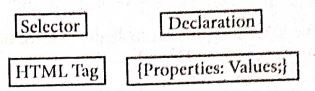
Write down general format of CSS declaration.
28.
What is pixel?
29.
What is a Static web Page?
30.
What are the different Operating Systems used in computer?
31.
Expand RAM and ROM.
32.
Distinguish Primary and Secondary memory.
33.
What do you understand by a slide?
34.
What are the options available in "Insert Cells" dialog box?
35.
What is Autocorrect Option?
36.
Explain How will you create drop-down list box with an example.
37.
Explain about the Arithmetic operator with suitable example.
38.
Explain the working of do while loop in Javascript with an example?
39.
Compare the different geographical types of Network
40.
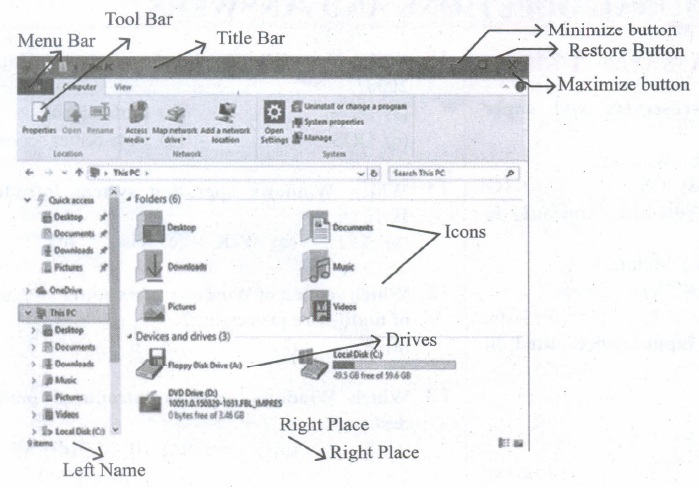
Observe the figure and mark all the window elements, Identify the version of the Windows Os.
41.
Explain the classification of Opensource OS
42.
Define the following. (a) Bus (b) Data bus (c) Address bus (d) Control Bus
43.
Explain the following:
a. Inkjet Printer
b. Multimedia projector
c. Bar code / QR code Reader
44.
List some advantages of using template.
45.
Explain how will you insert a function wizard.
1.
(i) True
(ii) False
(iii) False.
2.
One of the built-in features of JavaScript is the ability to concatenate strings. The + operator performs addition on numbers but also serves as the concatenation operator for strings. Because string concatenation has precedence over numeric addition, + will be interpreted as string concatenation if any of the operands are strings. + operator which is also called as the string concatenation operator.
3.
if (expression)
{
// Execute code block #1
}
else if (expression)
{
// Execute code block #2
}
else if (expression)
{
// Execute code block #3
}
else
{
// if all else fails, execute block #4
}
4.
Attributes of < html > tag:
(i) The < html > tag is used to specify the beginning and closing of an HTML document. This tag does not have any effect on the appearance of a document. This is only used to make browsers and other programs, known that this is an HTML document.
(ii) < html > tag has two attributes viz. dir and lang to specify the text direction and language setting respectively.
| Attribute | Value to be set to attribute | Description |
| dir | Itr (align left-to-right) rtl (align right-to-Ieft) | dir attribute specifies the direction of the text to be aligned within the entire document. It is global attribute. i) Itr is the default value. ii) rtl is used for Arabian languages. |
| lang | Predefined language code English - en Tamil- ta Telugu - te |
lang attribute specify the language used within the document. Predefined language code will be used for this purpose. Malayalam - ml; Kannada - kn; Hindi - hi; French - fr; German - de; |
5.
(a) Device Management
(b) Memory Management
(c) Process Management
6.
There are two types of microprocessors based on their instruction sets.
(i) Reduced Instruction Set Computers (RISC)
(ii) Complex Instruction Set Computers (CISC)
7.
(365)8 = 3 x 82 x 6 x 81 + 5 x 80
= 192 + 48 + 5 = (245)10
(366)8 = 3 x 82 + 6 x 81 + 6 x 80
= 192 + 42 + 6 = (246)10
(367)8 = 3 x 82 + 6 x 81 + 7 x 80
= 192 + 42 + 6 = (247)10
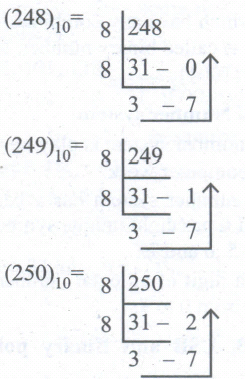
In decimal form, the given sequence will be 245, 246, 247, 248, 249, 250.
To complete the sequence of Octal number, we need to find the octal equal of 248, 249 and 250.
8.
Transition effects are special effects that play when the user view a presentation in slide show. In other words,it appear after vanishing of the current slide and before the appearance of the next slide. These effects are used to enhance the initial appearance of the slides.
9.
(i) Insert Cells floating toolbar is also used to insert cells, rows and columns
(ii) Click View ➝Toolbars ➝ Insert Cell
(iii) A tiny floating toolbar appears on the screen with four icons; using these icons, you can insert cells, rows and columns.
10.
Comments:
Comments also called "notes", which authors and reviewers often use to exchange ideas ask for suggestions or brainstorm during the review process.
Footnotes:
Afoot note will contain the source of the information or additional information about the text contained in the document. It appear at the bottom of a page.
End notes:
At end note is additional information or credits given at the end of the document instead of at the end of each page.
11.
(d)
all the above
12.
(b)
Portable Network Graphics
13.
(d)
All of these
14.
(d)
{ }
15.
(a)
0 1 2
16.
(c)
p {color:red; text-align:center;}
17.
(a)
I is correct
18.
(d)
Hexadecimal values
19.
(a)
Session Indicator
20.
(c)
pits
21.
(a)
Signed bit
22.
(c)
Third
23.
(a)
Normal
24.
(a)
1048576
25.
(a)
font
26.
(i) Duplicating and selling copyrighted programs
(ii) Downloading software illegally through network.
27.
28.
Thickness of the horizontal line can be changed with size attribute.The size is given in terms of pixels. A pixel is one of the tiny dots that make up the display on computer. Generally, 72 pixels is equal to an inch. Pixel is usually referred as points.
29.
Web pages are called static web pages as they remain the same whenever it is visited. Examples of static web pages are small business organizations, school websites etc.
30.
The different types of operating system uscd in the computer:
(i) Single User and Single Task Operating Systems
(ii) Multi User Operating Systems
(iii) Multi Pocessing Operating Systems
(iv) Distributed Operating Systems
(v) Prominent Operating Systems
31.
(i) RAM - Randam Access Memory
(ii) ROM - Read only Memory
32.
| Primary Memory | Secondary memory |
| It is used to temporarily store the programs and data when the instructions are ready to execute. | It is used to store the data permanently. |
| It is volatile, the content is lost when the power supply is Switched off. Eg. RAM |
It is non-volatile, the content is available even after the power supply is Switched off. Eg. ROM,CD-ROM, DVD ROM. |
33.
In a presentation a slide is an electronic page that contains information about the presentation topic.
34.
The options available in Insert cells dialog box are
(i) Shift cells down
(ii) Shift cells right
(iii) Entire row
(iv) Entire colunmn
35.
AutoCorrect function has the facility to correct the common misspellings and typing errors, automatically.
36.
The < select > tag is used to create dropdown list box in HTML.
It provides a list of various options as a dropdown list.
This element is more helpful when a number of options are to be displayed in a limited space. The < option > tag.is used to specify list items
Attributes of < Select > tag:
Name - Provide the name to the control, which is sent to the server.
Size - Determine the style of dropdown list box.
Size = 1 dropdown list box
Size = 2 List box
Multiple -Allows user to select multiple values.
Attributes of < Option > tag:
Selected - Indicate default selection
Value - Value to be submitted to server
< Select name = area size= 2 >
< option value = CHN > Chennai < /option >
< option value = MDR selected > Madurai < /option >
< option value = CBO > Coimbatore < /option >
< option value = KKM > Kanyakumari < /option >
< /Select > < /p >
37.
Javascript supports all the basic arithmetic operators like addition (+),subtraction (-) multiplication (*), division (/), and modulus (%, also known as the remainder operator)
Arithmetic operators :
| Arithmetic Operator | Meaning | Example | Result |
|---|---|---|---|
| + | Addition | var sum = 20 + 120 | Variable sum = 140 |
| - | Subtraction | var diff = 120 - 20 | Variable diff = 100 |
| * | Multiplication | var prod = 10*100 | Variable prod = 1000 |
| / | Division | var res = 100 / 522 | Variable res = 5.22 |
| % | Modulus operator | var rem = 100 % 522 | Variable rem = 22 (remainder) |
38.
The do ..while loop is like a while loop, except that the loop expression is tested at the end of the loop rather than at the beginning. This means that the body of the loop is always executed a,t least once. The syntax is:
do
{
body of the loop
} while (expression);
An important difference between while and do ..
while statement is in the do ..while loop
body of the loop always executed at least once before the condition can be executed. In a while loop, first condition will be evaluated and then only based on the result of the condition the body of the loop will be executed or not.
Using do ..while loop
< Html >
< Head >
< Title >Program - To test do ..while statement in
JavaScript < /Title >
< /Head >
< Body >
< script language="javascript" type="text/ javascript" >
document.write("< h2 > Using do ..while
Statement < /h2 >");
var no2=0; do
{
document. write(no2+"");
no2=no2+2;
}while(no2< = 10);
< /script >
< /Body >
< /Html >
39.
Depending upon geographical area covered by a network, it is classified as:
(i) Local Area Network (LAN)
(ii) Metropolitan Area Network (MAN)
(iii) Wide Area Network (WAN)
(iv) Personal Area Network (PAN)
(v) Campus Area Network (CAN)
(iv) Wireless Local Area Network (W-LAN)
(i) Local Area Network (LAN)
.JPG)
| Range | Upto 10 km |
| Location | Refers to same office, same building, same company and in same school |
| Speed | Upto 10-100 Mbps |
| Advantage | Low Cost, Resource Sharing, Security |
| Disadvantage | Area Covered Limited When Number of nodes increases,Performance Decreases |
(ii) Metropolitan Area Network (MAN)
.JPG)
| Range | 10 to 15 Miles |
| Location | MAN is a network designed to extend over an entire city. |
| Speed | Upto 5 - 10 Mbps |
| Advantage | Wider than LAN. |
| Disadvantage | Data rate is slow compared toLAN Cost higher than LAN. |
(iii) Wide Area Network (WAN)
.JPG)
| Range | Above 1000 Kms |
| Location | It Span entire countries and continents. |
| Speed | Upto 256 Kbpsto 2 Mbps. |
| Advantage | Large geographical Areaz |
| Disadvantage | 1. Complicated and Complex. High Cost. 2. Requires high Performance. Devices. 3. Low security. Cost higher than LAN. |
(iv) Personal Area Network (PAN)
.JPG)
| Range | Upto 100 meters |
| Location | Used for shorter distance, controlled by a single person within a single building |
| Speed | Up to 250 Kbps. |
| Advantage | 1. Efficient, Cost effective and convenient. 2. Controlled by a single person Hotspot may connect upto 8 devices. |
| Disadvantage | 1. Shorter distance upto 10 meters only. 2. Data rate is low compared to other network. |
(v) Campus Area Network (CAN)
.JPG)
| Range | Upto 5 Kms |
| Location | Larger than LAN, but smaller than MAN. University, school or small business, enterprise |
| Speed | 40 KB/s TO 1 MB/s |
| Advantage | Cost effective, Wired or Wired Network, High Bandwith Multidepartmental Network access |
| Disadvantage | Difficult to manage |
(iv) Wireless Local Area Network (W-LAN)
.JPG)
| Range | Upto 50 Kms |
| Location | Ranges from a single room to an entire campus Uses Wifi or Bluetooth, Radio waves |
| Speed | 1 Mbps to 54 Mbps. |
| Advantage | Portable Installation is quick and easy |
| Disadvantage | Low Bandwith due to interference |
40.
41.
(i) Android is a mobile operating system developed by Google, based on the Linux and designed primarily for touchscreen mobile devices such as smartphones and tablets.
(ii) Google has further developed Android TV for televisions, Android Auto for cars and Android Wear for wrist watches, each with a specialized user interface.
(iii) Variants of Android are also used on game consoles, digital cameras, PCs and other electronic gadgets.
UNIX :
UNIX is a family of multitasking, multi-user operating systems that derive originally from AT&T Bell Labs, where the development began in the 1970s by Ken Thompson and Dennis Ritchie.
Linux
(i) Linux is a family of open-source operating systems. It can be modified and distributed by anyone around the world.
(ii) This is different from proprietary software like Windows, which can only be modified by the company that owns it.
(iii) The main advantage of Linux operating system is that it is open source. There are many versions and their updates
(iv) Most of the servers run on Linux because it is easy to customize.
42.
(a) Bus:
A bus is a collection of wires used for communication between the internal components of a computer.
(b) Data bus:
(i) Data busis a collection of wires to carry data in bits.
(ii) A data bus is used to transfer data between the memory and the CPU.
(iii) The data bus is bidirectional.
(c) Address bus:
(i) Address bus is a collection of wires to carry data in bits.
(ii) The address bus is used to point a memory location.
(iii) The address bus is unidirectional.
(d) Control bus:
(i) Control bus is a control line/collection of wires to control the operation/functions.
(ii) The control bus controls both read and write operations.
43.
(a) Inkjet Printers:
(i) Inkjet Printers use colour cartridges which combined Magenta, Yellow and Cyan inks to create color tones. A black cartridge is also used for monochrome output. Inkjet printers work by spraying jonised ink at a sheet of paper.
(ii) They use the technology of firing ink by heating it so that it explodes towards the paper in bubbles or by using piezoelectricity in which tiny electric currents controlled by electronic circuits are used inside the printer to spread ink in jet speed.
(iii) An Inkjet printer can spread millions of dots of ink at the paper every single second.
(b) Multimedia Projectors:
(i) Multimedia projectors are used to produce computer output on a big screen.
(i) These are used to display presentations in meeting halls or in classrooms.
(c) Bar Code / QR Code Reader:
(i) A Bar code is a pattern printed in lines of different thickness. The Bar code reader scans the information on the bar codes transmits to the Computer for further processing.
(ii) The system gives fast and error free entry of information into the computer.
QR (Quick response) Code:
The QR code is the two dimension bar code which can be read by a camera and processed to interpret the image.
44.
(i) Professional Graphic Design: Even the user don't have graphic design experience, they know how to make adjustments to existing graphics.
(ii) Branding: Templates can easily be modified by changing colors, fonts, graphics etc.
(iii) Speed: With a good starting point in each slide, the presentation is made in a snap.
(iv) Quick customization: It's much easier to edit the template in its original form, not as a copy of a copy.
(v) Consistency: A consistent design scheme will avoid Jarring transitions and sneaking suspicion that the presentation was pasted together as a ransom note.
45.
Step 1: Click fx icon from Formula bar (or) choose Insert ➝ Functions (or) Press Ctrl +F2.
Step 2: Pull down category list box, Choose the type of functions "Mathematics"; All function under Mathematics category displayed in "Functions" list box.
Step 3: Scroll the "Functions" list box and select the type of function. The selected function and wizard shows description about the selected function on the right comer of the dialog box.
Step 4: Click ''Next'' command button.
Step 5: Type cell address according to the function selected or click Select cell button., Now, Function Wizard will be shrinked, and displayed as a floating toolbar as with the selected function.
Step 6: Click on the cell which is contains the value according the function selected. Now, Minimized wizard shows the cell address selected.
Step 7: Click "Maximize" button to display full wizard. Now, Function wizard appears.
Step 8: Directly type the cell address according to the selected function.
Step 9: Result Function box at the top right comer is also shown the result of the function. If you agreed the result, click "OK" button. If you click "Back" button, it will display the previous page of this wizard.

11th Standard Syllabus & Materials
11th Standard
TN 11th Tamil பீடு பெற நில் - செய்யுள் - காவடிச்சிந்து Important Questions And Answers Study Material - QB365 Set A
NEW11th Standard
TN 11th Tamil பீடு பெற நில் - உரைநடை - மலை இடப்பெயர்கள் : ஓர் ஆய்வு Important Questions And Answers Study Material - QB365 Set A
NEW11th Standard
TN 11th Tamil மாமழை போற்றுதும் - துணைப்பாடம் - யானை டாக்டர் Important Questions And Answers Study Material - QB365 Set A
NEW11th Standard
TN 11th Tamil மாமழை போற்றுதும் - செய்யுள் - ஐங்குறுநூறு Important Questions And Answers Study Material - QB365 Set A



Tamilnadu Stateboard 11th Standard Subjects

Maths

Commerce

Economics

Biology

Business Maths and Statistics

Accountancy

Computer Science

Physics

Chemistry
Maths
Biology
Economics
Physics
Chemistry

History
Business Maths and Statistics

Computer Science
Accountancy
Computer Applications
History
Computer Technology
Commerce
Computer Applications
Computer Technology

Tamil

English

French
Tamilnadu Stateboard Standards
