
 100% FREE ACCESS
11th Standard Syllabus & Materials
11th Standard
TN 11th Tamil இயற்கை வேளாண்மை,சுற்றுச்சூழல் -செய்யுள் - மனோன்மணீயம் Important Questions And Answers Study Material - QB365 Set A
NEW11th Standard
TN 11th Tamil என்னுயிர் என்பேன் -துணைப்பாடம் - இசைத்தமிழர் இருவர் Important Questions And Answers Study Material - QB365 Set A
NEW11th Standard
TN 11th Tamil மொழி கலை -செய்யுள் - ஒவ்வொரு புல்லையும் Important Questions And Answers Study Material - QB365 Set A
NEW11th Standard
TN 11th Tamil பீடு பெற நில் - இலக்கணம் - பகுபத உறுப்புகள் Important Questions And Answers Study Material - QB365 Set A
NEW11th Standard
TN 11th Tamil பீடு பெற நில் - துணைப்பாடம் - வாடிவாசல் Important Questions And Answers Study Material - QB365 Set A
NEW11th Standard
TN 11th Tamil பீடு பெற நில் - செய்யுள் - குறுந்தொகை Important Questions And Answers Study Material - QB365 Set A

Published on: 14/12/2019
Cascading Style Sheets
Download Tamil Nadu 11th Standard Computer Applications question papers, model tests, one-mark questions, important questions, and public exam papers in PDF format. Free study materials and answer keys for TN State Board students.
Questions + Answers key
Take MCQ Computer Applications Test
1.
A __________________ tag is used to change the default characteristics of a particular tag in the entire web document wherever that tag is used.
< Style >
< Default >
< DS >
None of these
2.
Which of the following provides powerful control over the presentation of an HTML document?
Style tag
CSS
Link
form
3.
How many color names supported by HTML?
256
16
140
16 million
4.
That is the name of the file where all style information are stored?
Sheet
HTML
Style
CSS
5.
A seperate style sheet files are known as_________
Page-level Style
Internal Style
Sitewide style sheet
all of these
6.
Which of the following indicates that the text included is a comment?
/* */
!* *!
< * * >
\* *\
7.
The Declaration block of CSS is surrounded by
( )
[ ]
{ }
< >
8.
The extension of CSS file is
.ssc
.css
.csc
.htm
9.
CSS is also called as:
Sitewide Style Sheets
Internal Style Sheets
Inline Style Sheets
Internal Inline Sheets
10.
Which of the following is the page level style?
< Page >
< Style >
< Link >
< H >
11.
Write about CSS Comments.
12.
What do you mean by Sitewide Style sheets or External Style Sheets.
13.
What is the use of < Link > tag? Give the details of attributes used with < Link >tag.
14.
Write a < style > tag to change color, font name and size of < h3 > tag?
15.
16.
How will link CSS with HTML?
17.
Write a CSS file to define font type, style and size to < h1 > tag.
18.
Write a CSS file to define text color and alignment to < p > tag.
19.
Write a short note on rule of CSS.
20.
What are the advantages of using CSS?
21.
Tabulate C55 - Frequently using background image and paragraph margin formatting Properties and Values.
22.
List and explain the Font and text element properties and values used in CSS.
23.
Write an HTML document to display the following paragraph as per the given description Using CSS:
1. Font Name: Cooper Black
2. Style: Bold Italics
3. Color: Blue
“The State Institute of Education (SIE) was established in 1965 to provide for systematic study of problems relating to School Education under the administration of Directorate of School Education.”
1.
(a)
< Style >
2.
(b)
CSS
3.
(c)
140
4.
(d)
CSS
5.
(c)
Sitewide style sheet
6.
(a)
/* */
7.
(c)
{ }
8.
(b)
.css
9.
(a)
Sitewide Style Sheets
10.
(b)
< Style >
11.
Many times, we may need to put additional comments in our style sheet blocks. We can simply put our comments inside.
/*.....this is a comment in style sheet.....*/
12.
If we want use the same style to multiple pages, we should define styles as a separate style file. These separate style files are known as Sitewide Style sheets or External Style Sheets.
13.
The < link > tag is used to add CSS file with HTML in head section. While 'using < link > tag, the following attributes' are also included along with standard values.
reI = "style sheet"
type = "text/css"
The href attribute is used to link the css file.
14.
< style >
h3
{color.blue;
font-family: "Copperplate Gothic Bold";
font-size: 14pt;}
< /style >
15.
16.
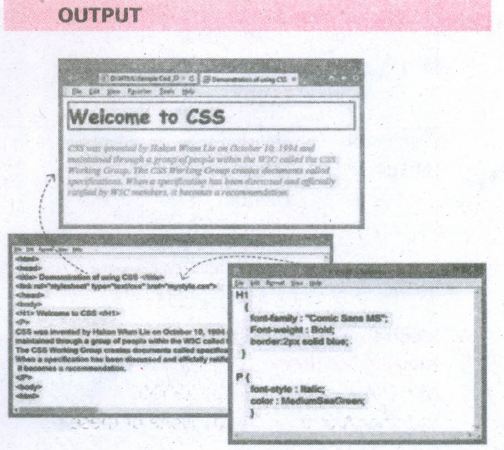
Linking CSS with HTML:
The < link > tag is used to add CSSfile with HTML in head section. While using < link > tag, the following attributes are also included along with standard values.
rel = "stylesheet"
type = "text/css"
The href attribute is used to link the .css file.
General format of < Link > tag
< Link rel = "stylesheet" type = "text/css" href = CSS_File_Name_with_Extension >
HTML Code for Formatting HTML element through CSS:
Mystyle.css
H1
{
font-family: "Comic Sans MS";
Font-weight: Bold;
border:2px solid blue;·
}
P {
font-style : Italic;
color :MediumSeaGreen;
}
--- CSS_Test.htm ---
< html >
< head >
< title > Demonstration of using CSS < /title >
< link rel="stylesheet" type="text/css"
href= "mystyle.css" >
< /head >
< body >
< H1 > Welcome to CSS < /H1 >
< p >
CSS was invented by HakonWium Lie on October 10, 1994 and maintained through a group of people within the W3C called the C5S Working Group. The CSSWorking Group creates documents called specifications. When a specification has been discussed and officially ratified by W3C members, it becomes a recommendation.
< /p >
< body >
< html >
17.
H1
{
Font-family
}
Font-family : "Arial";
Font-style : Italic;
Font-size : 24px;
}
18.
{
color: red; Text-align : center;
}
19.
CSS style declaration consists of two major parts; Selector and Declaration. The Selector refers an HTML tag in which you want to apply styles. The Declaration is a block of code that contains style definition. It should be surrounded by curly braces. Any number of properties for each selector can be included and they must be separated by semicolons. The property name and its value should be separated by a colon. Each declaration should be terminated by a semicolon (;).
20.
(i) Maintainability : CSS are also defined and stored as separate files. So, the style and appearance of a web page can be dynamically changed and maintained with less effort.
(ii) Reusability : The styles defined in CSS can be reused in multiple HTML pages.
(iii) Easy to understand : The tags in web pages are well organized with style specifications and therefor it is easy to understand.
21.
| Formatting | Properties | Values | Example |
| Background Image | Background-Image | URL ("image name with extension'') | Body { background-image: url ("Flower.gif''); } |
| Background-repeat | norepeat | Body { background-image: url ("Flower.gif''); background-repeat: norepeat; } |
|
| Background-position | Direction | Body { background-image: url ("Flower.gif''); background-repeat: norepeat; background-position: right top; } |
|
| Paragraph Margin | Margin-top Margin-bottom Margin-left Margin-right | Margin size in pixels | P { Margin-top: 50px; Margin-left : 50px; } |
22.
| Formatting | Properties | Values | Example |
| Text Colour | Color | Predefined _Color_Name | P { color:pink; } H1 { color:MediumSeaGreen; } |
| Text Alignment | Text-align | Centre / Left / Right / Justify | P { Text-align: centre; } |
| Font type | Font-family | Font_name | P { Font-family: "Times New Roman" : } |
| Font Style | Font_Style | Normal/Italic | P { Font-family: "Times New Roman" Font-style: Italic; } |
| Font Style (Bold) |
Font-weight | Normal/Bold | P { Font-family: "Times New Roman"; Font-style: Italic; Font-weight: bold; } |
| Font size | Font_size | Size in pixels | P { Font-family: "Times New Roman" Font-style: Italic; Font-size: I4px; } |
| Background Colour | Background Colour | Predefined_Color_Name | Body { background-color: violet; } |
| Border Colour | Border | Borer thickness < space > border style < space > Predefined_borderColor_Name |
H2 { border: 2px solid red;} |
| HTML supports nearly 140 color names | |||
| Background Image | Background-image | URL("image name with extension") | Body { background-image: url ("Flower.gif"); } |
| Background-repeat | norepeat | Body { background-image: url ("Flower.gif"); background-repeat: norepeat; } |
|
| Background-position | Direction | Body { background-image; url ("Flower.gif"} ; background-repeat: norepeat; background-position: right top; } |
|
| Paragraph Margin | Margin-top Margin-bottom Margin-left Margin-right |
Margin size in pixels | P { Margin-top: 50px; Margin-left: 50px; } |
23.
< html >
< head > < title > CSS DOCUMENT < /title >
< style >
P
{
font-family : "Cooper Black"; Font-style: Bold: Font-weight: Italics; Color: Blue;
}
< /style >
< body >
< p >
The State Institute of Education (SIE) was established in 1965 to provide for systematic study of problems relating to School Education under the administration of Directorate of School Education.
< /p >
< /body >
< /html >

11th Standard Syllabus & Materials
11th Standard
TN 11th Tamil பீடு பெற நில் - செய்யுள் - காவடிச்சிந்து Important Questions And Answers Study Material - QB365 Set A
NEW11th Standard
TN 11th Tamil பீடு பெற நில் - உரைநடை - மலை இடப்பெயர்கள் : ஓர் ஆய்வு Important Questions And Answers Study Material - QB365 Set A
NEW11th Standard
TN 11th Tamil மாமழை போற்றுதும் - துணைப்பாடம் - யானை டாக்டர் Important Questions And Answers Study Material - QB365 Set A
NEW11th Standard
TN 11th Tamil மாமழை போற்றுதும் - செய்யுள் - ஐங்குறுநூறு Important Questions And Answers Study Material - QB365 Set A



Tamilnadu Stateboard 11th Standard Subjects

Maths

Commerce

Economics

Biology

Business Maths and Statistics

Accountancy

Computer Science

Physics

Chemistry
Maths
Biology
Economics
Physics
Chemistry

History
Business Maths and Statistics

Computer Science
Accountancy
Computer Applications
History
Computer Technology
Commerce
Computer Applications
Computer Technology

Tamil

English

French
Tamilnadu Stateboard Standards
