
 100% FREE ACCESS
11th Standard Syllabus & Materials
11th Standard
TN 11th Tamil இயற்கை வேளாண்மை,சுற்றுச்சூழல் -செய்யுள் - மனோன்மணீயம் Important Questions And Answers Study Material - QB365 Set A
NEW11th Standard
TN 11th Tamil என்னுயிர் என்பேன் -துணைப்பாடம் - இசைத்தமிழர் இருவர் Important Questions And Answers Study Material - QB365 Set A
NEW11th Standard
TN 11th Tamil மொழி கலை -செய்யுள் - ஒவ்வொரு புல்லையும் Important Questions And Answers Study Material - QB365 Set A
NEW11th Standard
TN 11th Tamil பீடு பெற நில் - இலக்கணம் - பகுபத உறுப்புகள் Important Questions And Answers Study Material - QB365 Set A
NEW11th Standard
TN 11th Tamil பீடு பெற நில் - துணைப்பாடம் - வாடிவாசல் Important Questions And Answers Study Material - QB365 Set A
NEW11th Standard
TN 11th Tamil பீடு பெற நில் - செய்யுள் - குறுந்தொகை Important Questions And Answers Study Material - QB365 Set A

Published on: 21/01/2020
Download Tamil Nadu 11th Standard Computer Applications question papers, model tests, one-mark questions, important questions, and public exam papers in PDF format. Free study materials and answer keys for TN State Board students.
Questions + Answers key
Take MCQ Computer Applications Test
1.
List the website address of popular e-Libraries.
2.
What is phishing? Explain with suitable diagram.
3.
How will link CSS with HTML?
4.
Explain the usage of < B >, < I >, < U >, < S > tags
5.
Write about Webpage.
6.
How do you insert rows and columns?
7.
Write note on string Operator.
8.
What are the core tags used to create table in HTML?
9.
Write the specific use of Cortana.
10.
What are the requirements of segment in memory management?
11.
What are the differences between Windows and Linux Operating system?
12.
Write down the interfaces and ports available in a computer.
13.
Answer the following
1. In a decimal to binary conversion, the First remainder is known as ______and last remainder is _______
2. The binary System consists of _____and ________
3. The hexadecimal number system uses the digits from ______and _______
4. 20 = _______
14.
Write the steps to find 2's complement
15.
Write the truth table of fundamental gates
16.
Write a note Vaccum tube on.
17.
Differentiate Optical and Laser mouse.
18.
Write the applications of computer.
19.
Write the steps to save a worksheet.
20.
Why DDE link used while using paste special option?
1.
| Tamil e-Ubrary | Website address |
| Tamilnadu School Education andTeacher Education Training Textbooks and Resource Books |
http://www.textbooksonline. tn.nic.in/ |
| Tamil Virtual Academy | http://www.tamilvu.org/library/libindex.htm |
| Connemara Public Library | http://connemarapublic librarychennaLcom Veettukku_oru_noolagam /lndex.htrnl |
| Tamil Digital Library | http://tamildigitallibray.in/ |
| Chennai Library | http://www.chennailibrary. com |
| Thamizhagam | http://www.thamizham.net/ parithi/ parihi.html |
2.
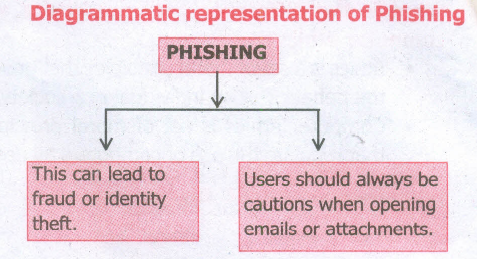
Phishing:
1. Phishing is a type of computer crime used to attack, steal user data, including login name, password and credit card numbers. It occurs when an attacker targets a victim into opening an e-rnailer an instant text message.
2. The attacker uses phishing to distribute malicious links or attachments that can perform a variety of functions including the extraction of sensitive login credentials from victims.
3.
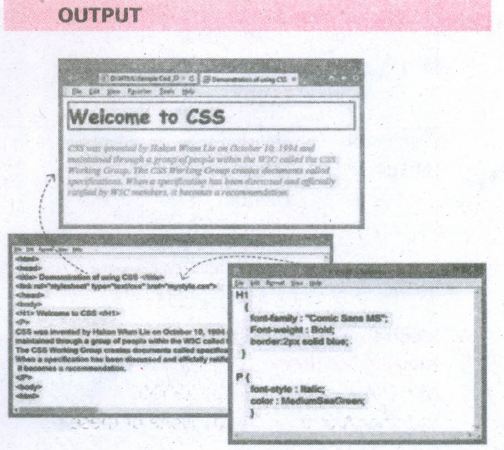
Linking CSS with HTML:
The < link > tag is used to add CSSfile with HTML in head section. While using < link > tag, the following attributes are also included along with standard values.
rel = "stylesheet"
type = "text/css"
The href attribute is used to link the .css file.
General format of < Link > tag
< Link rel = "stylesheet" type = "text/css" href = CSS_File_Name_with_Extension >
HTML Code for Formatting HTML element through CSS:
Mystyle.css
H1
{
font-family: "Comic Sans MS";
Font-weight: Bold;
border:2px solid blue;·
}
P {
font-style : Italic;
color :MediumSeaGreen;
}
--- CSS_Test.htm ---
< html >
< head >
< title > Demonstration of using CSS < /title >
< link rel="stylesheet" type="text/css"
href= "mystyle.css" >
< /head >
< body >
< H1 > Welcome to CSS < /H1 >
< p >
CSS was invented by HakonWium Lie on October 10, 1994 and maintained through a group of people within the W3C called the C5S Working Group. The CSSWorking Group creates documents called specifications. When a specification has been discussed and officially ratified by W3C members, it becomes a recommendation.
< /p >
< body >
< html >
4.
These tags may be shows the same output, but the usage of tags are varying. The following table shows the usage of this kind of tags.
| Tag | Usage | Tag | Usage | Final Output |
| < b > | To show the text in bold | < strong > | To show important text | Bold |
| < i > | To show the text as italics | < em > | To call attention | Italics |
| < u > | To show the text as underlined | < ins > | To insert a text | Underline |
| < s > | To show the wrong text in bold | < del > | To replaced or deleted text | Bold |
While writing HTML document, we should use the appropriate tags according to its usage. If we want show a text as underlined use < u > instead of < ins >
5.
Webpage :
A webpage is a page of a Website. A webpage can be accessed by a URL in a browser and that page can be copied and or send to a friend for review whereas websites are collections of multiple page that must be navigated to view other content.
6.
To insert rows or columns inside a table:
(i) Place the insertion pointer in the row or in the column where you would like to add new rows or columns and right-click.
(ii) Choose Row \(\rightarrow\) Insert - to insert a new row or Column \(\rightarrow\) Insert - to insert a new column. A dialog box will appear, from which you can select the number of rows or columns to insert. You can also set the position of the new rows or columns to Before or After.
7.
One of the built-in features of JavaScript is the ability to concatenate strings. The + operator performs addition on numbers but also serves as the concatenation operator for strings. Because string concatenation has precedence over numeric addition, + will be interpreted as string concatenation if any of the operands are strings. + operator which is also called as the string concatenation operator.
8.
There are five core tags are used to create a table in HTML. They are
(i) < table > tag is used to create a table
(ii) < tr > tag defines table rows
(iii) < th > tag defined table columns
(iv) < td > tag is used to specify the data in a cell
(v) < caption > tag defines title for the table.
9.
Use of Cortana
(i) Gives reminders based on time, places or people.
(ii) Track packages, teams, interests and flights.
(iii) Send emails and texts.
(iv) Find facts, files, places and information.
(v) Open any application on your system.
10.
Segments require hardware support in the form of a segment table which usually contains the physical address of the segment in memory, its size, and other data such as access protection bits and status (swapped in, swapped out, etc).
11.
| Windows OS | Linux OS |
| It is a commercial licensed OS. | It is a open source OS. |
| Only one distributor | Many distributors |
| It uses GUI | It uses kemal. |
| It boot only from primary partition | It boot either from a primary or from a logical partition. |
| Secure | Insecure. |
12.
(i) Serial Port
(ii) Parallen Port
(iii) USB 3.0
(iv) VGA connector
(v) Audio plugs
(vi) PS/2 Port
(vii) SCSI Port
(viii) High Definition Multimedia Interface(HDMI).
13.
1. LSB and MSB
2. 0 and 1
3. O and F
4. 1
14.
Step 1: Find 1's complement (Replace 1 by 0 and o by 1)
Step 2: Add 1 to the 1's complement
15.
a) AND gate truth table
| A | B | C |
| 0 | 0 | 0 |
| 0 | 1 | 0 |
| 1 | 0 | 0 |
| 1 | 1 | 1 |
b) OR Gate Truth table
| A | B | C |
| 0 | 0 | 0 |
| 0 | 1 | 1 |
| 1 | 0 | 1 |
| 1 | 1 | 1 |
c) Not Gate Truth Table
| A | A |
| 0 | 1 |
| 1 | 0 |
16.
(i) Vacuum tubes contain electrodes for controlling electron flow and were used in early computers as a switch or an amplifier.
(ii) Vaccum tubes are big in size and consumed more power.
17.
| Optical Mouse | Laser Mouse |
| Measures the motion and acceleration of the pointer. | Measures the motion and acceleration of pointer. |
| It uses light source instead of ball to judge the motion of the pointer. | Laser Mouse uses Laser Light. |
| Optical mouse is less sensitive towards surface. | Laser Mouse is highly sensitive and able to work on any hard surface. |
18.
The various applications of computers are,
(i) Business
(ii) Education
(iii) Marketing
(iv) Banking
(v) Insurance
(vi) Communication
(vii) Health care
(viii) Engineering - Robotics, Nano technology, Bio Engineering
19.
The process of saving a worksheet is very similar to saving a document.
Steps to save a worksheet are as follows:
Step 1: File ➝ Save (or) Ctrl + S (or) Click "Save" icon on the standard tool bar.
Step 2: If the spreadsheet has not been saved previously, the Save As dialog box will appear.
Step 3: Type the name in "File Name" list box.
Step 4: Click "Save as type" list box. It shows all possible formats to save your file. From the list select "Microsoft Excel 97/2000/XP (.xls)" option, and then click "Save" button
20.
DDE is an acronym for Dynamic Data Exchange, a mechanism whereby the source data can be pasted into destination as a linked, 'live' copy of the original. Any changes made in the source will immediately reflect into the destination. The DDE link ensures that, the source document is always updated.

11th Standard Syllabus & Materials
11th Standard
TN 11th Tamil பீடு பெற நில் - செய்யுள் - காவடிச்சிந்து Important Questions And Answers Study Material - QB365 Set A
NEW11th Standard
TN 11th Tamil பீடு பெற நில் - உரைநடை - மலை இடப்பெயர்கள் : ஓர் ஆய்வு Important Questions And Answers Study Material - QB365 Set A
NEW11th Standard
TN 11th Tamil மாமழை போற்றுதும் - துணைப்பாடம் - யானை டாக்டர் Important Questions And Answers Study Material - QB365 Set A
NEW11th Standard
TN 11th Tamil மாமழை போற்றுதும் - செய்யுள் - ஐங்குறுநூறு Important Questions And Answers Study Material - QB365 Set A



Tamilnadu Stateboard 11th Standard Subjects

Maths

Commerce

Economics

Biology

Business Maths and Statistics

Accountancy

Computer Science

Physics

Chemistry
Maths
Biology
Economics
Physics
Chemistry

History
Business Maths and Statistics

Computer Science
Accountancy
Computer Applications
History
Computer Technology
Commerce
Computer Applications
Computer Technology

Tamil

English

French
Tamilnadu Stateboard Standards
