
 100% FREE ACCESS
11th Standard Syllabus & Materials
11th Standard
TN 11th Tamil இயற்கை வேளாண்மை,சுற்றுச்சூழல் -செய்யுள் - மனோன்மணீயம் Important Questions And Answers Study Material - QB365 Set A
NEW11th Standard
TN 11th Tamil என்னுயிர் என்பேன் -துணைப்பாடம் - இசைத்தமிழர் இருவர் Important Questions And Answers Study Material - QB365 Set A
NEW11th Standard
TN 11th Tamil மொழி கலை -செய்யுள் - ஒவ்வொரு புல்லையும் Important Questions And Answers Study Material - QB365 Set A
NEW11th Standard
TN 11th Tamil பீடு பெற நில் - இலக்கணம் - பகுபத உறுப்புகள் Important Questions And Answers Study Material - QB365 Set A
NEW11th Standard
TN 11th Tamil பீடு பெற நில் - துணைப்பாடம் - வாடிவாசல் Important Questions And Answers Study Material - QB365 Set A
NEW11th Standard
TN 11th Tamil பீடு பெற நில் - செய்யுள் - குறுந்தொகை Important Questions And Answers Study Material - QB365 Set A

Published on: 14/12/2019
HTML - Adding Multimedia Elements and Forms
Download Tamil Nadu 11th Standard Computer Applications question papers, model tests, one-mark questions, important questions, and public exam papers in PDF format. Free study materials and answer keys for TN State Board students.
Questions + Answers key
Take MCQ Computer Applications Test
1.
Which of the following image format was standardized by W3C in 2001 ?
NX view
PNG
SVG
JPG
GIF
2.
Which of the following is the most popular image format supported by all web browsers?
PNG
GIF
JPEG
SWF
3.
Expansion of GIF is________.
Graphics Interchange Format
Graphical Interchange Format
Graph Interchange Format
Graphical Information Format
4.
Which of the following is an image editing applications?
Photoshop
GIMP
PICASA
All of these
5.
Which of the following is not an image editing applications?
Photoshop
Picasa
GIMP
HTML-5
6.
Write the General format of < bgsound > tag.
7.
Write the General format of < embed > tag?
8.
How the video or audio content included in HTML?
9.
What is inline?
10.
What is use of Alt attribute of < img > tag?
11.
How will you insert video and sound in a webpage?
12.
How will you insert an image in a HTML document?
13.
Explain any 2 use of the < Marquee > tag.
14.
Write a note on method attribute of < form > tag.
15.
What is the use of form in HTML?
16.
Explain all the attributes of < IMG > tag with suitable HTML code.
17.
Explain How will you create drop-down list box with an example.
18.
Explain how will you add video and sound in HTML.
19.
Explain scrolling text using < Marquee >.
1.
(c)
SVG
2.
(c)
JPEG
3.
(b)
Graphical Interchange Format
4.
(d)
All of these
5.
(d)
HTML-5
6.
General Format:
< bgsound src=music file name with location >
7.
General Format: < embed src=audio/video file name with location > < /embed >.
8.
In HTML, a video or audio content may be included as Inline or external data.
9.
The inline refers to audio or video files are handled as part pf the page.
10.
The alt attribute within < img > tag is used to describe the image, so that some text is conveyed even when the image cannot be displayed.
11.
1. The < embed > tag is used to attach an audio or video file easily within webpage.
2. This tag includes the controls of the- multimedia automatically in the browser.
3. The < noernbed > tag may be used as an alternate to display some other media file, in the case of the browser does not support < embed > tag.
Src is the primary attribute used with < embed > tag. The src attribute used to specify the name of the media file with its source location. Other attributes such as alt, height, width and align are used as it is used with < img >.
General Format:
< embed src = audio / video file name with location > < /embed >
An HTML code to demonstrate adding audio and video files (internal source):
< html >
< head >
< title > Adding Multimedi Files < /title >
< /head >
< body >
< img src="D:\Images\TN_Logo.
png" alt =, "Govt. of Tamilnadu Logo"
height=25% width = 15% >
< marquee > Welcome to < b > The State
Council of Educational Research and
Traning < /b >, Tamilnadu < /marquee >
12.
Inserting Images with HTML document
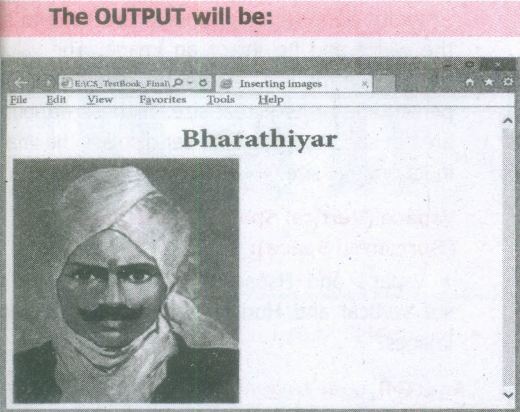
The < IMG > tag along with the attribute src (Source) is used to add images in HTML document.
General format:
< img src = image_name_with_extension > (OR)
< img src = URL >
Ex:
< img src = image1.gif >
Src attribute is the main attribute used to specify the filename of the image to be inserted.
If the image is not in the current working folder, image file name should clearly specify with the path of the file or URL, where the file is available.
Ex:
< img src = "D:\images\animals\cat.jpeg" >
An HTMLcode to insert an inline image:
< html >
< head >
< title > Inserting Images < /title >
< /head >
< body >
< h1 align = center > Bharathiyar< /h1 >
< img src = bharathiyar.gif >
< /body >
< /html >
13.
(i) Direction:
1. This is used to specify the direction of the movement of text or image.
2. The text or image will move towards right to left by default. So, the default direction is left.
3. The Possible values are 'up', 'down', 'left' or 'right'.
(ii) Behaviour:
1. This attribute is used to specify the type of scrolling.
2. The values are 'scroll', 'slide' and 'alternate'.
14.
The method attribute of the form tag is used to identify how the form element names and values will be sent to the server. The get method will append the names of the form elements and their values to the URL. The post method will send the names and values of the form elements as packets.
15.
Forms are used to receive information from the user:
1. Forms are commonly used to allow users to register on a Web site, to log in to a Web site, to order a product, and to send feedback.
2. In search engines, forms are used to accept the keywords for search.
16.
Attributes of < img > tag:
Other than src, the < img > tag has many attributes the enable to control how the image is presented on the page.
Alt (Alternative Text)
The alt attribute within < img > tag is used to describe the image, so that some text is conveyed even when the image cannot be displayed.
Ex:
< img src = bharathiyar.gif alt = "National Poet of India" >
Width and Height:
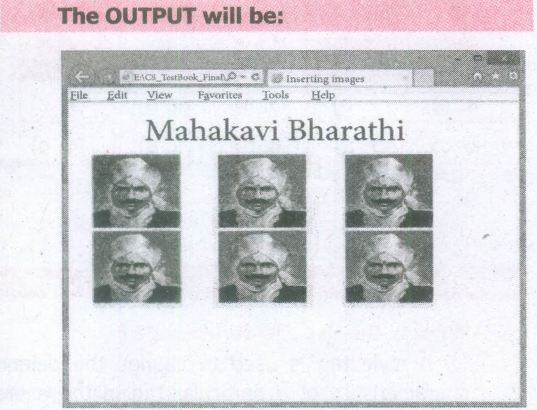
Width and Height attributes are used to set the width and height of an image. The values of these attributes should be either pixels or percentage of its actual size. If these attributes are not specified, the browser displays the image in its original size.
Vspace (Vertical Space) and Hspace (Horizontal Space):
Vspace and Hspace attributes are used to set Vertical and Horizontal space between the images.
An HTML code to demonstrate < img > attributes:
< html >
< head >
< title > Inserting Images < /title >
< /head >
< body >
< h1 align = center > Mahakavi Bharathi
< /h1 >
< img src = bharathiyar.gif alt = "National
Poet of' India" Width = 20% Height = 25% vpace = 20 Hspace = 20 >
< img src = bharathiyar.gif alt = "National
Poet of India" Width = 20% Height = 25% vpace = 20 Hspace = 20 >
< img src = bharathiyar.gif alt = "National
Poet of India" Width = 20% Height = 25% vpace = 20 Hspace = 20 > < br >
< img src = bharathiyar.gif alt = "National
Poet of 'India" Width = 20% Height = 25% vpace = 20 Hspace = 20 >
< img src = bharathiyar.gif alt = "National
Poet of India" Width = 20% Height = 25% vpace = 20 Hspace = 20 >
< img src = bharathiyar.gif alt = "National
Poet of India" Width = 20% Height = 25% vpace = 20 Hspace = 20 > < br >
< /body >
< /html >
17.
The < select > tag is used to create dropdown list box in HTML.
It provides a list of various options as a dropdown list.
This element is more helpful when a number of options are to be displayed in a limited space. The < option > tag.is used to specify list items
Attributes of < Select > tag:
Name - Provide the name to the control, which is sent to the server.
Size - Determine the style of dropdown list box.
Size = 1 dropdown list box
Size = 2 List box
Multiple -Allows user to select multiple values.
Attributes of < Option > tag:
Selected - Indicate default selection
Value - Value to be submitted to server
< Select name = area size= 2 >
< option value = CHN > Chennai < /option >
< option value = MDR selected > Madurai < /option >
< option value = CBO > Coimbatore < /option >
< option value = KKM > Kanyakumari < /option >
< /Select > < /p >
18.
(i) Video and Sound are the core part of the modern web pages. In HTML, a video or audio content may be included as Inline or external data. The inline refers to audio or video files are handled as part of the page. These media files play the audio or video when the page is visible in the browser window. The external refers, linking external audio or video files as url.
(ii) The < embed > tag is used to attach an audio or video file easily within webpage. This tag includes the controls of the multimedia automatically in the browser. The < noembed > tag may be used as an alternate to display some other media file, in the case of the browser does not support < embed > tag.
(iii) Src is the primary attribute used with < embed > tag. The src attribute used to specify the name of the media file with its source location. Other attributes such as alt, height, width and align are used as it is used with < img >.
General Format:
< embed src = audio / video file name with location > < /embed >
Background music:
(i) Music can be played in the background to a webpage, while the page is viewed. This is known as 'inline' sound or movie.
(ii) The < bgsound > tag is used to attach an inline sound file in HTML. The src attribute is used to define the location of the media file. Volume attribute used to adjust volume control. The loop attribute defines the duration of play. The 'infinite' value causes the audio play as long as the page is in view.
General Format:
< bgsound src=music file name with location >
19.
In HTML, a piece of text or image can be moved horizontally or vertically by using < marquee > tag. This feature makes a web page as more attractive.
(i) General format: < marquee > Text or image to be scroll < /marquee >
Attributes of < marquee >
(ii) Height and Width: These attributes are used to set height and width of the marquee. The values should be either in pixels or in percentage of browser window.
(iii) Direction: This is used to specify the direction of the movement of text or image. The text or image will move towards right to left by default. So, the default direction is left. The Possible values are up', 'down', 'left' or 'right'
(iv) Behaviour: This attribute is used to specify the type of scrolling. The values are scroll', 'slide' and 'alternate'.
(v) Scroll delay: This attribute is used to define the time delay between each jump. The time unit should be in seconds
(vi) Scrollamount: This is used to define the speed of the scroll.
(vii) Loop: This is for defining how many times the marquee element should repeat on the screen. The default value is 'infinite', which means the marquee element scrolls endlessly.
(viii) Bgcolor: This is used to specify the background color to the marquee elements.
(ix) Hspace and Vspace: This is for defining the horizontal and vertical space around the marquee. The value can be in pixels or percentage.
An HTML code to demonstrate marquee:
< html >
< head >
< title > Marquee < /title >
< /head >
< body >
< marquee > < b > The Government of
Tamilnadu < /b >, Directorate of School
Education < /marquee >
< marquee direction=right > Welcome
to < b > The State Council of Educational
Research and Training < /b >, Tamilnadu
< /marquee >
< /body >
< /html >

11th Standard Syllabus & Materials
11th Standard
TN 11th Tamil பீடு பெற நில் - செய்யுள் - காவடிச்சிந்து Important Questions And Answers Study Material - QB365 Set A
NEW11th Standard
TN 11th Tamil பீடு பெற நில் - உரைநடை - மலை இடப்பெயர்கள் : ஓர் ஆய்வு Important Questions And Answers Study Material - QB365 Set A
NEW11th Standard
TN 11th Tamil மாமழை போற்றுதும் - துணைப்பாடம் - யானை டாக்டர் Important Questions And Answers Study Material - QB365 Set A
NEW11th Standard
TN 11th Tamil மாமழை போற்றுதும் - செய்யுள் - ஐங்குறுநூறு Important Questions And Answers Study Material - QB365 Set A



Tamilnadu Stateboard 11th Standard Subjects

Maths

Commerce

Economics

Biology

Business Maths and Statistics

Accountancy

Computer Science

Physics

Chemistry
Maths
Biology
Economics
Physics
Chemistry

History
Business Maths and Statistics

Computer Science
Accountancy
Computer Applications
History
Computer Technology
Commerce
Computer Applications
Computer Technology

Tamil

English

French
Tamilnadu Stateboard Standards
