
 100% FREE ACCESS
11th Standard Syllabus & Materials
11th Standard
TN 11th Tamil இயற்கை வேளாண்மை,சுற்றுச்சூழல் -செய்யுள் - மனோன்மணீயம் Important Questions And Answers Study Material - QB365 Set A
NEW11th Standard
TN 11th Tamil என்னுயிர் என்பேன் -துணைப்பாடம் - இசைத்தமிழர் இருவர் Important Questions And Answers Study Material - QB365 Set A
NEW11th Standard
TN 11th Tamil மொழி கலை -செய்யுள் - ஒவ்வொரு புல்லையும் Important Questions And Answers Study Material - QB365 Set A
NEW11th Standard
TN 11th Tamil பீடு பெற நில் - இலக்கணம் - பகுபத உறுப்புகள் Important Questions And Answers Study Material - QB365 Set A
NEW11th Standard
TN 11th Tamil பீடு பெற நில் - துணைப்பாடம் - வாடிவாசல் Important Questions And Answers Study Material - QB365 Set A
NEW11th Standard
TN 11th Tamil பீடு பெற நில் - செய்யுள் - குறுந்தொகை Important Questions And Answers Study Material - QB365 Set A

Published on: 15/10/2019
HTML - Formatting text, Creating Tables, List and Links
Download Tamil Nadu 11th Standard Computer Applications question papers, model tests, one-mark questions, important questions, and public exam papers in PDF format. Free study materials and answer keys for TN State Board students.
Questions + Answers key
Take MCQ Computer Applications Test
1.
Explain the usage of multiple fonts with face attribute.
2.
Explain the usage of < B >, < I >, < U >, < S > tags
3.
Write about inserting and deleting text in html document.
4.
Explain Highlighting text with an example.
5.
Write note on Physical Style tags / Container tags.
6.
Define (i) Ordered list (ii) Unordered list (iii) Definition list
7.
Define
(i) cell
(ii) Border
(iii) column
(iv) Table.
8.
Explain the attributes used to customize the ordered list.
9.
Write-the usage and final output of the following tags
(i) < strong > (ii) < em > (iii) < ins > (iv) < del >
10.
Write a short note on (i) Subscript (ii) Superscript.
1.
Multiple fonts with face attribute:
The face attribute of font tag ·is used to change font style of a segment of text. In face attribute, we can assign more than one font-name at a time within double quotes with comma. For example,
< font face = "Bookman old style!, Broadway!, Forte, Arial" >
Welcome to HTML
< /font >
Browser first tries to find out whether the font-name in the list is supported or not. If the first font is not supported by the browser, then it displays the text in second font, otherwise it will display next one. If no font in the list is supported, then the browser display the in the default font.
2.
These tags may be shows the same output, but the usage of tags are varying. The following table shows the usage of this kind of tags.
| Tag | Usage | Tag | Usage | Final Output |
| < b > | To show the text in bold | < strong > | To show important text | Bold |
| < i > | To show the text as italics | < em > | To call attention | Italics |
| < u > | To show the text as underlined | < ins > | To insert a text | Underline |
| < s > | To show the wrong text in bold | < del > | To replaced or deleted text | Bold |
While writing HTML document, we should use the appropriate tags according to its usage. If we want show a text as underlined use < u > instead of < ins >
3.
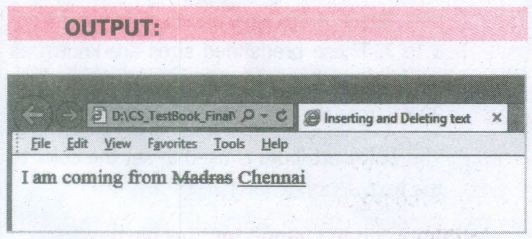
The text what we see on browser cannot delete or insert. But we can show a text as deleted or inserted. < del > and < ins > tags are used to markup a segment of text as deleted or inserted respectively. These two tags are container tags. The text what we specify between < del > and < fdel > will be displayed as strike through. The text we specify between < ins > and < fins > will be shown as underlined.
< html >
< head >
< title > Inserting and Deleting text
< /title>
< /head >
< body >
I am coming from < del > Madras< fdel >
< ins > Chennai < fins >
< /body >
< /html >
4.
Highlighting text :
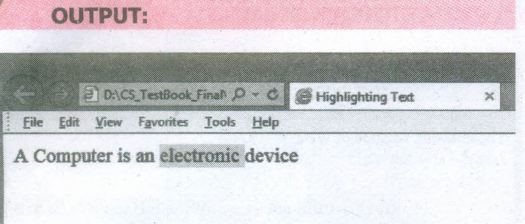
Highlighting is an important formatting feature is used to call attention to the reader. The < mark > tag is used to highlight the text in HTML. This is also a container tag. Whatever the text given between < mark > and < /mark > will be displayed as highlighting with default color.
HTML CODE:
< html >
< head >
< title > Highlighting text < /title >
< /head >
< body >
A Computer is an < mark > electronic
< /mark > device
< /body >
< /html >
5.
All tags which are in pair are called a container tags. All container tags required a closing tag. These tags are otherwise known as "Physical Style" tags.
Physical Style Tags
| Opening Tag | ClosingTag | Description |
| < b > | < /b > | Text will be bold |
| < i > | < /i > | Text will be italics |
| < u > | < /u > | Text will be underlined |
| < tt > | < /tt > | Text will be old type writer style i.e fixed width font |
6.
(i) Ordered List :
Indents lists having numbers or letters in front of every list item.
(ii) Unordered List:
Indents lists having a bullet symbol in front of every list item.
(iii) Definition List:
Lists showing definition terms and definition descriptions.
7.
(i) Cell: An individual box in a table.
(ii) Border: A line surrounded by cells.
(iii) Column: Vertical structure of a table.
(iv) Table: A Structure of rows and columns or grid of cells.
8.
Attributes of Ordered List :
There are two attributes can be used to customize ordered list.
1. Type - Changing numbering style
2. Start - Changing numbering order.
Type - is used to change the number style. The default number style is standard Arabic numeral If (1,2,3 .....)
| Type Value | Numbering Style |
|---|---|
| 1 | Standard Arabic Numerals 1,2,3,4 ............. |
| a | Lowercase letters a, b, c, d.......... |
| A | Uppercase letter A, B, C, D |
| i | Lowercase Roman numerals i, ii, iii,iv,v..;........... |
| I | Uppercase Roman numerals I, II,III, IV, V ................ |
Start - is used to specify the number of letter with which start the list. The default starting point is 1. The value Of the start attribute should be a decimal number, regardless of the. numbering style being used.
9.
| Tag | Usage | Final Output |
|---|---|---|
| < strong > | To show important text | Bold |
| < em > | To call attention | Italics |
| < ins > | To insert a text | Underline |
| < del > | To replaced or deleted text | Strikethrough |
10.
(i) A Subscript is a way to display a character or a, number below the normal line of type. For example: The scientific notation for water is H2O. It should be written as H2O Here, 2 is appearing below the normal line. This is called subscript.
(ii) A Superscript is also a way to show a character or a number above the normal line of type. For example: The familiar algebra equation "a plus b the whole square" should be written as (a+b)2 Here, the square value 2 is appearing above the normal line. This is called superscript.

11th Standard Syllabus & Materials
11th Standard
TN 11th Tamil பீடு பெற நில் - செய்யுள் - காவடிச்சிந்து Important Questions And Answers Study Material - QB365 Set A
NEW11th Standard
TN 11th Tamil பீடு பெற நில் - உரைநடை - மலை இடப்பெயர்கள் : ஓர் ஆய்வு Important Questions And Answers Study Material - QB365 Set A
NEW11th Standard
TN 11th Tamil மாமழை போற்றுதும் - துணைப்பாடம் - யானை டாக்டர் Important Questions And Answers Study Material - QB365 Set A
NEW11th Standard
TN 11th Tamil மாமழை போற்றுதும் - செய்யுள் - ஐங்குறுநூறு Important Questions And Answers Study Material - QB365 Set A



Tamilnadu Stateboard 11th Standard Subjects

Maths

Commerce

Economics

Biology

Business Maths and Statistics

Accountancy

Computer Science

Physics

Chemistry
Maths
Biology
Economics
Physics
Chemistry

History
Business Maths and Statistics

Computer Science
Accountancy
Computer Applications
History
Computer Technology
Commerce
Computer Applications
Computer Technology

Tamil

English

French
Tamilnadu Stateboard Standards
