
 100% FREE ACCESS
11th Standard Syllabus & Materials
11th Standard
TN 11th Tamil இயற்கை வேளாண்மை,சுற்றுச்சூழல் -செய்யுள் - மனோன்மணீயம் Important Questions And Answers Study Material - QB365 Set A
NEW11th Standard
TN 11th Tamil என்னுயிர் என்பேன் -துணைப்பாடம் - இசைத்தமிழர் இருவர் Important Questions And Answers Study Material - QB365 Set A
NEW11th Standard
TN 11th Tamil மொழி கலை -செய்யுள் - ஒவ்வொரு புல்லையும் Important Questions And Answers Study Material - QB365 Set A
NEW11th Standard
TN 11th Tamil பீடு பெற நில் - இலக்கணம் - பகுபத உறுப்புகள் Important Questions And Answers Study Material - QB365 Set A
NEW11th Standard
TN 11th Tamil பீடு பெற நில் - துணைப்பாடம் - வாடிவாசல் Important Questions And Answers Study Material - QB365 Set A
NEW11th Standard
TN 11th Tamil பீடு பெற நில் - செய்யுள் - குறுந்தொகை Important Questions And Answers Study Material - QB365 Set A

Published on: 21/11/2019
Introduction to Computers
Download Tamil Nadu 11th Standard Computer Applications question papers, model tests, one-mark questions, important questions, and public exam papers in PDF format. Free study materials and answer keys for TN State Board students.
Questions + Answers key
Take MCQ Computer Applications Test
1.
Which of the following is a Third generation computer?
IBM1620
ENIAC
UNIVAC 1
Honeywell 6000 series
2.
The component used in second generation computers is _____
Transistors
ICs
Vacuum tubes
Microprocessors
3.
The first calculating device is__________.
ENIAC
Analytical Engine
EDVAC
Abacus
4.
Expand POST
Post on Self Test
Power on Software Test
Power on Self Test
Power on Self Text
5.
Name the volatile memory _____
ROM
PROM
RAM
EPROM
6.
What is CPU?
7.
Name the types of computer introduced in Fourth generation computers.
8.
Distinguish Primary and Secondary memory.
9.
What is the function of an ALU?
10.
What are the components of a CPU?
11.
Write the advantages of fingerprint scanner.
12.
What is Robotics?
13.
Write the significant features of monitor.
14.
Differentiate Optical and Laser mouse.
15.
What are the characteristics of a computer?
16.
What are Registers? Explain the five Registers that are essential for instruction execution.
17.
Explain Impact Printers with an Example.
18.
Discuss the various generations of computers.
19.
Explain the basic components of a computer with a neat diagram.
1.
(d)
Honeywell 6000 series
2.
(a)
Transistors
3.
(d)
Abacus
4.
(c)
Power on Self Test
5.
(c)
RAM
6.
CPU is the major component which interprets and executes software instructions. It also controls the operation of all other components such as memory unit, input and output units.
7.
(i) Microcomputer
(ii) Portal Computers
8.
| Primary Memory | Secondary memory |
| It is used to temporarily store the programs and data when the instructions are ready to execute. | It is used to store the data permanently. |
| It is volatile, the content is lost when the power supply is Switched off. Eg. RAM |
It is non-volatile, the content is available even after the power supply is Switched off. Eg. ROM,CD-ROM, DVD ROM. |
9.
(i) The ALU performs arithmetic operations.
(ii) The result of an operation is stored in internal memory of CPU.
(iii) The logical operations of ALU promote the decision making ability of a computer.
10.
The CPU has three components which are Control unit, Arithmetic and Lagic Unit (ALU) and Memory unit.
11.
Fingerprint scanner :
Fingerprint Scanners is a fingerprint recognition device used for computer security equipped with the fingerprint recognition module feature that uses biometric technology. Fingerprint Reader/Scanner is very safe and convenient device for security instead of password, that is vulnerable to fraud and is hard to remember.
12.
(i) Robot is a term coined by Karel Capek in the 1921 play RUR (Rossum's Universal Robots).
(ii) It is used to describe a computerized machine designed to respond to input received manually or from its surroundings.
13.
Monitor:
(i) Monitor is the most commonly used output device to display the information. It looks like a TV.
(ii) Pictures on a monitor are formed with picture elements called PIXELS.
(iii) Monitors may either be Monochrome which display text or images in Black and White or can be color, which display results in multiple colors.
(iv) There are many types of monitors available such as CRT (Cathode Ray Tube), LCD (Liquid Crystal Display) and LED (Light Emitting Diodes).
(v) The video graphics card helps the keyboard to communicate with the screen.
(vi) It acts as an interface between the computer and display monitor.
14.
| Optical Mouse | Laser Mouse |
| Measures the motion and acceleration of the pointer. | Measures the motion and acceleration of pointer. |
| It uses light source instead of ball to judge the motion of the pointer. | Laser Mouse uses Laser Light. |
| Optical mouse is less sensitive towards surface. | Laser Mouse is highly sensitive and able to work on any hard surface. |
15.
(i) Computer is the powerful machine.
(ii) It can perform large number of tasks
(iii) The main capacities of computer are work length, speed accuracy, diligence, versatility memory and automation and lots of more tasks.
16.
Registers:
(i) Registers are the high-speed temporary storage locations in the CPU. Hence, their contents can be handled much faster than the contents of memory.
(ii) Although the number of registers varies from computer to computer, there are some registers which are common to all computers. Five registers that are essential for instruction execution are:
(iii) Program Counter (PC): Contains the address of the next instruction to be fetched.
(iv) Instruction Register (IR): Contains the instruction most recently fetched.
(v) Memory Address Registers (MAR): Contain the address of a location in memory for read and write operations.
(vi) Memory Buffer Register (MBR): It contains the value to be stored in memory or the last value read from memory.
(vii) Accumulator (ACC): An accumulator is a general purpose register used for storing temporary result produced by the arithmetic logic unit.
17.
Impact Printers:
(i) These printers print with striking of hammers or pins on ribbon. These printers can print on multi-part (using carbon papers) by using mechanical pressure.
(ii) For example, Dot Matrix printers and Line matrix printers are impact printers.
(iii) A Dot matrix printer that prints using a fixed number of pins or wires. Each dot is produced by a tiny metal rod, also called a "wire" or "pin", which works by the power of a tiny electromagnet or solenoid, either directly or through a set of small levers.
(iv) It generally prints one line of text at a time. The printing speed of these printers varies from 30 to 1550 CPS (Character Per Second).
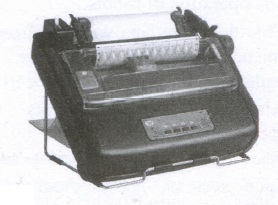
(v) It generally prints one line of text at a time. The printing speed of these printers varies from 30 to 1550 CPS (Character Per Second).
18.
| S.No | Generation | Period | Main Component used | Merits/ Demerits |
| 1 | First Generation | 1940 - 1956 | Vaccum tubes | 1. Big in size 2. Consumed more power 3. Malfunction due to over heat 4. Machine Language was used |
| First Generation Computer - ENIAC, EDVAC, UNIVAC 1 ENIAC weighed about 27 tons, size 8 feet x 100 feet x 3 feet and consumed around 150 watts of power |
||||
| 2 | Second Generation | 1956-1964 | Transistors | 1. Smaller compared to First Generation 2. Generated Less Heat 3. Consumed less power compared to first generation 4. Punched cards were used 5. First operating system was developed - Batch Processing and Multiprogramming Operating System 6. Machine language as well as Assembly language was used. |
| Second Generation Computers - IBM 1401, IBM 1620, UNIVAC 1108 | ||||
| 3 | Third Generation | 1964-1971 | Integrated Circuits (IC) | 1. Computers were smaller, faster and more reliable 2. Consumed less power. 3. High-Level Languages were used |
| Third Generation Computers -IBM ·360 series, Honeywell 6000 series | ||||
| 4 | Fourth Generation | 1971-1980 | Microprocessor Very Large Scale Integrated Circuits (VLSI) |
1. Smaller and Faster 2. Microcomputer series such as IBM and APPLE were developed 3. portable Computers were introduced |
| 5 | Fifth Generation | 1980-till date | Ultra Large Scale Integration (ULSI) | 1. Parallel, Processing 2. Super conductors 3. Computers size was drastically reduced. 4. Can recognize Images and Graphics 5. Introduction of Artificial Intelligence and Expert Systems 6. Able to solve high complex problems including decision making and logical reasoning |
| 6 | Sixth Generation | In future | 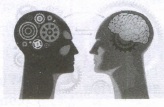 |
1. Parallel and Distributed computing 2. Computers have become smarter faster and smaller 3. Development of robotics 4. Natural Language Processing 5. Development of Voice Recognition Software. |
19.
Components of a Computer :
The computer is the combination of hardware and software. Hardware is the physical component of a computer like motherboard, memory devices, monitor, keyboard etc., while software is the set of programs or instructions. Both hardware and software together make the computer system to function. Every task given to a computer follows an Input-process - output cycle (IPO cycle).
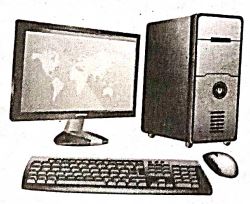
(i) Input unit: Input unit is used to feed any form of data to the computer, which can be stored in the memory unit for further processing.
Example : keyboard, mouse etc.
(i) Central Processing Unit : CPU is the major component which interprets and executes software instructions. It also control the operation of all other components such as memory, input and output units.
(iii) Arithmetic and Logic Unit : The ALU is a part of the CPU where various computing functions are performed on data. The ALU performs arithmetic operations such as addition, subtraction, multiplication, division and logical operations.
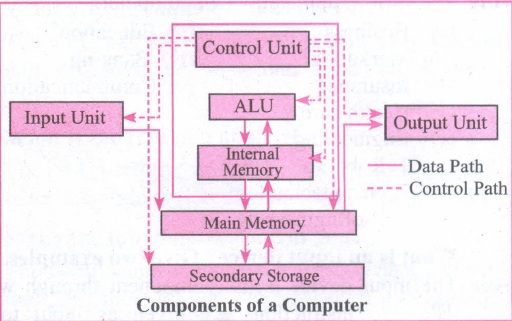
(iv) Control Unit : The control unit controls the flow of data between the CPU memory and I/o devices. It also controls the entire operation of a computer.
(v) Output Unit: An output unit is any hardware component that convey information to users in an understandable form. Example : Monitor, Printer etc.
(vi) Memory Unit: The Memory Unit is of two types which are primary memory and secondary memory. The primary memory is used to temporarily store the programs and data when the instructions are ready to execute. The secondary memory is used to store the data permanently. The Primary Memory is volatile, that is,the content is lost when the power supply is switched off. The Random Access Memory (RAM) is an example of a main memory. The Secondary memory is non volatile, that is, the content is available even after the power supply is switched off. Hard disk, CD-ROM and DVD ROM are examples of secondary memory.

11th Standard Syllabus & Materials
11th Standard
TN 11th Tamil பீடு பெற நில் - செய்யுள் - காவடிச்சிந்து Important Questions And Answers Study Material - QB365 Set A
NEW11th Standard
TN 11th Tamil பீடு பெற நில் - உரைநடை - மலை இடப்பெயர்கள் : ஓர் ஆய்வு Important Questions And Answers Study Material - QB365 Set A
NEW11th Standard
TN 11th Tamil மாமழை போற்றுதும் - துணைப்பாடம் - யானை டாக்டர் Important Questions And Answers Study Material - QB365 Set A
NEW11th Standard
TN 11th Tamil மாமழை போற்றுதும் - செய்யுள் - ஐங்குறுநூறு Important Questions And Answers Study Material - QB365 Set A



Tamilnadu Stateboard 11th Standard Subjects

Maths

Commerce

Economics

Biology

Business Maths and Statistics

Accountancy

Computer Science

Physics

Chemistry
Maths
Biology
Economics
Physics
Chemistry

History
Business Maths and Statistics

Computer Science
Accountancy
Computer Applications
History
Computer Technology
Commerce
Computer Applications
Computer Technology

Tamil

English

French
Tamilnadu Stateboard Standards
