
 100% FREE ACCESS
11th Standard Syllabus & Materials
11th Standard
TN 11th Tamil இயற்கை வேளாண்மை,சுற்றுச்சூழல் -செய்யுள் - மனோன்மணீயம் Important Questions And Answers Study Material - QB365 Set A
NEW11th Standard
TN 11th Tamil என்னுயிர் என்பேன் -துணைப்பாடம் - இசைத்தமிழர் இருவர் Important Questions And Answers Study Material - QB365 Set A
NEW11th Standard
TN 11th Tamil மொழி கலை -செய்யுள் - ஒவ்வொரு புல்லையும் Important Questions And Answers Study Material - QB365 Set A
NEW11th Standard
TN 11th Tamil பீடு பெற நில் - இலக்கணம் - பகுபத உறுப்புகள் Important Questions And Answers Study Material - QB365 Set A
NEW11th Standard
TN 11th Tamil பீடு பெற நில் - துணைப்பாடம் - வாடிவாசல் Important Questions And Answers Study Material - QB365 Set A
NEW11th Standard
TN 11th Tamil பீடு பெற நில் - செய்யுள் - குறுந்தொகை Important Questions And Answers Study Material - QB365 Set A

Published on: 14/12/2019
Introduction to JavaScript
Download Tamil Nadu 11th Standard Computer Applications question papers, model tests, one-mark questions, important questions, and public exam papers in PDF format. Free study materials and answer keys for TN State Board students.
Questions + Answers key
Take MCQ Computer Applications Test
1.
Write the syntax of confirm () dialog box.
2.
Difference between the increment and Decrement operator.
3.
What are the uses of Logical Operators?
4.
Write note on string Operator.
5.
Brief the basic data types in Java Scripts.
6.
Write a HTML code using relational operator to compare two data.
7.
Explain the lexical structure of a Javascript program.
8.
Explain about the Arithmetic operator with suitable example.
9.
Explain about the popup dialog boxes in JavaScript.
10.
Which of the following treated as single line comment statement in Javascript?
//
\\
/*
/**/
11.
Javascript can be written using _______.
Blue J
JDK
Text Editor
Eclipse
12.
The value of the type attribute of < script >tag is_______.
text / script
text / javascript
javascript / text
Script / text
13.
The < script > tag recommended to kept with in the tags?
< sub >
< head >
< body >
< sup >
14.
Which of the following tag used to create Javascript?
< java >
< script >
< sup >
< javascript >
15.
What is the use of typeof operator?
16.
Write note on assignment operator.
17.
What is the use of JavaScript dialog boxes?
18.
Write the three types of expressions in JavaScript
19.
What is meant by JavaScript expression?
1.
The syntax of confirm dialog box is
confirm ("message ");
(or)
window.confirm (" message ");
Example:
confirm (" Hai Do you want to continue: ");
(or)
window.confirm(" Hai Do you want to continue: ");
2.
| Increment Operator | Decrement Operator |
| The ++ operator increments its single operand. | The -- operator decrements its single operand |
| Its converts its operand to a number, adds 1 to that number, and assigns the incremented value back into the Operand | Its converts its operand to a number, subtracts 1 to that number, and assigns the decremented value back into the operand |
| Post increment: var m=3, n=m++; Pre increment: var m=3, n=++; |
Post decrement: var m=3, n=m--; Pre decrement: var m=3, n=m--; |
3.
Logical operators perform logical (boolean) operations. Logical operators combine or invert boolean values. Once comparisons are made, the logical operators && (AND), || (OR) and ! (NOT) can be used to create more complex conditions.
Best practice is to use logical operators on boolean operands., However, operands of any type can be combined. The strict rules are as follows:
(i) For & & (AND) the result is false if the first operand is false; otherwise, the result is the Boolean value of the second operand.
(ii) For || (OR) the result is true if the first operand is true; otherwise, the result is the Boolean value of the second operand.
(iii) For | (Not)the result is true if the operand is false; otherwise, the result is true.
4.
One of the built-in features of JavaScript is the ability to concatenate strings. The + operator performs addition on numbers but also serves as the concatenation operator for strings. Because string concatenation has precedence over numeric addition, + will be interpreted as string concatenation if any of the operands are strings. + operator which is also called as the string concatenation operator.
5.
The basic data types in JavaScript are Strings, Numbers, and Booleans.
(i) A string is a list of characters, and a string literal is indicated by enclosing the characters in single or double quotes. Strings may contain a single character or multiple characters, including whitespace and special characters such as \n (the newline).
(ii) Numbers can be integer or floating-point numerical value and numeric literals are specified in the natural way.
(iii) Boolean can be any one of two values: true or false. Boolean literals are indicated by using true or false directly in the source code.
6.
HTML CODE:
< Html >
< Head >
< Title >Demo Program - To test Relational(Comparison) Operators in JavaScript
< /Title >
< /Head >
< Body >
< script language="javascript" type="text/ javascript" >
Chaptervar
value1 = 522, value2=10;
document.write("< br >Data1 : "+value1);
document.write("< br >Data2 : "+value2);
document. write(" < br > < br > Whether Data 1 = Data2 : "+(value1==value2));
document.write("< br > Whether Datal < Data2 : "+(value1 < value2));
document.write("< br >Whether Datal> Data2 : "+(value1 > value2));
document.write("< br > Whether Datal <= Data2 : "+(value1 < =value2));
document.write("< br > Whether Datal > = Data2 : "+(value1 > =value2));
document.write("< br > Whether Datal != Data2 : "+(value!=value2));
< /script >
< /Body >
< /Html >
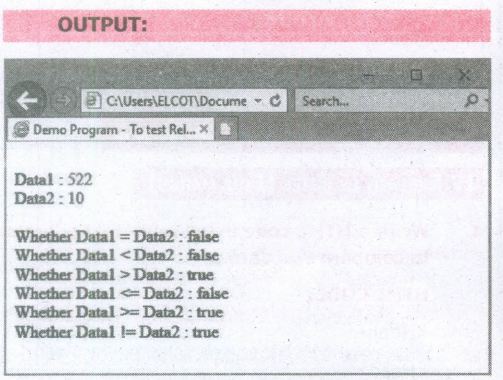
7.
The lexical structure of a programming language is the set of elementary rules that specifies how to write programs in that language. It is the lowest - level syntax of a language. The Lexical structure specifies variable names, the delimiter characters for comments, and how 'one program statement is separated from the next.
(i) Though JavaScript is a case-sensitive language. It is good programming practice to type the command in lowercase.
(ii) JavaScript ignores spaces that appear between tokens (identifiers, operators, punctuator, constants and keywords) in programs.
(iii) JavaScript supports two styles of comments. Any text follow a " // " and the end of a line is treated as a single line comment and is ignored by JavaScript. Any text between the characters " /* *I " is also treated as a multiline comment.
(iv) JavaScript uses the semicolon (;) to separate statements. Many JavaScript programmers use semicolons to explicitly mark the ends of statements
(v) A literal is a data value for variable that appears directly in a program.
(vi) An identifier is simply a name. In JavaScript, identifiers are used to name variables, functions and to provide labels for certain loops in JavaScript code.
(vii) In JavaScript certain keywords are used as reserved words, These words cannot used as identifiers in the programs
8.
Javascript supports all the basic arithmetic operators like addition (+),subtraction (-) multiplication (*), division (/), and modulus (%, also known as the remainder operator)
Arithmetic operators :
| Arithmetic Operator | Meaning | Example | Result |
|---|---|---|---|
| + | Addition | var sum = 20 + 120 | Variable sum = 140 |
| - | Subtraction | var diff = 120 - 20 | Variable diff = 100 |
| * | Multiplication | var prod = 10*100 | Variable prod = 1000 |
| / | Division | var res = 100 / 522 | Variable res = 5.22 |
| % | Modulus operator | var rem = 100 % 522 | Variable rem = 22 (remainder) |
9.
JavaScript supports three important types of dialog boxes. Dialog boxes are also called as Popup Boxes. These dialog boxes can be used to raise an alert, or to get confirmation on any input or to have a kind of input from the users.JavaScrípt supports three kind of popup boxes: Alert box, Confirm box, and Promnpt box.
Alert Dialog Box: An alert dialog box is mostly used to give a warning message to the users. For example, if one input field requires to enter some text but the user does not provide any input, then as a part of validation, you can use an alert box to give a warning message. Alert box gives only one button "OK" to select and proceed.
The syntax of alert box is
alert("Message");
(or) Window.alert ("Message");
Example:
alert("Name is compulsory entry);
(or) window.alert("Name is compulsory entry");
Confirm Dialog Box : A confirmation dialog box is mostly used to take user's consent on any option. It displays a dialog box with two buttons: OK and Cancel. If the user clicks on the OK button, the confirm() will return true. If the user clicks on the Cancel button, then confirm() returns false.
The syntax of confirm dialog box is
confirm("message");
(or)
window.confirm("message");
Example :
confirm("Hai Do you want to continue:");
(or)
window.confirm(“Hai Do you want to continue:");
Prompt Dialog Box: The prompt dialog box is very useful when the user want to pop-up a text box to get user input. Thus, it enables you to interact with the user. The user needs to fill in the text box field and then click OK.
The prompt dialog box is displayed using a method called prompt()which takes two parameters :
(i) a label which you want to display in the text box and (ii) a default string to display in the text box. This dialog box has two buttons: OK and Carncel. If the user clicks the OK button, the prompt() will return the entered value from the text box. If the user clicks the Cancel button, the prompt() returns null. The Sntax of prompt dialog box is,
Prompt("Message","default Value");
(or)
window.prompt("sometext","defaultText");
Example:
prompt("Enter Your Name:"Name");
(or)
window.prompt("Enter Your Name:"Name");
10.
(a)
//
11.
(c)
Text Editor
12.
(b)
text / javascript
13.
(b)
< head >
14.
(b)
< script >
15.
Type of Operator:
The type of operator is used to get the data type (returns a string) of its operand. The operand can be either a literal or a data structure such as a variable, a function, or an object. The operator returns the data type.
Syntax:
typeof operand or type of(operand)
typeof returns: boolean, function, number, strinq, and undefined. The following table summarizes possible values returned by the type of operator.
| Type of Operand | Result |
| Number | "number" |
| Boolean | "Boolean" |
| String | "string" |
| Functions | "function" |
| Undefined | "undefined" |
16.
Assignment Operator:
In Javascnpt; = is an assignment operator, which is used to assign a value to a variable. Often this operator is used to set a variable to a literal value.
Ex: var number1=10;
var number2=number1;
var name="Computer Science";
var booleanvar=true;
17.
JavaScript supports three important types of dialog boxes. Dialog boxes are also called as Popup Boxes These dialog boxes can be used to raise an alert, or to get confirmation on any input or to have a kind of input from the users.
18.
There are three types of expressions as follows,
(i) Arithmetic expressions
(ii) Relational expressions
(iii) Logical expressions
19.
An expression is a phrase of JavaScript that a JavaScript interpreter can evaluate to produce a value. The data types are used directly as literals or within variables in combination with simple operators, such as addition, subtraction, and so on, to create an expressions.

11th Standard Syllabus & Materials
11th Standard
TN 11th Tamil பீடு பெற நில் - செய்யுள் - காவடிச்சிந்து Important Questions And Answers Study Material - QB365 Set A
NEW11th Standard
TN 11th Tamil பீடு பெற நில் - உரைநடை - மலை இடப்பெயர்கள் : ஓர் ஆய்வு Important Questions And Answers Study Material - QB365 Set A
NEW11th Standard
TN 11th Tamil மாமழை போற்றுதும் - துணைப்பாடம் - யானை டாக்டர் Important Questions And Answers Study Material - QB365 Set A
NEW11th Standard
TN 11th Tamil மாமழை போற்றுதும் - செய்யுள் - ஐங்குறுநூறு Important Questions And Answers Study Material - QB365 Set A



Tamilnadu Stateboard 11th Standard Subjects

Maths

Commerce

Economics

Biology

Business Maths and Statistics

Accountancy

Computer Science

Physics

Chemistry
Maths
Biology
Economics
Physics
Chemistry

History
Business Maths and Statistics

Computer Science
Accountancy
Computer Applications
History
Computer Technology
Commerce
Computer Applications
Computer Technology

Tamil

English

French
Tamilnadu Stateboard Standards
