
 100% FREE ACCESS
11th Standard Syllabus & Materials
11th Standard
TN 11th Tamil இயற்கை வேளாண்மை,சுற்றுச்சூழல் -செய்யுள் - மனோன்மணீயம் Important Questions And Answers Study Material - QB365 Set A
NEW11th Standard
TN 11th Tamil என்னுயிர் என்பேன் -துணைப்பாடம் - இசைத்தமிழர் இருவர் Important Questions And Answers Study Material - QB365 Set A
NEW11th Standard
TN 11th Tamil மொழி கலை -செய்யுள் - ஒவ்வொரு புல்லையும் Important Questions And Answers Study Material - QB365 Set A
NEW11th Standard
TN 11th Tamil பீடு பெற நில் - இலக்கணம் - பகுபத உறுப்புகள் Important Questions And Answers Study Material - QB365 Set A
NEW11th Standard
TN 11th Tamil பீடு பெற நில் - துணைப்பாடம் - வாடிவாசல் Important Questions And Answers Study Material - QB365 Set A
NEW11th Standard
TN 11th Tamil பீடு பெற நில் - செய்யுள் - குறுந்தொகை Important Questions And Answers Study Material - QB365 Set A

Published on: 18/07/2019
Download Tamil Nadu 11th Standard Computer Applications question papers, model tests, one-mark questions, important questions, and public exam papers in PDF format. Free study materials and answer keys for TN State Board students.
Questions + Answers key
Take MCQ Computer Applications Test
1.
The component used in second generation computers is _____
Transistors
ICs
Vacuum tubes
Microprocessors
2.
Which of the following is not a first generation computers?
ENIAC
EDVAC
UNIVAC 1
IBM1401
3.
Identify the output device _____
Keyboard
Memory
Monitor
Mouse
4.
Name the volatile memory _____
ROM
PROM
RAM
EPROM
5.
First generation computers used ______.
Vacuum tubes
Transistors
Integrated circuits
Microprocessors
6.
Expand POST.
7.
Name the Second generation computers.
8.
Name the first generation computers.
9.
Distinguish Primary and Secondary memory.
10.
Differentiate Input and output unit.
11.
What is the function of memory?
12.
What is use of ALU?
13.
Define Transistor.
14.
Write a note Vaccum tube on.
15.
Write the significant features of monitor.
16.
Write the characteristics of sixth generation.
17.
Write short note on impact printer.
18.
Explain in detail the different types of Mouse.
19.
Explain any two input and output devices.
20.
Explain the basic components of a computer with a neat diagram.
1.
(a)
Transistors
2.
(d)
IBM1401
3.
(c)
Monitor
4.
(c)
RAM
5.
(a)
Vacuum tubes
6.
Power on Self Test.
7.
IBM 1401, IBM 1620, UNIVAC 1108
8.
ENIAC, EDVAC, UNIVAC 1
9.
| Primary Memory | Secondary memory |
| It is used to temporarily store the programs and data when the instructions are ready to execute. | It is used to store the data permanently. |
| It is volatile, the content is lost when the power supply is Switched off. Eg. RAM |
It is non-volatile, the content is available even after the power supply is Switched off. Eg. ROM,CD-ROM, DVD ROM. |
10.
| Input Unit | Output Unit |
| Input unit is used to feed any form of data to the computer, which can be stored in the memory unit for further processing. | An output unit is any hardware component that conveys information to users in an understandable form. |
| Example: Keyboard, mouse etc. | Example: Monitor, Printer etc. |
11.
The primary memory is used to temporarily store the programs and data when the instructions are ready to execute. The secondary memory is used to store the data permanently
12.
(i) The ALU is a part of the CPU where various computing functions are performed on data.
(ii) The ALU performs arithmetic operations such as addition, subtraction, multiplication, division and logical operations.
(iii) The result of an operation is stored in internal memory of CPU.
(iv) The logical operations of ALU promote the decision-making ability of a computer.
13.
(i) The transistor ("transfer resistance") is made up of semiconductors.
(ii) It is a component used to control the amount of current or voltage or used for amplification modulation or switching of an electronic signal.
14.
(i) Vacuum tubes contain electrodes for controlling electron flow and were used in early computers as a switch or an amplifier.
(ii) Vaccum tubes are big in size and consumed more power.
15.
Monitor:
(i) Monitor is the most commonly used output device to display the information. It looks like a TV.
(ii) Pictures on a monitor are formed with picture elements called PIXELS.
(iii) Monitors may either be Monochrome which display text or images in Black and White or can be color, which display results in multiple colors.
(iv) There are many types of monitors available such as CRT (Cathode Ray Tube), LCD (Liquid Crystal Display) and LED (Light Emitting Diodes).
(v) The video graphics card helps the keyboard to communicate with the screen.
(vi) It acts as an interface between the computer and display monitor.
16.
(i) Parallel and Distributed computing
(ii) Computers have become smarter, faster and smaller
(iii) Development of robotics
(iv) Natural Language Processing
(v) Development of Voice Recognition Software
17.
Impact printers:
(i) These printers print with striking of hammers or pins on ribbon. These printers can print multi-part (using carbon papers) by using mechanical pressure. For example, Dot Matrix printers and Line matrix printers are impact printers.
(ii) A Dot matrix printer that prints using a fixed number of pins or wires.
(iii) Line matrix printers use a fixed print head for printing.
18.
| S.N | Type of Mouse | Mechanism | Developed and Introduced |
| 1 | 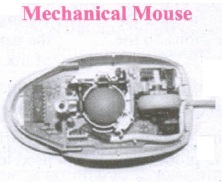 |
|
Telefunken, German Company, 0211011968 |
| 2 | 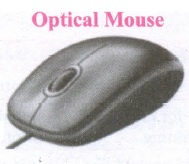 |
|
In 1988, Richard Lyon, Steve Krish independently invented different versions of Optical Mouse. |
| 3 | 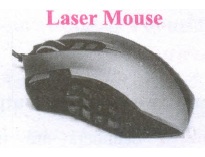 |
|
19.
(i) Scanner :
Scanners are used to enter the information directly into the computer's memory. This device works like a Xerox machine. The scanner converts any type of printed or written information including photographs into a digital format, which can be manipulated by the computer.
(ii) Fingerprint Scanners :
Fingerprint Scanner is a fingerprint recognition device used for computer security, equipped with the fingerprint recognition feature that uses biometric technology. Fingerprint Reader / Scanner is a very safe and convenient device for security instead of using passwords, which is vulnerable to fraud and is hard to remember.
(iii) Monitor :
Monitor is the most commonly used output device to display the information. It looks like a TV. Pictures on a monitor are formed with picture elements called PIXELS. Monitors may either be Monochrome which display text or images in Black and White or can be color, which display results in multiple colors. There are many types of monitors available such as CRT (Cathode Ray Tube), LCD (Liquid Crystal Display) and LED (Light Emitting Diodes). The monitor works with the VGA (Video Graphics Array) card. The video graphics card helps the keyboard to communicate with the screen. It acts as an interface between the computer and display monitor. Usually the recent motherboards incorporate built-in video card.
(iv) Plotter :
Plotter is an output device that is used to produce graphical output on papers. It uses single colour or multi colour pens to draw pictures.
20.
Components of a Computer :
The computer is the combination of hardware and software. Hardware is the physical component of a computer like motherboard, memory devices, monitor, keyboard etc., while software is the set of programs or instructions. Both hardware and software together make the computer system to function. Every task given to a computer follows an Input-process - output cycle (IPO cycle).
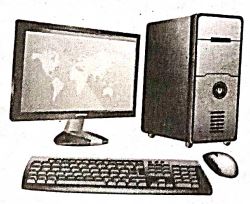
(i) Input unit: Input unit is used to feed any form of data to the computer, which can be stored in the memory unit for further processing.
Example : keyboard, mouse etc.
(i) Central Processing Unit : CPU is the major component which interprets and executes software instructions. It also control the operation of all other components such as memory, input and output units.
(iii) Arithmetic and Logic Unit : The ALU is a part of the CPU where various computing functions are performed on data. The ALU performs arithmetic operations such as addition, subtraction, multiplication, division and logical operations.
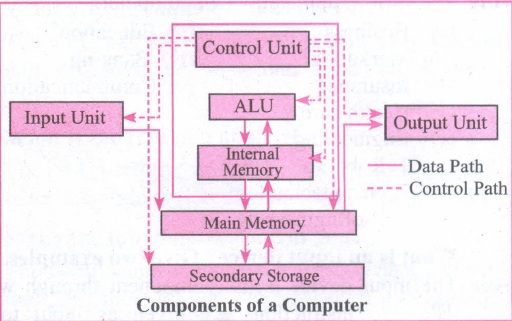
(iv) Control Unit : The control unit controls the flow of data between the CPU memory and I/o devices. It also controls the entire operation of a computer.
(v) Output Unit: An output unit is any hardware component that convey information to users in an understandable form. Example : Monitor, Printer etc.
(vi) Memory Unit: The Memory Unit is of two types which are primary memory and secondary memory. The primary memory is used to temporarily store the programs and data when the instructions are ready to execute. The secondary memory is used to store the data permanently. The Primary Memory is volatile, that is,the content is lost when the power supply is switched off. The Random Access Memory (RAM) is an example of a main memory. The Secondary memory is non volatile, that is, the content is available even after the power supply is switched off. Hard disk, CD-ROM and DVD ROM are examples of secondary memory.

11th Standard Syllabus & Materials
11th Standard
TN 11th Tamil பீடு பெற நில் - செய்யுள் - காவடிச்சிந்து Important Questions And Answers Study Material - QB365 Set A
NEW11th Standard
TN 11th Tamil பீடு பெற நில் - உரைநடை - மலை இடப்பெயர்கள் : ஓர் ஆய்வு Important Questions And Answers Study Material - QB365 Set A
NEW11th Standard
TN 11th Tamil மாமழை போற்றுதும் - துணைப்பாடம் - யானை டாக்டர் Important Questions And Answers Study Material - QB365 Set A
NEW11th Standard
TN 11th Tamil மாமழை போற்றுதும் - செய்யுள் - ஐங்குறுநூறு Important Questions And Answers Study Material - QB365 Set A



Tamilnadu Stateboard 11th Standard Subjects

Maths

Commerce

Economics

Biology

Business Maths and Statistics

Accountancy

Computer Science

Physics

Chemistry
Maths
Biology
Economics
Physics
Chemistry

History
Business Maths and Statistics

Computer Science
Accountancy
Computer Applications
History
Computer Technology
Commerce
Computer Applications
Computer Technology

Tamil

English

French
Tamilnadu Stateboard Standards
