
 100% FREE ACCESS
11th Standard Syllabus & Materials
11th Standard
TN 11th Tamil இயற்கை வேளாண்மை,சுற்றுச்சூழல் -செய்யுள் - மனோன்மணீயம் Important Questions And Answers Study Material - QB365 Set A
NEW11th Standard
TN 11th Tamil என்னுயிர் என்பேன் -துணைப்பாடம் - இசைத்தமிழர் இருவர் Important Questions And Answers Study Material - QB365 Set A
NEW11th Standard
TN 11th Tamil மொழி கலை -செய்யுள் - ஒவ்வொரு புல்லையும் Important Questions And Answers Study Material - QB365 Set A
NEW11th Standard
TN 11th Tamil பீடு பெற நில் - இலக்கணம் - பகுபத உறுப்புகள் Important Questions And Answers Study Material - QB365 Set A
NEW11th Standard
TN 11th Tamil பீடு பெற நில் - துணைப்பாடம் - வாடிவாசல் Important Questions And Answers Study Material - QB365 Set A
NEW11th Standard
TN 11th Tamil பீடு பெற நில் - செய்யுள் - குறுந்தொகை Important Questions And Answers Study Material - QB365 Set A

Published on: 17/01/2020
Download Tamil Nadu 11th Standard Computer Applications question papers, model tests, one-mark questions, important questions, and public exam papers in PDF format. Free study materials and answer keys for TN State Board students.
Questions + Answers key
Take MCQ Computer Applications Test
1.
What do you mean by Page-Level Styles or Internal Style sheets?
2.
Defined link.
3.
What is the use of function?
4.
How do you include an image as your web page background?
5.
What is Ubuntu?
6.
What is MDR?
7.
Distinguish Primary and Secondary memory.
8.
What do you understand by a presentation?
9.
What are the options available in "Insert Cells" dialog box?
10.
Explain scrolling text using < Marquee >.
11.
Explain about the Arithmetic operator with suitable example.
12.
Explain the steps to create a webpage.
13.
Explain the different types of encryption.
14.
Write an HTML document to display the following paragraph as per the given description Using CSS:
1. Font Name: Cooper Black
2. Style: Bold Italics
3. Color: Blue
“The State Institute of Education (SIE) was established in 1965 to provide for systematic study of problems relating to School Education under the administration of Directorate of School Education.”
15.
Draw and compare the icon equivalence in windows and Ubuntu.
16.
Explain advantages and disadvantages of open source operating systems.
17.
Explain RAM in detail.
18.
19.
20.
What are the functions of the for loop parts?
21.
List the familiar Tamil Keyuuard interfaces and Tamil keyboard layouts.
22.
Tabulate some pre-defined functions and its function with an example.
23.
What is the difference between moving and copying text?
24.
Write about encryption and decryption.
25.
Write a short note on familiar images format.
26.
How will you delete files and folders using file menu?
27.
Write note on binary number System.
28.
What is the use of tab key, Shift tab key and Enter key in a worksheet?
29.
Expand TSCII ________.
Telugu Script Code for Information Interchange
Total Script Code for Information Interchange
Tamil Script Code for Information Interchange
Technical Script Code for Information Interchange
30.
_________ operator returns true if expr1 and expr2 both true.
&& (AND)
| | (OR)
! (NOT)
None of these
31.
32.
The default width of the horizontal ruler line in percentage is_______.
72%
50%
75%
100%
33.
How many types of interactions in e-Governance?
5
4
3
6
34.
Which of the following is an image editing applications?
Photoshop
GIMP
PICASA
All of these
35.
e-commerce means
electronic commerce
electronic data exchange
electric data exchange
electronic commercialization
36.
In which loop the condition is evaluated, before executing a statement?
While
Do while
Break
Continue
37.
CSS is also called as:
Sitewide Style Sheets
Internal Style Sheets
Inline Style Sheets
Internal Inline Sheets
38.
Which of the following window element help to resize the windows?
Comers
Borders
(a) and (b)
Scroll bar
39.
Which of the following OS is a Commercially licensed Operating system?
Windows
UBUNTU
FEDORA
REDHAT
40.
The first general purpose Microprocessor developed by ............
IBM
Intel
Apple
Microsoft
41.
2\(\wedge \)50 is referred as
kilo
Tera
Peta
Zetta
42.
Which unit of the computer does processing?
ALU
CPU
Control Unit
Output Unit
43.
Which is the shortcut key to view the slide show?
F6
F9
F5
F10
1.
The < style > tag controls the presentation styles of a particular HTML document. If you want to use a particular tag with the same style applied in one HTML document to another is not possible. Thus, the < style > tags are called as "Page-Level Styles" or "Internal Style sheets".
2.
Link is an important feature of HTML to connect web resources. Link in HTML is used to create hyperlinks to web content.
3.
Functions are used to encapsulate code that performs. a specific task. Sometimes functions are defined for commonly required tasks to avoid the repetition entailed in typing the same statements over and over. More generally, they are used to keep the code that performs a particular job in one place in order to enhance reusability and program clarity.
4.
An image or picture can be applied as background to a webpage. When you insert an image as background, the text will be displayed on top of the image. Background images can be a texture or bitmap or even a photo.
The attributes to apply an image as background:
<body background = "image_name_with_extenstion">
5.
(i) A quality that includes the essential human virtues, comparison and humanity is called ubuntu.
(ii) Ubuntu is an open source OS for computer.
(iii) It is a Linux distribution based on the debian architecture.
6.
(i) Memory Data Register is the register of a computer's control unit that contains the data to be stored in the computer storage (Eg. RAM).
(ii) It is also called Memory Buffer Register.
7.
| Primary Memory | Secondary memory |
| It is used to temporarily store the programs and data when the instructions are ready to execute. | It is used to store the data permanently. |
| It is volatile, the content is lost when the power supply is Switched off. Eg. RAM |
It is non-volatile, the content is available even after the power supply is Switched off. Eg. ROM,CD-ROM, DVD ROM. |
8.
A presentation is a sequential collection of slides in which each slide displays some information in the form of text or graphics.
9.
The options available in Insert cells dialog box are
(i) Shift cells down
(ii) Shift cells right
(iii) Entire row
(iv) Entire colunmn
10.
In HTML, a piece of text or image can be moved horizontally or vertically by using < marquee > tag. This feature makes a web page as more attractive.
(i) General format: < marquee > Text or image to be scroll < /marquee >
Attributes of < marquee >
(ii) Height and Width: These attributes are used to set height and width of the marquee. The values should be either in pixels or in percentage of browser window.
(iii) Direction: This is used to specify the direction of the movement of text or image. The text or image will move towards right to left by default. So, the default direction is left. The Possible values are up', 'down', 'left' or 'right'
(iv) Behaviour: This attribute is used to specify the type of scrolling. The values are scroll', 'slide' and 'alternate'.
(v) Scroll delay: This attribute is used to define the time delay between each jump. The time unit should be in seconds
(vi) Scrollamount: This is used to define the speed of the scroll.
(vii) Loop: This is for defining how many times the marquee element should repeat on the screen. The default value is 'infinite', which means the marquee element scrolls endlessly.
(viii) Bgcolor: This is used to specify the background color to the marquee elements.
(ix) Hspace and Vspace: This is for defining the horizontal and vertical space around the marquee. The value can be in pixels or percentage.
An HTML code to demonstrate marquee:
< html >
< head >
< title > Marquee < /title >
< /head >
< body >
< marquee > < b > The Government of
Tamilnadu < /b >, Directorate of School
Education < /marquee >
< marquee direction=right > Welcome
to < b > The State Council of Educational
Research and Training < /b >, Tamilnadu
< /marquee >
< /body >
< /html >
11.
Javascript supports all the basic arithmetic operators like addition (+),subtraction (-) multiplication (*), division (/), and modulus (%, also known as the remainder operator)
Arithmetic operators :
| Arithmetic Operator | Meaning | Example | Result |
|---|---|---|---|
| + | Addition | var sum = 20 + 120 | Variable sum = 140 |
| - | Subtraction | var diff = 120 - 20 | Variable diff = 100 |
| * | Multiplication | var prod = 10*100 | Variable prod = 1000 |
| / | Division | var res = 100 / 522 | Variable res = 5.22 |
| % | Modulus operator | var rem = 100 % 522 | Variable rem = 22 (remainder) |
12.
Creating a Webpage :
Step 1: Open a text editor Windows7:
Start ⟶ All Programs Accessories ⟶ Notepad⟶Linux: Applications ⟶ Accessories ⟶ Text Editor.
Step 2: In the appearing Note pad / Text Editor, type the HTML document.
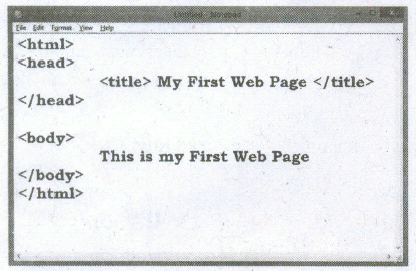
Step 3: Save the file as HTML
(i) Click File ⟶ Save (or) Press Ctrl + S
(ii) Save as dialog box appears.
(iii) In "File Name" text box, type a file name with .htm or .htmlextension.
(iv) Select "All Files" from "Save as type" list box. Click "Save" button.
13.
Types of Encryption :
There are two types of encryption schemes as listed below:
i. Synunetric Key encryption,
ii. Public Key encryption.
Symmetric Key Encryption :
Symmetric encryption is a technique to use the same key for both encryption and decryption. The main disadvantage of the symmetric key encryption is that all authorized persons involved, have to exchange the key used to encrypt the data before they can decrypt it. If anybody intercepts the key information, they may read all message. Depicts the working of symmetric key encryption.
Public Key Encryption:
Public key encryption is also called Asymmetric encryption. It uses the concept of a key value pair, a different key is used for the encryption and decryption process. One of the keys is typically known as the private key and the other is known as the public key. The private key is kept secret by the owner and the public key is either shared amongst authorized recipients or made available to the public at large. The data encrypted with the recipient's public key can only be decrypted with the corresponding private key. public key encryption.
14.
< html >
< head > < title > CSS DOCUMENT < /title >
< style >
P
{
font-family : "Cooper Black"; Font-style: Bold: Font-weight: Italics; Color: Blue;
}
< /style >
< body >
< p >
The State Institute of Education (SIE) was established in 1965 to provide for systematic study of problems relating to School Education under the administration of Directorate of School Education.
< /p >
< /body >
< /html >
15.
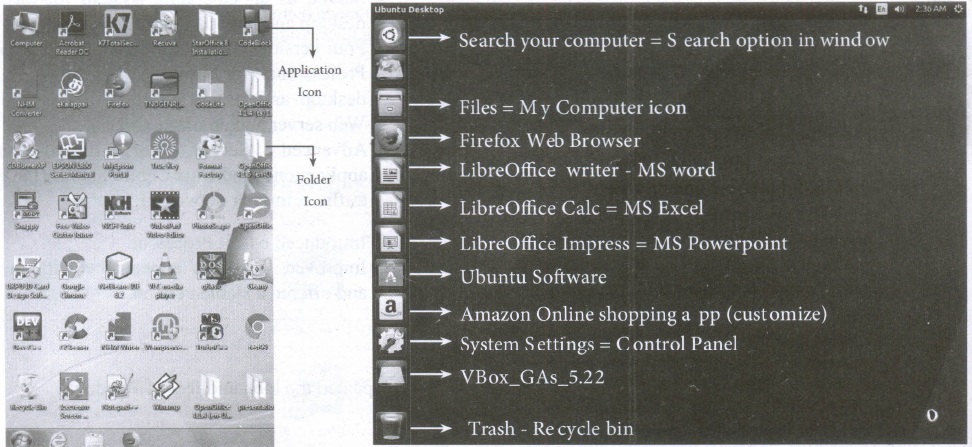
| S.No | Windows | Ubuntu |
| 1. | Recycle Bin | Trash |
| 2. | My computer | Files |
| 3. | Ms word | Libreoffice writer |
16.
Advantages:
(i) It is generally free.
(ii) It is continually evolving in real time as developers add to it and modify it, which means it can be better quality and more secure and less prone to bugs.
(iii) Using open source software also means the user are not locked into using a particular vendor system that only work with their other system.
(iv) The user can modify and adapt open source software for own business requirements
(v) More reliable and flexible
Disadvantages:
(i) Open source software might not be as user friendly as commercial versions because less attention is paid to developing the user interface.
(ii) Open source software do not come with extensive support when things go wrong-pen source software tends to rely on its communicate of users to respond to and fix problems.
(iii)Open source software may still be involved collecting indirect costs for external support.
(iv) Vulnerable to malicious users.
17.
(i) The main memory is otherwise called as Random Access Memory. This is available in computers in the form of Integrated Circuits ( lCs ). It is the place in a computer where the Operating System, Application Programs and the data in current use are kept temporarily so that they can be accessed by the computer's processor.
(ii) The smallest unit of information that can be stored in the memory is called as a bit. The memory can be accessed by a collection of 8 bits which is called as a byte.
(iii) The bytes are referred by 'B'. If a computer has 1 megabyte of memory, then it can store 10,48,576 bytes.(or characters) of information. [Hence 1MB is 1024KB and 1 KB is 1024 Bytes, So 1024 x 1024 =10,48,576 Bytes].
(iv) RAM is a volatile memory, which means that the information stored init is not permanent. As soon as the power is turned off, whatever data resides in RAM is lost. It allows both read and write operations.
(v) There are two basic types of RAM Dynamic RAM (DRAM), Static RAM (SRAM)
(vi) These two types differ in the technology they use to hold data. Dynamic RAM being a common type needs to be refreshed frequently. Static RAM needs to be refreshed less often, which makes it faster.
(vii) Hence, Static RAM is more expensive than Dynamic RAM.
18.
19.
20.
The for structure within parenthesis there are three parts each separated by semicolon.
They are:
i) The first part of the loop initialize a variable which is also called as control variable.
ii) In most case the control variable is declared as well as initialized.
iii) The second part isthe conditional statemem that determines how many times the loop will be iterated.
iv) The third and final part determines how the value of control variable is changed (Incremented/Decremented)
21.
1. NHM Writer, E-Kalappai and Lippikar - are familiar Tamil keyboard interfaces software that is used for Tamil typing which works on Tamil Unicode, using phonetics.
2. Sellinam and Ponmadal - are familiar Tamil keyboard layouts that works on Androidoperating system in Smart phone using phonetics.
22.
| Function | Description | Example | Result |
| toUpperCase( ) | Used to convertgiven string into uppercase | x="java" x.toUpperCase( ); | JAVA |
| to Lower Case ( ) | Used to convert given string into lowercase | x="JAVA" x.toLowerCase( ); | java |
| length | Used to find length of the given string | x="JAVA" x.length( ); | 4 |
| parselnti ( ) | Used to convert the given float value into an integer | parselnt(34.234); | 34 |
| parseFloat( ) | Used to convert the given string into a integer | parseInt(34.23"); | 34.23 |
23.
| Moving text | Copying text |
| To move a text from one location to another | To copy a text from one location to another |
| Select the text to be moved | Select the text to be copied |
Click Ctrl + X or Cut Icon  or Edit \(\rightarrow\)Cut or Edit \(\rightarrow\)Cut |
Click Ctrl + C or Copy Icon  or Edit \(\rightarrow\) Copy or Edit \(\rightarrow\) Copy |
| The text is removed from the source location and placed in the clipboard | A duplicate copy of the text is made and send to the clipboard |
| Take the insertion pointer to the new location to be moved | Take the insertion pointer to the new location to be copied |
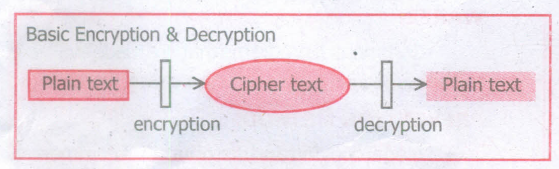
24.
(i) Encryption: Encryption is the process of translating the plain text data(plaintext) into random and mangled data (called cipher-text).
(ii) Decryption: Decryption is the reverse process of converting the cipher-text back to plaintext Encryption and decryption are done by cryptography: In cryptography a key is a piece of information (parameter) that determines the functional output of a cryptographic algorithm.
25.
(i) GIF (Graphical Interchange Format) : This format is one of the popular format for animated images. It was developed by CompuServe. Usually this image format is suitable for presenting tiny animated images, logos, icons, line art etc., It is not suitable for photographic work, because it uses maximum of 256 colours. Animated GIF do not support sound or playback control.
(ii) JPEG (Joint Photographic Experts Group): JPEG is the most popular image format supported by all web browsers. This format is suitable for photographic images. Unlike GIF, JPEG can include any number of colours.
(iii) PNG (Portable Network Graphics): PNG is designed as a replacement for GIF. It is also Supported by all browsers.
(iv) SVG (Scalable Vector Graphics): SVG is a graphics format that was developed for web. It was standardized by world wide web consortiumn (W3C) in 2001. All current web browsers supports basic features of SVG.
26.
(i) Select the file or folder you wish to delete.
(ii) Click on the File menu and select Delete.
(iii) The file will be moved to Recycle bin.
27.
(i) There are only two digits in the Binary system, namely, 0 and 1.
The numbers in the binary system are represented to the base 2 and the positional multipliers are the powers of 2.
(ii) The left most bit in the binary number is called as the Most Significant Bit (MSB) and it has the largest positional weight.
(iii) The right most bit is the Least Significant Bit (LSB) and has the smallest positional weight.
28.
(i) "Tab key" is used to move the cell pointer towards the right side or forward direction.
(ii) "Shift+ Tab" is used to move backwards i.e. from right to left in a row. "Enter" key is also used to move the cell pointer.
(iii) Enter moves the cell pointer to a cell below the current cell i.e, downwards.
29.
(b)
Total Script Code for Information Interchange
30.
(a)
&& (AND)
31.
(a)
32.
(d)
100%
33.
(b)
4
34.
(d)
All of these
35.
(a)
electronic commerce
36.
(a)
While
37.
(a)
Sitewide Style Sheets
38.
(c)
(a) and (b)
39.
(a)
Windows
40.
(b)
Intel
41.
(c)
Peta
42.
(b)
CPU
43.
(c)
F5

11th Standard Syllabus & Materials
11th Standard
TN 11th Tamil பீடு பெற நில் - செய்யுள் - காவடிச்சிந்து Important Questions And Answers Study Material - QB365 Set A
NEW11th Standard
TN 11th Tamil பீடு பெற நில் - உரைநடை - மலை இடப்பெயர்கள் : ஓர் ஆய்வு Important Questions And Answers Study Material - QB365 Set A
NEW11th Standard
TN 11th Tamil மாமழை போற்றுதும் - துணைப்பாடம் - யானை டாக்டர் Important Questions And Answers Study Material - QB365 Set A
NEW11th Standard
TN 11th Tamil மாமழை போற்றுதும் - செய்யுள் - ஐங்குறுநூறு Important Questions And Answers Study Material - QB365 Set A



Tamilnadu Stateboard 11th Standard Subjects

Maths

Commerce

Economics

Biology

Business Maths and Statistics

Accountancy

Computer Science

Physics

Chemistry
Maths
Biology
Economics
Physics
Chemistry

History
Business Maths and Statistics

Computer Science
Accountancy
Computer Applications
History
Computer Technology
Commerce
Computer Applications
Computer Technology

Tamil

English

French
Tamilnadu Stateboard Standards
