
 100% FREE ACCESS
11th Standard Syllabus & Materials
11th Standard
TN 11th Tamil இயற்கை வேளாண்மை,சுற்றுச்சூழல் -செய்யுள் - மனோன்மணீயம் Important Questions And Answers Study Material - QB365 Set A
NEW11th Standard
TN 11th Tamil என்னுயிர் என்பேன் -துணைப்பாடம் - இசைத்தமிழர் இருவர் Important Questions And Answers Study Material - QB365 Set A
NEW11th Standard
TN 11th Tamil மொழி கலை -செய்யுள் - ஒவ்வொரு புல்லையும் Important Questions And Answers Study Material - QB365 Set A
NEW11th Standard
TN 11th Tamil பீடு பெற நில் - இலக்கணம் - பகுபத உறுப்புகள் Important Questions And Answers Study Material - QB365 Set A
NEW11th Standard
TN 11th Tamil பீடு பெற நில் - துணைப்பாடம் - வாடிவாசல் Important Questions And Answers Study Material - QB365 Set A
NEW11th Standard
TN 11th Tamil பீடு பெற நில் - செய்யுள் - குறுந்தொகை Important Questions And Answers Study Material - QB365 Set A

Published on: 16/09/2019
Download Tamil Nadu 11th Standard Computer Applications question papers, model tests, one-mark questions, important questions, and public exam papers in PDF format. Free study materials and answer keys for TN State Board students.
Questions + Answers key
Take MCQ Computer Applications Test
1.
Draw and compare the icon equivalence in windows and Ubuntu.
2.
Explain the main purpose of an operating system
3.
Explain the types of ROM.
4.
5.
6.
a) Write the procedure to convert fractional Decimal to Binary
b) Convert (98.46)10 to bianary
7.
Discuss the various generations of computers.
8.
List some advantages of using template.
9.
Read the following table
| A | B | C | D | E | |
| 1 | Year | Chennai | Madurai | Tiruchi | Coimbatore |
| 2 | 2012 | 1500 | 1250 | 1000 | 500 |
| 3 | 2013 | 1600 | 1000 | 950 | 350 |
| 4 | 2014 | 1900 | 1320 | 750 | 300 |
| 5 | 2015 | 1850 | 1415 | 820 | 200 |
| 6 | 2016 | 1950 | 1240 | 920 | 250 |
Above table shows the sales figures for “Air Cooler” sold in four major cities of Tamilnadu from the year 2012 to 2016. Based on this data, write the formula to calculate the following.
(1) Total sales in the year 2015.
(2) Total sales in Coimbatore from 2012 to 2016.
(3) Total sales in Madurai and Tiruchi during 2015 and 2016.
(4) Average sales in Chennai from 2012 to 2016
(5) In 2016, how many “Air Coolers” are sold in Chennai compared to Coimbatore?
10.
Explain Page formatting in Writer.
1.
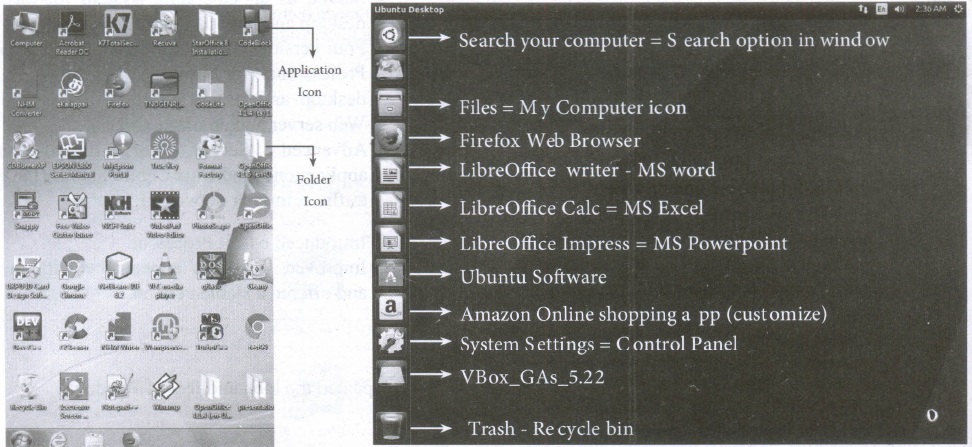
| S.No | Windows | Ubuntu |
| 1. | Recycle Bin | Trash |
| 2. | My computer | Files |
| 3. | Ms word | Libreoffice writer |
2.
The main purpose of using an operating system:
(i) It controls and coordinates all the activities of a computer system.
(ii) It provides an environment for a computer user to execute programs on computer hardware in a convenient and efficient manner.
(iii) It enables the user to design the application, and also it provides an interface to interact with the computer and controls the execution of all kinds .of programs without knowing the internals of the hardware.
(iv) It interprets the command and instructions to perform the specified tasks.
(v) It coordinates and assigns the compilers, assemblers, utility programs to the users.
(vi) It detects errors present in the hardware and software.
(vii) It maintains the internal time clock.
(viii) It protects itself from being destroyed by any users.
(ix) It serves two major functions
1. Supervision (Prevent errors)
2. Management (Operation and control of I/O devices)
(x) It loads the programs itself into memory so that user can interact with hardware and software.
3.
Read only memory (ROM):
(i) Read Only Memory refers to special memory in a computer with pre-recorded data at manufacturing time which cannot be modified. The stored programs that start the computer and perform diagnostics are available in ROMs.
(ii) ROM stores critical programs such as the program that boots the computer. Once the data has been written onto a ROM chip, it cannot be modified or removed and can only be read.
(iii) ROM retains its contents even when the computer is turned off. So, ROM is called as a non-volatile memory
Programmable Read only memory (PROM):
(i) Programmable read only memory is also a non-volatile memory on which data can be written only once. Once a program has been written onto a PROM, it remains there forever.
(ii) Unlike the main memory, PROMs retain their Contents even when the computer is turned off.
(iii) PROM is manufactured as a blank memory, whereas ROM is programmed during the manufacturing process itself. PROM programmer or a PROM burner is used to write data to a PROM chip. The process of programming a PROM is called burning the PROM.
Erasable Programmable Read-only memory (EPROM):
(i) Erasable Programmable Read-Only Memory is a special type of memory which serves as a PROM. The content can be erased using ultraviolet rays.
(ii) An EPROM differs from a PROM. PROM can be written only once and cannot be erased.
(iii) EPROMs are used widely in personal computer, because they enable the manufacturer to change the contents of the PROM to replace with updated versions or erase the contents before the computer is delivered.
Electrically Erasable Programmable Read-Only Memory (EEPROM)
(i) Electrically Erasable Programmable Read-Only Memory can be erased by exposing it to an electrical charge.
(ii) Like other types of PROM, EEPROM retains its contents even when the power is turned off. Comparing with all other types of ROM, EEPROM is slower in performance.
4.
5.
6.
a) The method of repeated multiplication by 2 has to be used to convert such kind of decimal fractions.
The steps involved in the method of repeated multiplication by 2:
Step 1: Multiply the decimal fraction by 2 and note the integer part. The integer part is either 0 or 1.
Step 2: Discard the integer part of the previous product. Multiply the fractional part of the previous product by 2. Repeat Step 1 until the same fraction repeats or terminates (0).
Step 3: The resulting integer part forms a sequence of 0s and 1s that become the binary equivalent of decimal fraction.
Step 4: The final answer is to be written from first integer part obtained till the last integer part obtained.
b) (98.46)10
1. Integer part
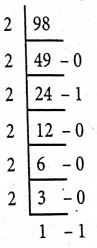
2. Fractional part
0.46 \(\times\) 2 = 0.92 = 0
0.92 \(\times\) 2= 1.84 = 1
0.84 \(\times\) 2= 1.68 = 1
0.68 \(\times\) 2= 1.36 = 1
0.36 \(\times\) 2 =0.72 = 0
0.72 \(\times\) 2= 1.44 = 1
98.4610= (1100010.011101...)2
7.
| S.No | Generation | Period | Main Component used | Merits/ Demerits |
| 1 | First Generation | 1940 - 1956 | Vaccum tubes | 1. Big in size 2. Consumed more power 3. Malfunction due to over heat 4. Machine Language was used |
| First Generation Computer - ENIAC, EDVAC, UNIVAC 1 ENIAC weighed about 27 tons, size 8 feet x 100 feet x 3 feet and consumed around 150 watts of power |
||||
| 2 | Second Generation | 1956-1964 | Transistors | 1. Smaller compared to First Generation 2. Generated Less Heat 3. Consumed less power compared to first generation 4. Punched cards were used 5. First operating system was developed - Batch Processing and Multiprogramming Operating System 6. Machine language as well as Assembly language was used. |
| Second Generation Computers - IBM 1401, IBM 1620, UNIVAC 1108 | ||||
| 3 | Third Generation | 1964-1971 | Integrated Circuits (IC) | 1. Computers were smaller, faster and more reliable 2. Consumed less power. 3. High-Level Languages were used |
| Third Generation Computers -IBM ·360 series, Honeywell 6000 series | ||||
| 4 | Fourth Generation | 1971-1980 | Microprocessor Very Large Scale Integrated Circuits (VLSI) |
1. Smaller and Faster 2. Microcomputer series such as IBM and APPLE were developed 3. portable Computers were introduced |
| 5 | Fifth Generation | 1980-till date | Ultra Large Scale Integration (ULSI) | 1. Parallel, Processing 2. Super conductors 3. Computers size was drastically reduced. 4. Can recognize Images and Graphics 5. Introduction of Artificial Intelligence and Expert Systems 6. Able to solve high complex problems including decision making and logical reasoning |
| 6 | Sixth Generation | In future |  |
1. Parallel and Distributed computing 2. Computers have become smarter faster and smaller 3. Development of robotics 4. Natural Language Processing 5. Development of Voice Recognition Software. |
8.
(i) Professional Graphic Design: Even the user don't have graphic design experience, they know how to make adjustments to existing graphics.
(ii) Branding: Templates can easily be modified by changing colors, fonts, graphics etc.
(iii) Speed: With a good starting point in each slide, the presentation is made in a snap.
(iv) Quick customization: It's much easier to edit the template in its original form, not as a copy of a copy.
(v) Consistency: A consistent design scheme will avoid Jarring transitions and sneaking suspicion that the presentation was pasted together as a ransom note.
9.
1. = Sum (B5 : E5) = 4285
2. = Sum (E2 : E6) = 1600
3. = Sum (C5 : D6) = 4395
4. = Average (B2 : B6) = 1760
5. = Average (B2 : B6) = 1760
5. =(B6 - E6) = 1700
10.
(i) Page formatting: The most important thing in a word processor is how to format the page with elements such as margins, numbering, page layout, headers and footers. Formatting your pages makes it look more attractive and make it easier to read.
(ii) Changing page size : The default page size in writer is 8.5 \(\times\) 11'', the same as that of a standard A4 printing paper. However, for different types of documents, you may need to change the page size.To change the paper size:
Select the page to be resized.
Select Format \(\rightarrow\) Page, the page style dialog box
Select Page Tab
In the paper format group, select the format like A4, legal etc.
Or the width and height option can be used to set the page size.
(iii) Changing page margins :Changing or setting page margins in OpenOffice Writer can be done in two ways :
Using the Rulers - quick and easy, but does not have precise values.
Using the Page Style dialog box - can specify precise values for the margins.
1. Changing page margins - using Ruler.
The shaded sections of the rulers are the margins.
Hold the mouse pointer over the line between the gray and white sections.
The mouse pointer turns into a double-headed arrow.
Hold down the left mouse button and drag the mouse to move the margin and release it at the required point.
The new margin is set.
2. Using the Page Style dialog box.
To change margins using the Page Style dialog box
1. Right-click anywhere on the page and select Page from the popup menu and select page tab of Page Style dialog box as shown.
2. In the Margins group, specify the values for left,right, top and bottom margins.
3. Click ok button.
Orientation : Page orientation refers to how the document will be displayed On screen and printed. There are two different orientations:
Landscape - The width of the document is more than the height. This is best suited for displaying professional photos, invitations, albums, tables etc.
Portrait - This is the most common and default orientation.Here, the height of the document is more than the width. Normally books, newspapers will be displayed in this format.
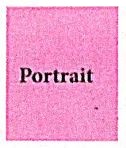
To change the orientation :
Select the page whose orientation is to be changed
In the Page Style dialog box, under the Orientation group,
Select Portrait or Landscape button.
Click ok button.
Page colour and borders: Changing the page color is not quite common. To do so, in the Page Style dialog box,select Background tab, In As option click on color and select the color" from the color palette or select "graphic" to apply an image as a page background.

11th Standard Syllabus & Materials
11th Standard
TN 11th Tamil பீடு பெற நில் - செய்யுள் - காவடிச்சிந்து Important Questions And Answers Study Material - QB365 Set A
NEW11th Standard
TN 11th Tamil பீடு பெற நில் - உரைநடை - மலை இடப்பெயர்கள் : ஓர் ஆய்வு Important Questions And Answers Study Material - QB365 Set A
NEW11th Standard
TN 11th Tamil மாமழை போற்றுதும் - துணைப்பாடம் - யானை டாக்டர் Important Questions And Answers Study Material - QB365 Set A
NEW11th Standard
TN 11th Tamil மாமழை போற்றுதும் - செய்யுள் - ஐங்குறுநூறு Important Questions And Answers Study Material - QB365 Set A



Tamilnadu Stateboard 11th Standard Subjects

Maths

Commerce

Economics

Biology

Business Maths and Statistics

Accountancy

Computer Science

Physics

Chemistry
Maths
Biology
Economics
Physics
Chemistry

History
Business Maths and Statistics

Computer Science
Accountancy
Computer Applications
History
Computer Technology
Commerce
Computer Applications
Computer Technology

Tamil

English

French
Tamilnadu Stateboard Standards
