
 100% FREE ACCESS
11th Standard Syllabus & Materials
11th Standard
TN 11th Tamil இயற்கை வேளாண்மை,சுற்றுச்சூழல் -செய்யுள் - மனோன்மணீயம் Important Questions And Answers Study Material - QB365 Set A
NEW11th Standard
TN 11th Tamil என்னுயிர் என்பேன் -துணைப்பாடம் - இசைத்தமிழர் இருவர் Important Questions And Answers Study Material - QB365 Set A
NEW11th Standard
TN 11th Tamil மொழி கலை -செய்யுள் - ஒவ்வொரு புல்லையும் Important Questions And Answers Study Material - QB365 Set A
NEW11th Standard
TN 11th Tamil பீடு பெற நில் - இலக்கணம் - பகுபத உறுப்புகள் Important Questions And Answers Study Material - QB365 Set A
NEW11th Standard
TN 11th Tamil பீடு பெற நில் - துணைப்பாடம் - வாடிவாசல் Important Questions And Answers Study Material - QB365 Set A
NEW11th Standard
TN 11th Tamil பீடு பெற நில் - செய்யுள் - குறுந்தொகை Important Questions And Answers Study Material - QB365 Set A

Published on: 27/11/2019
Working With Typical Operating System
Download Tamil Nadu 11th Standard Computer Applications question papers, model tests, one-mark questions, important questions, and public exam papers in PDF format. Free study materials and answer keys for TN State Board students.
Questions + Answers key
Take MCQ Computer Applications Test
1.
How many versions of Windows 2000 were released?
3
1
4
2
2.
Which was the last windows based MS-DOS?
Windows 98
Windows ME
W2K
Windows XP
3.
Which of the following OS is not based on Linux?
Ubuntu
Redhat
CentOs
BSD
4.
Which is the default folder for many Windows Applications to save your file?
My Document
My Pictures
Documents and Settings
My Computer
5.
From the options given below, choose the operations managed by the operating system.
Memory
Processes
Disks and I/O devices
all of the above
6.
Name any four icons in the Ubuntu OS desktop?
7.
Name the Linux free server distributions.
8.
How will you log off from Ubuntu OS?
9.
Mention the different server distributions in Linux OS.
10.
What is the advantage of open source?
11.
What are the functions of Windows Operating system.
12.
What is the difference between the application window and the document window?
13.
Differentiate between Windows 7 and Windows 8.
14.
Differentiate Save, Save As and Save a Copy in Ubuntu OS.
15.
Are there any difficulties you face while using Ubuntu? If so, mention it with reasons.
16.
List out the major differences between Windows and Ubuntu OS.
17.
Explain the methods followed while copying files and folders to removable disk.
18.
Write the procedure to create, rename, delete and save a file in Ubuntu OS. Compare it with Windows OS.
19.
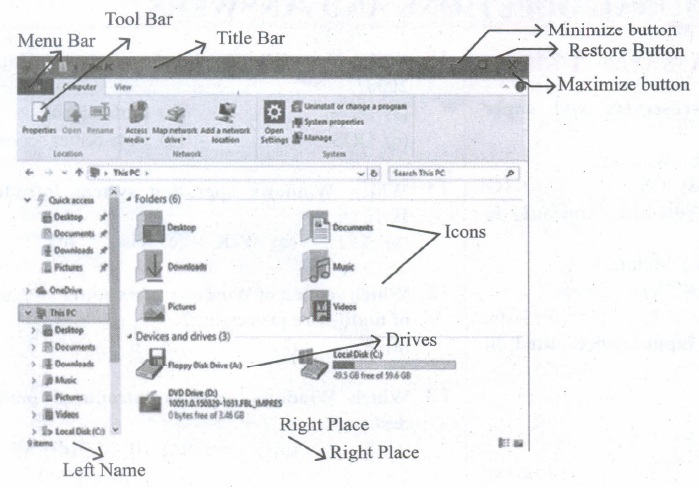
Observe the figure and mark all the window elements, Identify the version of the Windows Os.
1.
(c)
4
2.
(b)
Windows ME
3.
(d)
BSD
4.
(a)
My Document
5.
(d)
all of the above
6.
(i) Amazon
(ii) Trash
(iii) Files
(iv) System Settings
7.
Ubuntu and Cent OS.
8.
Choose an option logout through the session indicator on the far right side of the top paner.
9.
The server distributions in Linux OS
(i) Ubuntu
(ii) CentOS
(iii) Red Hat
(iv) SUSE
(v) Fedora
10.
(i) The Open source software is free to use, distribute, and modify.
(ii) It has lower cost in most cases in only the fraction of the cost of their proprietary counter parts.
(iii) It is most secured as the code is accessable to everyone.
11.
Some of the functions of Windows Operating System are:
(i) Access applications (programs) on the computer (word processing games, spread sheets, calculators and so on).
(ii) Load any new program on the computer.
(iii) Manage hardware such as printers, scanners, mouse, digital cameras etc.,
(iv) File managemnt activities (For example creating, modifying, saving, deleting files and folders).
(v) Change computer settings such as colour scheme, screen savers and the resolution of monitor.
12.
(i) When we open any application such as OpenOffice Writer, Open Office Impress or OpenOffice Calc etc., you will find two Windows on the screen.
(ii) The larger Window is called the Application Window. This Window helps the user to communicate with the Application program.
(iii) The smaller window, which is inside the Application Window, is called the Document window.
(iv) This Window is used for typing, editing, drawing, and formatting the text and graphics.
13.
| Windows 7 | Windows 8 |
|---|---|
| Faster boot times, introduced new user interfaces and Internet Explorer 8. | Windows 8 was faster than previous versions of Windows. |
| The most used operating system on the Internet and also the most used for PC gaming. |
Windows 8 takes better advantage of multi-core processing, solid state drives (SSD), touch screens and other alternate input methods. |
14.
Save - This will save the document without asking for a new name or location. It will overwrite the original.
Save As- This will prompt you to save the document using a dialog box. This allows to change the file name or location.
15.
(i) Different desktop managers lead to a fragmented experience.
(ii) Too many package Managers makes Ubuntu hard to learn and master.
(iii) Lack of software
(iv) Hardware compatibility.
16.
| S.No | Ubuntu OS | Windows |
| 1. | Open-source (Licensing freedom) |
Closed source (Licensing Restriction |
| 2. | Online peer support | Paid-help-desk support |
| 3. | Full hardware support | Partial hardware support |
| 4. | Support CUI | No CUI support |
| 5. | Flexibility | Rigidity |
17.
There are several methods of transferring files to or from a removable disk.
(i) Copy and Paste
(ii) Drag and Drop
(iii) Send To
(iv) Copy and Paste using keyboard shortcuts
METHOD 1: Plug the USB flash drive directly into an available USB port.
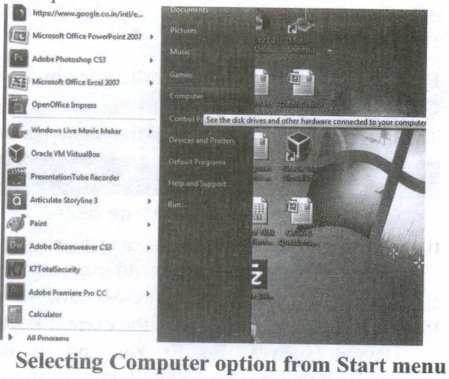
(i) Click Start ⟶ Computer.
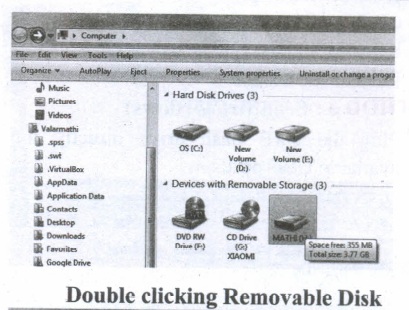
(ii) Double-click on the Removable Disk associated with the USB flash drive.
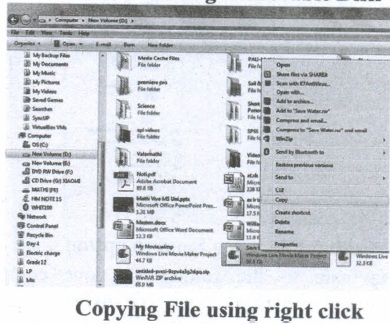
(i) Navigate to the folders in your computer containing files you want to transfer Right click on the file you want to copy, then select Copy.
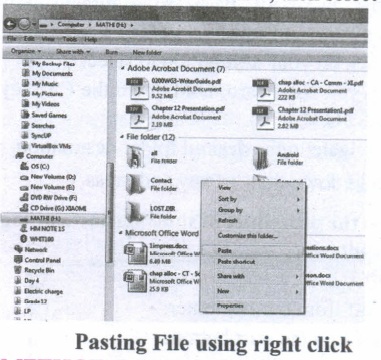
(ii) Return to Removable Disk window, right click within the window, then select Paste.
METHOD 2: Drag and Drop
(i) Plug the USB flash drive directly into an available USB port.
(ii) Allow the computer to recognize the drive, then click Start ⟶ Computer.
(iii) Navigate to 'the folders in your computer containing files you want to transfer.
(iv) Click and drag the files you want to the Removable Disk.
(v) Release the mouse.
METHOD 3: Send To (Windows)
(i) Plug the USB flash drive directly into an available USB port.
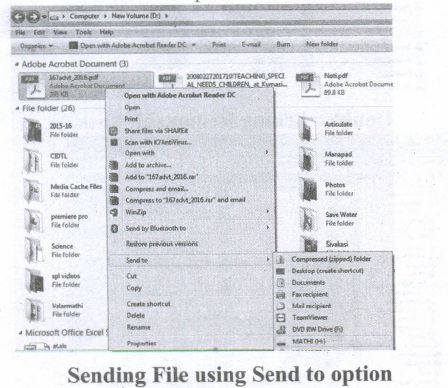
(ii) Navigate to the folders in your computer containing files you want to transfer.
(iii) Right-click on the file you want to transfer to your removable disk.
(iv) Click Send To and select the Removable Disk associated with the USB flash drive.
METHOD 4: Copy and Paste using keyboard shortcuts (Windows)
(i) Plug the USB flash drive directly into an available USB port.
(ii) Click on your desired file to select it.
(iii) On your keyboard, hold down the Ctrl key and press C.
(iv) Navigate to the desired folder destination.
(v) Hold down the Ctrl key and press V.
18.
In Ubuntu OS:
(i) Create a file: By right-clicking in the desktop' and also files be created by using the file menu.
(ii) Delete a file: By using right-click choosing a move to trash or by using the menu.
(iii) Rename a file: By using right-click and choosing rename option.
(iv) Save a file: Press ctrl + x or F2 to exit. You will. then be asked if you want to save. (or) Press ctrl+ 0 or F3 and ctrl + x or F2 for save and exit.
In Windows OS:
(i) Create file: Open an application and create it by using the file menu.
(ii) Delete a file: By right click on a file and choosing the delete option to delete a file.
(iii) Rename a file: By right-clicking on a file and choosing rename option to rename a file.
(iv) Save file: Press ctrl+S or file - save to save the file.
19.

11th Standard Syllabus & Materials
11th Standard
TN 11th Tamil பீடு பெற நில் - செய்யுள் - காவடிச்சிந்து Important Questions And Answers Study Material - QB365 Set A
NEW11th Standard
TN 11th Tamil பீடு பெற நில் - உரைநடை - மலை இடப்பெயர்கள் : ஓர் ஆய்வு Important Questions And Answers Study Material - QB365 Set A
NEW11th Standard
TN 11th Tamil மாமழை போற்றுதும் - துணைப்பாடம் - யானை டாக்டர் Important Questions And Answers Study Material - QB365 Set A
NEW11th Standard
TN 11th Tamil மாமழை போற்றுதும் - செய்யுள் - ஐங்குறுநூறு Important Questions And Answers Study Material - QB365 Set A



Tamilnadu Stateboard 11th Standard Subjects

Maths

Commerce

Economics

Biology

Business Maths and Statistics

Accountancy

Computer Science

Physics

Chemistry
Maths
Biology
Economics
Physics
Chemistry

History
Business Maths and Statistics

Computer Science
Accountancy
Computer Applications
History
Computer Technology
Commerce
Computer Applications
Computer Technology

Tamil

English

French
Tamilnadu Stateboard Standards
