
 100% FREE ACCESS
11th Standard Syllabus & Materials
11th Standard
TN 11th Tamil இயற்கை வேளாண்மை,சுற்றுச்சூழல் -செய்யுள் - மனோன்மணீயம் Important Questions And Answers Study Material - QB365 Set A
NEW11th Standard
TN 11th Tamil என்னுயிர் என்பேன் -துணைப்பாடம் - இசைத்தமிழர் இருவர் Important Questions And Answers Study Material - QB365 Set A
NEW11th Standard
TN 11th Tamil மொழி கலை -செய்யுள் - ஒவ்வொரு புல்லையும் Important Questions And Answers Study Material - QB365 Set A
NEW11th Standard
TN 11th Tamil பீடு பெற நில் - இலக்கணம் - பகுபத உறுப்புகள் Important Questions And Answers Study Material - QB365 Set A
NEW11th Standard
TN 11th Tamil பீடு பெற நில் - துணைப்பாடம் - வாடிவாசல் Important Questions And Answers Study Material - QB365 Set A
NEW11th Standard
TN 11th Tamil பீடு பெற நில் - செய்யுள் - குறுந்தொகை Important Questions And Answers Study Material - QB365 Set A

Published on: 21/01/2020
Download Tamil Nadu 11th Standard Computer Science question papers, model tests, one-mark questions, important questions, and public exam papers in PDF format. Free study materials and answer keys for TN State Board students.
Questions + Answers key
Take MCQ Computer Science Test
1.
Explain this pointer.
2.
What is containership write a C++ program to illustrate the containership
3.
Explain how the objects can be passed in pass by value method.
4.
Suppose we have following C ++ program:
#include < iostream.h >
class A
{ public:
A() {cout<<"A";}
~A() {cout<<"~A";}
};
classB
{ public:
B () {cout<< "B";}
~B () { cout<< "~B"}
};
class C
{ public:
C() {cout << "C";}
~c () {cout <<~"C";}
private :
Ba;Ab;
};
classD
{ public:
D() {cout<<"D";}
~D() {cout<<"~D";}
};
Class E : Public C
{ public;
E() {cout<< "E";}
~E () {cout-c "~E";}
private:
Dd; Bb;
};
voidmain()
} Ee;
cout << endl;
Assuming that the program complies and runs correctly, what does it print out?
5.
Answer the questions (i) to (iv) on the following
code:
class Dolls
{
char DCode[5];
protected :
float Price;
void CalcPrice (float);
public:
Dolls ();
void DInput ( ) ;
void DShow ( ); .
};
class SoftDolls : public Dolls
}
char SDName[20];
float Weight;
public:
SoftDolls ( ) ;
void SDInput ( ) ;
void SDShow ( ) ;
};
class ElectronicDolls : public Dolls
}
char EDName [20];
char BatteryType[10];
int Batteries ;
public: .
Electronic Dolls ( );
void EDInput ( ) ;
void EDShow ( ) ;
};
(i) Which type of Inheritance is shown in the above example?
(ii) How many bytes will be rreqiured by an object of the class ElectronicDolls?
(iii) Write name of all the data memebrs accessible from member functions of the class softDolls.
(iv) Write name of all the member functions accessible by· an object of the class ElectronicDolls.
6.
Explain the function of digital signature.
7.
Write a C++ program to find C.S.A of a cylinder (CSA = \(2\pi rh\)).
8.
Explain increment and decrement operator with an example.
9.
Explain nested class with example.
10.
11.
Write a c++ program to declare and accept an array of professors. Display the details of the department = ”COMP.SCI” and the name of the professors start with ‘A’. The structure “college” should contain the following members.
prof_id as integer
name and Department as character array
12.
What is Recursion? Write a program to find the factorial of the given number using recursion.
13.
Convert the following Decimal numbers to its equivalent Binary, Octal, Hexadecimal. - 1920
14.
Explain the methods followed while copying files and folders to removable disk.
15.
Trace the step-by-step execution of the algorithm for factorial(4).
factorial(n)
--inputs: n is an integer, n > 0
-- outputs: f = n!
f, i := 1 ,1
while i < nf
, i := f × i, i+1
16.
17.
Subtract 11010112 - 1110102
18.
Write the specification of an algorithm hypotenuse whose inputs are the lengths of the two shorter sides of a right angled triangle, and the output is the length of the third side.
19.
Discuss the various generations of computers.
20.
1.
'this' pointer is a constant pointer that holds the memory address of the current object. .It identifies the currently calling object.It is useful when the argument variable name in the member function and the data member name are same.
#include< iostream >
using namespace std;
class T
{
public:
int x;
Void foo( )
{
x = 6; // same as this->x = 6;
this- > x=5; // explicit use of this->
cout < < endl < < x < < " "< < this- >x;
}
void foo(int x) //parameter x shadows the member with the same name
{
this->x = x; // unqualified x refers to the parameter. 'this->' required for disambiguation
cout < < endl < < x < < " "< < this ->x;
}};
int main ( )
{
T tl, t2;
t1.foo();
t2.foo();
}
Output
5 5
5 5
---------------------------------------
Process exited after 0.1 seconds with return value 0
Press any key to continue ....
2.
Whenever an object of a class is declared as a member of another class it is known as a container class. In the container-ship the object of one class is declared in another class.
Illustration: C++ program to illustrate the containership
#include < iostream >
using namespace std;
class outer
{
int date;
public:
void get ( );
};
class inner
{
int value;
outer ot;
//object ot of class outer is declared in
class inner
public;
void getdata( );
};
void outer::get( )
{
cout << "\nEnter a value";
cin >> data;
cout << "\nThe given value is" << data;
}
void inner:: getdata( )
{
cout << "\nEnter a value";
cin >> value;
cout << "\nThe given value is " << value;
ot.get( ); //calling of get( ) of class outer in getdata( )of class inner
}
int main ( )
{
inner in;
in.getdata( );
return( );
}
Output:
Enter a value 10
To given value is 10
Enter a value 20
The given value is 20
3.
When an object is passed by value the function creates its own copy of the object and works on it. Therefore any changes made to the object inside the function do not affect the original object.
C++ program to illustrate how the pass by value method work.
#include < iostream >
using namespace std;
class Sample
{
private:
int num;
public:
void set(int x)
{
num = x;
}
void pass(Sample obj 1, Sample obj 2)
{
obj 1.num= 100;
obj 2.num=200;
cout << "\n\n Changed value of object1 "<< obj 1.num;
cout << "\n\n Changed value of object1 "<< obj 2.num;
}
void print ( )
{
cout << num;
}
};
int main ( )
{
Sample s1;
Sample s2;
Sample s3;
s1.set(10);
s2.set(20);
cout << "\n\t\tExample program for pass by value \n\n\n";
cout << "\n\n Value of object1 before passing;s1.print( );
cout << "\n\n Value of object2 before passing";
s2.print( );
s3.pass(s1,s2);
cout << "\n\n Value of object1 after passing";
s1.print( );
cout << "\n\n Value of object2 after passing";
s2.print ( );
return ( );
}
Output:
Example program for PASS BY VALUE
Value of object 1before passing 10
Value of object 2 before passing 20
Changed value of object 1 100
Changed value of object 200
Value of object 1 after passing 10
Value of object 1 after passing 20
4.
BACDBE
~E~B~D~C~A~B
5.
(i) Hierarchical Inheritance
(ii) 41 Bytes
(ill) Price, SDName, Weight
(iv) DInput(), DShow( ), EDInput ( ), EDshow( ).
6.
Digital signature:
(i) Digital signatures are based on asymmetric cryptography and can provide assurances of evidence to origin, identity and status of an electronic document, transaction or message, as well as acknowledging informed by the signer.
(ii) To create a digital signature, signing software (email) Creates a one-way hash of the electronic data to be signed.
(iii) The user's private key to encrypt the hash, returning a value that is unique to the hashed data. The encrypted hash, along with other information such as the hashing algorithm, forms the digital signature. Any change in the data, even to a single bit, results in a different hash value.
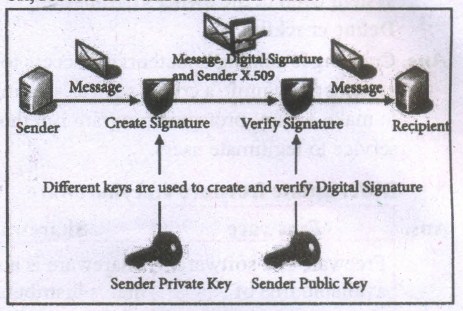
(iv) This attribute enables others to validate the integrity of the data by using the signer's public key to decrypt the hash. If the decrypted hash matches a second computed hash of the same data, it proves that the data hasn't changed since it was signed.
(v) If the two hashes don't match, the data has either been tampered with in some way (indicating a failure of integrity) or the signature-was created with a private key that doesn't correspond to the public key presented by the signer (indicating a failure of authentication).
7.
#include < iostream.h >
using namespace std;
int main( )
{
float pi = 3.14, radius, height, CSA;
cout << "\n Curved Surface Area of a cylinder";
cout << "\n Enter Radius (in em): ";
cin >> radius;
cout << "\n Enter Height (in em): ";
cin >> height;
CSA = (2*pi*radius)*height;
system("cls");
cout << "\n Radius: " << radius <<" em ";
cout << "\n Height: " << height c << " em ";
cout << "\n Curved Surface Area of a Cylinder is " << CSA << " sq.cm ";
}
8.
| Operator | Operation | Example (Assume n=2; what will be value of n) | |
|---|---|---|---|
| Prefix | Postfix | ||
| ++ | Increment | ++n; | n++; |
| n=n+1; Value of n; | Value of n; n=n+1; | ||
| Value of n = 3 | Value of n = 2 | ||
| -- | Decrement | --n; | n--; |
| n=n-1; Value of n; | Value of n; n=n-1; | ||
| Value of n = 1 | Value of n = 2 | ||
9.
Nested class: When one class become the member of another class then it is called Nested class and the relationship is called containership.
Classes can be nested in two ways.
1. By defining a class within another class
2. By declaring an object of a class as a member to another class.
Defining a class with in another: When a class is declared with in another class, the inner class is called as Nested class (ie the inner class) and the outer class is known as Enclosing class. Nested class can be defined in private as well as in the public section of the Enclosing class.
C++ program to illustrate the nested class
#include < iostream >
using namespace std;
class enclose
{
private:
int x;
class nest
{
private:
int y;
public:
int z;
void prn ( )
{
y=3;z=2;
cout << "\n The product of'" << y << '*' << z << "=" << y*z << "\n";
}
}; //inner class definition over
nest n1;
public:
nest n2;
void square ( )
{
n2.prn ( ); //inner class member function is called by its object
x=2;
n2.z=4;
cout << "\n The product of " << n2.z << '*' << n2.
z << "=" << n2.z*n2.z << "\n";
cout << "\n The product of " << x << '*' << x << "=+ << x*x;
}
}; //outer class definition over
int main ( )
{
enclose e;
e.square ( ); // outer class member function is called
}
Output:
The product of 3*2=6
The product of 4*4=16
The product of 2*2=4
In the above program the inner class nest is defined inside the outer class enclose. nest is accessed by enclose by creating an objec of nest.
10.
11.
#incluede< iostream >
using namespace std;
#include< string.h >
struct college
{
int prof.id;
char pname[20];
char dept[20];
} p[10];
int main()
{
int i;
for (i=0; i<10; i++)
{
cout << "Enter professor.id'' << endl;
cin >> p[i].prof_d;
cout << "Enter proferssor name'' << endl:
cin >> p[i].pname;
cout << "Enter department'' << endl;
cin >> p[i].dept;
}
for(i=0;i < 10; i++)
{
int flag= 1;
if(p[i].dept== "COMP.SCI"&& p[i].pname='A')
cout << p[i].prof id << endl;
cout << p[i].pname << endl;
cout << p[i].dept << endl;
}
if(flag==0)
cout << "The given details not found" << endly
return 0;
}
12.
A function that calls itself is known as recursive function. And, this technique is known as recursion.
#include
int factorial(int);//Function prototype//
int main ()
{
int no;
cout <<"\nEnter a number to find its factorial;";
cin>>no;
cout <<"\nFactorial of Number" < return 0;
}
int factorial(int m)
{
if (m>1)
{
return m*factorial(m-1);
}
else
{
return 1;
}
}
Output:
Enter a number to find its factorial: 5
Factorial of Number 5 = 120
13.
192010 = ?2
.png)
= 111100000002
= 111100000002 = ?8
= \(\overline { \underset { \overset { \downarrow }{ 3 } }{ 11 } } \) \(\overline { \underset { \overset { \downarrow }{ 6 } }{ 110 } } \) \(\overline { \underset { \overset { \downarrow }{ 0 } }{ 000 } } \) \(\overline { \underset { \overset { \downarrow }{ 0 } }{ 000} } \)
= 36008
= 111100000002 = ?16
= \(\overline { \underset { \overset { \downarrow }{ 7 } }{ 111 } } \) \(\overline { \underset { \overset { \downarrow }{ 8 } }{ 1000 } } \) \(\overline { \underset { \overset { \downarrow }{ 0 } }{ 0000} } \)
= 78016
= 192010 = 111100000002 = 36008 = 78016
14.
There are several methods of transferring files to or from a removable disk.
(i) Copy and Paste
(ii) Drag and Drop
(iii) Send To
(iv) Copy and Paste using keyboard shortcuts
METHOD 1:
Plug the USB flash drive directly into an available USB port.
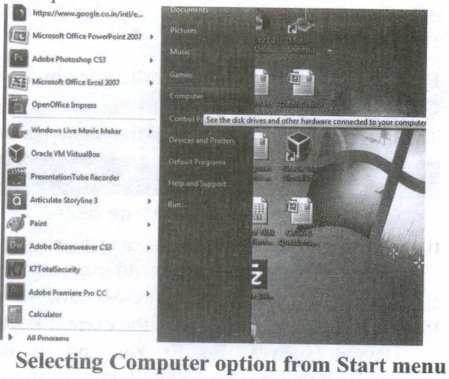
(i) Click Start ⟶ Computer.
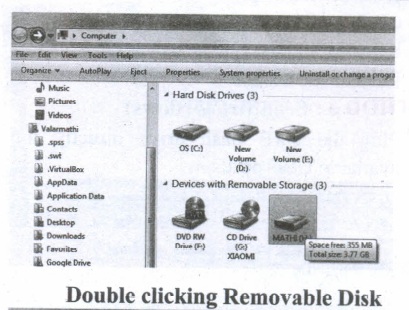
(ii) Double-click on the Removable Disk associated with the USB flash drive.
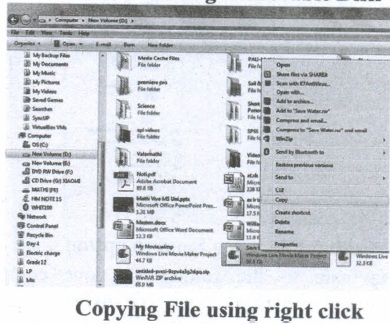
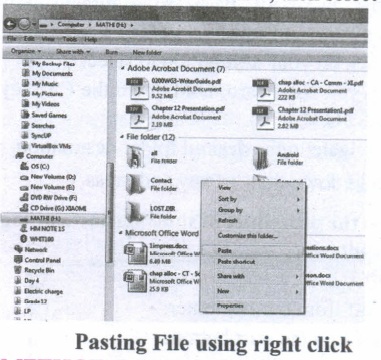
(i) Navigate to the folders in your computer containing files you want to transfer Right click on the file you want to copy, then select Copy.
(ii) Return to Removable Disk window, right click within the window, then select Paste.
METHOD 2:
Drag and Drop
(i) Plug the USB flash drive directly into an available USB port.
(ii) Allow the computer to recognize the drive, then click Start ⟶ Computer.
(iii) Navigate to 'the folders in your computer containing files you want to transfer.
(iv) Click and drag the files you want to the Removable Disk.
(v) Release the mouse.
METHOD 3:
Send To (Windows)
(i) Plug the USB flash drive directly into an available USB port.
(ii) Navigate to the folders in your computer containing files you want to transfer.
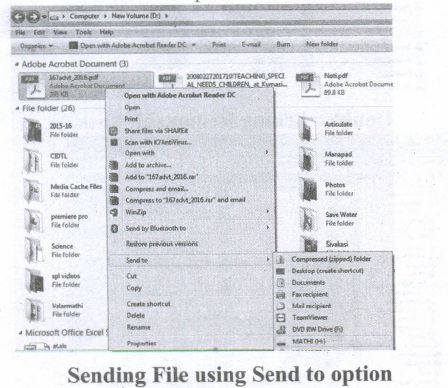
(iii) Right-click on the file you want to transfer to your removable disk.
(iv) Click Send To and select the Removable Disk associated with the USB flash drive.
METHOD 4:
Copy and Paste using keyboard shortcuts (Windows)
(i) Plug the USB flash drive directly into an available USB port.
(ii) Click on your desired file to select it.
(iii) On your keyboard, hold down the Ctrl key and press C.
(iv) Navigate to the desired folder destination.
(v) Hold down the Ctrl key and press V.
15.
(i) f=1 i=1 f = f * i i = i+1
f = 1 x 1 = 1 i = 2
(ii) f = 1 x 2 i = 3 = 2
(iii) f = 2 × 3 i = 4 = 6
(iv) f = 6 x 4 i = 5 (loop terminates) = 24
16.
 1985 1. Introduction of GUI in 16 - bit. processor
 1987 1. Supports to minimize or maximize windows.
 1992 1. Introduced the concept of multitasking.
 1995 1. Introduced Start button, the taskbar, Windows Explorer and Start menu.
 1998 1. Integration of the Web browser (Internet Explorer) with the Operating System.
 Designed to act as servers in network. 7. Windows Me
  2000 It introduced automated system diagnostics and recovery tools. 8. Windows 2000
  2000 1. Served as an Operating System for business
 2001 1. Introduced 64-bit Processor.
 2006 Updated the look and feel of Windows 11. Windows 7
  2009 Booting time was improved, introduced new user interfaces like Aero Peek, pinning programs to the taskbar, handwriting recognition etc, and Internet Explorer 8. 12. Windows 8
  2012 1. Windows 8 was faster than previous versions of Windows.
 2015 1. Start Button was added again.
17.
11010112 - 1110102
1101011
+111010
_______
0110001
_______
11010112 - 1110102 = 01100012
18.
1. hypotenuse (a, b)
2. -- inputs: a, b are real numbers, a > 0, b > 0
3 -- outputs: c²=a² + b² where c is real number, c > 0
19.
| Computers size was drastically reduced. S.No | Generation | Period | Main Component used | Merits/ Demerits |
| 1 | First Generation | 1942-1955 | 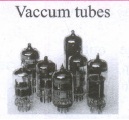 |
Big in size Consumed more power Malfunction due to overheating Machine Language was used Eg : ENIAC, EDVAC, UNIVAC |
| First Generation Computer - ENIAC, EDVAC, UNIVAC 1 ENIAC weighed about 27 tons, size 8 feet x 100 feet x 3 feet, and consumed around 150 watts of power | ||||
| 2 | Second Generation | 1955-1964 | 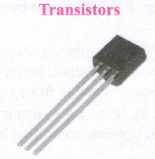 |
Smaller compared to First Generation Generated Less Heat Consumed less power compared to first-generation Punched cards were used. The first operating system was developed Batch Processing and Multiprogramming Operating System Machine language, as well as Assembly language, was used. |
| Second Generation Computers IBM 1404, IBM 1620, UNIVAC 1108 | ||||
| 3 | Third Generation | 1964-1975 | 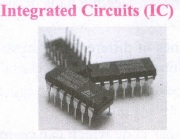 |
Computers were smaller, faster, and more reliable Consumed less power. High-Level Languages were used. |
| Third Generation Computers -IBM ·360 series, Honeywell 6000 series | ||||
| 4 | Fourth Generation | 1975-1980 | 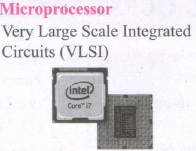 |
Smaller and Faster Microcomputer series such as IBM and APPLE was developed Portable Computers were introduced. |
| 5 | Fifth Generation | 1980-till date | 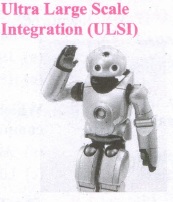 |
Parallel, Processing Superconductors Computers size was drastically reduced. Can recognize Images and Graphics Introduction of Artificial Intelligence and Expert Systems Able to solve highly complex problems including decision making and logical reasoning. |
| 6 | Sixth Generation | In future | 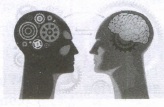 |
Parallel and Distributed computing Computers have become smarter faster and smaller Development of robotics Natural Language Processing Development of Voice Recognition Software. |
20.

11th Standard Syllabus & Materials
11th Standard
TN 11th Tamil பீடு பெற நில் - செய்யுள் - காவடிச்சிந்து Important Questions And Answers Study Material - QB365 Set A
NEW11th Standard
TN 11th Tamil பீடு பெற நில் - உரைநடை - மலை இடப்பெயர்கள் : ஓர் ஆய்வு Important Questions And Answers Study Material - QB365 Set A
NEW11th Standard
TN 11th Tamil மாமழை போற்றுதும் - துணைப்பாடம் - யானை டாக்டர் Important Questions And Answers Study Material - QB365 Set A
NEW11th Standard
TN 11th Tamil மாமழை போற்றுதும் - செய்யுள் - ஐங்குறுநூறு Important Questions And Answers Study Material - QB365 Set A



Tamilnadu Stateboard 11th Standard Subjects

Maths

Commerce

Economics

Biology

Business Maths and Statistics

Accountancy
Computer Science

Physics

Chemistry
Maths
Biology
Economics
Physics
Chemistry

History
Business Maths and Statistics

Computer Science
Accountancy

Computer Applications
History
Computer Technology
Commerce
Computer Applications
Computer Technology

Tamil

English

French
Tamilnadu Stateboard Standards
