
 100% FREE ACCESS
11th Standard Syllabus & Materials
11th Standard
TN 11th Tamil இயற்கை வேளாண்மை,சுற்றுச்சூழல் -செய்யுள் - மனோன்மணீயம் Important Questions And Answers Study Material - QB365 Set A
NEW11th Standard
TN 11th Tamil என்னுயிர் என்பேன் -துணைப்பாடம் - இசைத்தமிழர் இருவர் Important Questions And Answers Study Material - QB365 Set A
NEW11th Standard
TN 11th Tamil மொழி கலை -செய்யுள் - ஒவ்வொரு புல்லையும் Important Questions And Answers Study Material - QB365 Set A
NEW11th Standard
TN 11th Tamil பீடு பெற நில் - இலக்கணம் - பகுபத உறுப்புகள் Important Questions And Answers Study Material - QB365 Set A
NEW11th Standard
TN 11th Tamil பீடு பெற நில் - துணைப்பாடம் - வாடிவாசல் Important Questions And Answers Study Material - QB365 Set A
NEW11th Standard
TN 11th Tamil பீடு பெற நில் - செய்யுள் - குறுந்தொகை Important Questions And Answers Study Material - QB365 Set A

Published on: 01/08/2018
In this question paper, some of the important one mark, two and five marks questions from the chapter Working With Typical Operating System ( Windows & Linux) are covered. The questions are prepared from the book back and previous year questions.
Please Click Here, to get the answer of this question paper.
Download Tamil Nadu 11th Standard Computer Science question papers, model tests, one-mark questions, important questions, and public exam papers in PDF format. Free study materials and answer keys for TN State Board students.
Questions + Answers key
Take MCQ Computer Science Test
1.
Where will you select the option to log out, suspend, restart, or shut down from the desktop of Ubuntu OS?
Session Indicator
Launcher
Files
Search
2.
Which is the default browser for Ubuntu?
Firefox
Internet Explorer
Chrome
Thunderbird
3.
Which is the default application for spreadsheets in Ubuntu? This is available in the software launcher?
Libre Office Writer
Libre Office Calc
Libre Office Impress
Libre Office Spreadsheet
4.
Identify the default email client in Ubuntu?
Thunderbird
Firefox
Internet Explorer
Chrome
5.
Which of the following in Ubuntu OS is used to view the options for the devices installed?
Settings
Files
Dash
VBox_GAs_5.2.2
6.
Which of the following OS is not based on Linux?
Ubuntu
Redhat
CentOs
BSD
7.
What is the meaning of "Hibernate" in Windows XP/Windows 7?
Restart the Computer in safe mode
Restart the Computer in hibernate mode
Shutdown the Computer terminating all the running applications
Shutdown the Computer without closing the running applications
8.
Under which of the following OS, the option Shift + Delete - permanently deletes a file or folder?
Windows 7
MS-DOS
Linux
Android OS
9.
Which is the default folder for many Windows Applications to save your file?
My Document
My Pictures
Documents and Settings
My Computer
10.
From the options given below, choose the operations managed by the operating system.
Memory
Processes
Disks and I/O devices
all of the above
11.
How will you log off from Ubuntu OS?
12.
Mention the different server distributions in Linux OS.
13.
What is Open Source?
14.
Differentiate Files and Folders.
15.
What is the use of a file extension?
16.
Differentiate cut and copy options.
17.
Differentiate Save, Save As and Save a Copy in Ubuntu OS.
18.
Differentiate Thunderbird and Firefox in Ubuntu OS.
19.
Write the specific use of Cortana.
20.
Are drives such as hard drive and floppy drives represented with drive letters?
21.
If you are working on multiple files at a time, sometimes the system may hang. What is the reason behind it? How can you reduce it?
22.
Analyse: Why the drives are segregated?
23.
Write the significant features of Ubuntu OS.
24.
Explain the different methods of moving files and folders in windows.
1.
(a)
Session Indicator
2.
(a)
Firefox
3.
(b)
Libre Office Calc
4.
(a)
Thunderbird
5.
(d)
VBox_GAs_5.2.2
6.
(d)
BSD
7.
(d)
Shutdown the Computer without closing the running applications
8.
(a)
Windows 7
9.
(a)
My Document
10.
(d)
all of the above
11.
By choosing an option logout through the session indicator on the far right side of the top panel.
12.
The server distribution in Linux OS:
(i) Ubuntu Linux
(ii) Linux Mint
(iii) Arch Linux
(iv) Deepin
(v) Fedora
(vi) Debian
(vii) Centos
13.
Open source refers to a program or software in which the source code is available in the web to all public, without any cost.
14.
The basic difference between the two is that files store data, while folders store files and other folders.
| Files | Folders |
| Files, on the other hand, can range from a few bytes to several gigabytes. They can be documents, programs, libraries, and other compilations of data. |
The folders, often referred to as directories, are used to organize files on the computer. The folders themselves take up virtually no space on the hard drive. |
15.
File Extension is the second part of the file name. It succeeds the decimal point in the file name. It is used to identify the type of file and it is normally upto 3 to 4 characters long.
Ex. 1. exe,2. html.
16.
| Cut | Copy |
| The file is moved to the destination location. | File will be present in both source destination places. |
| Edit → cut, Edit → paste is used for cut. | Edit → copy, Edit → paste is used for copy. |
| Ctrl + X, Ctrl + V is used. | Ctrl + C, Ctrl + V is used. |
| Right click → cut, Right click → paste is used. | Right click → copy, Right click → paste is used. |
17.
| Save | Save as | Save a Copy |
| This will save the document without asking for a new name or location. It will over-write the original. | This will prompt to save the document using a dialog box. You will have the ability to change the file name and/or location. If you choose the same file name and location it will over- write the original. Your working document will be the one you just saved. | This will prompt you to save a 'copy' using the same dialog box as 'save as'. You will have the ability to change the file name and/or location. If you choose the same file name and location it will over-write the original. If you changed the name or location of the document you will be working on the original document not the copy. This means that if you make additional changes and then hit save the original will be overwritten with the new changes, but the copy you saved earlier will be left at the state of the "Save A Copy". |
18.
Difference between Thunderbird and Firefox in Ubuntu:
(i) Thunderbird is inbuilt email software of ubuntu whereas Firefox is a web browser.
(ii) Thunderbird is used to access email such as Gmail, hotmail whereas Firefox is used to open web pages including e-mail.
19.
Uses of Cortana:
1. Cortana is a voice activated personal assistant.
2. Give the reminders based on time, places, or people.
3. Track packages, teams, interests, and flights.
4. Send emails and texts.
5. Manage the calendar and keeps up to date.
6. Create and manage lists.
7. Chit chat and play games.
8. Find facts, files, places, and info.
9. Open any app on the system.
20.
Yes, hard drives and floppy drives are represented with drive letters.
A: drive is used for floppy disk of 3.5 inches and storage capacity of 1.44 MB.
B: drive is for floppy of size 5.25 inches and of storage capacity of 1.2 MB
So, we can say like
A: First Floppy Drive
B: Second Floppy Drive
C: D:E:.....Z: Hard Disk Drives, CD/DVD
21.
When we open multiple applications, each application opened on the system takes some internal and hardware resources to keep it running. Memory is used by all the applications. System processing speed will be shared and it will become slow finally the system will hang.
Methods of reducing it:
1. It is advisable to run one program at a time.
2. Upgrade RAM
3. Clean the cache Memories
4. Defragmentation can be done
22.
1. It saves space and increases system performance.
2. Sharing and protection
3. Segment and segregate the data to defend it from cyber attack.
23.
(i) The desktop version of Ubuntu supports all the normal software on Windows such as Firefox, Chrome, VLC, etc.
(ii) It supports the office suite called LibreOffice.
(iii) Ubuntu has an in-built email software called Thunderbird, which gives the user access to email such as Exchange, Gmail, Hot mail, etc.
(iv) There are a host of free applications for users to view and edit photos.
(v) There are also applications to manage share videos.
(vi) It is easy to find content on Ubuntu with the smart searching facility.
24.
To move a file(s) or folder(s), first select the file(s) or folder(s) and then choose one of the following.
(i) Click on the EDIT menu, select the CUT function.
(ii) Keyboard shortcut, CTRL + X.
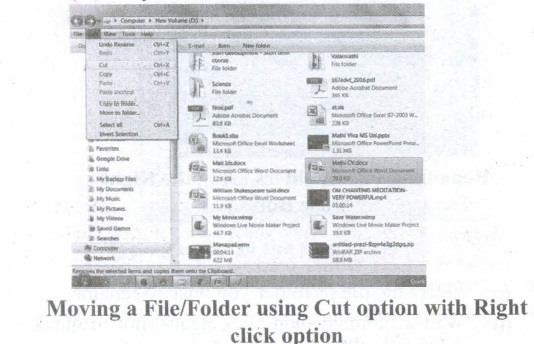
(iii) Or else click on the selected item with the RIGHT mouse button and select "CUT" from the shortcut Menu.
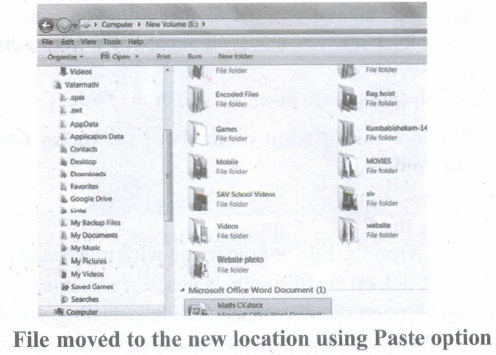
(iv) To bring back the file(s) or folder(s) in the new location, navigate to the new location then paste using one of the following:
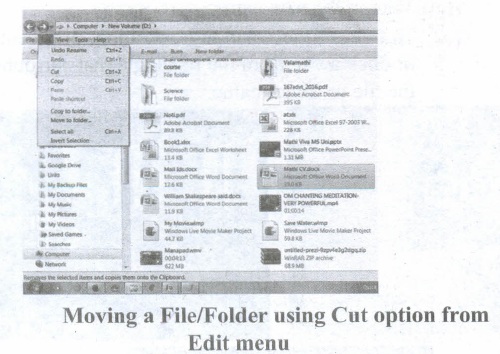
(v) Click on the EDIT menu, select the PASTE function.
(vi) Keyboard shortcut is, CTRL + V.
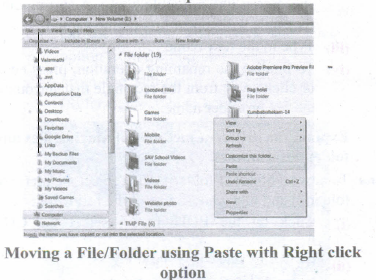
(vii) In the position where you want the item to be pasted, click with the Right mouse button and select "Paste" from the shortcut menu. The file will be pasted in the new location.
Method 2 - Dragging and Dropping
(i) In the right pane, select the file(s) or folder(s) you want to move.
(ii) Manipulate the Folder List on the left side of the Windows Explorer so that it shows the new location.
(iii) Make sure you use the scroll bars and the + and (collapse and expand buttons) to navigate.
(iv) Click and drag the selected file(s) or folder(s) from the RIGHT pane, over to the Folder List A on the left.
(v) Release the mouse button when the target folder is highlighted (active).
(vi) The file(s) or folder(s) will now appear in the new area.

11th Standard Syllabus & Materials
11th Standard
TN 11th Tamil பீடு பெற நில் - செய்யுள் - காவடிச்சிந்து Important Questions And Answers Study Material - QB365 Set A
NEW11th Standard
TN 11th Tamil பீடு பெற நில் - உரைநடை - மலை இடப்பெயர்கள் : ஓர் ஆய்வு Important Questions And Answers Study Material - QB365 Set A
NEW11th Standard
TN 11th Tamil மாமழை போற்றுதும் - துணைப்பாடம் - யானை டாக்டர் Important Questions And Answers Study Material - QB365 Set A
NEW11th Standard
TN 11th Tamil மாமழை போற்றுதும் - செய்யுள் - ஐங்குறுநூறு Important Questions And Answers Study Material - QB365 Set A



Tamilnadu Stateboard 11th Standard Subjects

Maths

Commerce

Economics

Biology

Business Maths and Statistics

Accountancy
Computer Science

Physics

Chemistry
Maths
Biology
Economics
Physics
Chemistry

History
Business Maths and Statistics

Computer Science
Accountancy

Computer Applications
History
Computer Technology
Commerce
Computer Applications
Computer Technology

Tamil

English

French
Tamilnadu Stateboard Standards
