
 100% FREE ACCESS
11th Standard Syllabus & Materials
11th Standard
TN 11th Tamil இயற்கை வேளாண்மை,சுற்றுச்சூழல் -செய்யுள் - மனோன்மணீயம் Important Questions And Answers Study Material - QB365 Set A
NEW11th Standard
TN 11th Tamil என்னுயிர் என்பேன் -துணைப்பாடம் - இசைத்தமிழர் இருவர் Important Questions And Answers Study Material - QB365 Set A
NEW11th Standard
TN 11th Tamil மொழி கலை -செய்யுள் - ஒவ்வொரு புல்லையும் Important Questions And Answers Study Material - QB365 Set A
NEW11th Standard
TN 11th Tamil பீடு பெற நில் - இலக்கணம் - பகுபத உறுப்புகள் Important Questions And Answers Study Material - QB365 Set A
NEW11th Standard
TN 11th Tamil பீடு பெற நில் - துணைப்பாடம் - வாடிவாசல் Important Questions And Answers Study Material - QB365 Set A
NEW11th Standard
TN 11th Tamil பீடு பெற நில் - செய்யுள் - குறுந்தொகை Important Questions And Answers Study Material - QB365 Set A

Published on: 28/07/2018
Some of the important questions are prepared from this chapter Computer Organization. In this question paper, questions are prepared from the book back and creative question.
For Teachers, please subscribes and gets the plenty of question paper based on chapter wise and also predefined blueprint. For subscription, please Click Here.
Download Tamil Nadu 11th Standard Computer Science question papers, model tests, one-mark questions, important questions, and public exam papers in PDF format. Free study materials and answer keys for TN State Board students.
Questions + Answers key
Take MCQ Computer Science Test
1.
2.
What is the smallest size of data represented in a CD?
blocks
sectors
pits
tracks
3.
What is the capacity of 12cm diameter DVD with single sided and single layer?
4.7 GB
5.5 GB
7.8 GB
2.2 GB
4.
How many memory locations are identified by a processor with 8 bits address bus at a time?
28
1024
256
8000
5.
Which is the fastest memory?
Hard disk
Main memory
Cache memory
Blue-Ray disc
6.
Which of the following is a CISC processor?
Intel P6
AMD K6
Pentium III
Pentium IV
7.
Which of the following device identifies the location when address is placed in the memory address register?
locator
encoder
decoder
multiplexed
8.
How many bits constitute a word?
8
16
32
determined by the processor used.
9.
Which of the following is not the part of a microprocessor unit?
ALU
Control unit
Cache memory
register
10.
Which of the following is said to be the brain of a computer?
Input devices
Output devices
Memory device
Microprocessor
11.
What are the collections of System Bus?
12.
13.
What is HDMI?
14.
15.
What is an instruction?
16.
What are the parameters which influence the characteristics of a microprocessor?
17.
What does word size determines?
18.
List out the operation carried out by and Instruction set.
19.
Differentiate PROM and EPROM
20.
Write down the classifications of microprocessors based on the instruction set.
21.
22.
Differentiate Computer Organization from Computer Architecture.
23.
Explain the flash memory devices and BIu-ray disc.
24.
Explain the ports and interfaces.
1.
(d)
2.
(c)
pits
3.
(a)
4.7 GB
4.
(c)
256
5.
(c)
Cache memory
6.
(c)
Pentium III
7.
(c)
decoder
8.
(d)
determined by the processor used.
9.
(c)
Cache memory
10.
(d)
Microprocessor
11.
(i) Address Bus
(ii) Data Bus
(iii) Control Bus
12.
13.
HDMI (High Definition Multimedia Interface) is an audio/video interface which transfer the uncompressed video and audio data from a video controller, to a compatible computer monitor, LCD projector, digital television, etc.
14.
15.
Instruction is a command which is given to the computer to perform an operation on a piece of data.
16.
It depends on
(a) Clock speed
(b) Instruction set
(c) Word size
17.
Word size determines the amount of RAM that can be accessed by a at one time and the total number of pins on the microprocessor. Total number of input and output pins in turn determines the architecture of the microprocessor.
18.
(i) Data transfer
(ii) Arithmetic operations
(iii) Logical operations
(iv) Control flow
(v) Input/output
19.
| PROM | EPROM |
| Can be Programmed only once. | It is reusable and can be programmed multiple times. |
| This has Permanent memory. | EPROMs memory can be erased using UV light. |
| Enclosed in plastic package so that not visible to UV light. | EPROMs are fused with quartz window. |
| Uses high Voltage. | Also use high Voltage but not enough to alter the semiconductor layer permanently. |
20.
Classification of Microprocessor based on the Instruction set:
(a) RISC-Reduced Instruction Set Computers
(b) CISC-Complex Instruction set Computers
21.
22.
Differences between computer organisation and Computer Architecture:
| Computer Organisation | Computer Architecture |
| Often called micro architecture (low level) | Computer architecture (a bit higher level) |
| Transparent from programmer (ex. a programmer does not worry much how addition is implemented in hardware) |
Programmer view (i.e. Programmer has to be aware of which instruction set used) |
| Physical components (Circuit design, Adders, Signals, Peripherals) | Logic (Instruction set, Addressing modes,Data types, Cache optimization) |
23.
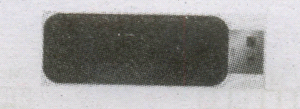
Flash Memory Devices
Flash memory is an electronic (solid-state) non-volatile computer storage medium that can be electrically erased and reprogrammed. They are either EEPROM or EPROM. Examples for Flash memories are pendrives, memory cards etc. Flash memories can be used in personal computers, Personal Digital Assistants (PDA), digital audio players, digital cameras and mobile phones. Flash memory offers fast access times. The time taken to read or write a character in memory is called access time. The capacity of the flash memories vary from 1 Gigabytes (GB) to 2 Terabytes (TB).
BIu-Ray Disc
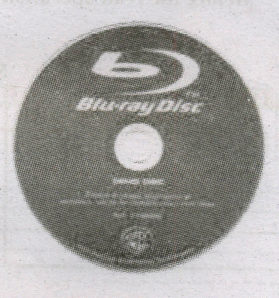
Blu-Ray Disc is a high-density optical disc similar to DVD. Blu-ray is the type of discussed for PlayStation games and for playing High-Definition (HD) movies. A double-layer Blu-Ray disc can store up to 50 GB (gigabytes) of data. This is more than 5 times the capacity of a DVD, and above 70 times of a CD. The format was developed to enable recording, rewriting and playback of high-definition video, as well as storing large amount of data. DVD uses a red laser to read and write data. But, Blu-ray uses a blue-violet laser to write. Hence, it is called as Blu-Ray.
24.
Ports and Interfaces
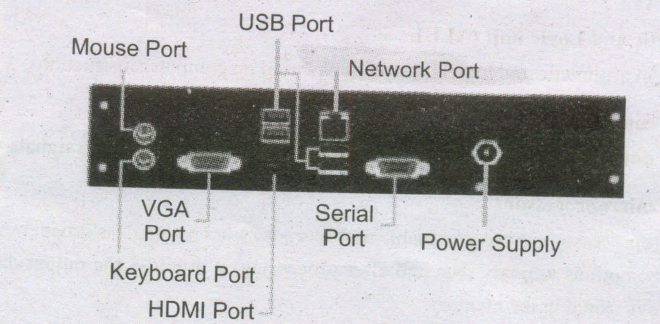
The Motherboard of a computer has many I/O sockets that are connected to the ports and interfaces found on the rear side of a computer. The external devices can be connected to the ports and interfaces. The various types of ports are given below:
Serial Port:
To connect the external devices, found in old computers.
Parallel Port:
To connect the printers,.found in old computers.
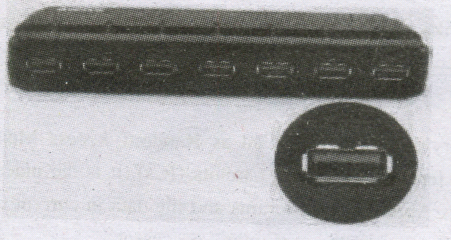
USB Ports:
To connect external devices like cameras, scanners, mobile phones, external hard disks and printers to the computer. USB 3.0 is the third major version of the Universal Serial Bus (USB) standard to connect
computers with other electronic gadgets. USB 3.0 can transfer data up to 5 Giga byte/second. USB 3.1 and USB 3.2 are also released
SCSI Port:
To connect the hard disk drives and network connectors.

11th Standard Syllabus & Materials
11th Standard
TN 11th Tamil பீடு பெற நில் - செய்யுள் - காவடிச்சிந்து Important Questions And Answers Study Material - QB365 Set A
NEW11th Standard
TN 11th Tamil பீடு பெற நில் - உரைநடை - மலை இடப்பெயர்கள் : ஓர் ஆய்வு Important Questions And Answers Study Material - QB365 Set A
NEW11th Standard
TN 11th Tamil மாமழை போற்றுதும் - துணைப்பாடம் - யானை டாக்டர் Important Questions And Answers Study Material - QB365 Set A
NEW11th Standard
TN 11th Tamil மாமழை போற்றுதும் - செய்யுள் - ஐங்குறுநூறு Important Questions And Answers Study Material - QB365 Set A



Tamilnadu Stateboard 11th Standard Subjects

Maths

Commerce

Economics

Biology

Business Maths and Statistics

Accountancy
Computer Science

Physics

Chemistry
Maths
Biology
Economics
Physics
Chemistry

History
Business Maths and Statistics

Computer Science
Accountancy

Computer Applications
History
Computer Technology
Commerce
Computer Applications
Computer Technology

Tamil

English

French
Tamilnadu Stateboard Standards
