
 100% FREE ACCESS
11th Standard Syllabus & Materials
11th Standard
TN 11th Tamil இயற்கை வேளாண்மை,சுற்றுச்சூழல் -செய்யுள் - மனோன்மணீயம் Important Questions And Answers Study Material - QB365 Set A
NEW11th Standard
TN 11th Tamil என்னுயிர் என்பேன் -துணைப்பாடம் - இசைத்தமிழர் இருவர் Important Questions And Answers Study Material - QB365 Set A
NEW11th Standard
TN 11th Tamil மொழி கலை -செய்யுள் - ஒவ்வொரு புல்லையும் Important Questions And Answers Study Material - QB365 Set A
NEW11th Standard
TN 11th Tamil பீடு பெற நில் - இலக்கணம் - பகுபத உறுப்புகள் Important Questions And Answers Study Material - QB365 Set A
NEW11th Standard
TN 11th Tamil பீடு பெற நில் - துணைப்பாடம் - வாடிவாசல் Important Questions And Answers Study Material - QB365 Set A
NEW11th Standard
TN 11th Tamil பீடு பெற நில் - செய்யுள் - குறுந்தொகை Important Questions And Answers Study Material - QB365 Set A

Published on: 21/11/2019
Introduction to Computers
Download Tamil Nadu 11th Standard Computer Science question papers, model tests, one-mark questions, important questions, and public exam papers in PDF format. Free study materials and answer keys for TN State Board students.
Questions + Answers key
Take MCQ Computer Science Test
1.
Expand NLP _____
National Language Problem
Natural Language Processing
Network Language Program
Network Local Processing
2.
Super Conductors are used in _____ generation computers.
fourth
sixth
fifth
third
3.
The component used in second generation computers is _____
Transistors
ICs
Vacuum tubes
Microprocessors
4.
Which generation of computer used IC's?
First
Second
Third
Fourth
5.
When a system restarts which type of booting is used.
Warm booting
Cold booting
Touch boot
Real boot
6.
Name the types of Monitors.
7.
What is NLP?
8.
What is the function of memory?
9.
Write the functions of control unit.
10.
What is a computer?
11.
Define Hardware and software.
12.
Define POST.
13.
Write the significant features of monitor.
14.
Differentiate optical and Laser mouse.
15.
What are the characteristics of a computer?
16.
What are Registers? Explain the five Registers that are essential for instruction execution.
17.
Explain any two input and output devices.
18.
19.
1.
(b)
Natural Language Processing
2.
(c)
fifth
3.
(a)
Transistors
4.
(c)
Third
5.
(a)
Warm booting
6.
(i) CRT- Cathode Ray Tube
(ii) LCD - Liquid Crystal Display
(iii) LED - Light Emitting Diodes
7.
Natural Language Processing is the ability of a computer program to understand human language. It is a component of artificial intelligence.
8.
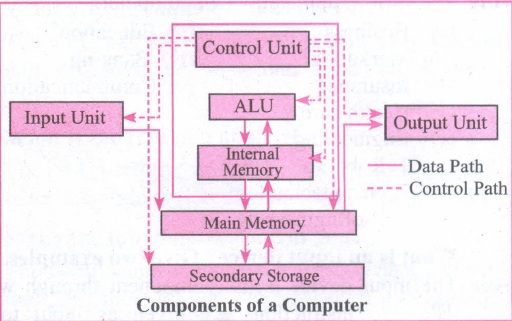
Memory enables the computer to store the program. The memory unit is of two types:
(i) Primary memory
(ii) Secondary memory
The primary memory is used to store data temporarily and secondary memory stores the data permanently.
9.
The control unit controls the flow of data between the CPU, memory I/O devices. It also controls the entire operations of a computer.
10.
Computer is an Electronic Machine, capable of performing basic operations like addition, multiplication, division etc. Computer accepts data as input, process it, produce output and stores it for future.
11.
Hardware are the physical components of a computer like a motherboard, memory devices, monitor, keyboard etc while the software is the set of programs or instructions. Both hardware and software together make the computer system function.
12.
(i) POST (Power-On Self-Test) is the diagnostic testing sequence that a computer's basic input! output system runs to determine if the computer keyboard, random access memory, disk drives and other hardware are working correctly.
(ii) If the necessary hardware is detected and found to be operating properly, the computer begins to boot.
13.
Monitor:
(a) A computer monitor is an output device which displays information in pictorial form.
(b) Monitors can be of monochrome which displays text or images in Black and white (or) in color.
(c) Different types of monitors are CRT, LCD and LED.
14.
| Optical Mouse | Laser Mouse |
| It is less sensitive towards the surface | Highly sensitive |
| Tracking power is less | Tracking power is more |
| Old technology | Latest technology |
| This uses the light source instead of ball to judge the motion of the pointer. | This uses Laser light |
| Optical mouse has 3 buttons | No. of buttons will vary from 3 to many |
15.
The Basic characteristics of the computers are:
(i) High speed
(ii) Stores Huge Data
(iii) They do millions of different tasks
(iv) Very versatile
(v) Accurate
(vi) Diligence
16.
Registers:
(i) Registers are the high-speed temporary storage locations in the CPU. Hence, their contents can be handled much faster than the' contents of memory.
(ii) Although the number of registers varies from computer to computer, there are some registers which are common to all computers. Five registers that are essential for instruction execution are:
(iii) Program Counter (PC): Contains the address of the next instruction to be fetched.
(iv) Instruction Register (IR): Contains the instruction most recently fetched.
(v) Memory Address Registers (MAR): Contain the address of a location in memory for read and write operations.
(vi) Memory Buffer Register (MBR): It contains the value to be stored in memory or the last value read from memory.
(vii) Accumulator (ACC): An accumulator is a general purpose register used for storing temporary result produced by the arithmetic logic unit.
17.
(i) Scanner:
Scanners are used to enter the information directly into the computer's memory. This device works like a Xerox machine. The scanner converts any type of printed or written information including photographs into a digital format, which can be manipulated by the computer.
(ii) Fingerprint Scanners:
Fingerprint Scanner is a fingerprint recognition device used for computer security, equipped with the fingerprint recognition feature that uses biometric technology. Fingerprint Reader / Scanner is a very safe and convenient device for security instead of using passwords, which is vulnerable to fraud and is hard to remember.
(iii) Monitor:
Monitor is the most commonly used output device to display the information. It looks like a TV. Pictures on a monitor are formed with picture elements called PIXELS. Monitors may either be Monochrome which display text or images in Black and White or can be color, which display results in multiple colors. There are many types of monitors available such as CRT (Cathode Ray Tube), LCD (Liquid Crystal Display) and LED (Light Emitting Diodes). The monitor works with the VGA (Video Graphics Array) card. The video graphics card helps the keyboard to communicate with the screen. It acts as an interface between the computer and display monitor. Usually the recent motherboards incorporate built-in video card.
(iv) Plotter:
Plotter is an output device that is used to produce graphical output on papers. It uses single colour or multi colour pens to draw pictures.
18.
19.

11th Standard Syllabus & Materials
11th Standard
TN 11th Tamil பீடு பெற நில் - செய்யுள் - காவடிச்சிந்து Important Questions And Answers Study Material - QB365 Set A
NEW11th Standard
TN 11th Tamil பீடு பெற நில் - உரைநடை - மலை இடப்பெயர்கள் : ஓர் ஆய்வு Important Questions And Answers Study Material - QB365 Set A
NEW11th Standard
TN 11th Tamil மாமழை போற்றுதும் - துணைப்பாடம் - யானை டாக்டர் Important Questions And Answers Study Material - QB365 Set A
NEW11th Standard
TN 11th Tamil மாமழை போற்றுதும் - செய்யுள் - ஐங்குறுநூறு Important Questions And Answers Study Material - QB365 Set A



Tamilnadu Stateboard 11th Standard Subjects

Maths

Commerce

Economics

Biology

Business Maths and Statistics

Accountancy
Computer Science

Physics

Chemistry
Maths
Biology
Economics
Physics
Chemistry

History
Business Maths and Statistics

Computer Science
Accountancy

Computer Applications
History
Computer Technology
Commerce
Computer Applications
Computer Technology

Tamil

English

French
Tamilnadu Stateboard Standards
