
 100% FREE ACCESS
11th Standard Syllabus & Materials
11th Standard
TN 11th Tamil இயற்கை வேளாண்மை,சுற்றுச்சூழல் -செய்யுள் - மனோன்மணீயம் Important Questions And Answers Study Material - QB365 Set A
NEW11th Standard
TN 11th Tamil என்னுயிர் என்பேன் -துணைப்பாடம் - இசைத்தமிழர் இருவர் Important Questions And Answers Study Material - QB365 Set A
NEW11th Standard
TN 11th Tamil மொழி கலை -செய்யுள் - ஒவ்வொரு புல்லையும் Important Questions And Answers Study Material - QB365 Set A
NEW11th Standard
TN 11th Tamil பீடு பெற நில் - இலக்கணம் - பகுபத உறுப்புகள் Important Questions And Answers Study Material - QB365 Set A
NEW11th Standard
TN 11th Tamil பீடு பெற நில் - துணைப்பாடம் - வாடிவாசல் Important Questions And Answers Study Material - QB365 Set A
NEW11th Standard
TN 11th Tamil பீடு பெற நில் - செய்யுள் - குறுந்தொகை Important Questions And Answers Study Material - QB365 Set A

Published on: 27/11/2019
Operating Systems
Download Tamil Nadu 11th Standard Computer Science question papers, model tests, one-mark questions, important questions, and public exam papers in PDF format. Free study materials and answer keys for TN State Board students.
Questions + Answers key
Take MCQ Computer Science Test
1.
Which of the following operating systems are not in mobile phones?
Symbian
Linux
Apple iOS
Google Android
2.
Which of the following operating systems are not used in laptops?
Windows
Linux
iOS
Unix
3.
Which of the following acts as an interface between a user and a computer?
Input device
Output device
Operating system
Bus
4.
File Management manages
Files
Folders
Directory systems
All the Above
5.
Which of the following Operating system are support Mobile Devices?
Windows 7
Linux
BOSS
iOS
6.
Differentiate MS-Windows and MS-DOS.
7.
Name the operating system used in PCs and Mobile devices.
8.
What are the different Operating Systems used in computer?
9.
List out different distributions of Linux operating system.
10.
List out any two uses of Operating System?
11.
Write the functions of OS.
12.
Write the types of Operating System?
13.
Explain the process management algorithms in Operating System.
14.
Explain and list out examples of mobile operating system.
15.
What are the advantages and disadvantages of Time-sharing features?
16.
Explain User Interface?
17.
Explain File Management.
18.
List out the points to be noted while creating a user interface for an Operating system.
19.
Explain the concept of a Distributed Operating System along with its advantages.
1.
(b)
Linux
2.
(c)
iOS
3.
(c)
Operating system
4.
(d)
All the Above
5.
(d)
iOS
6.
| S.No | MS-Windows | Ms-DOS |
| 1. | It is a GUI | It is a CUI |
| 2. | It is a Multi-user multi-tasking OS | It is a single-user multi-tasking OS |
7.
The operating systems used in personal computers and laptops are Windows, Unix and Linux. The mobile devices are using Android and iOS.
8.
Different operating system used:
1. Single user, single Task Operating system
2. Multi user operating system
3. Multiprocessing operating system
4. Distributed Operating system
9.
Different server distributions in Linux OS:
Ubuntu, Linux Mint, Debian, Fedora, Red Hat.
10.
(i) Keeping track of which portion of memory is currently being used and who is using them.
(ii) Determining which processes (or parts of processes) and data to move in and out of memory.
(iii) Allocation and de-allocation of memory blocks as needed by the program in main memory. (Garbage Collection).
11.
The functions of OS
(i) Process Management
(ii) Device management
(iii) Memory Management
(iv) File Management
(v) Security Management
(vi) Storage Management
12.
(i) Single-user operating system
(ii) Multi-user Operating system
(iii) Distributed Operating system
(iv) Operating system
(v) Mobile Operating system.
13.
(i) This algorithm is based on queuing technique. This is the basic logic of the FIFO algorithm.
(ii) Technically, the process that enters the queue first is executed first by the CPU, followed by the next and so on.
(iii) The processes are executed in the order of the queue (row).
14.
A mobile operating system controls a mobile device and its design supports wireless communication and different types of mobile applications. It operates on smartphones Tablets and Digital Mobile devices.
(i) Google Android
(ii) Apple iOS
(iii) BlackBerry
(iv) Symbian
15.
Advantages and disadvantages of Time Sharing Option (TSO)
| Time-sharing Operating Systems | |
| Advantages | Disadvantages |
| Each task and each user get its time. | Problem in Reliability |
| Systems have to give time to these applications individual tasks and other applications also, so that all systems behave correctly. | It consumes many resources so it needs special operating systems. |
| Reduces the CPU idle time | Need High specification hardware |
16.
User Interface:
User interface is one of the significant feature in Operating System. The only way that user can make interaction with a computer. If the computer interface is not user-friendly, the user slowly reduces the computer usage from their normal life. This is the main reason for the key success of GUI (Graphical User Interface) based Operating System. The GUI is a window based system with a pointing device to direct I/O, choose from menus, make selections and a keyboard to enter text. Its vibrant colours attract the user very easily. Beginners are impressed by the help and pop up window message boxes. Icons are playing vital role of the particular application.
Now Linux distribution is also available as GUI based Operating System.
The following points are considered when User Interface is designed for an application.
1. The user interface should enable the user to retain this expertise for a longer time
2. The user interface should also satisfy the customer based on their needs.
3. The user interface should save user's precious time. Create graphical elements like Menus,Window,Tabs, Icons and reduce typing work will be an added advantage of the Operating System.
4. The ultimate aim of any product is to satisfy the customer. The User Interface is also designed to satisfy the customer.
5. The user interface should reduce number of errors committed by the user with a little practice the user should be in a position to avoid errors (Error Log File)
17.
(i) File management is an important function of OS which handles the data storage techniques. The operating system manages the files, folders, and directory systems on a computer.
(ii) Any type of data in a computer is stored in the form of files and directories/folders through File Allocation Table (FAT).
(iii) The FAT stores general information about files like filename, type (text or binary), size, starting address and access mode (sequential/indexed / indexed-sequential/direct/relative).
(iv) The file manager of the operating system helps to create, edit, copy, allocate memory to the files, and also updates the FAT.
(v) The OS also takes care of the files that are opened with proper access rights to read or edit them. There are few other file management techniques available like Next-Generation File System (NTFS) and ext2(Linux).
18.
The main purpose of using an operating system:
(i) It controls and coordinates all the activities of a computer system.
(ii) It provides an environment for a computer user to execute programs on computer hardware in a convenient and efficient manner.
(iii) It enables the user to design the application, and also it provides an interface to interact with the computer and controls the execution of all kinds of programs without knowing the internals of the hardware.
(iv) It interprets the command and instructions to perform the specified tasks.
(v) It coordinates and assigns the compilers, assemblers, utility programs to the users.
(vi) It detects errors present in the hardware and software.
(vii) It maintains the internal time clock.
(viii) It protects itself from being destroyed by any users.
(ix) It serves two major functions
1. Supervision (Prevent errors)
2. Management (Operation and control of I/O devices)
(x) It loads the program itself into memory so that user can interact with hardware and software.
19.
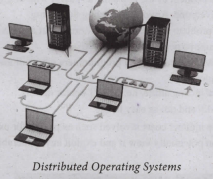
The data and application that are stored and processed on multiple physical locations across the world over the digital network (internet/intranet). The Distributed Operating System is used to access shared data and files that reside in any machine around the world. The user can handle the data from different locations. The users can access as if it is available on their own computer.
The advantages of distributed Operating System are as follows:
1. A user at one location can make use of all the resources available at another location over the network.
2. Many computer resources can be added easily in the network
3. Improves the interaction with the customers and clients.
4. Reduces the load on the host computer.

11th Standard Syllabus & Materials
11th Standard
TN 11th Tamil பீடு பெற நில் - செய்யுள் - காவடிச்சிந்து Important Questions And Answers Study Material - QB365 Set A
NEW11th Standard
TN 11th Tamil பீடு பெற நில் - உரைநடை - மலை இடப்பெயர்கள் : ஓர் ஆய்வு Important Questions And Answers Study Material - QB365 Set A
NEW11th Standard
TN 11th Tamil மாமழை போற்றுதும் - துணைப்பாடம் - யானை டாக்டர் Important Questions And Answers Study Material - QB365 Set A
NEW11th Standard
TN 11th Tamil மாமழை போற்றுதும் - செய்யுள் - ஐங்குறுநூறு Important Questions And Answers Study Material - QB365 Set A



Tamilnadu Stateboard 11th Standard Subjects

Maths

Commerce

Economics

Biology

Business Maths and Statistics

Accountancy
Computer Science

Physics

Chemistry
Maths
Biology
Economics
Physics
Chemistry

History
Business Maths and Statistics

Computer Science
Accountancy

Computer Applications
History
Computer Technology
Commerce
Computer Applications
Computer Technology

Tamil

English

French
Tamilnadu Stateboard Standards
