
 100% FREE ACCESS
11th Standard Syllabus & Materials
11th Standard
TN 11th Tamil இயற்கை வேளாண்மை,சுற்றுச்சூழல் -செய்யுள் - மனோன்மணீயம் Important Questions And Answers Study Material - QB365 Set A
NEW11th Standard
TN 11th Tamil என்னுயிர் என்பேன் -துணைப்பாடம் - இசைத்தமிழர் இருவர் Important Questions And Answers Study Material - QB365 Set A
NEW11th Standard
TN 11th Tamil மொழி கலை -செய்யுள் - ஒவ்வொரு புல்லையும் Important Questions And Answers Study Material - QB365 Set A
NEW11th Standard
TN 11th Tamil பீடு பெற நில் - இலக்கணம் - பகுபத உறுப்புகள் Important Questions And Answers Study Material - QB365 Set A
NEW11th Standard
TN 11th Tamil பீடு பெற நில் - துணைப்பாடம் - வாடிவாசல் Important Questions And Answers Study Material - QB365 Set A
NEW11th Standard
TN 11th Tamil பீடு பெற நில் - செய்யுள் - குறுந்தொகை Important Questions And Answers Study Material - QB365 Set A

Published on: 17/01/2020
Download Tamil Nadu 11th Standard Computer Science question papers, model tests, one-mark questions, important questions, and public exam papers in PDF format. Free study materials and answer keys for TN State Board students.
Questions + Answers key
Take MCQ Computer Science Test
1.
Which option is used to save the file?
Ctrl + s
Save
File + Save
All the above
2.
What will be the value of of control line for read operation from RAM to MDR?
1
0
-1
2
3.
The set of statements that are executed again and again in iteration is called as:
condition
loop
statement
body of loop
4.
Phishing and pharming and examples of _________.
Social Engineering
Social Media
Malware
firewalls
5.
The first version of Unicode introduced in the year ________.
1990
1998
1991
1981
6.
How many types of scopes in C++?
4
5
3
2
7.
class vehicle
{ int wheels;
public:
void input_data(float,float);
void output_data();
protected:
int passenger;
};
class heavy_vehicle : protected vehicle {
int diesel_petrol;
protected:
int load;
public:
void read_data(float,float)
void write_data(); };
class bus: private heavy_vehicle {
char Ticket[20];
public:
void fetch_data(char);
void display_data(); };
The member function that can be accessed by an objects of bus Class is
input data(), output _data()
read _data() ,write _data()
fetch _data(), display_data()
All of these
8.
Which of the following statement is false regarding procedural programming?
(i) All data items are local
(ii) suitable for small sized software application
(iii) Time consuming
(iv) Pascal is an example
Both (ii) and (iii)
Only (i)
Only (iv)
Both (i) and (iv)
9.
Which of the following datatype operations take more time to execute?
float
int
char
void
10.
Who was a Hungarian Mathematician?
G. Polya
John Wiley
Krysia Broda
Steve Vickers
11.
Using this recursive definition
\(a^n= \begin{cases}1 & \text { if } n=0 \\ a \times a^{n-1} & \text { otherwise }\end{cases}\)
how many multiplications are needed to calculate a10?
11
10
9
8
12.
EBCDIC uses.....bit coding scheme.
2
4
8
16
13.
14.
Identify the usage of Operating Systems
Easy interaction between the human and computer
Controlling Input & Output Devices
Managing use of main memory
All the above
15.
Expand POST
Power On Self Test
Power On Self Test
Power on Self Test
Power On Self Test
16.
Mention any 2 reasons as to why the websites use cookies?
17.
Define inethods of a class and write its types.
18.
Write the algorithm specification to find minimum of 2 numbers.
19.
Write a short note on "Thamizpori".
20.
Write the disadvantages of OOP.
21.
What is Open source Operating system?
22.
Write the two main categories of Printer.
23.
Initially, farmer, goat, grass, wolf = L, L, L, L and the farmer crosses the river with goat. Model the action with an assignment statement.
24.
What is multi-processing?
25.
Write the coding for the following output using constructor overloading.
Output:
Constructor without parameters ...
Parameterized constructor ...
Copy Constructor ....
Enter data ... 20 30
Object a:
The numbers are ..20 30
Thesum of the numbers are .. 50
Object b:
The numbers are..10 20
The sum of the numbers are .. 30
Object c..
The numbers are ..10 20
The sum of the numbers are .. 30
26.
Explain recursive - problem solving.
27.
Explain process Management.
28.
Explain switch-case with an example.
29.
What is number system? Describe different number systems in detail.
30.
Explain the types of symbols used in flowchart in detail.
31.
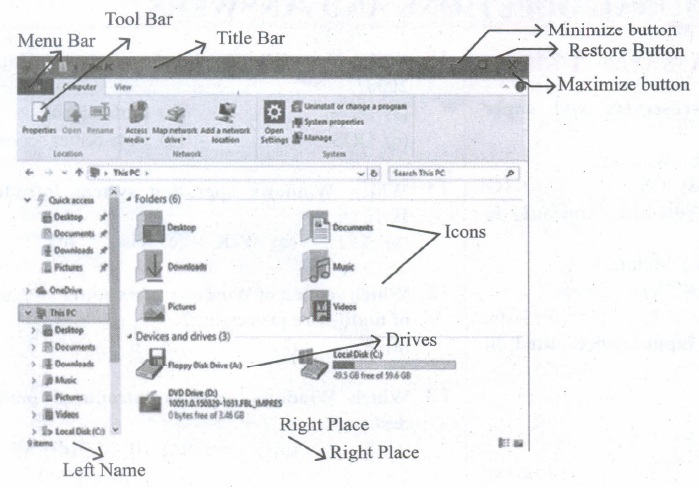
Observe the figure and mark all the window elements, Identify the version of the Windows OS.
32.
Exchange the contents: Given two glasses marked A and B. Glass A is full of apple drink and glass B is full of grape drink. For exchanging the contents of glasses A and B, represent the state by suitable variables, and write the specification of the algorithm.
33.
Discuss the various generations of computers.
34.
Explain the types of ROM.
35.
Differentiate Spyware and Ransomware.
36.
Write a program to assign data to members of a structure variable and display the contents.
37.
What is goto statement? Explain
38.
Write some facts about the execution of constructors and destructors in inheritance.
39.
Define information hiding.
40.
What is Built-in functions?
41.
What are the differences between “Logical error” and “Syntax error”?
42.
Complete the Table
1) 0 + _ = 0
2) _ + 0 = 1
3) 1+ 1 = _
4) 0 + 1 = _
43.
Name the control flow statements used in an algorithm.
1.
(d)
All the above
2.
(a)
1
3.
(d)
body of loop
4.
(a)
Social Engineering
5.
(c)
1991
6.
(a)
4
7.
(d)
All of these
8.
(d)
Both (i) and (iv)
9.
(a)
float
10.
(a)
G. Polya
11.
(c)
9
12.
(c)
8
13.
(a)
14.
(d)
All the above
15.
(d)
Power On Self Test
16.
(i) To collect demographic information about who has visited the Web site.
(ii) It helps to personalize the user's experience on the Website.
17.
Class comprises of members. Member functions are called as methods. The member functions of a class can be defined in two ways.
(i) Inside the class definition
(ii) Outside the class definition
18.
Minimum (a, b)
- - inputs : a, b
- - outputs : result = a \(\downarrow\) b
19.
Thamizpori (தமிழ்பொறி) is a Tamil translation application having more than 30000 Tamil words equalent to English words. Using-this application. we can transalte small English sentences into Tamil.
20.
Size: Object Oriented Programs are much larger than other programs.
Effort: Object Oriented Programs require a lot of work to create.
Speed: Object Oriented Programs are slower than other programs, because of their size.
21.
It is the software in which the source code is available to the general public for use and modification from its original design, free of charge.
22.
Printers are divided into two main categories:
(i) Impact Printers
(ii) Non Impact printers
23.
Model of the action with an assignment statement:
1. --farmer, goat, grass, wolf = L,L,L,L.
2. Farmer, goat:= R, R
3. -farmer, goat, grass, wolf = R,R,L,L
4. --farmer:= L
5. --farmer, goat, grass, wolf = L,R,L,L
6. farmer, grass:= R, R
7. --farmer, goat, grass, wolf = R,R,R,L
8. farmer, goat:= L, L
9. --farmer, goat, grass, wolf = L,L,R,L
10. farmer, wolf:= R,R
11. --farmer, goat, grass, wolf = R,L,R,R
12. farmer:= L
13. --farmer, goat, grass, wolf = L,L,L,R
14. farmer, goat:= R,R
15. -- farmer, goat, grass, wolf = R,R,R,R
24.
Multiprocessing is one of the features of operating system. It has two or more processors for a single running process. Each processor works on different parts of the same task or two or more different tasks.
25.
#include< iostream >
using namespace std;
class add
{
int num1, num2, sum;
public:
add ( )
{
cout < < "\n Constructor without parameters ...";
num1=0;
num2=0;
sum=0;
}
add (int s1, int s2)
{
cout < < "\n Parameterized constructor ...";
num1= s1;
num2=s2;
sum=0;
}
add (add &a)
{
cout < < "\n Copy Constructor ...";
num1= a.num1;
num2=a.num2;
sum=0;
}
void getdata ( )
{
cout < < "\n Enter data ...";'
cin > > num 1 > > num2;
}
void addition ( )
{
sum=num1+num2;
}
void putdata ( )
{
cout < < "\n The numbers are ..";
cout< <num 1 < < '\t' < < num2;
cout < < "\n The sum of the numbersare .."< < sum;
}
};
int main ( )
{
add a, b (10, 20) , c(b);
a.getdata ( );
a.addition( );
b.addition( );
c.addition( );
cout< < "\n Object a:";
a.putdatat);
cout < < "\n Object b :";
b.putdata( );
cout < < "\n Object c..";
c.putdata( );
return 0;
}
26.
To solve a problem recursively, the solver reduces the problem to sub-problems, and calls another instance of the solver, known as sub-solver, to solve the sub-problem. The input ,size to a sub-problem is smaller than the input size to the original problem. When the solver calls a sub-solver, it is known as recursive call. The magic of recursion allows the solver to assume that the sub-solver (recursive call) outputs the solution to the sub-problem. Then, from the, solution to the sub-problem, the solver constructs the solution to the given problem.
As the sub-solvers go on reducing the problem into sub-problems of smaller sizes, eventually the sub-problem becomes small enough to be solved directly, without recursion. Therefore, a recursive solver has two cases:
1. Base case: The problem size is small enough to be solved directly. Output the solution. here must be at least one base case.
2. R-ecursion step: The problem size is not small enough. Deconstruct the problem into a sub-problem, strictly smaller in size than the given problem. Call a sub-solver to solve the sub problem. Assume that the sub-solver outputs the solution to the sub problem. Construct the solution to the given problem.
This outline of recursive problem solving technique is shown below.
solver (input)
if input is small enough
construct solution
else
find sub_Problems of reduced
input
solutions to sub problems =
solver for each sub .Problem
construct solution to the
problem from
solutions to the sub_problems
Whenever we solve a problem using recursion, we have to ensure these two cases: In the recursion step, the size of the input to the recursive call is strictly smaller than the size of the given input, and there is at least one base case.
27.
Process Management:
Process management is a function that includes creating and deleting processes and providing mechanisms for processes to communicate and synchronize with each other.
A process is a unit of work (program) in a computer. A word processing program being run by an individual user on.a computer is a process. A system task, such as sending output to a printer or screen, can also be called as a Process.
A computer consists of a collection of processes, they are classified as two categories:
1. Operating System processes which is executed by system code
2. User Processes which is executed by user code. All these processes can potentially execute concurrently on a single CPU. A process needs certain resources including CPU time, memory, files and 110 devices to finish its task.
The Operating System is responsible for the following activities associated with the process management:
1. Scheduling processes and threads on the CPUs.
2. Creating and deleting both user and system processes
3. Suspending and resuming processes.
4. Providing mechanisms for process synchronization.
5. Providing mechanisms for the process communication
The following algorithms are mainly used to allocate the job (process) to the processor.
1. FIFO
2. SJF
3. Round Robin
4. Based on Priority.
28.
The switch statement is a multi-way branch statement. It provides an easy way to dispatch execution to different parts of code based on the value of the expression. The switch statement replaces multiple if-else sequence.
The syntax of the switch statement is:
switch( expression)
{
case constant 1:
statement( s);
break;
case constant 2:
statement( s);
break;
default:
statement(s);
}
Example:
#include < iostream.h >
using namespace std;
int main( )
{
int num;
cout << "\n Enter week day number:";
cin >> num;
switch (num)
{
easel : cout << "\n Sunday";break;
case2 : cout << "\n Monday";break;
case3 : cout << "\n Tuesday";break;
case4 : cout << "\n Wednesday";break;
case5 : cout << "\n Thursday'xbreak;
case6 : cout << "\n Friday";break;
case7 : cout << "\n Saturday";break;
default: cout << "\n Wrong input.. ...";
}
}
Output:
Enter week day number: 6
Friday
29.
A number system is a set of digits used to represent the values derived from a common base or radix.
Decimal Number System:
(i) The term Decimal is derived from a Latin prefix deci, which means ten.
(ii) The Decimal number system has ten digits ranging from 0-9. Because this system has ten digits.
(iii) It is also called as a base ten number system or denary number system.
(iv) Decimal number should always be written with a subscript 10.
Binary Number System:
(i) The decimal number system is not convenient to implement in digital system.
(ii) For instance, it is very difficult to design electronic equipment so that it can work with 10 different voltage levels (each one representing one decimal character, 0 through 9).
(iii) On other hand, it is very easy to design simple, accurate electronic circuits that operate with only 2 voltage levels.
(iv) For this reason, almost every digital system utilizes the binary number system (base 2) as the basic number system of its operation;
(v) In a binary system, there are only two symbols or possible digit values, 0 and 1.
Octal Number System:
(i) The octal number system is playing a vital role in digital computer work.
(ii) The octal number system has a base of 8.
(iii) It means that it has eight unique symbols such as 0,1,2,3,4,5,6 and 7.
(iv) Thus, each digit of an octal number can have any value from 0 to 7.
(v) The places to the left of the octal point are positive powers of 8 and places to the right are negative powers of 8.
Hexadecimal Number System:
(i) The hexadecimal system uses base 16 in digital systems.
(ii) It has 16 possible symbols.
(iii) It uses the digits 0 through 9 plus the letters A, B, C, D, E and F as the 16 different symbols.
(iv) Hexadecimal System is a positional value system, wherein each hexadecimal digit has its own value or weight expressed as a power of 16.
30.
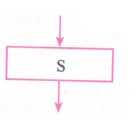
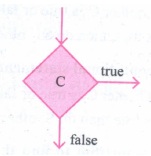
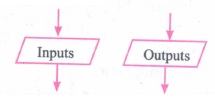
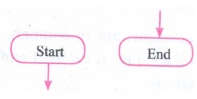
Flowchart is a diagrammatic notation for representing algorithms. They show the control flow of algorithms using diagrams in a visual manner. In flowcharts, rectangular boxes represent simple statements, diamond-shaped boxes represent conditions, and arrows describe how the control flows during the execution of the algorithm. A flowchart is a collection of boxes containing statements and conditions which are connected by arrows showing the order in which the boxes are to be executed.
(i) A statement is contained in a rectangular box with a single outgoing arrow, which points to the box to be executed next.
(ii) A condition is contained in a diamond-shaped box with two outgoing arrows, labelled true and false. The true arrow points to the box to be executed next if the condition is true, and the false arrow points to the box to be executed next if the condition is false.
(iii) Parallelogram boxes represent inputs given and outputs produced.
(iv) Special boxes marked Start and End are used to indicate the start and end of execution:
31.
32.
Let the variables a, b, c represent the glass A, glass B and Glass C respectively. Variables A, B, C can store values APPLE, GRAPE or EMPTY.
Initial State:
1.-- a, b, c := APPLE, GRAPE, EMPTY
2. c := b
3.-- a, b, c := APPLE, EMPTY, GRAPE
4. b := a
5.-- a, b, c := EMPTY, APPLE, GRAPE
6. a := c
7.-- a, b, c := GRAPE, APPLE, EMPTY
Final State:
Specification:
1. Exchange ()
2. -- inputs: a, b, c := APPLE, GRAPE, EMPTY
3.--outputs: a, b, c:= GRAPE, APPLE, EMPTY
33.
| Computer size was drastically reduced. S.No | Generation | Period | Main Component used | Merits/ Demerits |
| 1 | First Generation | 1942-1955 | 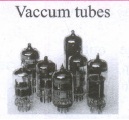 |
Big in size Consumed more power Malfunction due to overheating Machine Language was used Eg : ENIAC, EDVAC, UNIVAC |
| First Generation Computer - ENIAC, EDVAC, UNIVAC 1 ENIAC weighed about 27 tons, size 8 feet x 100 feet x 3 feet, and consumed around 150 watts of power | ||||
| 2 | Second Generation | 1955-1964 | 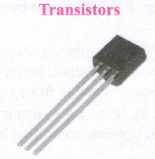 |
Smaller compared to First Generation Generated Less Heat Consumed less power compared to first-generation Punched cards were used. The first operating system was developed Batch Processing and Multiprogramming Operating System Machine language, as well as Assembly language, was used. |
| Second Generation Computers IBM 1404, IBM 1620, UNIVAC 1108 | ||||
| 3 | Third Generation | 1964-1975 | 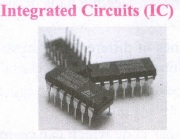 |
Computers were smaller, faster, and more reliable Consumed less power. High-Level Languages were used. |
| Third Generation Computers -IBM ·360 series, Honeywell 6000 series | ||||
| 4 | Fourth Generation | 1975-1980 | 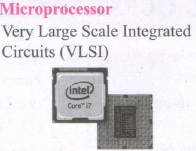 |
Smaller and Faster Microcomputer series such as IBM and APPLE was developed Portable Computers were introduced. |
| 5 | Fifth Generation | 1980-till date | 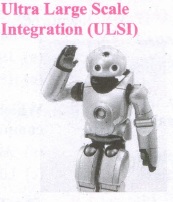 |
Parallel, Processing Superconductors Computer size was drastically reduced. Can recognize Images and Graphics Introduction of Artificial Intelligence and Expert Systems Able to solve highly complex problems including decision making and logical reasoning. |
| 6 | Sixth Generation | In future | 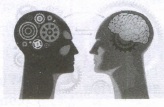 |
Parallel and Distributed computing Computers have become smarter faster and smaller Development of robotics Natural Language Processing Development of Voice Recognition Software. |
34.
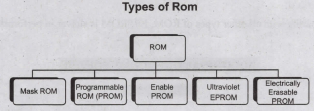
Read-only memory (ROM):
1. Read-Only Memory refers to special memory in a computer with pre-recorded data at manufacturing time which cannot be modified.
2. The stored programs that start the computer and perform diagnostics are available in ROMs. ROM stores critical programs such as the program that boots the computer.
3. Once the data has been written onto a ROM chip, it cannot be modified or removed and can only be read.
4. ROM retains its contents even when the computer is turned off. So, ROM is called as a non-volatile memory.
Programmable Read-Only Memory (PROM):
1. Programmable read-only memory is also a nonvolatile memory on which data can be written only once. Once a program has been written onto a PROM, it remains there forever.
2. Unlike the main memory, PROMs retain their contents even when the computer is turned off.
3. The PROM differs from ROM. PROM is manufactured as a blank memory, whereas a ROM is programmed during the manufacturing process itself.
4. PROM programmer or a PROM burner is used to write data to a PROM chip. The process of programming a PROM is called burning the PROM.
Erasable Programmable Read-Only Memory (EPROM):
1. Erasable Programmable Read-Only Memory is a special type of memory which serves as a PROM, but the content can be erased using ultraviolet rays.
2. EPROM retains its contents until it is exposed to ultraviolet light. The ultraviolet light clears its contents, making it possible to reprogram the memory.
3. An EPROM differs from a PROM. PROM can be written only once and cannot be erased.
4. EPROMs are used widely in personal computers because they enable the manufacturer to change the contents of the PROM to replace with updated versions or erase the contents before the computer is delivered.
Electrically Erasable Programmable Read-Only Memory (EEPROM)
1. Electrically Erasable Programmable Read-Only Memory is a special type of PROM that can be erased by exposing it to an electrical charge.
2. Like other types of PROM, EEPROM retains its contents even when the power is turned off.
3. Comparing with all other types of ROM, EEPROM is slower in performance.
35.
| Spyware | Ransomware |
| Spyware can be installed on the computer automatically when the attachments are open, by clicking on links or by downloading infected software. | Ransomware is a type of malicious program that demands payment after launching a cyber-attack on a computer system. This type of malware has become increasingly popular among criminals and costs organizations millions each year. |
36.
C++ Program that assigns data to members of a structure variable and displays the contents
include< iostream >
using namespace std;
struct Employee
{
char name[50];
int age;
float salary;
};
int main( )
{
Employee e1;
cout < < "Enter Full name:";
cin > > e1.name;
cout < < endl < < "Enter age:";
cin > >e1.age;
couts < < endl < < "Enter salary:";
cin-c-e1.salary; ,
cout < <"\nDisplaying Information." << endl;
cout< < "Name:" < < e1.name < < endl;
cout< < "Age:" < < e1.age < < endl:
cout < < "Salary:" < < e1.salary;
return 0;
}
Output:
Enter Full name:
Ezhil
Enter age:
27
Enter salary:
40000.00 .
Displaying Information.
Name: Ezhil
Age: 27
Salary: 40000.00
37.
The goto statement is a control statement which is used to transfer the control from one place to another place without any condition in a program.
The syntax of the goto statement is;
|
Syntax 1 label; |
Syntax 2 ------------- |
38.
Some Facts About the execution of constructor in inheritance
i. Base class constructors are executed first, before the derived class constructors execution
ii. Derived class cannot inherit the base class constructor but it can call the base class constructor by using Base_class name::base_class_constructor() in derived class definition
iii. If there are multiple base classes, then its start executing from the left most base class
iv. In multilevel inheritance, the constructors will be executed in the order of inheritance The destructors are executed in the reverse order of inheritance.
39.
Encapsulation is the most striking feature of a class. The data is not accessible to the outside world, and only those functions which are wrapped in the class can access it. This encapsulation of data from direct access by the program is called data hiding or information hiding.
40.
C++ provides a rich collection of functions ready to be used for various tasks. The tasks to be perfornned by each of these are already written, debugged and compiled, their definitions alone are grouped and stored in files called header files. Such ready-touse sub programs are called pre-defined functions or build-in functions.
41.
| Syntax error | Logical error |
| The syntax is a set of grammatical rules to construct a program. Every programming language has unique rules for constructing the source code. Syntax errors occur when grammatical rules of c++ are violated. | A Program has not produced the expected result even though the program is grammatically correct. It may happen by the wrong use of variable/operator/order of execution etc. This means, the program is grammatically correct, but it contains some logical errors. So, Semantic error is also called as "Logic Error". |
42.
1) 0 + 0 = 0
2) 1 + 0 = 1
3) 1 + 1 = 1
4) 0 + 1 = 1
43.
(i) Sequential Control Flow
(ii) Alternative Control Flow
(iii) Iterative Control Flow.

11th Standard Syllabus & Materials
11th Standard
TN 11th Tamil பீடு பெற நில் - செய்யுள் - காவடிச்சிந்து Important Questions And Answers Study Material - QB365 Set A
NEW11th Standard
TN 11th Tamil பீடு பெற நில் - உரைநடை - மலை இடப்பெயர்கள் : ஓர் ஆய்வு Important Questions And Answers Study Material - QB365 Set A
NEW11th Standard
TN 11th Tamil மாமழை போற்றுதும் - துணைப்பாடம் - யானை டாக்டர் Important Questions And Answers Study Material - QB365 Set A
NEW11th Standard
TN 11th Tamil மாமழை போற்றுதும் - செய்யுள் - ஐங்குறுநூறு Important Questions And Answers Study Material - QB365 Set A



Tamilnadu Stateboard 11th Standard Subjects

Maths

Commerce

Economics

Biology

Business Maths and Statistics

Accountancy
Computer Science

Physics

Chemistry
Maths
Biology
Economics
Physics
Chemistry

History
Business Maths and Statistics

Computer Science
Accountancy

Computer Applications
History
Computer Technology
Commerce
Computer Applications
Computer Technology

Tamil

English

French
Tamilnadu Stateboard Standards
