
 100% FREE ACCESS
11th Standard Syllabus & Materials
11th Standard
TN 11th Tamil இயற்கை வேளாண்மை,சுற்றுச்சூழல் -செய்யுள் - மனோன்மணீயம் Important Questions And Answers Study Material - QB365 Set A
NEW11th Standard
TN 11th Tamil என்னுயிர் என்பேன் -துணைப்பாடம் - இசைத்தமிழர் இருவர் Important Questions And Answers Study Material - QB365 Set A
NEW11th Standard
TN 11th Tamil மொழி கலை -செய்யுள் - ஒவ்வொரு புல்லையும் Important Questions And Answers Study Material - QB365 Set A
NEW11th Standard
TN 11th Tamil பீடு பெற நில் - இலக்கணம் - பகுபத உறுப்புகள் Important Questions And Answers Study Material - QB365 Set A
NEW11th Standard
TN 11th Tamil பீடு பெற நில் - துணைப்பாடம் - வாடிவாசல் Important Questions And Answers Study Material - QB365 Set A
NEW11th Standard
TN 11th Tamil பீடு பெற நில் - செய்யுள் - குறுந்தொகை Important Questions And Answers Study Material - QB365 Set A

Published on: 16/09/2019
Download Tamil Nadu 11th Standard Computer Science question papers, model tests, one-mark questions, important questions, and public exam papers in PDF format. Free study materials and answer keys for TN State Board students.
Questions + Answers key
Take MCQ Computer Science Test
1.
Trace the step-by-step execution of the algorithm for factorial(4).
factorial(n)
--inputs: n is an integer, n > 0
-- outputs: f = n!
f, i := 1 ,1
while i < nf
, i := f × i, i+1
2.
Power can also be defined recursively as
\(a^n= \begin{cases}1 & \text { if } \mathrm{n}=0 \\ \mathrm{a} \times \mathrm{a}^{\mathrm{n}-1} & \text { if } \mathrm{n} \text { is odd } \\ \mathrm{a}^{\mathrm{n} / 2} \times \mathrm{a}^{\mathrm{n} / 2} & \text { if } \mathrm{n} \text { is even }\end{cases}\)
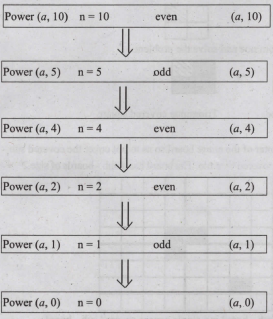
Construct a recursive algorithm using this definition. How many multiplications are needed to calculate a10?
3.
4.
Subtract 11010112 - 1110102
5.
Exchange the contents: Given two glasses marked A and B. Glass A is full of apple drink and glass B is full of grape drink. For exchanging the contents of glasses A and B, represent the state by suitable variables, and write the specification of the algorithm.
6.
Discuss the various generations of computers.
7.
Explain the types of ROM.
8.
Convert (98.46)10 to Binary.
9.
List out the points to be noted while creating a user interface for an Operating system.
10.
How the read and write operations are performed by a processor? Explain.
1.
(i) f=1 i=1 f = f * i i = i+1
f = 1 x 1 = 1 i = 2
(ii) f = 1 x 2 i = 3 = 2
(iii) f = 2 × 3 i = 4 = 6
(iv) f = 6 x 4 i = 5 (loop terminates) = 24
2.
power (5,2) = 5 × 5 = 25
power (x, n) raise x to the power n
Algorithm :
power (x, n)
If n = 0 -- base case
1
else -- rrecursion step
if n is odd
x * power (x, n - 1)
else
p = power (x, n/2)
p * p
To find a 10 :
3.
 1985 1. Introduction of GUI in 16 - bit. processor
 1987 1. Supports to minimize or maximize windows.
 1992 1. Introduced the concept of multitasking.
 1995 1. Introduced Start button, the taskbar, Windows Explorer and Start menu.
 1998 1. Integration of the Web browser (Internet Explorer) with the Operating System.
 Designed to act as servers in network. 7. Windows Me
  2000 It introduced automated system diagnostics and recovery tools. 8. Windows 2000
  2000 1. Served as an Operating System for business
 2001 1. Introduced 64-bit Processor.
 2006 Updated the look and feel of Windows 11. Windows 7
  2009 Booting time was improved, introduced new user interfaces like Aero Peek, pinning programs to the taskbar, handwriting recognition etc, and Internet Explorer 8. 12. Windows 8
  2012 1. Windows 8 was faster than previous versions of Windows.
 2015 1. Start Button was added again.
4.
11010112 - 1110102
1101011
+111010
_______
0110001
_______
11010112 - 1110102 = 01100012
5.
Let the variables a, b, c represent the glass A, glass B and Glass C respectively. Variables A, B, C can store values APPLE, GRAPE or EMPTY.
Initial State:
1.-- a, b, c : = APPLE, GRAPE, EMPTY
2. C : = b
3.-- a, b, c : = APPLE, EMPTY, GRAPE
4. b : = a
5.-- a, b, c : = EMPTY, APPLE, GRAPE
6. a : = C
7.-- a, b, c : = GRAPE, APPLE, EMPTY
Final State:
Specification:
1. Exchange ()
2. -- inputs: a, b, c :- APPLE, GRAPE, EMPTY
3.--outputs: a, b, c:- GRAPE, APPLE, EMPTY
6.
| Computers size was drastically reduced. S.No | Generation | Period | Main Component used | Merits/ Demerits |
| 1 | First Generation | 1942-1955 | 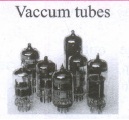 |
Big in size Consumed more power Malfunction due to overheating Machine Language was used Eg : ENIAC, EDVAC, UNIVAC |
| First Generation Computer - ENIAC, EDVAC, UNIVAC 1 ENIAC weighed about 27 tons, size 8 feet x 100 feet x 3 feet, and consumed around 150 watts of power | ||||
| 2 | Second Generation | 1955-1964 | 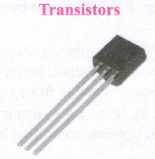 |
Smaller compared to First Generation Generated Less Heat Consumed less power compared to first-generation Punched cards were used. The first operating system was developed Batch Processing and Multiprogramming Operating System Machine language, as well as Assembly language, was used. |
| Second Generation Computers IBM 1404, IBM 1620, UNIVAC 1108 | ||||
| 3 | Third Generation | 1964-1975 | 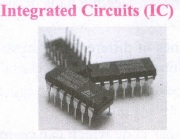 |
Computers were smaller, faster, and more reliable Consumed less power. High-Level Languages were used. |
| Third Generation Computers -IBM ·360 series, Honeywell 6000 series | ||||
| 4 | Fourth Generation | 1975-1980 | 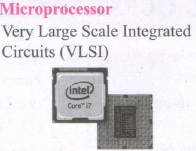 |
Smaller and Faster Microcomputer series such as IBM and APPLE was developed Portable Computers were introduced. |
| 5 | Fifth Generation | 1980-till date | 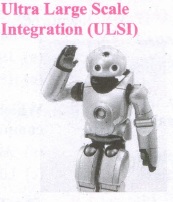 |
Parallel, Processing Superconductors Computers size was drastically reduced. Can recognize Images and Graphics Introduction of Artificial Intelligence and Expert Systems Able to solve highly complex problems including decision making and logical reasoning. |
| 6 | Sixth Generation | In future |  |
Parallel and Distributed computing Computers have become smarter faster and smaller Development of robotics Natural Language Processing Development of Voice Recognition Software. |
7.
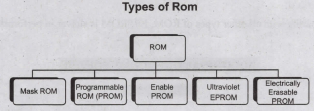
Read-only memory (ROM):
1. Read only memory refers to special memory in a computer with pre-recorded data at manufacturing time which cannot be modified.
2. The stored programs that start the computer and perform diagnostics are available in ROMs. ROM stores critical programs such as the program that boots the computer.
3. Once the data has been written onto a ROM chip, it cannot be modified or removed and can only be read.
4. ROM retains its contents even when the computer is. turned off. So, ROM is called as a non-volatile memory.
Programmable Read-Only Memory (PROM):
1. Programmable read-only memory is also a nonvolatile memory on which data can be written only once. Once a program has been written onto a PROM, it remains there forever.
2. Unlike the main memory, PROMs retain their contents even when the computer is turned off.
3. The PROM differs from ROM. PROM is manufactured as a blank memory, whereas a ROM is programmed during the manufacturing process itself.
4. PROM programmer or a PROM burner is used to write data to a PROM chip. The process of programming a PROM is called burning the PROM.
Erasable Programmable Read-Only Memory (EPROM):
1. Erasable Programmable Read Only Memory is a special type of memory which serves as a PROM, but the content can be erased using ultraviolet rays.
2. EPROM retains its contents until it is exposed to ultraviolet light. The ultraviolet light clears its contents, making it possible to reprogram the memory.
3. An EPROM differs from a PROM, PROM can be written only once and cannot be erased.
4. EPROMs are used widely in personal computers because they enable the manufacturer to change the contents of the PROM to replace with updated versions or erase the contents before the computer is delivered.
Electrically Erasable Programmable Read Only Memory (EEPROM)
1. Electrically Erasable Programmable Read Only Memory is a special type of PROM that can be erased by exposing it to an electrical charge.
2. Like other types of PROM, EEPROM retains its contents even when the power is turned off.
3. Comparing with all other types of ROM, EEPROM is slower in performance.
8.
98.4610
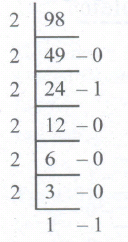
2. Fractional part
0.46 x 2 = 0.92 = 0
0.92 x 2 = 1.84 = 1
0.84 x 2 = 1.68 = 1
0.68 x 2 = 1.36 = 1
0.36 x 2 = 0.72 = 0
0.72 x 2 = 1.44 = 1
98.4610 = (1100010.011101...)2
9.
The main purpose of using an operating system:
(i) It controls and coordinates all the activities of a computer system.
(ii) It provides an environment for a computer user to execute programs on computer hardware in a convenient and efficient manner.
(iii) It enables the user to design the application, and also it provides an interface to interact with the computer and controls the execution of all kinds .of programs without knowing the internals of the hardware.
(iv) It interprets the command and instructions to perform the specified tasks.
(v) It coordinates and assigns the compilers, assemblers, utility programs to the users.
(vi) It detects errors present in the hardware and software.
(vii) It maintains the internal time clock.
(viii) It protects itself from being destroyed by any users.
(ix) It serves two major functions
1. Supervision (Prevent errors)
2. Management (Operation and control of I/O devices)
(x) It loads the program itself into memory so that user can interact with hardware and software.
10.
1. The Central Processing Unit(CPU) has a Memory Data Register (MDR) and a Memory Address Register (MAR).
2. The Memory Data Register (MDR) keeps the data which is transferred between the Memory and the CPU. The Program Counter (PC) is a special register in the CPU which always keeps the address of the next instruction to be executed.
3. The Arithmetic and Logic unit of CPU places the address of the memory to be fetched, into the Memory Address Register.
4. A bus is a collection of wires used for communication between the internal components of a computer.
5. The address bus is used to point a memory location. A decoder, a digital circuit is used to point to the specific memory location where the word can be located.
6. The address register is connected with the address bus, which provides the address of the instruction. A data bus is used to transfer data between the memory and the CPU.
7. The data bus is bidirectional and the address bus is unidirectional. The control bus controls both read and write operations.
8. The read operation fetches data from memory and transfers to MDR. A single control line performs two operations like Read/Write using 1 or 0.
9. Also, the write operation transfers data from the MDR to memory. This organisation is shown below.
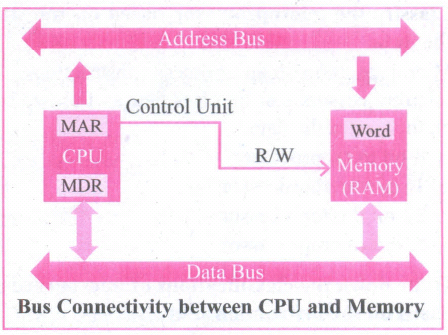
10. The word in the RAM has the same size (no.of bits) as the Memory Data Register (MDR). If the processor is an 8-bit RAM processor like Intel 8085, its MDR and the word in the both have 8 bits.
11. If the size of the MDR is eight bits, which can be connected with a word in the memory which is also eight bits size. The data bus has eight parallel wires to transfer data either from MDR to word or word to MDR based on the control(Read or write).
.png)
13. This control line is labeled as which becomes 1 means READ operation and 0 means WRITE operation.
.png)
14. These pictures show the contents of MDR and the word before and after the READ operation.
i. The read operation transfers the data(bits) from word to Memory Data Register.
ii. The write operation transfers the data(bits) from Memory Data Register to word.

11th Standard Syllabus & Materials
11th Standard
TN 11th Tamil பீடு பெற நில் - செய்யுள் - காவடிச்சிந்து Important Questions And Answers Study Material - QB365 Set A
NEW11th Standard
TN 11th Tamil பீடு பெற நில் - உரைநடை - மலை இடப்பெயர்கள் : ஓர் ஆய்வு Important Questions And Answers Study Material - QB365 Set A
NEW11th Standard
TN 11th Tamil மாமழை போற்றுதும் - துணைப்பாடம் - யானை டாக்டர் Important Questions And Answers Study Material - QB365 Set A
NEW11th Standard
TN 11th Tamil மாமழை போற்றுதும் - செய்யுள் - ஐங்குறுநூறு Important Questions And Answers Study Material - QB365 Set A



Tamilnadu Stateboard 11th Standard Subjects

Maths

Commerce

Economics

Biology

Business Maths and Statistics

Accountancy
Computer Science

Physics

Chemistry
Maths
Biology
Economics
Physics
Chemistry

History
Business Maths and Statistics

Computer Science
Accountancy

Computer Applications
History
Computer Technology
Commerce
Computer Applications
Computer Technology

Tamil

English

French
Tamilnadu Stateboard Standards
