
 100% FREE ACCESS
11th Standard Syllabus & Materials
11th Standard
TN 11th Tamil இயற்கை வேளாண்மை,சுற்றுச்சூழல் -செய்யுள் - மனோன்மணீயம் Important Questions And Answers Study Material - QB365 Set A
NEW11th Standard
TN 11th Tamil என்னுயிர் என்பேன் -துணைப்பாடம் - இசைத்தமிழர் இருவர் Important Questions And Answers Study Material - QB365 Set A
NEW11th Standard
TN 11th Tamil மொழி கலை -செய்யுள் - ஒவ்வொரு புல்லையும் Important Questions And Answers Study Material - QB365 Set A
NEW11th Standard
TN 11th Tamil பீடு பெற நில் - இலக்கணம் - பகுபத உறுப்புகள் Important Questions And Answers Study Material - QB365 Set A
NEW11th Standard
TN 11th Tamil பீடு பெற நில் - துணைப்பாடம் - வாடிவாசல் Important Questions And Answers Study Material - QB365 Set A
NEW11th Standard
TN 11th Tamil பீடு பெற நில் - செய்யுள் - குறுந்தொகை Important Questions And Answers Study Material - QB365 Set A

Published on: 03/08/2018
Based on the Term I syllabus, the model question paper is prepared. In this question paper, it covers the question from the book back and previous year questions.
Chapters are covered in this question paper:
1.Introduction to Computers
2.Number Systems
3.Computer Organization
Download Tamil Nadu 11th Standard Computer Science question papers, model tests, one-mark questions, important questions, and public exam papers in PDF format. Free study materials and answer keys for TN State Board students.
Questions + Answers key
Take MCQ Computer Science Test
1.
Match the Following
| (i) | Used to feed data to the computer | 1 | ALU |
| (ii) | Controls the operation of memory Unit | 2 | Input Unit |
| (iii) | Computing functions are performed on data | 3 | Output Unit |
| (iv) | Controls the flow of data between memory unit and I/O Units. | 4 | CPU |
| (v) | Convey information in understandable form | 5 | Control Unit |
| i) | ii) | iii) | iv) | v) |
| 2 | 4 | 1 | 3 | 5 |
| i) | ii) | iii) | iv) | v) |
| 1 | 3 | 5 | 2 | 4 |
| i) | ii) | iii) | iv) | v) |
| 2 | 3 | 1 | 4 | 5 |
| i) | ii) | iii) | iv) | v) |
| 2 | 4 | 1 | 5 | 3 |
2.
Which of the following is the logical machine which interprets and executes software instructions?
CPU
ALU
Control Unit
Memory Unit
3.
Which of the following devices stores the data permanently?
HDD
Tape drives
SSD
All of these
4.
The first digital computer name was _______.
EDVAC
UNIVACI
ENIAC
IBM 1620
5.
Who was the inventor of the electronic digital computer?
John Vincent Atanasoff
J. Presper Eckert
John Mauchly
Charles babbage
6.
The expansion of VLSI is _______.
Verified logical scale integrated circuits
Very logical small integer circuits
Very large scale integrated circuits
Volatile large scale integrated circuits
7.
Which printer work by spraying irised ink at a sheet of paper?
Laser printer
Inkjet printer
Dot matrix printer
Line dot matrix printer
8.
Laser mouse has as many as ______ buttons.
10
11
12
3
9.
Optical Mouse invented in the year _______.
1968
1973
1988
1981
10.
The first calculating device is ______.
ENIAC
Analytical Engine
EDVAC
Abacus
11.
Which of the following led us today to extremely high speed calculating device?
Laptop
Tabulating Machine
Abacus
ENIAC
12.
NOR is a combination of ?
NOT(OR)
NOT(AND)
NOT(NOT)
NOT(NOR)
13.
Which of the following is not the part of a microprocessor unit?
ALU
Control unit
Cache memory
register
14.
Which of the following is said to be the brain of a computer?
Input devices
Output devices
Memory device
Microprocessor
15.
How many bytes does 1 KiloByte contain?
1000
8
4
1024
16.
Which refers to the number of bits processed by a computer's CPU?
Byte
Nibble
Word length
Bit
17.
_____ output device is used for printing building plan.
Thermal printer
Plotter
Dot matrix
Inkjet printer
18.
Identify the input device
Printer
Mouse
Plotter
Projector
19.
Identify the output device
Keyboard
Memory
Monitor
Mouse
20.
First generation computers used
Vacuum tubes
Transistors
Integrated circuits
Microprocessors
21.
What is Cache Memory?
22.
What is Nibble?
23.
Name the four types of Number system.
24.
Write the main advantages of using LED & LCD Screen.
25.
Name the types of Monitors available.
26.
Define Pixels.
27.
Write any two pointing device.
28.
Name the Second generation computers.
29.
Name the First generation computers.
30.
We cannot find 1's complement for (28)10. State reason.
31.
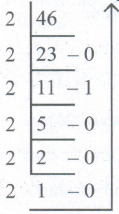
Convert (46)10 into Binary number
32.
What is the function of memory?
33.
What is the function of an ALU?
34.
Define touch screen?
35.
Find the Answer the Following; 1002 - 12
36.
Describe Octal Number system
37.
What is microprocessor?
38.
What is use of ALU?
39.
Define POST.
40.
Differentiate CD and DVD.
41.
42.
Explain the flash memory devices and BIu-ray disc.
43.
Explain the different types of number systems?
44.
Explain in detail the different types of Mouse.
45.
Add 11010102 + 1011012
46.
47.
How the read and write operations are performed by a processor? Explain.
1.
(d)
| i) | ii) | iii) | iv) | v) |
| 2 | 4 | 1 | 5 | 3 |
2.
(a)
CPU
3.
(d)
All of these
4.
(c)
ENIAC
5.
(a)
John Vincent Atanasoff
6.
(c)
Very large scale integrated circuits
7.
(b)
Inkjet printer
8.
(c)
12
9.
(c)
1988
10.
(d)
Abacus
11.
(c)
Abacus
12.
(a)
NOT(OR)
13.
(c)
Cache memory
14.
(d)
Microprocessor
15.
(d)
1024
16.
(c)
Word length
17.
(b)
Plotter
18.
(b)
Mouse
19.
(c)
Monitor
20.
(a)
Vacuum tubes
21.
The cache memory is a very high speed and expensive memory, which is used to speed up the memory retrieval process.
22.
A nibble is half a byte, which is usually a grouping A of 4 bits. Word is the number of bits a processor can bundle (read/write) at a time.
23.
(i) Decimal Number system
(ii) Binary Number system
(iii) Octal Number system
(iv) Hexadecimal Number system
24.
(1) It needs less space and looks slim.
(2) It consumes less power and does not radiate heat at the time of operation.
25.
The types of monitors available such as CRT (Cathode Ray Tube), LCD (Liquid Crystal Display) and LED (Light Emitting Diodes).
26.
Pictures on a monitor are formed with picture elements called PIXELS.
27.
(i) Mouse
(ii) Light pen
28.
IBM 1401, IBM 1620, UNIVAC 1108
29.
ENIAC, EDVAC, UNIVAC 1
30.
Since it is a positive number. 1's complement will come only for negative number.
31.
(46)10 into Binary = 1011102
32.
Memory enables the computer to store the program. The memory unit is of two types:
(i) Primary memory
(ii) Secondary memory
The primary memory is used to store data temporarily and secondary memory stores the data permanently.
33.
The ALU is a part of CPU where various computing functions are performed on data. ALU performs arithmetic operations such as addition, subtraction, multiplication, division and logical operations.
34.
Touch Screen:
A touch screen is a display device that allows the user to interact with a computer by using the finger. It can be quite useful as an alternative to a mouse or keyboard for navigating a Graphical User Interface (GUI). Touch screens are used on a wide variety of devices such as computers, laptops, monitors, smart phones, tablets, cash registers and information kiosks. Some touch screens use a grid of infrared beams to sense the presence of a finger instead of utilizing touch-sensitive input.
35.
1002 - 12
.png)
1002 - 12 =0112
36.
(i) The octal number system is playing a vital role in digital computer work.
(ii) The octal number system has a base of 8: It means that it has eight unique symbols such as 0,1 ,2,3,4,5,6 and 7.
(iii) Thus, each digit of an octal number can have any value from 0 to 7
37.
(i) The microprocessor which is an Integrated Circuit. Microprocessors were first introduced in early 1970s. The first general purpose microprocessor, 4004 was developed by Intel Inc.
(ii) The microprocessor is a programmable multipurpose silicon chip. It is driven by clock pulses. It accepts input as a binary data and after processing, it provides the output data as per the instructions stored in the memory.
38.
(i) The ALU is a part of the CPU where various computing functions are performed on data.
(ii) The ALU performs arithmetic operations such as addition, subtraction, multiplication, division and logical operations.
(iii) The result of an operation is stored in internal memory of CPU.
(iv) The logical operations of ALU promote the decision-making ability of a computer.
39.
(i) POST (Power-On Self-Test) is the diagnostic testing sequence that a computer's basic input! output system runs to determine if the computer keyboard, random access memory, disk drives and other hardware are working correctly.
(ii) If the necessary hardware is detected and found to be operating properly, the computer begins to boot.
40.
| CD | DVD |
| CD stands for Compact Disc | DVD stands for Digital Versatile Disc |
| Can store up to 700 MB | Capacity of DVD is 4.7 GB of data |
| CD's are single sided | DVD's are single or double sided |
| Due to capacity constraint, CD's cannot store movies of good quality | DVD's are used for storing movies with good quality |
| CD players cannot play DVD's | DVD players can play CD's |
41.
42.
Flash Memory Devices
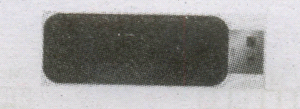
Flash memory is an electronic (solid-state) non-volatile computer storage medium that can be electrically erased and reprogrammed. They are either EEPROM or EPROM. Examples for Flash memories are pendrives, memory cards etc. Flash memories can be used in personal computers, Personal Digital Assistants (PDA), digital audio players, digital cameras and mobile phones. Flash memory offers fast access times. The time taken to read or write a character in memory is called access time. The capacity of the flash memories vary from 1 Gigabytes (GB) to 2 Terabytes (TB).
BIu-Ray Disc
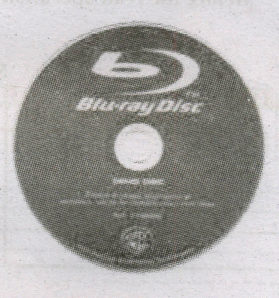
Blu-Ray Disc is a high-density optical disc similar to DVD. Blu-ray is the type of discussed for PlayStation games and for playing High-Definition (HD) movies. A double-layer Blu-Ray disc can store up to 50 GB (gigabytes) of data. This is more than 5 times the capacity of a DVD, and above 70 times of a CD. The format was developed to enable recording, rewriting and playback of high-definition video, as well as storing large amount of data. DVD uses a red laser to read and write data. But, Blu-ray uses a blue-violet laser to write. Hence, it is called as Blu-Ray.
43.
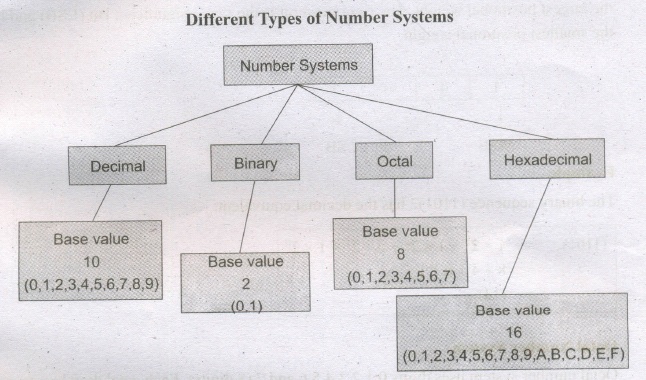
A numbering system is a way of representing numbers. The most commonly used numbering system in real life is Decimal number system.· Other number systems are Binary, Octal, Hexadecimal number system. Each number system 'is uniquely identified by its base value or radix. Radix or base is the count of number of digits in each number system. Radix or base is the general idea behind positional numbering system.
Decimal Number System
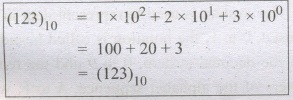
It consists of 0,1,2,3,4,5,6,7,8,9(10 digits). It is the oldest and most popular number system used in our day to day life, In the positional number system, each decimal digit is weighted relative to its position in the number. This means that each digit in the number is multiplied by 10 raised to a power corresponding to that digit's position.
Binary Number System
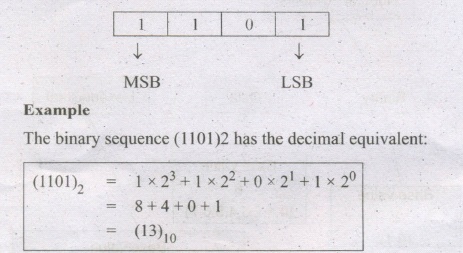
There are only two digits in the Binary system, namely, 0 and 1. The numbers in the binary system are represented to the base 2 and the positional multipliers are the powers of2. The left most bit in the binary number is called as the Most Significant Bit (MSB) and it has the largest positional weight. The right most bit is the Least Significant Bit (LSB) and has the smallest positional weight.
Octal Number System
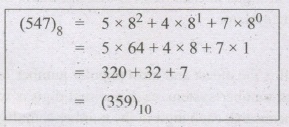
Octal number system uses digits 0,1,2,3,4,5,6 and 7-(8 digits). Each octal digit.has its own positional value or weight as a power of 8.
Example
The Octal sequence (547)8 has the decimal equivalent:
Hexadecimal Number System:
A hexadecimal number is represented using base 16. Hexadecimal or Hex numbers are used as a shorthand form of binary sequence. This system is used to represent data in a more compact manner. Since 16 symbols are used, 0 to F, the notation is called hexadecimal. The first 10 symbols are the same as in the decimal system, 0 to 9 and the remaining 6 symbols are taken from the first 6 letters of the alphabet sequence, A to F, where A represents 10, B is 11, C is 12, D is 13, E is 14 and F is 15.
44.
| S.No | Type of Mouse | Mechanism | Developed and Introduced |
| 1 | 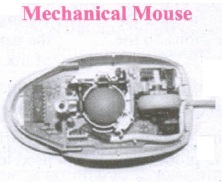 |
1. A small ball is kept inside and touches the pad through a hole at the bottom of the mouse. |
Telefunken, German Company, 0211011968 |
| 2 | 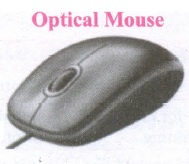 |
1. Measures the motion and acceleration of pointer. |
In 1988, Richard Lyon, Steve Krish independently invented different versions of Optical Mouse. |
| 3 | 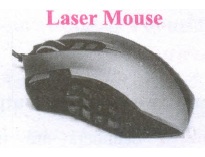 |
1. Measures the motion and acceleration of pointer. |
45.
11010102 + 1011012
1101010
+101101
________
10010111
________
11010102 + 1011012 = 100101112
46.
47.
1. The Central Processing Unit(CPU) has a Memory Data Register (MDR) and a Memory Address Register (MAR).
2. The Memory Data Register (MDR) keeps the data which is transferred between the Memory and the CPU. The Program Counter (PC) is a special register in the CPU which always keeps the address of the next instruction to be executed.
3. The Arithmetic and Logic unit of CPU places the address of the memory to be fetched, into the Memory Address Register.
4. A bus is a collection of wires used for communication between the internal components of a computer.
5. The address bus is used to point a memory location. A decoder, a digital circuit is used to point to the specific memory location where the word can be located.
6. The address register is connected with the address bus, which provides the address of the instruction. A data bus is used to transfer data between the memory and the CPU.
7. The data bus is bidirectional and the address bus is unidirectional. The control bus controls both read and write operations.
8. The read operation fetches data from memory and transfers to MDR. A single control line performs two operations like Read/Write using 1 or 0.
9. Also, the write operation transfers data from the MDR to memory. This organisation is shown below.
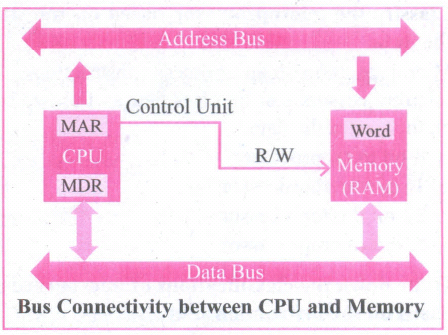
10. The word in the RAM has the same size (no.of bits) as the Memory Data Register (MDR). If the processor is an 8-bit RAM processor like Intel 8085, its MDR and the word in the both have 8 bits.
11. If the size of the MDR is eight bits, which can be connected with a word in the memory which is also eight bits size. The data bus has eight parallel wires to transfer data either from MDR to word or word to MDR based on the control(Read or write).
.png)
13. This control line is labeled as which becomes 1 means READ operation and 0 means WRITE operation.
.png)
14. These pictures show the contents of MDR and the word before and after the READ operation.
i. The read operation transfers the data(bits) from word to Memory Data Register.
ii. The write operation transfers the data(bits) from Memory Data Register to word.

11th Standard Syllabus & Materials
11th Standard
TN 11th Tamil பீடு பெற நில் - செய்யுள் - காவடிச்சிந்து Important Questions And Answers Study Material - QB365 Set A
NEW11th Standard
TN 11th Tamil பீடு பெற நில் - உரைநடை - மலை இடப்பெயர்கள் : ஓர் ஆய்வு Important Questions And Answers Study Material - QB365 Set A
NEW11th Standard
TN 11th Tamil மாமழை போற்றுதும் - துணைப்பாடம் - யானை டாக்டர் Important Questions And Answers Study Material - QB365 Set A
NEW11th Standard
TN 11th Tamil மாமழை போற்றுதும் - செய்யுள் - ஐங்குறுநூறு Important Questions And Answers Study Material - QB365 Set A



Tamilnadu Stateboard 11th Standard Subjects

Maths

Commerce

Economics

Biology

Business Maths and Statistics

Accountancy
Computer Science

Physics

Chemistry
Maths
Biology
Economics
Physics
Chemistry

History
Business Maths and Statistics

Computer Science
Accountancy

Computer Applications
History
Computer Technology
Commerce
Computer Applications
Computer Technology

Tamil

English

French
Tamilnadu Stateboard Standards
