
 100% FREE ACCESS
11th Standard Syllabus & Materials
11th Standard
TN 11th Tamil இயற்கை வேளாண்மை,சுற்றுச்சூழல் -செய்யுள் - மனோன்மணீயம் Important Questions And Answers Study Material - QB365 Set A
NEW11th Standard
TN 11th Tamil என்னுயிர் என்பேன் -துணைப்பாடம் - இசைத்தமிழர் இருவர் Important Questions And Answers Study Material - QB365 Set A
NEW11th Standard
TN 11th Tamil மொழி கலை -செய்யுள் - ஒவ்வொரு புல்லையும் Important Questions And Answers Study Material - QB365 Set A
NEW11th Standard
TN 11th Tamil பீடு பெற நில் - இலக்கணம் - பகுபத உறுப்புகள் Important Questions And Answers Study Material - QB365 Set A
NEW11th Standard
TN 11th Tamil பீடு பெற நில் - துணைப்பாடம் - வாடிவாசல் Important Questions And Answers Study Material - QB365 Set A
NEW11th Standard
TN 11th Tamil பீடு பெற நில் - செய்யுள் - குறுந்தொகை Important Questions And Answers Study Material - QB365 Set A

Published on: 27/11/2019
Working with Typical Operating System
Download Tamil Nadu 11th Standard Computer Science question papers, model tests, one-mark questions, important questions, and public exam papers in PDF format. Free study materials and answer keys for TN State Board students.
Questions + Answers key
Take MCQ Computer Science Test
1.
In which version of windows the mouse was introduced?
1
2
3
95
2.
Which of the following is not an access applications?
Word processing
games
Spreadsheets
C++
3.
Which is the default application for spreadsheets in Ubuntu? This is available in the software launcher?
Libre Office Writer
Libre Office Calc
Libre Office Impress
Libre Office Spreadsheet
4.
Identify the default email client in Ubuntu?
Thunderbird
Firefox
Internet Explorer
Chrome
5.
Which is the default folder for many Windows Applications to save your file?
My Document
My Pictures
Documents and Settings
My Computer
6.
In what way Ubuntu and other OS are similar?
7.
Name the Linux server distributions are associated with price.
8.
Name any four most popular Linux distributors.
9.
How will you log off from Ubuntu OS?
10.
Mention the different server distributions in Linux OS.
11.
Write a note on window.
12.
Differentiate between Windows 7 and Windows 8.
13.
Differentiate Save, Save As and Save a Copy in Ubuntu OS.
14.
Differentiate Thunderbird and Firefox in Ubuntu OS.
15.
Are there any difficulties you face while using Ubuntu? If so, mention it with reasons.
16.
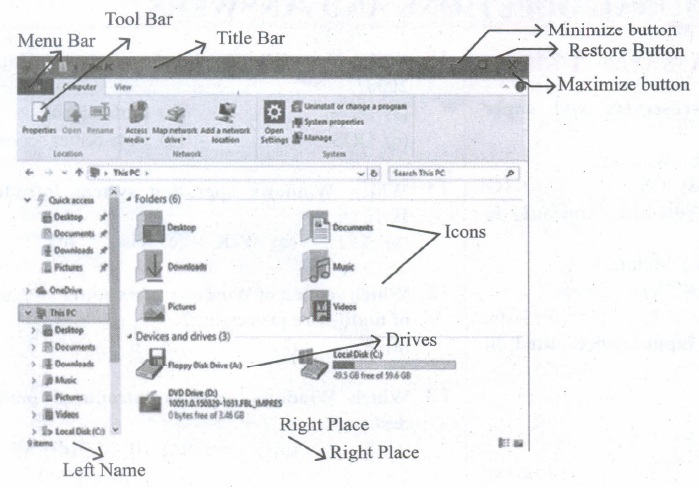
Explain the elements of Windows.
17.
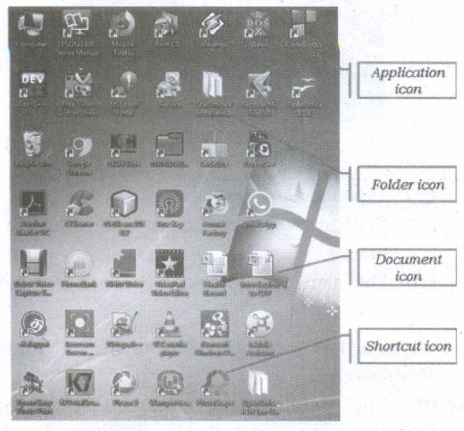
Explain the different types of icons of windows desktop
18.
Write the procedure to create, rename, delete and save a file in Ubuntu OS. Compare it with Windows OS.
19.
Observe the figure and mark all the window elements, Identify the version of the Windows Os.
1.
(a)
1
2.
(d)
C++
3.
(b)
Libre Office Calc
4.
(a)
Thunderbird
5.
(a)
My Document
6.
All the Operating system based on the concept of GUI (Graphical User Interface).
7.
Red Hat and SUSE Enterprise.
8.
(i) Red Hat
(ii) Ubuntu
(iii) Cent OS
(iv) Linux Mint
9.
By choosing an option logout through the session indicator on the far right side of the top panel.
10.
The server distribution in Linux OS:
(i) Ubuntu Linux
(ii) Linux Mint
(iii) Arch Linux
(iv) Deepin
(v) Fedora
(vi) Debian
(vii) Centos
11.
(i) The window is an area on the screen that displays information for a specific program.
(ii) Window is a typical rectangular area in an application or a document or a-dialog.
(iii) A typical window includes a title bar along the top that describes the contents of the window, A followed by a toolbar that contains user interface buttons.
(iv) Most of the window's remaining area is used to display the content.
12.
|
Windows 7 |
Windows 8 |
|---|---|
| Faster boot times, introduced new user interfaces and Internet Explorer 8. | Windows 8 was faster than previous versions of Windows. |
| Most used operating system on the Internet and also the most used for PC gaming. | Windows 8 takes better advantage of multi-core processing, solid-state drives (SSD), touch screens and other alternate input methods. |
13.
| Save | Save as | Save a Copy |
| This will save the document without asking for a new name or location. It will over-write the original. | This will prompt to save the document using a dialog box. You will have the ability to change the file name and/or location. If you choose the same file name and location it will over- write the original. Your working document will be the one you just saved. | This will prompt you to save a 'copy' using the same dialog box as 'save as'. You will have the ability to change the file name and/or location. If you choose the same file name and location it will over-write the original. If you changed the name or location of the document you will be working on the original document not the copy. This means that if you make additional changes and then hit save the original will be overwritten with the new changes, but the copy you saved earlier will be left at the state of the "Save A Copy". |
14.
Difference between Thunderbird and Firefox in Ubuntu:
(i) Thunderbird is inbuilt email software of ubuntu whereas Firefox is a web browser.
(ii) Thunderbird is used to access email such as Gmail, hotmail whereas Firefox is used to open web pages including e-mail.
15.
(i) Ubuntu has less hardware support for commercial/industrial/medical/ logistical therefore its less voted for use in big time backends.
(ii) Ubuntu doesn't support middlewares such as C panel, cloud linux and a plethora of other infrastructure or monitoring tools.
(iii) Hard to install graphic drivers especially for old hardwares. It is not possible to play the modern games, because of poor graphics quality.
(iv) The user switching from windows will not like the user experience on Ubuntu and will have difficulty in operating the OS.
(v) Ubuntu is not capable of playing MP3 files by default.
16.
(i) The Title Bar and control buttons - The title bar will display the name of the program and the name of the document that has been currently opened and also contains control buttons like Minimize, MaximizelRestore and Close buttons.
(ii) The Menu bar - The menu bar is seen under the title bar. Menus in the menu bar can be accessed through shortcuts involving the Alt key and the mnemonic letter that appears underlined in the menu title. Additionally, pressing Alt or F 10 brings the focus on the first menu of the menu bar.
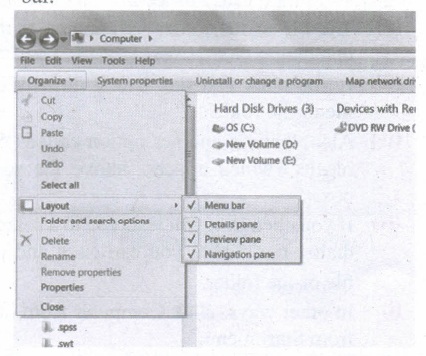
(iii) In Windows 7, in the absence of the menu bar, you have to click organize and in the sub menu list, click the layout option from it and then select the desired item from that list.
(iv) The Workspace: The Workspace is the area in the document window where you enter or type the text of document. It is the point of insertion for typing within the document.
(v) The Scroll bars: A scrollbar is an interaction technique in which continuous text, pictures, or any other content can be scrolled in a predetermined direction (up, down, left, or right) on a computer display so that all contents can be viewed, even if only a fraction of the content can be seen on a device's screen at a time. Refer figure 5.10 to view the Scroll bars.
(vi) Corners and borders: The corners and borders of the windows help to drag and hence help to resize the Windows. The mouse cursor changes to a double arrow when positioned over a border or a corner. Drag the border or corner in the direction indicated by the double arrow to the desired shape.
(a) The corners can be resized diagonally by dragging it across any of the corners. It will resize the window on all the sides simultaneously.
(b) On the other hand, the borders will let you to resize the window by either dragging it in left side, right side, from the top or from the bottom of the window.
(c) It will change the size of the window at one side only depending on the side in which the dragging is made.
17.
Application Icons:
(i) These icons are representing Software package's logo. Double-click over this icon, the related application gets invoked.
(ii) Shortcut Icons: These icons point to a particular application or file or folder. By double clicking over them the related application or file or folder will open. This represents the shortcut form to open a particular application.
(iii) Document Icons: Active document window which is a window within an application window is called as the document icon.
18.
In Ubuntu OS:
(i) Create a file: By right clicking in the desktop and also files be created by using file menu.
(ii) Delete a file: By using right-click choosing a move to trash or by using the menu.
(iii) Rename a file: By using right-click and choosing rename option.
(iv) Save a file: Press ctrl + x or F2 to exit. You will. then be asked if you want to save. (or) Press ctrl+ 0 or F3 and ctrl + x or F2 for save and exit.
In Windows OS:
(i) Create file: Open an application and create by using file menu.
(ii) Delete a file: By right click on a file and choosing the delete option to delete a file.
(iii) Rename a file: By right click on a file and choosing rename option to rename a file.
(iv) Save file: Press ctrl+S or file - save to save the file.
19.

11th Standard Syllabus & Materials
11th Standard
TN 11th Tamil பீடு பெற நில் - செய்யுள் - காவடிச்சிந்து Important Questions And Answers Study Material - QB365 Set A
NEW11th Standard
TN 11th Tamil பீடு பெற நில் - உரைநடை - மலை இடப்பெயர்கள் : ஓர் ஆய்வு Important Questions And Answers Study Material - QB365 Set A
NEW11th Standard
TN 11th Tamil மாமழை போற்றுதும் - துணைப்பாடம் - யானை டாக்டர் Important Questions And Answers Study Material - QB365 Set A
NEW11th Standard
TN 11th Tamil மாமழை போற்றுதும் - செய்யுள் - ஐங்குறுநூறு Important Questions And Answers Study Material - QB365 Set A



Tamilnadu Stateboard 11th Standard Subjects

Maths

Commerce

Economics

Biology

Business Maths and Statistics

Accountancy
Computer Science

Physics

Chemistry
Maths
Biology
Economics
Physics
Chemistry

History
Business Maths and Statistics

Computer Science
Accountancy

Computer Applications
History
Computer Technology
Commerce
Computer Applications
Computer Technology

Tamil

English

French
Tamilnadu Stateboard Standards
