
 100% FREE ACCESS
11th Standard Syllabus & Materials
11th Standard
TN 11th Tamil இயற்கை வேளாண்மை,சுற்றுச்சூழல் -செய்யுள் - மனோன்மணீயம் Important Questions And Answers Study Material - QB365 Set A
NEW11th Standard
TN 11th Tamil என்னுயிர் என்பேன் -துணைப்பாடம் - இசைத்தமிழர் இருவர் Important Questions And Answers Study Material - QB365 Set A
NEW11th Standard
TN 11th Tamil மொழி கலை -செய்யுள் - ஒவ்வொரு புல்லையும் Important Questions And Answers Study Material - QB365 Set A
NEW11th Standard
TN 11th Tamil பீடு பெற நில் - இலக்கணம் - பகுபத உறுப்புகள் Important Questions And Answers Study Material - QB365 Set A
NEW11th Standard
TN 11th Tamil பீடு பெற நில் - துணைப்பாடம் - வாடிவாசல் Important Questions And Answers Study Material - QB365 Set A
NEW11th Standard
TN 11th Tamil பீடு பெற நில் - செய்யுள் - குறுந்தொகை Important Questions And Answers Study Material - QB365 Set A

Published on: 27/11/2019
Computer Organization
Download Tamil Nadu 11th Standard Computer Technology question papers, model tests, one-mark questions, important questions, and public exam papers in PDF format. Free study materials and answer keys for TN State Board students.
Questions + Answers key
Take MCQ Computer Technology Test
1.
Microprocessors were first introduced in the early
1956
1958
1960
1970
2.
Which of the following performs all tasks in the computer?
Chips
Bus
CPU
I/O devices
3.
What is the capacity of 12cm diameter DVD with single sided and single layer?
4.7 GB
5.5 GB
7.8 GB
2.2 GB
4.
How many bits constitute a word?
8
16
32
determined by the processor used.
5.
Which of the following is not the part of a microprocessor unit?
ALU
Control unit
Cache memory
register
6.
Name the measurement of clock speed of the computer.
7.
What are the collections of System Bus?
8.
Which source is used to erase the content of a EPROM?
9.
What is a program counter?
10.
What is an instruction?
11.
What is the use of System Bus?
12.
What is Clock speed?
13.
How will you differentiate a flash memory and an EEPROM?
14.
Differentiate CD and DVD
15.
Write down the classifications of microprocessors based on the instruction set.
16.
Explain any three secondary storage devices.
17.
Define the following. (a) Bus (b) Data bus (c) Address bus (d) Control Bus
18.
Arrange the memory devices in ascending order based on the access time.
19.
How the read and write operations are performed by a processor? Explain.
1.
(d)
1970
2.
(c)
CPU
3.
(a)
4.7 GB
4.
(d)
determined by the processor used.
5.
(c)
Cache memory
6.
(i) MHz (Mega Hertz)
(ii) GHz (Giga Hertz)
7.
(i) Address Bus
(ii) Data Bus
(iii) Control Bus
8.
Ultra-violet-rays is used to erase the content of a EPROM.
9.
The Program Counter (PC) is a special register in the CPU which always keeps the address of the next instruction to be executed.
10.
A command which is given to a computer to perform an operation on data is called an instruction
11.
(i) The address bus is used to point a memory location.
(ii) A decoder, a digital circuit is used to point to the specific memory location where the word can be located.
(iii) The address register is connected with the address bus, which provides the address of the instruction.
(iv) A data bus is used to transfer data between the memory and the CPU.
(v) The data bus is bidirectional and the address bus is unidirectional.
(vi) The control bus controls both read and write operations.
(vii) The system bus is a bunch of wires which is the collection of address bus, data bus and control bus that serves as communication channels between the microprocessor and other devices.
12.
Every microprocessor has an internal clock that regulates the speed at which it executes instructions. The speed at which the microprocessor executes instructions is called clock speed. Clock speed is measured in MHz (Mega Hertz) or in GHz (Giga Hertz).
13.
| Flash memory | EEPROM |
| Faster in performance | Slower in performance |
| Flash uses the slower NAND gate. | EEPROM uses the faster NOR gate |
| Using flash, access and erase data in block- Wise. | Using EEPROM, access and erase data only byte-wise or byte at a time. |
| Storage capacity can range from a GB to hundred of GB. | Storage capacity can range from a kilobytes to a couple of megabytes. |
14.
| CD | DVD |
| Expansion is Compact-Disk | Expansion -is Digital Versatile Disc. |
| A standard CD can store about 700 MB of Data. | A standard DVD can hold 4.7 GB of data. |
| CD players cannot play DVDs. | DVD players can play CDs. |
| It stores upto 80 min of audio | It can range from 4.7 GB to 17.08 GB. |
15.
The two types of microprocessors which are based on their instruction sets.
(i) Reduced Instruction Set Computers (RISC)
(ii) Complex Instruction Set Computers (CISC)
16.
Hard disk:
(i) Hard disk is a magnetic disk on which you can store data. The hard disk has the stacked arrangement of disks accessed by a pair of heads for each of the disks.
(ii) The hard disks come with a single or double-sided disk.
Compact Disk (CD):
.png)
(i) A CD or CD-ROM is made from 1.2 millimetres thick, polycarbonate plastic material. A thin layer of aluminium or gold is applied to the surface.
(ii) CD data is represented as tiny indentations known as "pits", encoded in a spiral track moulded into the top of the polycarbonate layer. The areas between pits are known as "lands".
(iii) A motor within the CD player rotates the disk. The capacity of an ordinary CD- ROM is 700MB.
Digital Versatile Disc (DVD):
.png)
(i) A DVD (Digital Versatile Disc or Digital Video Disc) is an optical disc capable of storing up to 4.7 GB of data, more than six times what a CD can hold.
(ii) DVDs are often used to store movies at a better quality. Like CDs, DVDs are read with a laser. The disc can have one or two sides, and one or two layers of data per side; the number of sides and layers determines how much it can hold.
(iii) A 12 em diameter disc with single sided, single layer has 4.7 GB capacity, whereas the single sided, double layer has 8.5 GB capacity.
(iv) The 8 em DVD has 1.5 GB capacity. The capacity of a DVD-ROM can be visually determined by noting the number of data sides of the disc. Double-layered sides- are usually gold-coloured, while single-layered sides are usually silver-coloured, like a CD.
17.
(a) Bus: A bus is a collection of wires used for communication between the internal components of a computer.
(b) Data bus:
(i) Data busis a collection of wires to carry data in bits.
(ii) A data bus is used to transfer data between the memory and the CPU.
(iii) The data bus is bidirectional.
(c) Address bus:
(i) Address bus is a collection of wires to carry data in bits.
(ii) The address bus is used to point a memory location.
(iii) The address bus is unidirectional.
(d) Control bus:
(i) Control bus is a control line/collection of wires to control the operation/functions.
(ii) The control bus controls both read and write operations.
18.
(i) CD/DVD/Blu-Ray
(ii) Hard Disk
(iii) Main Memory
(iv) Cache Memory
19.
(i) The Central Processing Unit(CPU) has a Memory Data Register (MDR) and a Memory Address Register (MAR).
(ii) The Memory Data Register (MDR) keeps the data which is transferred between the Memory and the CPU. The Program Counter (PC) is a special register in the CPU which always keeps the address of the next instruction to be executed.
(iii) The Arithmetic and Logic unit of CPU places the address of the memory to be fetched, into the Memory Address Register.
(iv) A bus is a collection of wires used for communication between the internal components of a computer.
(v) The address bus is used to point a memory location. A decoder, a digital circuit is used to point to the specific memory location where the word can be located.
(VI) The address register is connected with the address bus, which provides the address of the instruction. A data bus is used to transfer data between the memory and the CPU.
(vii) The data bus is bidirectional and the address bus is unidirectional. The control bus controls the operations of both read or write operations.
(viii) The read operation fetches data from memory and transfers to MDR. control line performs two operations like read write using 1 or O.
(ix ) Also, the write operation transfers data from the MDR to memory. This organization is as shown in figure.
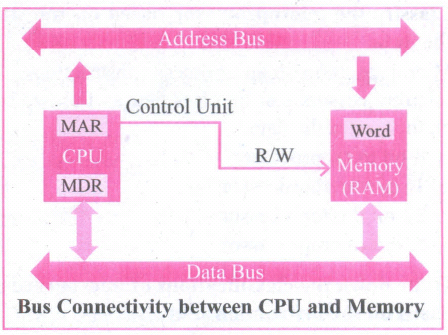
(i) The word in the RAM has the same size (no.of bits) as the Memory Data Register (MDR). If the processor is an 8-bit RAM processor like Intel 8085, its MDR and the word in the both have 8 bits.
(ii) If the size of the MDR is eight bits, which can be connected with a word in the memory which is also eight bits size. The data bus has eight parallel wires to transfer data either from MDR to word or word to MDR based on the control(Read or write).
.png)
(iii) This control line is labeled as which becomes 1 means READ operation and 0 means WRITE operation. shows content of M'DR and the Word before the READ operation. Also shows the content of MDR and the Word after the READ operation.
.png)
(iv) The read operation transfers the data (bits) from memory word to data register. The write operation transfers the data (bits) from memory data register to word.

11th Standard Syllabus & Materials
11th Standard
TN 11th Tamil பீடு பெற நில் - செய்யுள் - காவடிச்சிந்து Important Questions And Answers Study Material - QB365 Set A
NEW11th Standard
TN 11th Tamil பீடு பெற நில் - உரைநடை - மலை இடப்பெயர்கள் : ஓர் ஆய்வு Important Questions And Answers Study Material - QB365 Set A
NEW11th Standard
TN 11th Tamil மாமழை போற்றுதும் - துணைப்பாடம் - யானை டாக்டர் Important Questions And Answers Study Material - QB365 Set A
NEW11th Standard
TN 11th Tamil மாமழை போற்றுதும் - செய்யுள் - ஐங்குறுநூறு Important Questions And Answers Study Material - QB365 Set A



Tamilnadu Stateboard 11th Standard Subjects

Maths

Commerce

Economics

Biology

Business Maths and Statistics

Accountancy

Computer Science

Physics

Chemistry
Maths
Biology
Economics
Physics
Chemistry

History
Business Maths and Statistics

Computer Science
Accountancy
Computer Applications
History
Computer Technology
Commerce
Computer Applications
Computer Technology

Tamil

English

French
Tamilnadu Stateboard Standards
