
 100% FREE ACCESS
11th Standard Syllabus & Materials
11th Standard
TN 11th Tamil இயற்கை வேளாண்மை,சுற்றுச்சூழல் -செய்யுள் - மனோன்மணீயம் Important Questions And Answers Study Material - QB365 Set A
NEW11th Standard
TN 11th Tamil என்னுயிர் என்பேன் -துணைப்பாடம் - இசைத்தமிழர் இருவர் Important Questions And Answers Study Material - QB365 Set A
NEW11th Standard
TN 11th Tamil மொழி கலை -செய்யுள் - ஒவ்வொரு புல்லையும் Important Questions And Answers Study Material - QB365 Set A
NEW11th Standard
TN 11th Tamil பீடு பெற நில் - இலக்கணம் - பகுபத உறுப்புகள் Important Questions And Answers Study Material - QB365 Set A
NEW11th Standard
TN 11th Tamil பீடு பெற நில் - துணைப்பாடம் - வாடிவாசல் Important Questions And Answers Study Material - QB365 Set A
NEW11th Standard
TN 11th Tamil பீடு பெற நில் - செய்யுள் - குறுந்தொகை Important Questions And Answers Study Material - QB365 Set A

Published on: 21/01/2020
Download Tamil Nadu 11th Standard Computer Technology question papers, model tests, one-mark questions, important questions, and public exam papers in PDF format. Free study materials and answer keys for TN State Board students.
Questions + Answers key
Take MCQ Computer Technology Test
1.
Write the steps to correct the word "Comupter" into "Computer" automatically.
2.
How will you insert a picture in a document? Explains
3.
Explain How will you copy the text in word processor.
4.
Write the advantages of using Tamil Interface. While typing in Tamil.
5.
Explain the do’s and don’t of safe surfing on internet.
6.
Explain how a presentation can help a sales person to promote his/her products.
7.
Write the steps to generate the following series. 5, 10, 20 ….. 2560.
8.
Explain the most common indicators in Ubuntu OS menu bar.
9.
Explain the classification of Open source OS.
10.
Explain the classification of proprietary licensed OS.
11.
List out the points to be noted while creating a user interface for an Operating system.
12.
How the read and write operations are performed by a processor? Explain.
13.
Convert the following Octal numbers into Binary numbers. - 347
14.
State whether the following numbers are valid or not. If invalid, given reason.
15.
Explain the following terms in detail. (1) ISCII (2) TSCII.
16.
Find 1's Complement and 2's Complement for the following Decimal number. = -135
17.
Explain in detail the different types of Mouse.
18.
Discuss the various generations of computers
19.
How do you resize the position of a table?
20.
What are the different types of paragraph alignment?
1.
The necessary steps to correct the word "comupter" into "computer" automatically
(i) Goto Tools ⟶ Autocorrect option
(ii) Click the replace tab and type "computer" in Replace text box and "computer" in with textbox.
(iii) Then Click OK.
(iv) The word "Comupter" is replaced with "Computer" and displayed in the list.
(v) After entering this, when you type "comupter" in the document, it will be automatically changed to the correct spelling "computer".
2.
(i) Place the insertion point where you want the image to appear
(ii) Select Insert ⟶ Picture ⟶ From file
(iii) The insert picture dialog box appears where the picture gallery opens from which the desired picture can be selected.
(iv) If the picture is not in the gallery, then browse the picture from the folder, choose the desired picture.
(v) Click on the Open button.
(vi) The selected picture is inserted into the document.
3.
Coping text:
To copy a text from one location to another
(i) Select the text to be copied
(ii) Click Ctrl + C or Copy Icon or Edit ⟶ Copy
(iii) A duplicate copy of the text is made and send to the clipboard
(iv) Take the insertion pointer to the new location to be copied and
(v) Click Ctrl + V or Paste Icon or Edit ⟶ Paste
(vi) The required text is copied to the required location.
4.
The interface method provides the following advantages:
(i) It follows Unicode technique. Hence knowledge of Tamil typing is not necessary.
(ii) It is easy to type documents in Tamil in any word processor
(iii) Some of the Unicode fonts like "Arial Unicode" supports all Indian languages including Tamil and English using respective language interface
5.
Do's and don'ts of Safe internet:
1. Don't give out your personal information - Don't put personal details such as your home address, telephone numbers or parent's work address online as cybercriminals can use this information to create a fake profile with your details.
2. What goes online, stays online - Use privacy settings to make sure only your friends and family can see photos you post. Avoid posting holiday plans as criminals have been known to track your movements.
3. Check your security and privacy settings - Make sure your social network privacy settings are secured so only your friends can see your personal information and use your privacy settings to restrict who can see your posts, videos and photos.
4. Password safety - Sharing your password with your parents is a sensible idea, but avoid sharing your password with your friends, even if they promise they won't tell anyone! Also, when setting your password, make sure it isn't something people may guess such as your pet's name. Use a mixture of letters, numbers and upper and lower cases characters.
5. Always protect your mobile device - Make sure your mobile phone is pin-protected so all your personal information stored on it is safe. Download a security app which allows you to remotely wipe any personal data, should your mobile be lost or stolen.
6. Don't talk to strangers online or offline - Don't meet up with strangers and let your parents know if a stranger has tried to get in contact with you online.
7. Listen to the adults who know - Adults will always be worried about you. Help set their mind at rest and avoid chatting online with strangers.
6.
1. Presentation is help a sales person to promote his / her products, explain the short presentation.
2. Presentation will give visual video, pictures to understand a better of products.
3. Presentation help sales person to present prospect challenges is easier.
4. By using presentation, sales person can make audience understand easier and he can get more feedback.
5. Sales person can explain with physical demonstration by shocking animations. It makes the audience to concentrate.
6. If we wish to get some information on every page, either on top or bottom of the page, we need to use header or footer as per the requirement.
7.
The steps to generate the series 5,10,20.......2560.
Step 1 : Select Edit → fill → Series Command. The fill series dialog log opens. In the dialog box.
Step 2 : Select Direction (Down / Right / Up / Left) in which the series to be displayed.
Step 3 : Select Growth to generate the series
Step 4 : Initial value of the series 5 should be typed in start value box.
Step 5 : End value of the series 2560 should be typed in End value text box.
Step 6 : Growth value of the series 2 should be typed in Increment text box.
Step 7 : Click OK to generate the series.
8.
The most common indicators in the Menu bar are:

(i) Network indicator (or) manages network connections, allowing you to connect quicly and easily to a wired or wireless network.
(ii) Text entry settings shows the current keyboard layout (such as En, Fr, Ku, and so on). If more than one keyboard layout is shown, it allows you to select a keyboard layout out of those choices. The keyboard indicator menu contains the following menu items: Character Map, Keyboard Layout Chart, and Text Entry Settings.
(iii) Messaging indicator incorporates your social applications. From here, among others, you can access instant messenger and email clients.
(iv) Sound indicator provides an easy way to adjust the sound volume as well as access your music player and sound settings.
(v) Clock displays the current time and provides a link to your calendar and time and date settings.
(vi) Session indicator is a link to the system settings, Ubuntu Help, and session options (like locking your computer, user/guest session, logging out of a session, restarting the computer, or shutting down completely).
9.
(i) Android is a mobile operating system developed by Google, based on the Linux and designed primarily for touchscreen mobile devices such as smartphones and tablets.
(ii) Google has further developed Android TV for televisions, Android Auto for cars and Android Wear for wrist watches, each with a specialized user interface.
(iii) Variants of Android are also used on game consoles, digital cameras, PCs and other electronic gadgets.
UNIX:
UNIX is a family of multitasking, multi-user operating systems that derive originally from AT&T Bell Labs, where the development began in the 1970s by Ken Thompson and Dennis Ritchie.
Linux:
(i) Linux is a family of open-source operating systems. It can be modified and distributed by anyone around the world.
(ii) This is different from proprietary software like Windows, which can only be modified by the company that owns it.
(iii) The main advantage of Linux operating system is that it is open source. There are many versions and their updates
(iv) Most of the servers run on Linux because it is easy to customize.
10.
Microsoft Windows is a family of proprietary operating systems designed by Microsoft Corporation and primarily targeted to Intel architecture based computers. Windows comes as pre-loaded on most of the new personal Computers and laptops.
Microsoft Windows Home Screen
iOS - iPhone OS
iOS (formerly iPhone OS) is a mobile operating system created and developed by Apple Inc. exclusively for its hardware. It is the operating system that presently powers many of the company's mobile devices, including the iPhone, iPad and iPod Touch. It is the second most popular mobile operating system globally after Android.
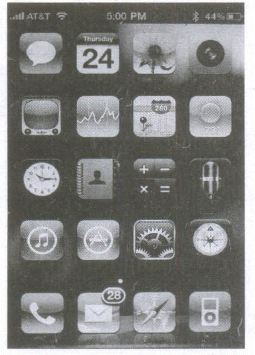
iPhone Home Screen
11.
(i) The user interface determines how command are given to the computer and how data is displayed on the screen.
(ii) User interface allows user to interact with computer effectively.
(iii) User interface is the first impression of a software where the user interacts with computer.
(iv) The user interface is mostly of two types:
1. Command line interface
2. Graphical user interface
(v) Command line interface: It indicates user must know machine language and program language.
(vi) Graphical user interface: In this user gives command by clicking or selecting the icons displayed on the screen.
The following points should be noted while creating a user interface for an Operating system:
(i) The user interface should satisfy the customers based on their needs.
(ii) The user interface should reduce number of errors committed by the user.
(iii) The user interface should save user time.
(iv) The user interface should make simple, common task easy.
(v) The user interface should be flexible and tolerant.
12.
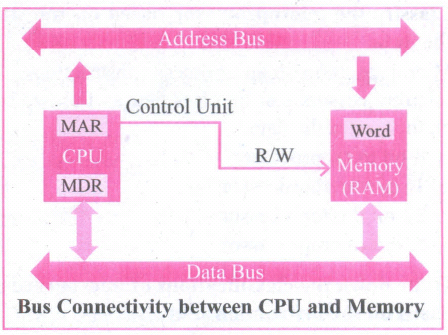
(i) The Central Processing Unit(CPU) has a Memory Data Register (MDR) and a Memory Address Register (MAR).
(ii) The Memory Data Register (MDR) keeps the data which is transferred between the Memory and the CPU. The Program Counter (PC) is a special register in the CPU which always keeps the address of the next instruction to be executed.
(iii) The Arithmetic and Logic unit of CPU places the address of the memory to be fetched, into the Memory Address Register.
(iv) A bus is a collection of wires used for communication between the internal components of a computer.
(v) The address bus is used to point a memory location. A decoder, a digital circuit is used to point to the specific memory location where the word can be located.
(VI) The address register is connected with the address bus, which provides the address of the instruction. A data bus is used to transfer data between the memory and the CPU.
(vii) The data bus is bidirectional and the address bus is unidirectional. The control bus controls the operations of both read or write operations.
(viii) The read operation fetches data from memory and transfers to MDR. control line performs two operations like read write using 1 or O.
(ix ) Also, the write operation transfers data from the MDR to memory. This organization is as shown in figure.
(i) The word in the RAM has the same size (no.of bits) as the Memory Data Register (MDR). If the processor is an 8-bit RAM processor like Intel 8085, its MDR and the word in the both have 8 bits.
(ii) If the size of the MDR is eight bits, which can be connected with a word in the memory which is also eight bits size. The data bus has eight parallel wires to transfer data either from MDR to word or word to MDR based on the control(Read or write).
.png)
(iii) This control line is labeled as which becomes 1 means READ operation and 0 means WRITE operation. shows content of M'DR and the Word before the READ operation. Also shows the content of MDR and the Word after the READ operation.
.png)
(iv) The read operation transfers the data (bits) from memory word to data register. The write operation transfers the data (bits) from memory data register to word.
13.
3478
\(\overset { 3 }{ \underset { 11 }{ \downarrow } } \) \(\overset { 4 }{ \underset { 100 }{ \downarrow } } \)\(\overset { 7 }{ \underset { 111 }{ \downarrow } } \)
3478 = 111001112
14.
| S.No | Statement | Yes/No | Reason if invalid |
| 1 | 786 is an octal number | No | In.octal number, the allowable digits is between 0 and 7 |
| 2 | 101 is a binary number | No | No Radix is mentional |
| 3 | radix of octal number is 7 | No | Radix of octal number is 8 |
15.
ISCII. (Indian Script Code for Information Interchange)
(i) In order to encode Indian languages Ion computers, a common standard for coding Indian scripts is developed which is called as ISCII. In 1991, the Bureau of Indian Standards adopted the Indian Standard Code for Information Interchange (ISCII).
(ii) ISCII standard is evolved by a standardization committee during 1986-88. The ISCII document is available as IS 13194: 1991 from the BIS offices.
(iii) Assamese, Bengali (Bangla), Devanagari, Gujarati, Gurumukhi, Kannada, Malayalam, Oriya, Tamil, and Telugu are supported in ISCII. ISCII has been used by IBM for PCDOS, Apple for ILK, and several companies are developing products and solutions based on this representation.
TSCII. (Tamil Standard Code for Information Interchange)
(i) Tamil Standard Code for Information Interchange is the Tamil encoding scheme designed to handle the entire Tamil alphabet. TSCII is proposed by Internet Working Group for the Tamil Standard Code (IWG-TSC).
(ii) The Tamil alphabets have soup (247), grantha characters (13) and the Tamil numerals (13). The number of unique Tamil glyphs to consider is about 170. Since the number of slots available in upper-ASCII segment (#128-255) is much less than the required slot for each character in Tamil.
(iii) Therefore, few Tamil alphabets are to be included in the native form, and the others are generated using modifiers (several keystrokes in sequence).
16.
.png)
13510 = 10000111
1's complement = 0 1 1 1 1 0 0 0
Add 1 bit = + 1
____________
2's complement = 0 1 1 1 1 0 01
_____________
17.
| S.N | Type of Mouse | Mechanism | Developed and Introduced |
| 1 | 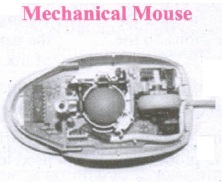 |
(i) A small ball is kept inside and touches the pad through a hole at the bottom of the mouse.
|
Telefunken, German Company, 0211011968 |
| 2 | 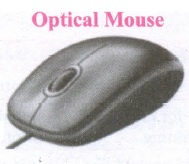 |
(i) Measures the motion and acceleration of pointer. |
In 1988, Richard Lyon, Steve Krish independently invented different versions of Optical Mouse. |
| 3 | 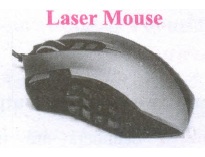 |
(i) Measures the motion and acceleration of pointer.
|
18.
| S.N | Generation | Period | Main Component used | Merits/ Demerits |
| 1 | First Generation | 1942-1955 | Vaccum tubes | 1. Big in size 2. Consumed more power 3. Malfunction due to overheat 4. Machine Language was used |
| First Generation Computer - ENIAC, EDVAC, UNIVAC 1 ENIAC weighed about 27 tons, size 8 feet x 100 feet x 3 feet and consumed around 150 watts of power | ||||
| 2 | Second Generation | 1955-1964 | Transistors | 1. Smaller compared to First Generation 2. Generated Less Heat 3. Consumed less power compared to first generation 4. Punched cards were used 5. First operating system was developed - Batch Processing and Multiprogramming Operating System 6. Machine language as well as Assembly language was used. |
| Second Generation Computers IBM 1404, IBM 1620, UNIVAC 1108 | ||||
| 3 | Third Generation | 1964-1975 | Integrated Circuits(IC) | 1. Computers were smaller, faster and more reliable 2. Consumed less power. 3. High-Level Languages were used |
| Third Generation Computers -IBM ·360 series, Honeywell 6000 series | ||||
| 4 | Fourth Generation | 1975-1980 | Microprocessor Very Large Scale Integrated Circuits (VLSI) |
1. Smaller and Faster 2. Microcomputer series such as IBM and APPLE were developed 3. Portable Computers were introduced |
| 5 | Fifth Generation | 1980-till date | Ultra Large Scale Integration (ULSI) |
1. Parallel, Processing 2. Superconductors 3. Computers size was drastically reduced. 4. Can recognize Images and Graphics 5. Introduction of Artificial Intelligence and Expert Systems 6. Able to solve high complex problems including decision making and logical reasoning |
| 6 | Sixth Generation | In future |  |
1. Parallel and Distributed computing 2. Computers have become smarter faster and smaller 3. Development of robotics 4. Natural Language Processing 5. Development of Voice Recognition Software |
19.
Resize the position of Table:
A newly created table will occupy the entire width of the page area by default. The table can be resized as per our requirement:
(i) To resize a table quickly, move the mouse over the table edge until the cursor becomes a double headed arrow, and drag the border to its new desired position.
(ii) To resize a row height/column width using Mouse:
(iii) To resize row height
(iv) Move the insertion point over the horizontal border for the row height now the insertion point will change into double headed arrow, click and drag to resize the row height.
20.
| Alignment | Action | Icon | Shortcut Key |
| Left | Aligns the paragraph with respect to the left margin | .JPG) |
Ctrl + L |
| Right | Aligns the paragraph with respect to the right margin | .JPG) |
Ctrl + R |
| Center | Aligns the paragraph with respect to the center of the page | .JPG) |
Ctrl + E |
| Justify | Aligns the paragraph with respect to both the left and right margin | .JPG) |
Ctrl + J |

11th Standard Syllabus & Materials
11th Standard
TN 11th Tamil பீடு பெற நில் - செய்யுள் - காவடிச்சிந்து Important Questions And Answers Study Material - QB365 Set A
NEW11th Standard
TN 11th Tamil பீடு பெற நில் - உரைநடை - மலை இடப்பெயர்கள் : ஓர் ஆய்வு Important Questions And Answers Study Material - QB365 Set A
NEW11th Standard
TN 11th Tamil மாமழை போற்றுதும் - துணைப்பாடம் - யானை டாக்டர் Important Questions And Answers Study Material - QB365 Set A
NEW11th Standard
TN 11th Tamil மாமழை போற்றுதும் - செய்யுள் - ஐங்குறுநூறு Important Questions And Answers Study Material - QB365 Set A



Tamilnadu Stateboard 11th Standard Subjects

Maths

Commerce

Economics

Biology

Business Maths and Statistics

Accountancy

Computer Science

Physics

Chemistry
Maths
Biology
Economics
Physics
Chemistry

History
Business Maths and Statistics

Computer Science
Accountancy
Computer Applications
History
Computer Technology
Commerce
Computer Applications
Computer Technology

Tamil

English

French
Tamilnadu Stateboard Standards
