
 100% FREE ACCESS
11th Standard Syllabus & Materials
11th Standard
TN 11th Tamil இயற்கை வேளாண்மை,சுற்றுச்சூழல் -செய்யுள் - மனோன்மணீயம் Important Questions And Answers Study Material - QB365 Set A
NEW11th Standard
TN 11th Tamil என்னுயிர் என்பேன் -துணைப்பாடம் - இசைத்தமிழர் இருவர் Important Questions And Answers Study Material - QB365 Set A
NEW11th Standard
TN 11th Tamil மொழி கலை -செய்யுள் - ஒவ்வொரு புல்லையும் Important Questions And Answers Study Material - QB365 Set A
NEW11th Standard
TN 11th Tamil பீடு பெற நில் - இலக்கணம் - பகுபத உறுப்புகள் Important Questions And Answers Study Material - QB365 Set A
NEW11th Standard
TN 11th Tamil பீடு பெற நில் - துணைப்பாடம் - வாடிவாசல் Important Questions And Answers Study Material - QB365 Set A
NEW11th Standard
TN 11th Tamil பீடு பெற நில் - செய்யுள் - குறுந்தொகை Important Questions And Answers Study Material - QB365 Set A

Published on: 21/11/2019
Introduction to Computers
Download Tamil Nadu 11th Standard Computer Technology question papers, model tests, one-mark questions, important questions, and public exam papers in PDF format. Free study materials and answer keys for TN State Board students.
Questions + Answers key
Take MCQ Computer Technology Test
1.
Which of the following is not a first generation computers?
ENIAC
EDVAC
UNIVAC 1
IBM1401
2.
The first calculating device is
ENIAC
Analytical Engine
EDVAC
Abacus
3.
Which one of the following is the main memory?
ROM
RAM
Flash drive
Hard disk
4.
When a system restarts which type of booting is used.
Warm booting
Cold booting
Touch boot
Real boot
5.
Name the volatile memory
ROM
PROM
RAM
EPROM
6.
Write the two main categories of Printer.
7.
What is NLP?
8.
Distinguish Primary and Secondary memory.
9.
What is the function of an ALU?
10.
What are the components of a CPU?
11.
Differentiate Impact Printers and Non-Impact Printers.
12.
Differentiate optical mouse and laser mouse.
13.
What is use of ALU?
14.
Differentiate Optical and Laser mouse.
15.
Write the applications of computer.
16.
What the Sixth generation computers could be defined as the era of intelligent computers?
17.
Explain Non-Impact printers with an example.
18.
Explain Impact Printers with an Example.
19.
Discuss the various generations of computers
1.
(d)
IBM1401
2.
(d)
Abacus
3.
(b)
RAM
4.
(a)
Warm booting
5.
(c)
RAM
6.
Printers are divided into two main categories:
(i) Impact Printers
(ii) Non Impact printers
7.
Natural Language Processing is the ability of a computer program to understand human language. It is a component of artificial intelligence.
8.
| Primary Memory | Secondary memory |
| It is used to temporarily store the programs and data when the instructions are ready to execute. | It is used to store the data permanently. |
| It is volatile, the content is lost when the power supply is switched off. Eg.RAM. |
It is non-volatile, the content is available even after the power supply is switched off. Eg. ROM, CD-ROM, DVD ROM. |
9.
(i) The ALU performs arithmetic operations.
(ii) The result of an operation is stored in internal memory of CPU.
(iii) The logical operations of ALU promote the decision making ability of a computer.
10.
The CPU has three components which are Control Unit, Arithmetic and logic unit (ALU) and Memory unit.
11.
| Impact Printers | Non-Impact Printers |
| It uses ribbons/carbon papers to leave the impressions on the paper. | It use ink cartridges and the impressions appear on the paper with the flow of ink. |
| The quality of printing is a draft quality. | The quality of printing is a high quality. |
| Striking Mechanism used to produce output. | No striking mechanism used to produce output. |
12.
(i) Optical mouse uses Red, Blue or Green led whereas Laser mouse uses only infrared led.
(ii) Optical mouse has three buttons; Laser mouse has as many as 12 buttons and can be programmed by user.
(iii) Optical mouse is less sensitive and sensitive towards surface but Laser mouse is highly sensitive and able to work on any hard surface.
13.
(i) The ALU is a part of the CPU where various computing functions are performed on data.
(ii) The ALU performs arithmetic operations such as addition, subtraction, multiplication, division and logical operations.
(iii) The result of an operation is stored in internal memory of CPU.
(iv) The logical operations of ALU promote the decision-making ability of a computer.
14.
| Optical Mouse | Laser Mouse |
| Measures the motion and acceleration of pointer. | Measures the motion and acceleration of pointer. |
| It uses light source instead of ball to judge the motion of the pointer. | Laser Mouse uses Laser Light. |
| Optical mouse is less sensitive towards surface. | Laser Mouse is highly sensitive and able to work on any hard surface. |
15.
The various applications of computer.
(i) Business
(ii) Education
(iii) Marketing
(iv) Banking
(v) Insurance
(vi) Communication
(vii) Healthcare
(viii) Engineering - Robotics, Nano technology, Bio Engineering
16.
(i) The Sixth Generation, computers could be defined as the era of intelligent computers, based on Artificial Neural Networks. This generation gave a start to parallel computing.
(ii) One of the most dramatic changes in the sixth generation will be the explosive growth of wide is a component of artificial intelligence
(iii) Robotics is a branch of engineering that involves the conception, design, manufacture, and operation of robots.
(iv) This field overlaps with electronics, computer science, artificial intelligence, mechatronics, nanotechnology and bioengineering.
(v) Artificial neural networks (ANNs) are computing systems inspired by the biological neural networks that constitute animal brains.
(vi) Such systems learn (progressively improve performance on) tasks by considering examples, generally without task-specific programming.
(vii) An ANN is based on a collection of connected units or nodes called Artificial Neurons (analogous to biological neurons in an animal brain).
(viii) Each connection (synapse) between neurons can transmit a signal from one to another. The receiving neuron can process the signal(s) and then signal neurons connected to it.
(ix) Parallel computing is a type of computation in which many calculations or the execution of processes are carried out simultaneously.
(x) Large problems can often be divided into smaller ones, which can then be solved at the same time. There are several different forms of parallel computing: bit-level, instruction-level, data, and task parallelism.
(xi) Parallelism has been employed for many years, mainly in high-performance computing, but interest in it has grown lately due to the physical constraints preventing frequency scaling.
(xii) As power consumption by computers has become a concern in recent years, parallel computing has become the dominant paradigm in computer architecture, mainly in the form of multi-core processors.
17.
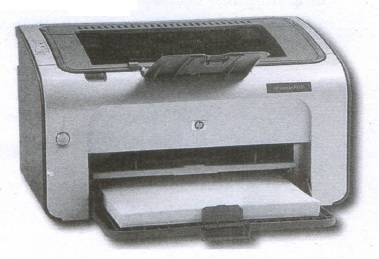
Non-Impact Printers:
(i) These printers do not use striking mechanism for printing. They use electrostatic or laser technology.
(ii) Quality and speed of these printers are better than Impact printers. For example, Laser printers and Inkjet printers are non-impact printers.
Laser Printers:
(i) Laser printers mostly work with similar technology used by photocopiers.
(ii) It makes a laser beam scan back and forth across a drum inside the printer, building up a pattern. It can produce very good quality of graphic images.
(iii) One of the chief characteristics of laser printer is their resolution - how many Dots per inch(DPI). The available resolution range around 1200 dpi. Approximately it can print 100 pages per minute(PPM).
Inkjet Printers:
(i) Inkjet Printers use colour cartridges which combined Magenta, Yellow and Cyan inks to create color tones.
(ii) A black cartridge is also used for monochrome output. Inkjet printers work by spraying ionised ink at a sheet of paper.
(iii) The speed of Inkjet printers generally ranges from 1-20 PPM (Page Per Minute).
(iv) They use the technology offering ink by heating it so that it explodes towards the paper in bubbles or by using piezoelectricity in which tiny electric currents controlled by electronic circuits are used inside the printer to spread ink in jet speed.
(v) An Inkjet printer can spread millions of dots of ink at the paper every single second.
18.
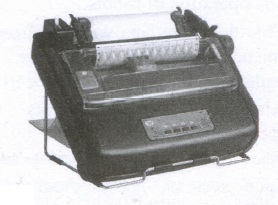
Impact Printers:
(i) These printers print with striking of hammers or pins on ribbon. These printers can print on multi-part (using carbon papers) by using mechanical pressure.
(ii) For example, Dot Matrix printers and Line matrix printers are impact printers.
(iii) A Dot matrix printer that prints using a fixed number of pins or wires. Each dot is produced by a tiny metal rod, also called a "wire" or "pin", which works by the power of a tiny electromagnet or solenoid, either directly or through a set of small levers.
(iv) It generally prints one line of text at a time. The printing speed of these printers varies from 30 to 1550 CPS (Character Per Second).
(v) A Dot matrix printer that prints using a fixed number of pins or wires. Each dot is produced by a tiny metal rod, also called a "wire" or "pin", which works by the power of a tiny electromagnet or solenoid, either directly or through a set of small levers.
(vi) It generally prints one line of text at a time. The printing speed of these printers varies from 30 to 1550 CPS (Character Per Second).
19.
| S.N | Generation | Period | Main Component used | Merits/ Demerits |
| 1 | First Generation | 1942-1955 | Vaccum tubes | 1. Big in size 2. Consumed more power 3. Malfunction due to overheat 4. Machine Language was used |
| First Generation Computer - ENIAC, EDVAC, UNIVAC 1 ENIAC weighed about 27 tons, size 8 feet x 100 feet x 3 feet and consumed around 150 watts of power | ||||
| 2 | Second Generation | 1955-1964 | Transistors | 1. Smaller compared to First Generation 2. Generated Less Heat 3. Consumed less power compared to first generation 4. Punched cards were used 5. First operating system was developed - Batch Processing and Multiprogramming Operating System 6. Machine language as well as Assembly language was used. |
| Second Generation Computers IBM 1404, IBM 1620, UNIVAC 1108 | ||||
| 3 | Third Generation | 1964-1975 | Integrated Circuits(IC) | 1. Computers were smaller, faster and more reliable 2. Consumed less power. 3. High-Level Languages were used |
| Third Generation Computers -IBM ·360 series, Honeywell 6000 series | ||||
| 4 | Fourth Generation | 1975-1980 | Microprocessor Very Large Scale Integrated Circuits (VLSI) |
1. Smaller and Faster 2. Microcomputer series such as IBM and APPLE were developed 3. Portable Computers were introduced |
| 5 | Fifth Generation | 1980-till date | Ultra Large Scale Integration (ULSI) |
1. Parallel, Processing 2. Superconductors 3. Computers size was drastically reduced. 4. Can recognize Images and Graphics 5. Introduction of Artificial Intelligence and Expert Systems 6. Able to solve high complex problems including decision making and logical reasoning |
| 6 | Sixth Generation | In future |  |
1. Parallel and Distributed computing 2. Computers have become smarter faster and smaller 3. Development of robotics 4. Natural Language Processing 5. Development of Voice Recognition Software |

11th Standard Syllabus & Materials
11th Standard
TN 11th Tamil பீடு பெற நில் - செய்யுள் - காவடிச்சிந்து Important Questions And Answers Study Material - QB365 Set A
NEW11th Standard
TN 11th Tamil பீடு பெற நில் - உரைநடை - மலை இடப்பெயர்கள் : ஓர் ஆய்வு Important Questions And Answers Study Material - QB365 Set A
NEW11th Standard
TN 11th Tamil மாமழை போற்றுதும் - துணைப்பாடம் - யானை டாக்டர் Important Questions And Answers Study Material - QB365 Set A
NEW11th Standard
TN 11th Tamil மாமழை போற்றுதும் - செய்யுள் - ஐங்குறுநூறு Important Questions And Answers Study Material - QB365 Set A



Tamilnadu Stateboard 11th Standard Subjects

Maths

Commerce

Economics

Biology

Business Maths and Statistics

Accountancy

Computer Science

Physics

Chemistry
Maths
Biology
Economics
Physics
Chemistry

History
Business Maths and Statistics

Computer Science
Accountancy
Computer Applications
History
Computer Technology
Commerce
Computer Applications
Computer Technology

Tamil

English

French
Tamilnadu Stateboard Standards
