
 100% FREE ACCESS
11th Standard Syllabus & Materials
11th Standard
TN 11th Tamil இயற்கை வேளாண்மை,சுற்றுச்சூழல் -செய்யுள் - மனோன்மணீயம் Important Questions And Answers Study Material - QB365 Set A
NEW11th Standard
TN 11th Tamil என்னுயிர் என்பேன் -துணைப்பாடம் - இசைத்தமிழர் இருவர் Important Questions And Answers Study Material - QB365 Set A
NEW11th Standard
TN 11th Tamil மொழி கலை -செய்யுள் - ஒவ்வொரு புல்லையும் Important Questions And Answers Study Material - QB365 Set A
NEW11th Standard
TN 11th Tamil பீடு பெற நில் - இலக்கணம் - பகுபத உறுப்புகள் Important Questions And Answers Study Material - QB365 Set A
NEW11th Standard
TN 11th Tamil பீடு பெற நில் - துணைப்பாடம் - வாடிவாசல் Important Questions And Answers Study Material - QB365 Set A
NEW11th Standard
TN 11th Tamil பீடு பெற நில் - செய்யுள் - குறுந்தொகை Important Questions And Answers Study Material - QB365 Set A

Published on: 14/12/2019
Introduction to Spreadsheet
Download Tamil Nadu 11th Standard Computer Technology question papers, model tests, one-mark questions, important questions, and public exam papers in PDF format. Free study materials and answer keys for TN State Board students.
Questions + Answers key
Take MCQ Computer Technology Test
1.
Can you edit the contents of a cell? If yes, explain any one of the method of editing the cell content.
2.
What are the keyboard shortcuts to cut, copy and paste?
3.
Write the general syntax of constructing a formula in Calc.
4.
What is a Cell pointer?
5.
What are the types of toolbars available in OpenOffice calc?
6.
In cell A1 = 34, A2 = 65, A3 = 89 write the formula to find the average.
7.
Write any three formatting options.
8.
Differentiate Deleting data using Backspace and Delete.
9.
Write about inserting columns and rows in Calc.
10.
Write a short note on OpenOffice Calc.
11.
Read the following table
| A | B | C | D | E | |
|---|---|---|---|---|---|
| 1 | Year | Chennai | Madurai | Tiruchi | Coimbatore |
| 2 | 2012 | 1500 | 1250 | 1000 | 500 |
| 3 | 2013 | 1600 | 1000 | 950 | 350 |
| 4 | 2014 | 1900 | 1320 | 750 | 300 |
| 5 | 2015 | 1850 | 1415 | 820 | 200 |
| 6 | 2016 | 1950 | 1240 | 920 | 250 |
Above table shows the sales figures for “Air Cooler” sold in four major cities of Tamilnadu from the year 2012 to 2016. Based on this data, write the formula to calculate the following.
(1) Total sales in the year 2015.
(2) Total sales in Coimbatore from 2012 to 2016.
(3) Total sales in Madurai and Tiruchi during 2015 and 2016.
(4) Average sales in Chennai from 2012 to 2016
(5) In 2016, how many “Air Coolers” are sold in Chennai compared to Coimbatore?
12.
Write the steps to generate the following series. 5, 10, 20 ….. 2560.
13.
Explain about changing the column width in Calc.
14.
Which of the following key combination is used to increase the width of the current column?
Alt + Right arrow
Ctrl + Right arrow
Alt + Left arrow
Ctrl + Left arrow
15.
Which of the following symbol is used to make a cell address as an absolute reference?
+
%
&
$
16.
What will be the result of the following expression (Assume H1 = 12, H2 = 12)? = H1 <> H2
True
False
24
1212
17.
What will be the result of the following formula (Assume A1 = 5, B2 = 2)? + A1 ^ B2
7
25
10
52
18.
A formula in calc may begin with
=
+
-
All the above
19.
Which key is used to move the cell pointer in the forward direction within the worksheet?
Enter
Tab
Shift + Tab
Delete
20.
A column heading in Calc is a
Number
Symbol
Date
Alphabet
21.
Grid of cells with a programmable calculator:
Spreadsheet
Database
Word processor
Linux
22.
Which of the following applications is the parent to OpenOffice Calc?
Visicalc
LibreCalc
Lotus 123
Star Office Calc
23.
Which is the first electronic spreadsheet?
Excel
Lotus 1-2-3
Visicalc
Open Office Calc
1.
(i) Yes, you can edit the contents of a cell.
(ii) Click the cell that contains the data that you want to edit, and then press F2. This starts Edit mode and Positions the cursor at the end of the cell contents.
2.
The Keyboard Shortcuts to
(i) Cut → Ctrl + x
(ii) Copy → Ctrl + c
(iii) Paste → Ctrl + v
3.
General Syntax of constructing a formula is : = cell reference 1 <operator> cell reference 2 <operator> ......................
4.
Cell pointer is a rectangle box which can be moved around the worksheet. The cell in which the cell pointer is currently located is known as “Active cell”. When you type any content, it will appear in the active cell.
5.
There are three toolbars available by default. They are :
(i) Standard Toolbar
(ii) Formatting Toolbar
(iii) Formula bar
6.
= Average (A1 : A3) (or) = (A1 + A2 + A3) / 3 = 62.7%
7.
(i) Bold
(ii) Italic
(iii) Underline
8.
| Deleting Data | Backspace |
| Delete key deletes data towards right of the insertion point. | Backspace key deletes data towards left of the insertion point |
9.
Insert a new column anywhere in the worksheet.
Step 1 : Select the column where a new column to be inserted.
Step 2 : Right–click on the selected column name that you selected. A pop-up menu appears.
Step 3 : click the "Insert Columns" option from the menu.
a new column will be inserted to the left of the current column. Insert a new row in the worksheet.
Step 1 : Select the row where a new row to be inserted.
Step 2 : Right–click on the row number, a pop-up menu appears.
Step 3 : click "Insert Rows" option from the menu a new row will be inserted to above the current row.
10.
OpenOffice Calc is a popular open source spreadsheet application maintained by Apache Foundation. Star Office Calc is the parent application of OpenOffice Calc which was developed by a German Company namely, Star Division in 1985. Calc is the spreadsheet component of OpenOffice. You can enter any kind of data in a spreadsheet and then manipulate this data to produce certain results.
11.
| SI.NO | QUESTION | FORMULA | ANSWER |
| 1 | Total sales in the year 2015. |
= SUM(B5:E5) | 4285 |
| 2 | Total sales in Coimbatore from 2012 to 2016. |
= SUM(E2:E6) | 1600 |
| 3 | Total sales in Madurai and Tiruchi during 2015 and 2016. |
= SUM(C5:D6) | 4395 |
| 4 | Average sales in Chennai from 2012 to 2016. |
= AVERAGE(B2:B6) | 1760 |
| 5 | In 2016, how many "Air Coolers" are sold in Chennai compared to Coimbatore? |
= B6 - E6 | 1700 |
12.
The steps to generate the series 5,10,20.......2560.
Step 1 : Select Edit → fill → Series Command. The fill series dialog log opens. In the dialog box.
Step 2 : Select Direction (Down / Right / Up / Left) in which the series to be displayed.
Step 3 : Select Growth to generate the series
Step 4 : Initial value of the series 5 should be typed in start value box.
Step 5 : End value of the series 2560 should be typed in End value text box.
Step 6 : Growth value of the series 2 should be typed in Increment text box.
Step 7 : Click OK to generate the series.
13.
Changing Column Width and Row Height :
(i) Often while entering data into a worksheet you will realize that the width of the column is not enough.
(ii) StarOffice Calc. allows you to change the width of a column and the height of a row. To change the column width, select the column whose width you want to change.
(iii) Click on Format → Column → Width and type the new column width in the dialog box, which appears as shown in figure Click on OK.
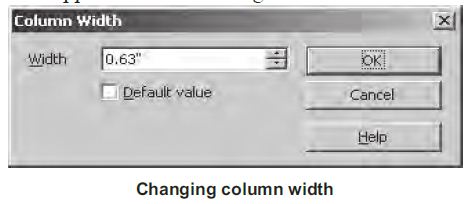
(iv) You can also change the column width in another way. Point to the line separating the column whose width you want to change from the next column.
(v) The mouse pointer becomes a double – headed arrow. Click and drag this pointer to the left to decrease the width and to the right to increase the width.
14.
(a)
Alt + Right arrow
15.
(d)
$
16.
(b)
False
17.
(b)
25
18.
(d)
All the above
19.
(b)
Tab
20.
(d)
Alphabet
21.
(a)
Spreadsheet
22.
(d)
Star Office Calc
23.
(c)
Visicalc

11th Standard Syllabus & Materials
11th Standard
TN 11th Tamil பீடு பெற நில் - செய்யுள் - காவடிச்சிந்து Important Questions And Answers Study Material - QB365 Set A
NEW11th Standard
TN 11th Tamil பீடு பெற நில் - உரைநடை - மலை இடப்பெயர்கள் : ஓர் ஆய்வு Important Questions And Answers Study Material - QB365 Set A
NEW11th Standard
TN 11th Tamil மாமழை போற்றுதும் - துணைப்பாடம் - யானை டாக்டர் Important Questions And Answers Study Material - QB365 Set A
NEW11th Standard
TN 11th Tamil மாமழை போற்றுதும் - செய்யுள் - ஐங்குறுநூறு Important Questions And Answers Study Material - QB365 Set A



Tamilnadu Stateboard 11th Standard Subjects

Maths

Commerce

Economics

Biology

Business Maths and Statistics

Accountancy

Computer Science

Physics

Chemistry
Maths
Biology
Economics
Physics
Chemistry

History
Business Maths and Statistics

Computer Science
Accountancy
Computer Applications
History
Computer Technology
Commerce
Computer Applications
Computer Technology

Tamil

English

French
Tamilnadu Stateboard Standards
