
 100% FREE ACCESS
11th Standard Syllabus & Materials
11th Standard
TN 11th Tamil இயற்கை வேளாண்மை,சுற்றுச்சூழல் -செய்யுள் - மனோன்மணீயம் Important Questions And Answers Study Material - QB365 Set A
NEW11th Standard
TN 11th Tamil என்னுயிர் என்பேன் -துணைப்பாடம் - இசைத்தமிழர் இருவர் Important Questions And Answers Study Material - QB365 Set A
NEW11th Standard
TN 11th Tamil மொழி கலை -செய்யுள் - ஒவ்வொரு புல்லையும் Important Questions And Answers Study Material - QB365 Set A
NEW11th Standard
TN 11th Tamil பீடு பெற நில் - இலக்கணம் - பகுபத உறுப்புகள் Important Questions And Answers Study Material - QB365 Set A
NEW11th Standard
TN 11th Tamil பீடு பெற நில் - துணைப்பாடம் - வாடிவாசல் Important Questions And Answers Study Material - QB365 Set A
NEW11th Standard
TN 11th Tamil பீடு பெற நில் - செய்யுள் - குறுந்தொகை Important Questions And Answers Study Material - QB365 Set A

Published on: 28/12/2018
11th Half Yearly Model Question
Download Tamil Nadu 11th Standard Computer Technology question papers, model tests, one-mark questions, important questions, and public exam papers in PDF format. Free study materials and answer keys for TN State Board students.
Questions + Answers key
Take MCQ Computer Technology Test
1.
ISDN is Acronym of_________.
Integrated services Digital Network
Intermediate service Digital Network
Information services digital network
Intellectual services Digital Network
2.
Identify the device that forwards packets between networks by processing the routing information included in the packet.
bridge
firewall
router
all of the mentioned
3.
Which is the shortcut key for adjustment to formatting text
F10
F7
F11
F5
4.
In presentation tools, the entry effect as one slide replaces another slide in a slide show. Identify the option that suits after reading the statement.
Animation
Slide Transition
Custom animation
Rehearse Timing
5.
The size of an A4 paper is 21 cm x 29 cm. If the user chooses Landscape orientation, then the size of the paper is…..?
21 x 29
29 x 21
None of the above
All of the above
6.
If cell A5 contains value 18, then if (A26 < 5; “True”, “False”) will return
True
False
Blasse
Error
7.
Which is the first electronic spreadsheet?
Excel
Lotus 1-2-3
Visicalc
Open Office Calc
8.
Which OS is designed for computer, smart phones and network servers?
Android
Ubuntu
iOS7
None of these
9.
Operating system is a
Application Software
Hardware
System Software
Component
10.
Which of the following process computer instructions?
ALU
Control Unit
Register
Microprocessor
11.
1's complement of 10012 is
10002
01112
01102
10102
12.
Identify the input device
Printer
Mouse
Plotter
Projector
13.
Spelling errors can be viewed in a document through ______
Green wavy line
Blue wavy line
Black strike
Red wavy line
14.
Which option helps to assign text, tables, graphics and other items to a key or key combination?
Autoformat
Automatic
Auto text
Autographics
15.
What is the shortcut key for finding and replacing text in a document?
Ctrl + F1
Ctrl + F4
Ctrl + F5
Ctrl + F7
16.
What are the keyboard layouts used in Android?
17.
Define Computer network.
18.
List out pre-packaged layouts.
19.
What is header and footer?
20.
What are the keyboard shortcuts to cut, copy and paste?
21.
What is user Interface?
22.
What are the parameters which influence the characteristics of a microprocessor?
23.
Name the frequently used number system
24.
Distinguish Primary and Secondary memory.
25.
What is Text formatting?
26.
What are Advantages of email.
27.
How many types of views are provided by Impress to its users?
28.
What are functions in OpenOffice Calc?
29.
Are drives such as hard drive and floppy drives represented with drive letters? If so why, if not why?
30.
Write the classification of OS according to availability.
31.
Write the applications included by flash memory.
32.
Perform the following expressions. (COFFEE)16 = (?)2
33.
Write the characteristics of sixth generation.
34.
List the advantages of the Mail Merge feature.
35.
How do you change the clarity of the picture in background?
36.
What are the morals that society adheres to?
37.
Explain the applications of internet.
38.
Valarmathi’s teacher asks her to create a presentation in OpenOffice Impress. As Valarmathi has never worked in Impress before, help her to perform the following tasks:
a. She wants that except for the first slide, all the slides should have the same design. For this, what does she need to do?
b. To easily communicate with her audience, she wants to provide them with a hard copy of the slides of the presentation. What should she create for it?
c. She wants to insert some pictures and movie files in some slides. How can she do that?
d. Suggest her the view that would be the most suitable for showing the presentation to the audience.
e. To make her presentation more attractive, she wants to add some effects in it. How can she do it? Suggest.
39.
Explain how to format a worksheet
40.
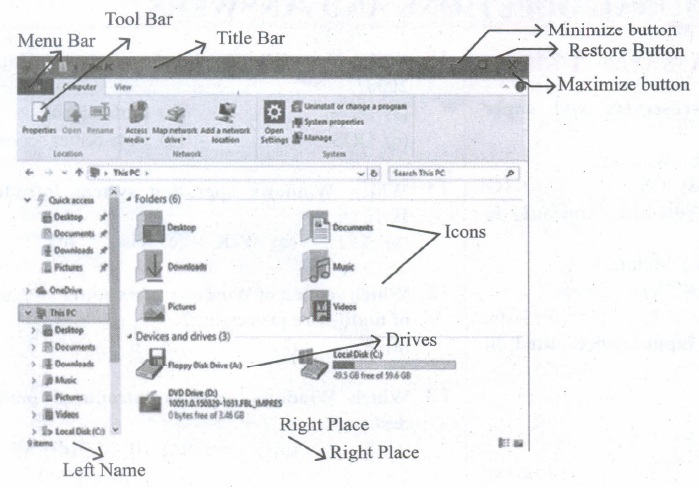
Observe the figure and mark all the window elements, Identify the version of the Windows Os.
41.
Explain memory management techniques.
42.
Define the following. (a) Bus (b) Data bus (c) Address bus (d) Control Bus
43.
What are Registers? Explain the five Registers that are essential for instruction execution.
44.
Explain Address book feature.
45.
Write the steps to preview before printing and steps in printing a document.
1.
(a)
Integrated services Digital Network
2.
(c)
router
3.
(a)
F10
4.
(b)
Slide Transition
5.
(b)
29 x 21
6.
(d)
Error
7.
(c)
Visicalc
8.
(b)
Ubuntu
9.
(c)
System Software
10.
(a)
ALU
11.
(b)
01112
12.
(b)
Mouse
13.
(d)
Red wavy line
14.
(a)
Autoformat
15.
(c)
Ctrl + F5
16.
There are many good options, though. Let’s take a look at the best Android keyboards !
(i) SwiftKey is definitely among the best Android keyboards ever. It has top of the line prediction and auto-correction along with gesture typing, cloud syncing so all of your devices can stay up to date, themes, keyboard customization, a number row, and more....
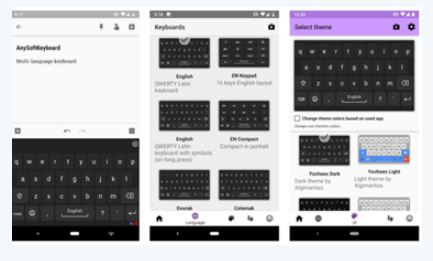
(ii) There are a number of different arrangements of alphabetic, numeric, and punctuation symbols on keys. These different keyboard layouts arise mainly because different people need easy access to different symbols, either because they are inputting text in different languages, or because they need a specialized layout for mathematics, accounting, computer programming, or other purposes..
17.
(i) Network is a broad term similar to "system". Network is a communication system which supports many users. In relation with the computer, we can say that a "computer network" is a system which allows communication among the computers connected in the network.
(ii) In a computer network, we need to make use of hardware and software. The hardware consists of connecting cables, connectors, network connecting devices and the software consists of protocols, programs, etc. This enables the systematic exchange of information between the computers connected in the network.
18.
However there is no uniform save file spot, the unofficial Unity save game destinations are all stored by default in the application 'persistant Data Path.' If you just use Unity PlayerPrefs, the information will be stored in the register.
19.
(i) Header and Footer are some titles (such as Document Title, Author Name) or references (such as page no, number of pages, date) or remarks to be printed in the top (called as Header) and bottom of the page (called as Footer).
(ii) Headers and Footers are useful for including material that you want to appear on every page of the document.
20.
The Keyboard Shortcuts to
(i) Cut → Ctrl + x
(ii) Copy → Ctrl + c
(iii) Paste → Ctrl + v
21.
It is a part of OS which is visible to the user and has to be understood by the user.
22.
A Microprocessor's performance depends on the following characteristics:
(a) Clock speed
(b) Instruction set
(c) Word size
23.
A decimal number system is the frequently used number system.
24.
| Primary Memory | Secondary memory |
| It is used to temporarily store the programs and data when the instructions are ready to execute. | It is used to store the data permanently. |
| It is volatile, the content is lost when the power supply is switched off. Eg.RAM. |
It is non-volatile, the content is available even after the power supply is switched off. Eg. ROM, CD-ROM, DVD ROM. |
25.
Changing the default appearance of the text like changing the font type, size, color, style etc., are called as Text formatting.
26.
1. E-Mails provides faster and easy mean of communication. One can send message to any person at any place of world by just one click.
2. Its effective and cheap means of communication because single message can be sent to multiple people at same time.
3. E-mail is not just only for textual message. One can send any kind of multimedia within mail.
4. It is secure and reliable method to deliver our message.
5. To write an email there is no need of any kind of paper thus it is environment friendly.
6. Email allows the exchange of information, removes global barriers, keep communication costs low and allow business people the flexibility to access their messages from anywhere in the world.
27.
Normal view:
is the main view for creating individual slides. Use this view to format and design slides and to add text, graphics, and animation effects.
Outline view:
Shows topic titles, bulleted lists, and numbered lists for each slide in outline format. Use this view to rearrange the order of slides, edit titles and headings, rearrange the order of items in a list, and add new slides.
Notes view:
lets you add notes to each slide that are not seen when the presentation is shown.
Slide Sorter view:
Shows a thumbnail of each slide in order. Use this view to rearrange the order of slides, produce a timed slide show, or add transitions between selected slides.
Handout view:
Lets you print your slides for a handout. You can choose one, two, three, four, or six slides per page from Tasks pane → Layouts. Thumbnails can be re-arranged in this view by dragging and dropping them.
28.
A function is a predefined calculation entered in a cell to help to analyze or manipulate data in a spreadsheet. These functions simplify help to create the formulas needed to get the expected results
29.
1. In Windows, the drive letter is assigned to the physical drive of the system.
2. It makes easy to remember the location of files. We can change or rename the drives.
3. Additional drives can be added as per the requirement.
4. In Linux, each drive and device have different designations. It is not represented by alphabet.
5. Yes, hard drives and floppy drives represented with drive letters.
30.
Operating System
(i) Proprietary Licence
(a) Microsoft Windows
(b) Apple Mac OS
(c) Apple IOS [Mobile Device]
(ii) Open source Free licence (GNU)
(a) UNIX
(b) LINUX
(c) Google's Android [Mobile Device]
31.
Flash memory include personal computers, PDAs digital audio players, digital cameras, mobile phones, synthesizers, video games, scientific instrumentation, industrial robotics, and medical electronics.
32.
(COFFEE)16
\(\overset { C }{ \underset { 1100 }{ \downarrow } } \)\(\overset { O }{ \underset { 0000 }{ \downarrow } } \)\(\overset { F }{ \underset { 1111 }{ \downarrow } } \)\(\overset { F }{ \underset { 1111 }{ \downarrow } } \)\(\overset { E }{ \underset { 1110 }{ \downarrow } } \)\(\overset { E }{ \underset { 1110 }{ \downarrow } } \)
(COFFEE)16 = (110000001111111111101110)2
33.
(i) In the Sixth Generation, computers could be defined as the era of intelligent computers based on Artificial Neural Networks.
(ii) One of the most dramatic changes in the sixth generation will be the explosive growth of Wide Area Networking.
(iii) Natural Language Processing (NLP) is a component of Artificial Intelligence (AI).
(iv) It provides the ability to develop the computer program to understand human language.
34.
(i) one standard letter can be send to all without having to manually add each name and address.
(ii) The letter can be personalized - it looks like the letter has been written to the individual person.
(iii) It is a very fast method to produce hundred of personalized letter.
35.
Clicking on Transparency icon helps  to adjust the clarity of the picture in %.
36.
37.
There are many applications of internet such as:
1. Communication: Computer users around the world extensively use the email service on internet to communicate with each other. Pictures, documents and other files are sent as email attachments. VolP stands for Voice over Internet Protocol, referring to the protocol that underlies all internet communication.
2. Job search: Nowadays many people search for their jobs online as it is quicker and there is a larger variety of jobs vacancies present. People can publish resume online for prospective job.
3. Video conferencing: It enables direct face to face communication across networks via web cameras, microphones and other communication tools. Video conferencing can enable individuals in distant locations to participate in meetings on short notice, with time and money saving. Video conferencing is very interactive in education to communicate between teacher to teacher, teacher to classroom and classroom to classroom with students at different places.
4. E-commerce: E-commerce or electronic commerce is the buying and selling of goods and services, or transmitting of funds or data, over an electronic network. These transactions occur either business-to-business, business to consumer, consumer to consumer or consumer to business.
5. Travel: One can use internet to gather information about various touristplace. It can be used for booking Holiday tours. Some of the websites providing this service are goibibo.com, makemytrip.com,olacabs.com.
6. Nowadays internet is almost use in every fields. Due to increase in technology, use of internet has benefitted the users in many ways. Internet enables millions of computers from different organization and people to communicate and share resource globally.
38.
a. Select Format → Page from the Menu bar on the page setup, dialog box, choose background tab.
b. Select the type of fill you want for your background from the fine choices, None, color, gradient, hatching or bitmap. A list of choices for the selected fill type will appear → select it. Select one of the items on the list and click OK. The fill you have chosen is added to slide master then go normal view.
c. Select the first slide then right click → select slide design then select the design in slide master, then right click, a popup menu will appear, it displays 'back ground settings for all' you can choose 'No' option. The only first slide would not appear the background design.
Follow above steps to make first slide different from other slides.
39.
(i) Formatting Data in a cell gives additional effect to the text. Additional effect includes changing the font style, font size, automatic wrapping, bold, underline, italic etc. The data in Calc can be formatted in several ways. Using formatting icons can be used.
(ii) Text formatting : Making the cell contents as bold, italics, underlined, changing font style, size, colour etc., comes under text formatting.
(iii) Number formatting : Number formatting options are used to visually change the format of a numeric content. These formatting changes are appear for visual as, it does not change the original value. For example, To display a number as currency form use Number format: Currency.
40.
41.
Memory Management:
(i) Memory Management is the process of controlling and coordinating computer's main memory and assigning memory block (space) to various running programs to optimize overall computer performance.
(ii) The Memory management involves the allocation of specific memory blocks to individual programs based on user demands. At the application level, memory management ensures the availability of adequate memory for each running program at all times.
(iii) The objective of Memory Management process is to improve both the utilization of the CPU and the speed of the computer's response to its users via main memory. For these reasons, the computers must keep several programs in main memory that associates with many different Memory Management schemes.
(iv) The Operating System is responsible for the following activities in connection with memory management.
(v) Keeping track of which portion of memory are currently being used and who is using them.
(vi) Determining which processes (or parts of processes) and data to move in and out of memory.
(vii) Allocation and de-allocation of memory blocks as needed by the program in main memory. (Garbage Collection).
42.
(a) Bus: A bus is a collection of wires used for communication between the internal components of a computer.
(b) Data bus:
(i) Data busis a collection of wires to carry data in bits.
(ii) A data bus is used to transfer data between the memory and the CPU.
(iii) The data bus is bidirectional.
(c) Address bus:
(i) Address bus is a collection of wires to carry data in bits.
(ii) The address bus is used to point a memory location.
(iii) The address bus is unidirectional.
(d) Control bus:
(i) Control bus is a control line/collection of wires to control the operation/functions.
(ii) The control bus controls both read and write operations.
43.
Registers:
(i) Registers are the high-speed temporary storage locations in the CPU. Hence, their contents can be handled much faster than the contents of memory.
(ii) Although the number of registers varies from computer to computer, there are some registers which are common to all computers. Five registers that are essential for instruction execution are:
(iii) Program Counter (PC): Contains the address of the next instruction to be fetched.
(iv) Instruction Register (IR): Contains the instruction most recently fetched.
(v) Memory Address Registers (MAR): Contain the address of a location in memory for read and write operations.
(vi) Memory Buffer Register (MBR): It contains the value to be stored in memory or the last value read from memory.
(vii) Accumulator (ACC): An accumulator is a general purpose register used for storing temporary result produced by the arithmetic logic unit.
44.
(i) An a address book is a database that stores names, address and other contact information for a computer user.
(ii) Address books allow easy access to the user's friend, family business associates and others by maintaining their email and other contact details on their computer.
(iii) Address books can be software based, or accessed online or through a network.
(iv) User may also be able to export contacts from their address books to mobile phone, PDAs and other portable electronic devices.
45.
to preview the document before taking the print out.
The steps to be followed to preview the document:
(i) Click File ⟶ Page Preview, or click the Page Preview button. The Writer displays the Page Preview toolbar displayed.
(ii) In the page preview toolbar click Multiple pages icon to display multiple pages.
(iii) To close the preview click on Close Preview button.
The following are some steps to change the printer setting:
(i) Click File ⟶ Print or Ctrl+P or' Print File icon which opens the Print dialog box that appears
(ii) Click General tab.
(iii) Select the required printer from the list of printers
(iv) Under Range and copies section: select All pages option to print all pages, select Pages option to specify the particular page or page range.
(v) Specify Number of copies using spin arrows.
(vi) Click Print button.

11th Standard Syllabus & Materials
11th Standard
TN 11th Tamil பீடு பெற நில் - செய்யுள் - காவடிச்சிந்து Important Questions And Answers Study Material - QB365 Set A
NEW11th Standard
TN 11th Tamil பீடு பெற நில் - உரைநடை - மலை இடப்பெயர்கள் : ஓர் ஆய்வு Important Questions And Answers Study Material - QB365 Set A
NEW11th Standard
TN 11th Tamil மாமழை போற்றுதும் - துணைப்பாடம் - யானை டாக்டர் Important Questions And Answers Study Material - QB365 Set A
NEW11th Standard
TN 11th Tamil மாமழை போற்றுதும் - செய்யுள் - ஐங்குறுநூறு Important Questions And Answers Study Material - QB365 Set A



Tamilnadu Stateboard 11th Standard Subjects

Maths

Commerce

Economics

Biology

Business Maths and Statistics

Accountancy

Computer Science

Physics

Chemistry
Maths
Biology
Economics
Physics
Chemistry

History
Business Maths and Statistics

Computer Science
Accountancy
Computer Applications
History
Computer Technology
Commerce
Computer Applications
Computer Technology

Tamil

English

French
Tamilnadu Stateboard Standards
