
 100% FREE ACCESS
11th Standard Syllabus & Materials
11th Standard
TN 11th Tamil இயற்கை வேளாண்மை,சுற்றுச்சூழல் -செய்யுள் - மனோன்மணீயம் Important Questions And Answers Study Material - QB365 Set A
NEW11th Standard
TN 11th Tamil என்னுயிர் என்பேன் -துணைப்பாடம் - இசைத்தமிழர் இருவர் Important Questions And Answers Study Material - QB365 Set A
NEW11th Standard
TN 11th Tamil மொழி கலை -செய்யுள் - ஒவ்வொரு புல்லையும் Important Questions And Answers Study Material - QB365 Set A
NEW11th Standard
TN 11th Tamil பீடு பெற நில் - இலக்கணம் - பகுபத உறுப்புகள் Important Questions And Answers Study Material - QB365 Set A
NEW11th Standard
TN 11th Tamil பீடு பெற நில் - துணைப்பாடம் - வாடிவாசல் Important Questions And Answers Study Material - QB365 Set A
NEW11th Standard
TN 11th Tamil பீடு பெற நில் - செய்யுள் - குறுந்தொகை Important Questions And Answers Study Material - QB365 Set A

Published on: 17/01/2020
Download Tamil Nadu 11th Standard Computer Technology question papers, model tests, one-mark questions, important questions, and public exam papers in PDF format. Free study materials and answer keys for TN State Board students.
Questions + Answers key
Take MCQ Computer Technology Test
1.
Explain the steps to perform mail merge speration.
2.
How will you insert mathematical equation in a document? Explain.
3.
Explain the types of computer networks based on its size, distance and the structure.
4.
Sivabalan created a presentation to be shown at his school’s Annual Function. Just 5 minutes before the presentation, he noticed that he has misspelt the name of the school, which is appearing in all the 30 slides of the presentation. How can he rectify this mistake in all the slides in one-shot?
5.
Create a Worksheet to contain student database with following fields.
Rollno., Name, English, Tamil, Maths, Science, Social, Total, average.
6.
Read the following table
| A | B | C | D | E | |
|---|---|---|---|---|---|
| 1 | Year | Chennai | Madurai | Tiruchi | Coimbatore |
| 2 | 2012 | 1500 | 1250 | 1000 | 500 |
| 3 | 2013 | 1600 | 1000 | 950 | 350 |
| 4 | 2014 | 1900 | 1320 | 750 | 300 |
| 5 | 2015 | 1850 | 1415 | 820 | 200 |
| 6 | 2016 | 1950 | 1240 | 920 | 250 |
Above table shows the sales figures for “Air Cooler” sold in four major cities of Tamilnadu from the year 2012 to 2016. Based on this data, write the formula to calculate the following.
(1) Total sales in the year 2015.
(2) Total sales in Coimbatore from 2012 to 2016.
(3) Total sales in Madurai and Tiruchi during 2015 and 2016.
(4) Average sales in Chennai from 2012 to 2016
(5) In 2016, how many “Air Coolers” are sold in Chennai compared to Coimbatore?
7.
Explain the classification of Microprocessor based on Instruction set?
8.
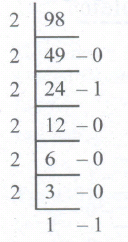
Convert (98.46)10 to Binary
9.
Explain Non-Impact printers with an example.
10.
What are Header and Footer? How do you insert page numbers?
11.
The command to change the table border
Table ⟶ Table Format
Table ⟶ Table Border
Table ⟶ Table Properties
Format ⟶ Character
12.
The vertical ruler is used to set margins .........
left and top
right and bottom
left and right
top and bottom
13.
The internet is governed by
ICANM
ICANN
ICMA
ICNNA
14.
Vanya has made a presentation on “Global Warming”. She wants to progress her slide show automatically while speaks on the topic in the class. Which features of Impress would she use?
Custom Animation
Rehearse Timing
Slide Transition
Either (a) or (b).
15.
The customer is required to design the item number between 101 to 200. If the user types above 200 or below 100, the system should give an error message. Which of the following tool is used?
Listing
Filtering
Formatting
Validating
16.
To select multiple continuous sheet which key is used?
Ctrl
Shift
Alt
tab
17.
A column heading in Calc is a
Number
Symbol
Date
Alphabet
18.
Which command is used to cut file or folder?
File ⟶ Cut
Edit ⟶ Cut
Edit ⟶ Move
Format ⟶ Cut
19.
Which of the following in Ubuntu OS is used to view the options for the devices installed?
Settings
Files
Dash
VBox_GAs_5.2 ..2
20.
Operating system is a
Application Software
Hardware
System Software
Component
21.
Which operation transfers data from the MDR to memory?
read
Copy
move
write
22.
What is the 1's complement of 00100110?
00100110
11011001
11010001
00101001
23.
Which of the following is not a form of parallel computing?
bit level
instruction level
task parallelism
Robotics
24.
Which menu option of the menu bar is used to Mail Merge a document?
View
Format
Table
Tools
25.
Which option helps to assign text, tables, graphics and other items to a key or key combination?
Autoformat
Automatic
Auto text
Autographics
26.
What is the purpose of using Auto Text? Give example.
27.
Differentiate Website and Webpage.
28.
Write the steps to print the title row on every page of the spread-sheet.
29.
Differentiate Deleting data using Backspace and Delete.
30.
Differentiate Save, Save As and Save a Copy in Ubuntu OS.
31.
How the Linux OS was created?
32.
Differentiate CD and DVD
33.
Write note on binary number System
34.
Write down the steps to find the number of words in a paragraph.
35.
What can be accessed through openoffice mail merge?
36.
What is table in writer? In what way it helps us?
37.
Name the control buttons available in title bar of window
38.
What are the keyboard layouts used in Android?
39.
What is electronic commerce?
40.
List out the presentation supported file types.
41.
What is header and footer?
42.
What is Chart?
43.
What is the function of an ALU?
1.
Step 1: Choose Mail Merge
Tools Mail Merge
Step 2: Select starting document.
This step has four option. Select any are option click next.
Step 3: Select document type
This step has two options. Select anyone option click next.
Step 4: Insert Address Block
This step has four sections. Work with the optins according to the user need. Click OK.
Step 5: Edit document
It helps user to add or modify the content of the letter. Click Next.
Step 6: Personalize document.
If helps to add specific comments to selected records. Click Next.
Step 7: Save, Print or Send.
The save as dialog box is used to save the created document by giving a suitable name and also merge, print and send merged document as E-mail. Click finish to view the mail merge on the screen.
2.
These equations can be inserted by following the steps below:
(i) Click on the Insert ⟶ Object ⟶ Formula
(ii) The equation editor opens at the bottom of the screen.
(iii) Click in the equation editor and type the equation.
(iv) To include symbols in the equation Right-click in the equation editor and select the symbol from the pop-up menu.
(v) Click inside the document to include the equation in the document and this will automatically exit the control from equation editor.
(vi) Double-click on a formula to edit the equation
3.
Different types of computer networks are:
1. LAN(Local Area Network):
(i) The local area network is a network which is designed to operate over a small physical area such as an office, factory or a group of buildings. LAN are widely used in variety of applications.
(ii) In LAN all the machines are connected to a single cable. Different topologies such as Bus, Ring, Star, Tree, etc. are used for LANs.
(iii) The size of LAN is usually small. The various devices in LAN are connected to central devices called Hub or Switch using a cable.
(iv) A LAN is usually a privately owned and links the devices in a single office, building or campus of up to few kilometres in size.
(v) The data rate for LAN can now range from 4 to 16 Mbps.
2. MAN(Metropolitan Area Network):
(i) A MAN is basically a bigger version of LAN. It is designed to extend over the entire city. MANs extend beyond 100 KM.
(ii) The MAN can be in the form of a single network such as a cable network or it can be a combination of multiple LANs.
(iii) A MAN may be wholly owned and operated by a private company or it may be a service provided by a public company, such as local telephone company(telco).
3. WAN(Wide area network):
(i) When a network spans a large distance or when the computers to be connected to each other are at wide separated locations a local area network cannot be used. For such situation, a Wide area Network(WAN) must be installed.
(ii) The communication between different users of WAN is established using leased telephone lines or satellite links and similar channels.
(iii) A WAN provides a long-distance transmission of data, voice image and video information over large geographical areas that may comprise a country, a continent or even the whole world.
(iv) WANs may use public, leased or private communication devices, and can spread over a wide geographical area. WAN that is wholly owned and used by a single company is often called as enterprise network.
(v) In most WANs the network contains a large number of cables or telephone lines each one connecting a pair of routers.
4. PAN (Personal area network):
(i) A personal area network, or PAN, is a computer network that enables communication between computer devices.
(ii) PANs can be wired, such as USB or FireWire, or they can be wireless, such as infrared, ZigBee, Bluetooth and ultra-wide band (UWB).
(iii) The range of a PAN typically is a few meters. Examples of wireless PAN (WPAN) are devices include cell phone, headsets, wireless keyboards, wireless mice, printers, bar code scanners and game consoles.
(iv) Hence computer network are classified into four types based on the size, distance and the structure namely: LAN (Local Area Network), MAN (Metropolitan Area Network), WAN (Wide Area Network) and PAN (Personal Area Network).
4.
Open the presentation and then follow the below given steps:
1. On the 'Home' Tab → Editing → Choose → Replace option. Top left of the screen, then click Find → Replace option.
2. New window pops-out. Find what box.
3. In the find what box, you can enter the word 'Miss-pelt school name'.
4. Then in the replace with box enter the correct 'school name word' and then click 'Replace All' option.
5. Now, the correct school Name will be changed in all slides.
6. After following the above steps correctly, one can rectify the mistake.
5.
In cell A1, type Roll no
In cell B1, type Name
In cell C1, type English
In cell D1, type Tamil
In cell E1, type Maths
In cell F1, type Science
In cell G1, type Social
In cell H1, type Total
In cell 11, type Average.
6.
| SI.NO | QUESTION | FORMULA | ANSWER |
| 1 | Total sales in the year 2015. |
= SUM(B5:E5) | 4285 |
| 2 | Total sales in Coimbatore from 2012 to 2016. |
= SUM(E2:E6) | 1600 |
| 3 | Total sales in Madurai and Tiruchi during 2015 and 2016. |
= SUM(C5:D6) | 4395 |
| 4 | Average sales in Chennai from 2012 to 2016. |
= AVERAGE(B2:B6) | 1760 |
| 5 | In 2016, how many "Air Coolers" are sold in Chennai compared to Coimbatore? |
= B6 - E6 | 1700 |
7.
(i) The size of the instruction set is another important consideration while categorizing microprocessors.
(ii) Initially, microprocessors had very small instruction sets because complex hardware was expensive as well as difficult to build.
(iii) As technology had developed to overcome these issues, more and more complex instructions were added to increase the functionality of the microprocessor,
(iv) Let us learn more about the two types of microprocessors which are based on their instruction sets.
(v) RISC stands for Reduced Instruction Set Computers. They have a small set of highly optimized instructions.
(vi) Complex instructions are also implemented using simpler instructions, thus reducing the size of the instruction set.
(vii) Examples of RISC processors are Intel P6, Pentium IV, AMD K6 and K7.
(viii) CISC stands for Complex Instruction Set Computers. They support hundreds of instructions. Computers supporting CISC can accomplish a wide variety of tasks, making them ideal for personal computers.
(ix) Examples of CISC processors are Intel 386 & 486, Pentium, Pentium II and III, and Motorola 68000.
8.
98.4610
1. Integer part
2. Fractional part
0.46 x 2 = 0.92 = 0
0.92 x 2 = 1.84 = 1
0.84 x 2 = 1.68 = 1
0.68 x 2 = 1.36 = 1
0.36 x 2 = 0.72 = 0
0.72 x 2 = 1.44 = 1
98.4610 = (1100010.011101...)2
9.
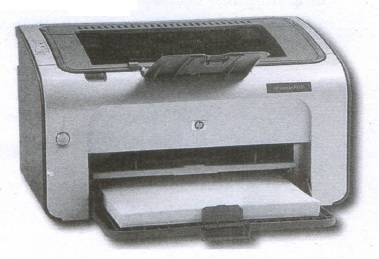
Non-Impact Printers:
(i) These printers do not use striking mechanism for printing. They use electrostatic or laser technology.
(ii) Quality and speed of these printers are better than Impact printers. For example, Laser printers and Inkjet printers are non-impact printers.
Laser Printers:
(i) Laser printers mostly work with similar technology used by photocopiers.
(ii) It makes a laser beam scan back and forth across a drum inside the printer, building up a pattern. It can produce very good quality of graphic images.
(iii) One of the chief characteristics of laser printer is their resolution - how many Dots per inch(DPI). The available resolution range around 1200 dpi. Approximately it can print 100 pages per minute(PPM).
Inkjet Printers:
(i) Inkjet Printers use colour cartridges which combined Magenta, Yellow and Cyan inks to create color tones.
(ii) A black cartridge is also used for monochrome output. Inkjet printers work by spraying ionised ink at a sheet of paper.
(iii) The speed of Inkjet printers generally ranges from 1-20 PPM (Page Per Minute).
(iv) They use the technology offering ink by heating it so that it explodes towards the paper in bubbles or by using piezoelectricity in which tiny electric currents controlled by electronic circuits are used inside the printer to spread ink in jet speed.
(v) An Inkjet printer can spread millions of dots of ink at the paper every single second.
10.
The header is a section of the document that appears in the top margin, while the footer is a section of the document that appears in the bottom margin of the page. Typically, headers display the title or chapter name, author name of a document while the footer displays the page number, date, time etc which gets displayed on all the pages automatically.
To Insert Headers and Footers:
(i) Select from the main menu Insert -> Header -> Default
(ii) The header text area is separated from the normal text are (a)
(iii) Enter the text that is to be repeated in all pages or Select Insert -> Fields -> Title.
(iv) The Header dialog box is displayed
To insert a Footer, the steps are as given below:
(i) Select from the main menu Insert -> Footer -> Default
(ii) Piace the cursor in the Footer part of the page.
(iii) Select Insert -> Fields -> Page Number.
Once the headers and footers are given in the first page, the same text appears in all the pages.
Inserting and Formatting Page Numbers:
Once the Header/footer area is enabled, the page numbers can be inserted by performing the following steps:
(i) position the cursor where you want to insert the number
(ii) choose Insert -> Fields -> Page Number
(iii) The page number appears with a gray background
Normally, the page numbers appear as 1,2,3 ..... , To change the numbering style, the following sequence of steps can be performed:
(i) Position the cursor where the page number has to appear
(ii) Select Format -> page, which will bring the page style dialog box
(iii) Select page Tab
(iv) In the Layout settings, select the format drop down combo box
(v) Select the desired style and click OK button
11.
(c)
Table ⟶ Table Properties
12.
(c)
left and right
13.
(b)
ICANN
14.
(b)
Rehearse Timing
15.
(d)
Validating
16.
(b)
Shift
17.
(d)
Alphabet
18.
(b)
Edit ⟶ Cut
19.
(a)
Settings
20.
(c)
System Software
21.
(d)
write
22.
(b)
11011001
23.
(d)
Robotics
24.
(d)
Tools
25.
(a)
Autoformat
26.
AutoText allows the user to assign text, tables, graphics and other items to a key or key combination. For example, rather than typing "TamilNadu" every time you use that phrase, you might just type "tn" and press F3.
27.
| Website | Webpage |
| 1. A collection of many related webpages linked together under one domain. | 1. A single document on the internet. |
| 2. Has content about several entities. | 2. Has content about single entity. |
| 3. URL of the website does not depend on a webpage. | 3. Address of URL of a webpage depends on the website. |
| 4. Development takes a long time. | 4. Development requires minimum amount of time. |
| 5. Example: Amazon, Flipkart, etc. | 5. Example: Contact pages, registration, login, etc. |
28.
If a sheet is printed on multiple pages, you can set up certain rows or columns to repeat on each printed page.
Steps to print the title row on every page of the spread-sheet:
(i) On the Page Layout tab, in the Page Setup group, click Page Setup.
(ii) Under Print Titles, click in Rows to repeat at top or Columns to repeat at left and select the column or row that contains the titles you want to repeat.
(iii) Click OK.
(iv) Choose Format → Print Ranges → Edit.
(v) On the Edit Print Ranges dialog box, type the rows in the text entry box under Rows to repeat.
29.
| Deleting Data | Backspace |
| Delete key deletes data towards right of the insertion point. | Backspace key deletes data towards left of the insertion point |
30.
Save - This will save the document without asking for a new name or location. It will overwrite the original.
Save As - This will prompt you to save the document using a dialog box. This allows to change the file name or location.
31.
The Linux operating system was originated in 1991, as a project of "Linus Torvalds" from a university student of Finland. He posted information about his project on a newsgroup for computer students and programmers. He received support and assistance from volunteers who succeeded in creating a complete and functional operating system. Linux is similar to UNIX operating system.
32.
| CD | DVD |
| Expansion is Compact-Disk | Expansion -is Digital Versatile Disc. |
| A standard CD can store about 700 MB of Data. | A standard DVD can hold 4.7 GB of data. |
| CD players cannot play DVDs. | DVD players can play CDs. |
| It stores upto 80 min of audio | It can range from 4.7 GB to 17.08 GB. |
33.
(i) There are only two digits in the Binary system, namely, 0 and 1. The numbers in the binary system are represented to the base 2 and the positional multipliers are the powers of 2.
(ii) The left most bit in the binary number is called as the Most Significant Bit (MSB) and it has the largest positional weight.
(iii) The right most bit is the Least Significant Bit (LSB) and has the smallest positional weight.
34.
Step 1: Select the required paragraph.
Step 2: Click tools ⟶ word count Number of words and character in the selected paragraph appear in word count dialog box.
35.
Open Office Mail merge can access a wide variety of data sources, including spreadsheets, text files and databases such as MySQL, Adabas, and ODBC.
36.
A table is a grid with a specified number of rows and columns. A well-designed table can help readers understand better what you are trying to convey.
37.
Control Buttons :
In the right comer of title bar is the
(1) minimize,
(2) maximize/restore and
(3) close
38.
There are many good options, though. Let’s take a look at the best Android keyboards !
(i) SwiftKey is definitely among the best Android keyboards ever. It has top of the line prediction and auto-correction along with gesture typing, cloud syncing so all of your devices can stay up to date, themes, keyboard customization, a number row, and more....
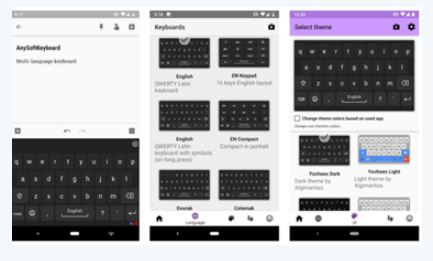
(ii) There are a number of different arrangements of alphabetic, numeric, and punctuation symbols on keys. These different keyboard layouts arise mainly because different people need easy access to different symbols, either because they are inputting text in different languages, or because they need a specialized layout for mathematics, accounting, computer programming, or other purposes..
39.
(i) Ecommerce or electronic commerce refers to transactions conducted via the internet. Ever time individual and companies are buying or selling products and services online they are engaging in ecommerce.
(ii) Ecommerce is a popular term for electronic commerce or even internet commerce.
(iii) Examples of ecommerce: Amazon, flipkart, eBay, Olx, Quikr,
40.
(i) Microsoft PowerPoint, the famous presentations software used for office and instructional power point slides, uses the PPT file extension for a presentation file format. The PPT file contains all of the text, images, audio, and picture used during presentation.
(ii) A presentation that can be opened in PowerPoint 2007 and newer versions on a PC, or PowerPoint 2008 and newer versions on a Mac.
(iii) The show can also be used on any mobile device that has PowerPoint enabled.
41.
(i) Header and Footer are some titles (such as Document Title, Author Name) or references (such as page no, number of pages, date) or remarks to be printed in the top (called as Header) and bottom of the page (called as Footer).
(ii) Headers and Footers are useful for including material that you want to appear on every page of the document.
42.
Chart is a powerful way to convey information to the reader through a pictorial representation. This facility enhances the presentation of data in an effective manner.
43.
(i) The ALU performs arithmetic operations.
(ii) The result of an operation is stored in internal memory of CPU.
(iii) The logical operations of ALU promote the decision making ability of a computer.

11th Standard Syllabus & Materials
11th Standard
TN 11th Tamil பீடு பெற நில் - செய்யுள் - காவடிச்சிந்து Important Questions And Answers Study Material - QB365 Set A
NEW11th Standard
TN 11th Tamil பீடு பெற நில் - உரைநடை - மலை இடப்பெயர்கள் : ஓர் ஆய்வு Important Questions And Answers Study Material - QB365 Set A
NEW11th Standard
TN 11th Tamil மாமழை போற்றுதும் - துணைப்பாடம் - யானை டாக்டர் Important Questions And Answers Study Material - QB365 Set A
NEW11th Standard
TN 11th Tamil மாமழை போற்றுதும் - செய்யுள் - ஐங்குறுநூறு Important Questions And Answers Study Material - QB365 Set A



Tamilnadu Stateboard 11th Standard Subjects

Maths

Commerce

Economics

Biology

Business Maths and Statistics

Accountancy

Computer Science

Physics

Chemistry
Maths
Biology
Economics
Physics
Chemistry

History
Business Maths and Statistics

Computer Science
Accountancy
Computer Applications
History
Computer Technology
Commerce
Computer Applications
Computer Technology

Tamil

English

French
Tamilnadu Stateboard Standards
