
 100% FREE ACCESS
11th Standard Syllabus & Materials
11th Standard
TN 11th Tamil இயற்கை வேளாண்மை,சுற்றுச்சூழல் -செய்யுள் - மனோன்மணீயம் Important Questions And Answers Study Material - QB365 Set A
NEW11th Standard
TN 11th Tamil என்னுயிர் என்பேன் -துணைப்பாடம் - இசைத்தமிழர் இருவர் Important Questions And Answers Study Material - QB365 Set A
NEW11th Standard
TN 11th Tamil மொழி கலை -செய்யுள் - ஒவ்வொரு புல்லையும் Important Questions And Answers Study Material - QB365 Set A
NEW11th Standard
TN 11th Tamil பீடு பெற நில் - இலக்கணம் - பகுபத உறுப்புகள் Important Questions And Answers Study Material - QB365 Set A
NEW11th Standard
TN 11th Tamil பீடு பெற நில் - துணைப்பாடம் - வாடிவாசல் Important Questions And Answers Study Material - QB365 Set A
NEW11th Standard
TN 11th Tamil பீடு பெற நில் - செய்யுள் - குறுந்தொகை Important Questions And Answers Study Material - QB365 Set A

Published on: 17/01/2020
Download Tamil Nadu 11th Standard Computer Technology question papers, model tests, one-mark questions, important questions, and public exam papers in PDF format. Free study materials and answer keys for TN State Board students.
Questions + Answers key
Take MCQ Computer Technology Test
1.
Write the steps to correct the word "Comupter" into "Computer" automatically.
2.
Explain How will you insert a table using Insert table dialog box.
3.
Mention the types of wireless technologies we are using. Write in brief on each of them.
4.
List some advantages of using templates.
5.
How to use function in Open Office Calc? Explain with suitable example.
6.
Read the following table
| A | B | C | D | E | |
|---|---|---|---|---|---|
| 1 | Year | Chennai | Madurai | Tiruchi | Coimbatore |
| 2 | 2012 | 1500 | 1250 | 1000 | 500 |
| 3 | 2013 | 1600 | 1000 | 950 | 350 |
| 4 | 2014 | 1900 | 1320 | 750 | 300 |
| 5 | 2015 | 1850 | 1415 | 820 | 200 |
| 6 | 2016 | 1950 | 1240 | 920 | 250 |
Above table shows the sales figures for “Air Cooler” sold in four major cities of Tamilnadu from the year 2012 to 2016. Based on this data, write the formula to calculate the following.
(1) Total sales in the year 2015.
(2) Total sales in Coimbatore from 2012 to 2016.
(3) Total sales in Madurai and Tiruchi during 2015 and 2016.
(4) Average sales in Chennai from 2012 to 2016
(5) In 2016, how many “Air Coolers” are sold in Chennai compared to Coimbatore?
7.
Define the following. (a) Bus (b) Data bus (c) Address bus (d) Control Bus
8.
Write the procedure to convert fractional Decimal to Binary.
9.
Explain Impact Printers with an Example.
10.
Write the steps to find and replace a word with another in Open Office writer.
11.
When Insert Column icon clicked a blank column is inserted ................ of the insertion point.
right
left
top
bottom
12.
The opening of openoffice is called?
Open center
Star center
Office center
Open office center
13.
The abbrevation for http_________.
Hyper text transfer protocol
Hyper transmit transfe protocol
Hyper tech transfer protocol
Hyper text telnet protocol
14.
In Impress, which views shows thumbnail versions of all your slides arranged in horizontal rows
Notes
Outline
Handout
Slide Sorter
15.
In a form, the teacher needs “True or False” as a drop down menu. Which of the following tool is used?
Form
Data
List
Format
16.
Which can be powerful way to convey information to the reader through a pictorial representation?
Charts and images
graphs and images
Charts and graphs
Images and Pictures
17.
Which of the following symbol is used to make a cell address as an absolute reference?
+
%
&
$
18.
Which version removed the option "Boot in DOS"?
Windows 98
Windows ME
W2K
Windows XP
19.
Which of the following OS is not based on Linux?
Ubuntu
Redhat
CentOs
BSD
20.
Identify the usage of Operating Systems
Easy interaction between the human and computer
Controlling Input & Output Devices
Managing use of main memory
All the above
21.
System Bus is the collection of....... buses.
2
3
4
6
22.
Expansion for ASCII
American School Code for Information Interchange
American Standard Code for Information Interchange
All Standard Code for Information Interchange
American Society Code for Information Interchange
23.
In which of the following, data coded in light and dark lines?
Machine code
Bar code
Object code
Optical code
24.
Which menu option of the menu bar is used to Mail Merge a document?
View
Format
Table
Tools
25.
Which option helps to assign text, tables, graphics and other items to a key or key combination?
Autoformat
Automatic
Auto text
Autographics
26.
What is the purpose of using Auto Text? Give example.
27.
Write a note on two access methods of connecting to internet.
28.
The user needs page number at the bottom of all pages. Which tool is used? Write the steps to design the needs.
29.
Differentiate Deleting data using Backspace and Delete.
30.
Are drives such as hard drive and floppy drives represented with drive letters? If so why, if not why?
31.
What is protected by the security modules of an OS?
32.
Differentiate Computer Organization from Computer Architecture.
33.
Add:
(a) -2210 + 1510
(b) 2010 + 2510
34.
List out the data sources in Mail Merge.
35.
Write the options in 'select documents type' options in mail merge wizard?
36.
What are the ways you can split the cells in writer?
37.
Writer the contents of openoffice writer window.
38.
Write a short note about Tamil Programming Language.
39.
What is electronic commerce?
40.
Define slide master.
41.
What are the type of the filters?
42.
What is Chart?
43.
Distinguish between data and information.
1.
The necessary steps to correct the word "comupter" into "computer" automatically
(i) Goto Tools ⟶ Autocorrect option
(ii) Click the replace tab and type "computer" in Replace text box and "computer" in with textbox.
(iii) Then Click OK.
(iv) The word "Comupter" is replaced with "Computer" and displayed in the list.
(v) After entering this, when you type "comupter" in the document, it will be automatically changed to the correct spelling "computer".
2.
Using The Insert Table Dialog Box:
(i) To insert a table with more control over the settings and properties, use the Insert Table dialog box. To open the dialog box, click Table ⟶ Insert ⟶ Table or Ctrl + F12. The Insert table dialog box appears.
(ii) In the Name text box give a suitable name to the table.
(iii) Specify the number of columns and rows either using spin arrows or enter the value directly.
(iv) Click the Heading check box to make the first row of the table as heading, automatically the Repeat heading check box will be enabled to repeat the heading row when the table spans more than one page.
(v) Select the Border check box to display table with grid.
(vi) Click OK button to create a table.
3.
Different types of wireless technologies are:
1. Bluetooth:
(i) It is named after a Danish king named Harald Bluetooth.
(ii) Bluetooth is used to connect different electronic devices wirelessly to a system for transferring and sharing data.
(iii) Cell phones are connected to hands-free earpieces, wireless keyboard, mice and mike to laptops with the help of Bluetooth as it transmits information from one device to other device.
2. Infrared:
(i) Infrared technology is a type of wireless communication technology to transfer data between two infrared enabled devices through infrared radiation.
(ii) This technology plays a very important role in wireless data communication
(iii) Infrared is used in devices such as the mouse, wireless keyboard and printers.
3. Wi-Fi:
(i) Wi-Fi is a low-cost wireless communication technology.
(ii) A Wi-Fi setup consists of a wireless router which serves a communication hub, linking portable device with an internet connection.
(iii) This network facilitates connection of many devices depending on the router configuration.
4. Radio link:
(i) A radio link is a wireless connection(also called wireless Point-to-Point connection) between two nodes, or radio units, in a data network.
(ii) Each radio unit consists of a transceiver(a device that can both send and receive communication) and a highly directive antenna.
(iii) The antenna only emits or receives power in the direction it is pointing.
5. Microwave Link:
(i) Microwave is a line-of-sight wireless communication technology that uses high frequency beams of radio waves to provide high speed wireless connections that can send and receive voice, video and data information.
(ii) One of the reasons microwave links are so adaptable is that they are broadband.
(iii) They require no equipment or facilities between the two terminal points, so installing a microwave link is often faster and less costly than a cable connection.
5. Microwave Link:
(i) Microwave is a line-of-sight wireless communication technology that uses high frequency beams of radio waves to provide high speed wireless connections that can send and receive voice, video and data information.
(ii) One of the reasons microwave links are so adaptable is that they are broadband.
(iii) They require no equipment or facilities between the two terminal points, so installing a microwave link is often faster and less costly than a cable connection.
6. Satellite Link:
(i) Satellite communication is one of the wireless technologies, used to transfer the signals from the transmitter to a receiver with the help of satellites.
(ii) It is widely spread all over the world allowing users to stay connected virtually anywhere on the Earth.
(iii) The Satellites used in this mode of communication, communicate directly with the orbiting satellites via radio signals.
4.
Advantages of using templates:
1. On using the standard templates, it is easy to create colour, attractive designs for slides.
2. Easily one can modify the templates, even we can download from Internet.
3. Attractive designs of templates are available; it will be the audience to look up of the presentation.
4. It creates attentive of audience.
5. Quick customization of templates, text, fonts, pictures were available. -
6. It have professional computer design.
7. A template is a design scheme and pre-defined layout for a specific purpose to be used for making presentations.
5.
The most commonly used feature input method is built-in functions, the Function Wizard. To open the Function Wizard can be opened through. The menu choose Insert→ Function or using the shortcut key press Ctrl+F2.
(i) Once open, Select a category of functions to shorten the list, then scroll down through the named functions and select the required one.
(ii) When you select a function its description appears on the right-hand side of the dialog. Double-click on the required function.
(iii) The Wizard now displays a textbox where you can enter data manually in text boxes and the result will be displayed in the Result text box
ABS (Number/Cell Address): Number/ Cell Address is the value whose absolute value is to be calculated. The absolute value of a number is its value without +/- sign.
Example : =ABS (-76) returns 76, =ABS (74) returns 7, =ABS (0) returns 0.
6.
| SI.NO | QUESTION | FORMULA | ANSWER |
| 1 | Total sales in the year 2015. |
= SUM(B5:E5) | 4285 |
| 2 | Total sales in Coimbatore from 2012 to 2016. |
= SUM(E2:E6) | 1600 |
| 3 | Total sales in Madurai and Tiruchi during 2015 and 2016. |
= SUM(C5:D6) | 4395 |
| 4 | Average sales in Chennai from 2012 to 2016. |
= AVERAGE(B2:B6) | 1760 |
| 5 | In 2016, how many "Air Coolers" are sold in Chennai compared to Coimbatore? |
= B6 - E6 | 1700 |
7.
(a) Bus: A bus is a collection of wires used for communication between the internal components of a computer.
(b) Data bus:
(i) Data busis a collection of wires to carry data in bits.
(ii) A data bus is used to transfer data between the memory and the CPU.
(iii) The data bus is bidirectional.
(c) Address bus:
(i) Address bus is a collection of wires to carry data in bits.
(ii) The address bus is used to point a memory location.
(iii) The address bus is unidirectional.
(d) Control bus:
(i) Control bus is a control line/collection of wires to control the operation/functions.
(ii) The control bus controls both read and write operations.
8.
The method of repeated multiplication by 2 has to be used to convert such kind of decimal fractions.
The steps involved in the method of repeated multiplication by 2:
Step 1: Multiply the decimal fraction by 2 and note. the integer part. The integer part is either 0 or 1.
Step 2: Discard the integer part of the previous product. Multiply the fractional part of the previous product by 2. Repeat Step 1 until the same fraction repeats or terminates (0).
Step 3: The resulting integer part forms a sequence of 0s and 1s that become the binary equivalent of decimal fraction.
Step 4: The final answer is to be written from first. integer part obtained till the last integer part obtained.
9.
Impact Printers:
(i) These printers print with striking of hammers or pins on ribbon. These printers can print on multi-part (using carbon papers) by using mechanical pressure.
(ii) For example, Dot Matrix printers and Line matrix printers are impact printers.
(iii) A Dot matrix printer that prints using a fixed number of pins or wires. Each dot is produced by a tiny metal rod, also called a "wire" or "pin", which works by the power of a tiny electromagnet or solenoid, either directly or through a set of small levers.
(iv) It generally prints one line of text at a time. The printing speed of these printers varies from 30 to 1550 CPS (Character Per Second).
(v) A Dot matrix printer that prints using a fixed number of pins or wires. Each dot is produced by a tiny metal rod, also called a "wire" or "pin", which works by the power of a tiny electromagnet or solenoid, either directly or through a set of small levers.
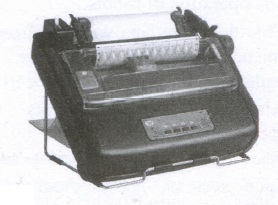
(vi) It generally prints one line of text at a time. The printing speed of these printers varies from 30 to 1550 CPS (Character Per Second).
10.
Steps to find and replace a text
(i) Type the text you want to find in the Search for box.
For Example: To search for a word "Bombay" in a document and replace with "Mumbai", enter the word "Bombay" in the Search for box
(ii) To replace the word with different text, type the new text in the Replace with box
Click Find button, to start the search, the found word is highlighted
(iii) To replace text, click Replace button.
The highlighted word is replaced with the word given in the Replace with box.
(iv) Click Find All, Writer selects all instances of the search text in the document
(v) Click Replace All button, Writer replaces all matches.
(vi) Enable Match case to perform the search case sensitively so that uppercase and lower cases are distinguished separately.
(vii) Enable Whole Words only to make the search more specific to words used separately alone.
11.
(a)
right
12.
(b)
Star center
13.
(a)
Hyper text transfer protocol
14.
(d)
Slide Sorter
15.
(c)
List
16.
(c)
Charts and graphs
17.
(d)
$
18.
(b)
Windows ME
19.
(d)
BSD
20.
(d)
All the above
21.
(b)
3
22.
(b)
American Standard Code for Information Interchange
23.
(b)
Bar code
24.
(d)
Tools
25.
(a)
Autoformat
26.
AutoText allows the user to assign text, tables, graphics and other items to a key or key combination. For example, rather than typing "TamilNadu" every time you use that phrase, you might just type "tn" and press F3.
27.
1. Indirect access:
(i) This is most common method used in home and office networks.
(ii) The device e.g. computer connects to a network using Ethernet or Wi-Fi and the network connects to the Internet using Asymmetric digital subscriber line ADSL (cable or fibre).
2. Direct access:
(i) This is most common method used when travelling.
(ii) The device e.g. smart phone connects directly to the Internet using 3G/4G mobile networks or public Wi-Fi.
(iii) Internet access is sold by Internet Service Provider(ISPs) delivering connectivity at a wide range of data transfer rates via various networking technologies.
28.
(i) The user needs page number at the bottom of all pages. It means footer will be required.
1. Footer will be used to add page number at the bottom of the page.
2. Double-click the footer area (near the bottom of the page).
3. Go to Header & Footer > Field.
4. In the Field names list, Select Page, and
5. then select OK.
6. To change the numbering format, go to Header & Footer > Page Number > Format Page Numbers.
(ii) To add page number at the bottom, we need to edit footer.
29.
| Deleting Data | Backspace |
| Delete key deletes data towards right of the insertion point. | Backspace key deletes data towards left of the insertion point |
30.
1. In Windows, the drive letter is assigned to the physical drive of the system.
2. It makes easy to remember the location of files. We can change or rename the drives.
3. Additional drives can be added as per the requirement.
4. In Linux, each drive and device have different designations. It is not represented by alphabet.
5. Yes, hard drives and floppy drives represented with drive letters.
31.
The security modules of an Operating System protect the resources and information of a computer system against destruction and unauthorized user access. It is a process of ensuring OS integrity, confidentiality and availability.
32.
Computer architecture deals with the engineering considerations involved in designing a computer. Computer Organization deals with the hardware components that are transparent to the programmer.
33.
(a) -2210 + 1510
.JPG)
\((1111)_2 \Rightarrow(00001111)_2 \)
\((10110)_2 \Rightarrow(00010110)_2 \)
\(1 \text { 's complement } \quad \quad \quad =11101001 \)
\(2 \text {'s complement } \quad \quad \quad =11101010 \)
\((-22)_{10}+(15)_{10} \quad \quad \quad =11101001 \)
\(= 00001111\)
______________
1 1 1 0 1 0 1 0
______________
(b) 2010 + 2510
a.JPG)
(10100)2 = (11001)2
8 bit Format of 2010 = 00010100
8 bit format of 2510 = 00011001
2010 + 2510 = _________
00101101
__________
2010 + 2510 = 001011012
34.
(i) Spread sheet
(ii) Text tiles
(iii) Database
(iv) Microsoft outlook contact list
(v) Microsoft office address list
(vi) Word data file.
35.
Letter, E-mail Message.
36.
(i) Table ⟶ split cells
(ii) Using split cells icon
(iii) Right click ⟶ cell ⟶ split.
37.
The contents of OpenOffice Writer window such as Title bar, Menu bar, Standard Toolbar, Formatting Tool bar, Ruler, Work space and Status bar.
38.
1. Programming languages to develop software in computers and smart phones are available only in English.
2. Based on Python programming language, the first Tamil programming language "Ezhil" (எழில்) is designed.
3. Ezhil allows easy representation of computer program closer to the Tamil language Iogical constructs equivalent to the conditional, branch and loop statements in modern English based programming languages.
4. Ezhil converts the program code into Python AST objects and executes them as Python objects with full access to the Python programming language environment.
5. Ezhil is a promising candidate for a general purpose interpreted programming language in Tamil. Ezhil is currently a work in progress with several new and consistent features. We have reported the successful prototyping of Ezhil in Python
39.
(i) Ecommerce or electronic commerce refers to transactions conducted via the internet. Ever time individual and companies are buying or selling products and services online they are engaging in ecommerce.
(ii) Ecommerce is a popular term for electronic commerce or even internet commerce.
(iii) Examples of ecommerce: Amazon, flipkart, eBay, Olx, Quikr,
40.
(i) Slide Master is a slideshow slide template that determines the style, textures, theme, fonts, and background to be used on the slides. Slide Master can be used to adjust the presentation of all display slides at the same time.
(ii) A screen leader is the highest slide in a slider ladder that stores details about a presentation's theme and slide designs, including the setting, texture, fonts, effects, placeholder sizes, and placement. Find the master slide with a mouse, then select Master Layout from the Slide Master tab.
41.
OpenOffice Calc allows three types of filters. They are:
1. AutoFilter
2. Standard Filter
3. Advanced Filter.
Filters are a feature for displaying and browsing a selected list or subset of data from a worksheet. The visible records satisfy the condition set by the user.
42.
Chart is a powerful way to convey information to the reader through a pictorial representation. This facility enhances the presentation of data in an effective manner.
43.
| Data | Information |
| Data is defined as an unprocessed collection of raw facts, suitable for communications interpretation or processing. |
Information is a collection of facts from which conclusions may be drawn. |
| (Eg) 134, 16 'Kavitha', 'C" | (Eg) Kavitha is 16 years old |

11th Standard Syllabus & Materials
11th Standard
TN 11th Tamil பீடு பெற நில் - செய்யுள் - காவடிச்சிந்து Important Questions And Answers Study Material - QB365 Set A
NEW11th Standard
TN 11th Tamil பீடு பெற நில் - உரைநடை - மலை இடப்பெயர்கள் : ஓர் ஆய்வு Important Questions And Answers Study Material - QB365 Set A
NEW11th Standard
TN 11th Tamil மாமழை போற்றுதும் - துணைப்பாடம் - யானை டாக்டர் Important Questions And Answers Study Material - QB365 Set A
NEW11th Standard
TN 11th Tamil மாமழை போற்றுதும் - செய்யுள் - ஐங்குறுநூறு Important Questions And Answers Study Material - QB365 Set A



Tamilnadu Stateboard 11th Standard Subjects

Maths

Commerce

Economics

Biology

Business Maths and Statistics

Accountancy

Computer Science

Physics

Chemistry
Maths
Biology
Economics
Physics
Chemistry

History
Business Maths and Statistics

Computer Science
Accountancy
Computer Applications
History
Computer Technology
Commerce
Computer Applications
Computer Technology

Tamil

English

French
Tamilnadu Stateboard Standards
