
 100% FREE ACCESS
11th Standard Syllabus & Materials
11th Standard
TN 11th Tamil இயற்கை வேளாண்மை,சுற்றுச்சூழல் -செய்யுள் - மனோன்மணீயம் Important Questions And Answers Study Material - QB365 Set A
NEW11th Standard
TN 11th Tamil என்னுயிர் என்பேன் -துணைப்பாடம் - இசைத்தமிழர் இருவர் Important Questions And Answers Study Material - QB365 Set A
NEW11th Standard
TN 11th Tamil மொழி கலை -செய்யுள் - ஒவ்வொரு புல்லையும் Important Questions And Answers Study Material - QB365 Set A
NEW11th Standard
TN 11th Tamil பீடு பெற நில் - இலக்கணம் - பகுபத உறுப்புகள் Important Questions And Answers Study Material - QB365 Set A
NEW11th Standard
TN 11th Tamil பீடு பெற நில் - துணைப்பாடம் - வாடிவாசல் Important Questions And Answers Study Material - QB365 Set A
NEW11th Standard
TN 11th Tamil பீடு பெற நில் - செய்யுள் - குறுந்தொகை Important Questions And Answers Study Material - QB365 Set A

Published on: 16/09/2019
Download Tamil Nadu 11th Standard Computer Technology question papers, model tests, one-mark questions, important questions, and public exam papers in PDF format. Free study materials and answer keys for TN State Board students.
Questions + Answers key
Take MCQ Computer Technology Test
1.
Write the procedure to create, rename, delete and save a file in Ubuntu OS. Compare it with Windows OS.
2.
List out the points to be noted while creating a user interface for an Operating system.
3.
How the read and write operations are performed by a processor? Explain.
4.
Subtract 11010112 - 1110102
5.
Convert (98.46)10 to Binary
6.
Explain the basic components of a computer with a neat diagram.
7.
How to create and storing data in mail merge.
8.
Explain Mail Merge feature.
9.
How do you format pictures?
10.
What are the different types of paragraph alignment?
1.
In Ubuntu OS:
(i) Create a file: By right clicking in the desktop' and also files be created by using file menu.
(ii) Delete a file: By using right click choosing move to trash or by using menu.
(iii) Rename a file: By using right click and choosing rename option.
(iv) Save a file: Press ctrl + x or F2 to exit. You will. then be asked if you want to save. (or) Press ctrl+ O or F3 and ctrl + x or F2 for save and exit.
In windows OS:
(i) Create file: Open an application and created by using file menu.
(ii) Delete a file: By right click on a file and choose delete option to delete a file.
(iii) Rename a file: By right click on a file and choose rename option to rename a file.
(iv) Save file: Press ctrl+S or file-save to save the file.
2.
(i) The user interface determines how command are given to the computer and how data is displayed on the screen.
(ii) User interface allows user to interact with computer effectively.
(iii) User interface is the first impression of a software where the user interacts with computer.
(iv) The user interface is mostly of two types:
1. Command line interface
2. Graphical user interface
(v) Command line interface: It indicates user must know machine language and program language.
(vi) Graphical user interface: In this user gives command by clicking or selecting the icons displayed on the screen.
The following points should be noted while creating a user interface for an Operating system:
(i) The user interface should satisfy the customers based on their needs.
(ii) The user interface should reduce number of errors committed by the user.
(iii) The user interface should save user time.
(iv) The user interface should make simple, common task easy.
(v) The user interface should be flexible and tolerant.
3.
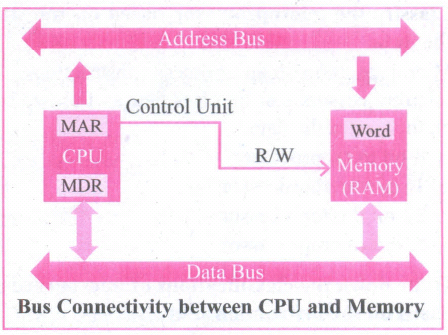
(i) The Central Processing Unit(CPU) has a Memory Data Register (MDR) and a Memory Address Register (MAR).
(ii) The Memory Data Register (MDR) keeps the data which is transferred between the Memory and the CPU. The Program Counter (PC) is a special register in the CPU which always keeps the address of the next instruction to be executed.
(iii) The Arithmetic and Logic unit of CPU places the address of the memory to be fetched, into the Memory Address Register.
(iv) A bus is a collection of wires used for communication between the internal components of a computer.
(v) The address bus is used to point a memory location. A decoder, a digital circuit is used to point to the specific memory location where the word can be located.
(VI) The address register is connected with the address bus, which provides the address of the instruction. A data bus is used to transfer data between the memory and the CPU.
(vii) The data bus is bidirectional and the address bus is unidirectional. The control bus controls the operations of both read or write operations.
(viii) The read operation fetches data from memory and transfers to MDR. control line performs two operations like read write using 1 or O.
(ix ) Also, the write operation transfers data from the MDR to memory. This organization is as shown in figure.
(i) The word in the RAM has the same size (no.of bits) as the Memory Data Register (MDR). If the processor is an 8-bit RAM processor like Intel 8085, its MDR and the word in the both have 8 bits.
(ii) If the size of the MDR is eight bits, which can be connected with a word in the memory which is also eight bits size. The data bus has eight parallel wires to transfer data either from MDR to word or word to MDR based on the control(Read or write).
.png)
(iii) This control line is labeled as which becomes 1 means READ operation and 0 means WRITE operation. shows content of M'DR and the Word before the READ operation. Also shows the content of MDR and the Word after the READ operation.
.png)
(iv) The read operation transfers the data (bits) from memory word to data register. The write operation transfers the data (bits) from memory data register to word.
4.
11010112 - 1110102
1101011
+111010
_______
110001
_______
= 1100012
5.
98.4610
1. Integer part
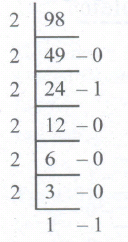
2. Fractional part
0.46 x 2 = 0.92 = 0
0.92 x 2 = 1.84 = 1
0.84 x 2 = 1.68 = 1
0.68 x 2 = 1.36 = 1
0.36 x 2 = 0.72 = 0
0.72 x 2 = 1.44 = 1
98.4610 = (1100010.011101...)2
6.
Components of a Computer:
The computer is the combination of hardware and software. Hardware is the physical component of a computer like motherboard, memory devices, monitor, keyboard etc., while software is the set of programs or instructions. Both hardware and software together make the computer system to function. Every task given to a computer follows an Inputprocess - output cycle (IPO cycle).
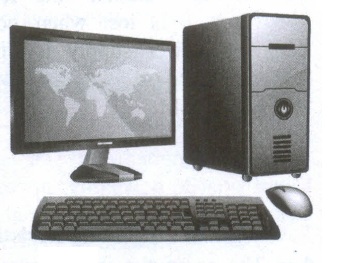
(i) Input unit: Input unit is used to feed any form of data to the computer, which can be stored in the memory unit for further processing.
Example: keyboard, mouse etc.
(ii) Central Processing Unit: CPU is the major component which interprets and executes software instructions. It also control the operation of all other components such as memory, input and output units.
(iii) Arithmetic and Logic Unit: The ALU is a part of the CPU where various computing functions are performed on data. The ALU performs arithmetic operations such as addition, subtraction, multiplication, division and logical operations.
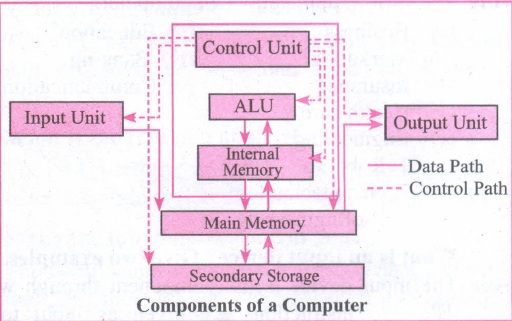
(iv) Control Unit: The control unit controls the flow of data between the CPU memory and I/o devices. It also controls the entire operation of a computer.
(v) Output Unit: An output unit is any hardware component that convey information to users in an understandable form. Example : Monitor, Printer etc.
(vi) Memory Unit: The Memory Unit is of two types which are primary memory and secondary memory. The primary memory is used to temporarily store the programs and data when the instructions are ready to execute. The secondary memory is used to store the data permanently. The Primary Memory is volatile, that is, the content is lost when the power supply is switched off. The Random Access Memory (RAM) is an example of a main memory. The Secondary memory is non volatile, that is, the content is available even after the power supply is switched off. Hard disk, CD-ROM and DVD ROM are examples of secondary memory.
7.
(i) A data source is a database containing the name and address or records of other information from which a mailing list may be derived. Printing the mailing labels arid envelopes does not require data source facilities
(ii) Open Office Mail merge can access a wide variety of data sources, including spreadsheets, text files and databases such as MySQL, Adabas, and ODBC.
(iii) The following example uses a spreadsheet with the following column (field) headers; Title, First name, Last name, Address, State/County, Country, Post Code, Gender, and Points. The mail merge wizard. The following steps perform mail merge operation.
Step 1: Choose Mail Merge
Tools -> Mail Merge
Step 2: Select starting document
This step has four options:
Use the current document.
(i) Create a new document.
(ii) Use a template.
(iii) Use an existing document.
(iv) Choose "Create a new document" option.
(v) Click Next Button.
Step 3: Select document type
This step has two options:
(i) Letter
(ii) E-mail Message
(iii) Choose "Letter" as option - to send letters to a group of recipients.
(iv) Click Next button.
8.
(i) Mail merge is a process to create personalized letters and pre-addressed enveloped or mailing labels forms mailings form a form letter
(ii) The feature is usually employed in a word processing document which contains fixed text and variables (which act as place holders that are replaced by text from the data source.)
(iii) It is used to create multiple documents at once. These documents have identical layout, formatting, text and graphics.
(iv) The documents can create will mail merge include bulk labels, letters, envelops and emails and more using information stored in a list, database or spreadsheet
9.
Formatting Pictures:
(i) Using Picture toolbar of Writer one can modify the format of the inserted picture.
(ii) A click inside the picture displays the picture toolbar which helps to format the picture by cropping the picture adding borders, set the height and width, change the background color and perform various other formatting.

(iii) To increase and decrease the size of the picture, click and drag at the four comers.
(iv) Clicking on Crop displays the cropping handles, Click and drag a handle to crop an image. Click the Crop command to deselect the crop tool.
(v) Clicking on Default drop down arrow displays options like Black and white, Grey scale or Water mark (background) while default option displays the picture as original.
(vi) Clicking on Flip horizontally icon -3M.JPG) flips the picture horizontally.
flips the picture horizontally.
(vii) Clicking on Flip vertically icon .JPG) flips the picture vertically.
flips the picture vertically.
(viii) Clicking on Transparency icon .JPG) helps to adjust the clarity of the picture in %.
helps to adjust the clarity of the picture in %.
10.
| Alignment | Action | Icon | Shortcut Key |
| Left | Aligns the paragraph with respect to the left margin | .JPG) |
Ctrl + L |
| Right | Aligns the paragraph with respect to the right margin | .JPG) |
Ctrl + R |
| Center | Aligns the paragraph with respect to the center of the page | .JPG) |
Ctrl + E |
| Justify | Aligns the paragraph with respect to both the left and right margin | .JPG) |
Ctrl + J |

11th Standard Syllabus & Materials
11th Standard
TN 11th Tamil பீடு பெற நில் - செய்யுள் - காவடிச்சிந்து Important Questions And Answers Study Material - QB365 Set A
NEW11th Standard
TN 11th Tamil பீடு பெற நில் - உரைநடை - மலை இடப்பெயர்கள் : ஓர் ஆய்வு Important Questions And Answers Study Material - QB365 Set A
NEW11th Standard
TN 11th Tamil மாமழை போற்றுதும் - துணைப்பாடம் - யானை டாக்டர் Important Questions And Answers Study Material - QB365 Set A
NEW11th Standard
TN 11th Tamil மாமழை போற்றுதும் - செய்யுள் - ஐங்குறுநூறு Important Questions And Answers Study Material - QB365 Set A



Tamilnadu Stateboard 11th Standard Subjects

Maths

Commerce

Economics

Biology

Business Maths and Statistics

Accountancy

Computer Science

Physics

Chemistry
Maths
Biology
Economics
Physics
Chemistry

History
Business Maths and Statistics

Computer Science
Accountancy
Computer Applications
History
Computer Technology
Commerce
Computer Applications
Computer Technology

Tamil

English

French
Tamilnadu Stateboard Standards
