
 100% FREE ACCESS
11th Standard Syllabus & Materials
11th Standard
TN 11th Tamil இயற்கை வேளாண்மை,சுற்றுச்சூழல் -செய்யுள் - மனோன்மணீயம் Important Questions And Answers Study Material - QB365 Set A
NEW11th Standard
TN 11th Tamil என்னுயிர் என்பேன் -துணைப்பாடம் - இசைத்தமிழர் இருவர் Important Questions And Answers Study Material - QB365 Set A
NEW11th Standard
TN 11th Tamil மொழி கலை -செய்யுள் - ஒவ்வொரு புல்லையும் Important Questions And Answers Study Material - QB365 Set A
NEW11th Standard
TN 11th Tamil பீடு பெற நில் - இலக்கணம் - பகுபத உறுப்புகள் Important Questions And Answers Study Material - QB365 Set A
NEW11th Standard
TN 11th Tamil பீடு பெற நில் - துணைப்பாடம் - வாடிவாசல் Important Questions And Answers Study Material - QB365 Set A
NEW11th Standard
TN 11th Tamil பீடு பெற நில் - செய்யுள் - குறுந்தொகை Important Questions And Answers Study Material - QB365 Set A

Published on: 28/12/2018
+1 First Revision Test Model
Download Tamil Nadu 11th Standard Computer Applications question papers, model tests, one-mark questions, important questions, and public exam papers in PDF format. Free study materials and answer keys for TN State Board students.
Questions + Answers key
Take MCQ Computer Applications Test
1.
Which of the following is used to insert remarks in JavaScript source code?
dialog box
operators
comments
identifiers
2.
Which of the following attribute of < bgsound > tag defines the duration of play?
duration
time
loop
limit
3.
The first version of Unicode is_________.
1.0.0
1.0.1
0.0.1
0.1.1
4.
The punctuator used to identify the function is _______.
{ }
< >
( )
[ ]
5.
_________ statement can be used as alterative to if-else statement.
While
If
Else-if
Switch
6.
What is the property to set text as bold?
Font-Style
Font-Weight
Font-Property
Font-Bold
7.
A list block can be defined inside another list is:
Inner List
Nested List
Outer List
Listing List
8.
HTML is acronym for
Hyper Transfer Markup Language
Hyper Text Markup Language
Hyper Transfer Makeup Language
Hyper Text Makeup Language
9.
Which is the default folder for many Windows Applications to save your file?
My Document
My Pictures
Documents and Settings
My Computer
10.
What is the capacity of 12cm diameter DVD with single sided and single layer?
4.7 GB
5.5 GB
7.8 GB
2.2 GB
11.
The binary equivalent of a hexadecimal digit C is repressed by.....
1010
1011
1101
1100
12.
Which one of the following is used to in ATM machines
Touch Screen
Speaker
Monitor
Printer
13.
In Impress, which views shows thumbnail versions of all your slides arranged in horizontal rows.
Notes
Outline
Handout
Slide Sorter
14.
By default in which side the numbers are aligned in worksheet?
left
Right
Center
Justify
15.
How many type of line spacing option are there in Openoffice writer?
5
6
7
12
16.
What is meant by Ransomware?
17.
What is Inline Style?
18.
What is thematic break?
19.
What are the components of URL addressing?
20.
List out any two uses of Operating System?
21.
Arrange the following memories according to slower access time.
a. Hard disk
b. cache
c. main memory
d. Blu - ray
22.
Write the functions of control unit.
23.
How will you start open office impress.
24.
What are the options available in "Insert Cells" dialog box?
25.
What is Wrap through?
26.
Write a note on following attribute of < Marquee > tag?
(i) Scroll delay
(ii) Scroll amount
(iii) loop
27.
What are the advantages of programming language?
28.
What is if statement and write its types?
29.
How do you view the source file?
30.
Identify the type of OS for the following statement.
(a) It is a family of open-source OS.
(b) It is a family of proprietary OS.
(c) It is a family of multitasking and Multi user OS.
(d) It is a windows alternative open source OS.
(e) Most common in tablets, phones.
(f) Concept of having more than one OS in a single PC.
31.
How will you differentiate a flash memory and an EEPROM?
32.
Write the three common ways of representing a signed binary number?
33.
Who uses the presentation software and why
34.
Write a note on conditional formatting.
35.
How will you delete a word in Autocorrect list?
36.
Explain scrolling text using < Marquee >.
37.
Explain about the popup dialog boxes in JavaScript.
38.
Write a Javascript to display the given number is words using switch-case (Number between only 1 and 5)
39.
Classify and explain any five e-commerce parties with suitable examples.
40.
Explain the versions of Windows Operating System.
41.
Explain the classification of Opensource OS
42.
Explain RAM in detail.
43.
Explain the basic components of a computer with a neat diagram.
44.
Valarmathi's teacher asks her to create a presentation in Open Office Impress. As Valarmathi has never worked in Impress before, help her to perform the following tasks:
a. She wants that except for the first slide, all the slides should have the same design. For this, what does she need to do?
b. To easily communicate with her audience, she wants to provide them with a hard copy of the slides of the presentation. What should she create for it?
c. She wants to insert some pictures and movie files in some slides. How can she do that?
d. Suggest her the view that would be the most suitable for showing the presentation to the audience.
e. To make her presentation more attractive, she wants to add some effects in it. How can she do it? Suggest.
45.
Explain the parts of OpenOffice Calc Status bar.
1.
(c)
comments
2.
(c)
loop
3.
(a)
1.0.0
4.
(c)
( )
5.
(d)
Switch
6.
(b)
Font-Weight
7.
(b)
Nested List
8.
(b)
Hyper Text Markup Language
9.
(a)
My Document
10.
(a)
4.7 GB
11.
(d)
1100
12.
(a)
Touch Screen
13.
(d)
Slide Sorter
14.
(b)
Right
15.
(c)
7
16.
Ransomware is a type of malicious program that demands payment after launching a cyber-attack on a computer system. This type of malware has become increasingly popular among criminals and costs the organizations millions each year.
17.
"Inline style is used to define style for a particular tag anywhere in an HTML document. You can define styles for any tag within an HTML document. But it is applicable only on that line where it is defined.
18.
The < hr > (Horizontal Rules) tag, which is known as "Thematic Breaks" separate sections of an HTML document visually. It produces a horizontal line spread across the width of the browser. This is an empty tag, which means the tag has no closing tag.
19.
Protocol, domain, path, hash and query string.
20.
(i) To ensure that a computer can be used to extract what the user wants it do.
(ii) Easy interaction between the users and computers
21.
(a) Blu - Ray
(b) Hard disk
(c) Main Memory
(d) Cache
22.
The control unit controls the flow of data between the CPU, memory and I/O devices. It also controls the entire operation of a computer.
23.
(i) In order to open Impress using Start button, click Start button and select All Programs \(\rightarrow \)Open Office \(\rightarrow \)Open Office Impress.
(ii) If it is already pinned in the Start menu, just click and open it.
24.
The options available in Insert cells dialog box are
(i) Shift cells down
(ii) Shift cells right
(iii) Entire row
(iv) Entire colunmn
25.
The Wrap Through option inserts an image that overlaps the text which as a result will be hidden
26.
(i) Scroll delay:
This attribute is used to define the time delay between each jump. The time unit should be in seconds.
(ii) Scroll amount :
This is used to define the speed of the scroll.
(iii) Loop:
This is for defining how many times the marquee element should repeat on the screen. The default value is 'infinite', which means the marquee element scrolls endlessly.
27.
(i) JavaScript programming language is used to develop interactive web pages called Dynamic Web pages.
(ii) User entered data in the Dynamic Web page can be validated before sending it to the server. This saves server traffic, which means less load on your server
(iii) JavaScript includes items such as Texboxes, Buttons, drag-and-drop components and sliders to give a Rich Interface to site visitors.
28.
The if statement is the fundamental control statement that allows JavaScript to make decisions to execute statements conditionally. This statement has two forms. The form is for only true condition.
The syntax is
if(condition)
{
True block;
}
Types of if statement:
if else statement
else if statement
nested if statement
29.
Viewing Source file : Source file is an HTML document, what you actually type in text editor (Notepad or getit). You can view your original source fle in the browser. The following steps are to be followed to view a source file.
(i) Double click on the browser.
(ii) Select View \(\rightarrow\) PageSource(FirefoxandChrome)/ View Source (Internet Explorer) Ctrl + U (all browser).
(iii) Source file will be displayed.
(iv) In Internet Explorer, View \(\rightarrow\) Source is also used to open source file.
30.
(a) Linux
(b) Windows
(c) Unix
(d) React OS
(e) Android
(f) Virtual OS
31.
Flash memory devices:
(i) Flash memory is an clectronic (solid-state) non-volatile computer storaye medium that can be electrically erased and reprogrammed.
(ii) Flash memories can be used in personal computers, Personal Digital Assistants (PDA). digital audio players, digital cameras and mobile phones.
(iii) Flash memory offers fast access timcs. The time taken to read or write a character in memory is called access is time.
(iv) Examples for Flash memories arc pen memory drives, cards etc.
EEPROM :
(i) Electrically Erasable Programmable Read Only Memory can be erased by exposing it to an electrical charge.
(ii) EEPROM is non-volatile.
(iii) EEPROM is slower in performance.
32.
In computer technology, there are three common ways of representing a signed Binary number.
(i) Prefixing an extra sign bit to a Binary number.
(ii) Using one's complement.
(iii) Using two's complement
33.
Several people make use of the presentation software while giving presentations, some examples are as follows.
(i) Sales persons need to give presentation to their customers clients and managers.
(ii) Human Resource departments use the presentation to provide training to new staff.
(iii) In schools, teachers can better explain concepts by the means of presentation.
(iv) Students also create presentation on topic given by their teachers.
(v) The presentation software is mostly used during seminars, conferences. This helps the presenter easily project his key points on a large screen while talking about the topic simultaneously.
34.
(i) Conditional format gives different font size, font colour and background colour for different data based on the user requirements.
(ii) You can set up cell formats to change font size, font colour, background colour depending on conditions that you specify.
35.
(i) To stop the Writer to replace specific spellings, use Tools ➝ AutoCorrect ➝ Replace, highlight the word pair and click Delete.
(ii) To add a new spelling to correct, type it into the Replace and With boxes and click New.
36.
In HTML, a piece of text or image can be moved horizontally or vertically by using < marquee > tag. This feature makes a web page as more attractive.
(i) General format: < marquee > Text or image to be scroll < /marquee >
Attributes of < marquee >
(ii) Height and Width: These attributes are used to set height and width of the marquee. The values should be either in pixels or in percentage of browser window.
(iii) Direction: This is used to specify the direction of the movement of text or image. The text or image will move towards right to left by default. So, the default direction is left. The Possible values are up', 'down', 'left' or 'right'
(iv) Behaviour: This attribute is used to specify the type of scrolling. The values are scroll', 'slide' and 'alternate'.
(v) Scroll delay: This attribute is used to define the time delay between each jump. The time unit should be in seconds
(vi) Scrollamount: This is used to define the speed of the scroll.
(vii) Loop: This is for defining how many times the marquee element should repeat on the screen. The default value is 'infinite', which means the marquee element scrolls endlessly.
(viii) Bgcolor: This is used to specify the background color to the marquee elements.
(ix) Hspace and Vspace: This is for defining the horizontal and vertical space around the marquee. The value can be in pixels or percentage.
An HTML code to demonstrate marquee:
< html >
< head >
< title > Marquee < /title >
< /head >
< body >
< marquee > < b > The Government of
Tamilnadu < /b >, Directorate of School
Education < /marquee >
< marquee direction=right > Welcome
to < b > The State Council of Educational
Research and Training < /b >, Tamilnadu
< /marquee >
< /body >
< /html >
37.
JavaScript supports three important types of dialog boxes. Dialog boxes are also called as Popup Boxes. These dialog boxes can be used to raise an alert, or to get confirmation on any input or to have a kind of input from the users.JavaScrípt supports three kind of popup boxes: Alert box, Confirm box, and Promnpt box.
Alert Dialog Box: An alert dialog box is mostly used to give a warning message to the users. For example, if one input field requires to enter some text but the user does not provide any input, then as a part of validation, you can use an alert box to give a warning message. Alert box gives only one button "OK" to select and proceed.
The syntax of alert box is
alert("Message");
(or) Window.alert ("Message");
Example:
alert("Name is compulsory entry);
(or) window.alert("Name is compulsory entry");
Confirm Dialog Box : A confirmation dialog box is mostly used to take user's consent on any option. It displays a dialog box with two buttons: OK and Cancel. If the user clicks on the OK button, the confirm() will return true. If the user clicks on the Cancel button, then confirm() returns false.
The syntax of confirm dialog box is
confirm("message");
(or)
window.confirm("message");
Example :
confirm("Hai Do you want to continue:");
(or)
window.confirm(“Hai Do you want to continue:");
Prompt Dialog Box: The prompt dialog box is very useful when the user want to pop-up a text box to get user input. Thus, it enables you to interact with the user. The user needs to fill in the text box field and then click OK.
The prompt dialog box is displayed using a method called prompt()which takes two parameters :
(i) a label which you want to display in the text box and (ii) a default string to display in the text box. This dialog box has two buttons: OK and Carncel. If the user clicks the OK button, the prompt() will return the entered value from the text box. If the user clicks the Cancel button, the prompt() returns null. The Sntax of prompt dialog box is,
Prompt("Message","default Value");
(or)
window.prompt("sometext","defaultText");
Example:
prompt("Enter Your Name:"Name");
(or)
window.prompt("Enter Your Name:"Name");
38.
< Html >
< Body >
< script language="Javascript" type="text/ javascript" > .
var N=0;
var N = promt ("Enter the Number","0");
switch (N)
{
case 1 :
document.write ("One");
break;
case 2 :
document.write ("Two");
break;
case 3 :
document.write ("Three");
break;
case 4 :
document.write ("Four");
break;
case 5 :
document.write ("Five");
break;
default:
document.write ("Invalid! Enter between 1 and 5");
}
< /script >
< /body >
< /Html >
39.
Classifying e-commerce according to the parties involved:
1. Business to consumer (B2C) : Transactions happen between businesses and consumers. In B2C e-commerce, businesses are the ones selling products or services to end-users (i.e. consumers).
2. Business to business (B2B) : As its name states, B2B e-commerce pertains to transactions conducted between two businesses. Any company whose customers are other businesses operate on a B2B model.
3. Consumer to business (C2B) : Consumer to qusiness e-commerce happens when a consumer sells or contributes monetary value to a business. Many crowdsourcing campaigns fall under C2B e-commerce.
4. Consumer to consumer (C2C) : As you might have guessed, C2C e-commerce happens when something is bought and sold between two consumers. C2C commonly takes place on online marketplaces such as eBay, in which one individual sells a product or service to another
5. Government to business (G2B) : G2C transactions take place when a company pays for government goods, services, or fees online. Examples could be a business paying for taxes using the Internet.
6. Business to government (B2G) : When a government entity uses the Internet to purchases goods or services from a business, the transaction may fall under B2G e-commerce. Let's say a city or town hires a web design firm to update its website. This type of deal may be considered a form of B2G.
7. Consumer to government (G2C) : Consumers can also engage in B2C e-commerce. People paying for traffic tickets or paying for their car registration renewals Online may fall under this category
40.
| S.No | Versions | Year | Specific features |
| 1. | Windows 1.x | 1985 | 1. Introduction of GUI in 16 - bit. processor 2. Mouse was introduced as an input device |
| 2. | Windows 2.x | 1987 | 1. Supports to minimize or maximize windows. 2. Control panel feature was introduced with various system settings and customising options. |
| 3. | Windows 3.x | 1992 | 1. Introduced the concept of multitasking. 2. Supported 256 colours which brought a more modern, colourful look to the interface. |
| 4. | Windows 95 | 1995 | 1. Introduced Start button, the taskbar, Windows Explorer and Start menu. 2. Introduced 32 - bit processor and focused more on multitasking. |
| 5. | Windows 98 | 1998 | 1. Integration of the Web browser (Internet Explorer) with the Operating System. 2. DOS gaming began to disappear as Windows based games improved. 3. Plug and play feature was introduced. |
| 6. | Windows NT | Designed to act as servers in network. | |
| 7. | Windows Me | 2000 | It introduced automated system diagnostics and recovery tools. |
| 8. | Windows 2000 | 2000 | 1. Served as an Operating System for business desktop and laptop systems. 2. Four versions of Windows 2000 were released: Professional (for business desktop and laptop systems), Server (both a Web server and an office server), Advanced Server (for line-of-business applications) and Data Centre Server (for high traffic computer networks). |
| 9. | Windows XP | 2001 | 1. Introduced 64-bit Processor. 2. Improved Windows appearance with themes and offered a stable version |
| 10. | Windows Vista | 2006 | Updated the look and feel of Windows |
| 11. | Windows 7 | 2009 | Booting time was improved, introduced new user interfaces like Aero Peek, pinning programs to taskbar, handwriting recognition etc. and Internet Explorer 8. |
| 12. | Windows 8 | 2012 | 1. Windows 8 is faster than previous versions of Windows. 2. Start button was removed 3. Windows 8 takes better advantage of multi-core processing, solid state drives (SSD), touch screens and other alternate input methods. 4. Served as common platform for mobile and computer. |
| 13. | Windows 10 | 2015 | 1. Start Button was added again. 2. Multiple desktop. 3. Central Notification Center for App notification and quick actions. 4. Cortana voice activated personal assistant. |
41.
(i) Android is a mobile operating system developed by Google, based on the Linux and designed primarily for touchscreen mobile devices such as smartphones and tablets.
(ii) Google has further developed Android TV for televisions, Android Auto for cars and Android Wear for wrist watches, each with a specialized user interface.
(iii) Variants of Android are also used on game consoles, digital cameras, PCs and other electronic gadgets.
UNIX :
UNIX is a family of multitasking, multi-user operating systems that derive originally from AT&T Bell Labs, where the development began in the 1970s by Ken Thompson and Dennis Ritchie.
Linux
(i) Linux is a family of open-source operating systems. It can be modified and distributed by anyone around the world.
(ii) This is different from proprietary software like Windows, which can only be modified by the company that owns it.
(iii) The main advantage of Linux operating system is that it is open source. There are many versions and their updates
(iv) Most of the servers run on Linux because it is easy to customize.
42.
(i) The main memory is otherwise called as Random Access Memory. This is available in computers in the form of Integrated Circuits ( lCs ). It is the place in a computer where the Operating System, Application Programs and the data in current use are kept temporarily so that they can be accessed by the computer's processor.
(ii) The smallest unit of information that can be stored in the memory is called as a bit. The memory can be accessed by a collection of 8 bits which is called as a byte.
(iii) The bytes are referred by 'B'. If a computer has 1 megabyte of memory, then it can store 10,48,576 bytes.(or characters) of information. [Hence 1MB is 1024KB and 1 KB is 1024 Bytes, So 1024 x 1024 =10,48,576 Bytes].
(iv) RAM is a volatile memory, which means that the information stored init is not permanent. As soon as the power is turned off, whatever data resides in RAM is lost. It allows both read and write operations.
(v) There are two basic types of RAM Dynamic RAM (DRAM), Static RAM (SRAM)
(vi) These two types differ in the technology they use to hold data. Dynamic RAM being a common type needs to be refreshed frequently. Static RAM needs to be refreshed less often, which makes it faster.
(vii) Hence, Static RAM is more expensive than Dynamic RAM.
43.
Components of a Computer :
The computer is the combination of hardware and software. Hardware is the physical component of a computer like motherboard, memory devices, monitor, keyboard etc., while software is the set of programs or instructions. Both hardware and software together make the computer system to function. Every task given to a computer follows an Input-process - output cycle (IPO cycle).
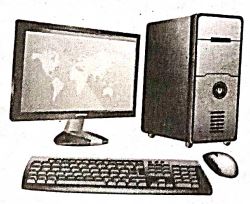
(i) Input unit: Input unit is used to feed any form of data to the computer, which can be stored in the memory unit for further processing.
Example : keyboard, mouse etc.
(i) Central Processing Unit : CPU is the major component which interprets and executes software instructions. It also control the operation of all other components such as memory, input and output units.
(iii) Arithmetic and Logic Unit : The ALU is a part of the CPU where various computing functions are performed on data. The ALU performs arithmetic operations such as addition, subtraction, multiplication, division and logical operations.
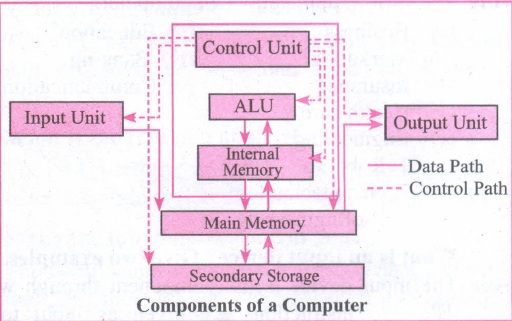
(iv) Control Unit : The control unit controls the flow of data between the CPU memory and I/o devices. It also controls the entire operation of a computer.
(v) Output Unit: An output unit is any hardware component that convey information to users in an understandable form. Example : Monitor, Printer etc.
(vi) Memory Unit: The Memory Unit is of two types which are primary memory and secondary memory. The primary memory is used to temporarily store the programs and data when the instructions are ready to execute. The secondary memory is used to store the data permanently. The Primary Memory is volatile, that is,the content is lost when the power supply is switched off. The Random Access Memory (RAM) is an example of a main memory. The Secondary memory is non volatile, that is, the content is available even after the power supply is switched off. Hard disk, CD-ROM and DVD ROM are examples of secondary memory.
44.
Create the presentation with same design for all slides using master page option, by clicking YES in Page Setting dialog box.
Click the Master slide and choose Format \(\rightarrow\) Page menu. The Page setup dialog box appears on the screen.
Click Background and choose any one of the Fill option (Colour, Gradient, Bitmap, Hatching) for changing the background of the master slide.
The Page Setting dialog box appears on the Screen.
Click NO in the Page Setting dialog box.
Now you can see the changes except for the first slide, all the slides will have the same design.
b. Handout view is used for setting up the layout of your slides for a printed handout.
c. Select the slide to insert the picture.
Choose Insert \(\rightarrow\) Picture \(\rightarrow\) From File option, and choose the required picture that has to be inserted into the slide.
d. Use Slide Show view to deliver your pesentation to your audience. Slide Show view occupies the full computer screen, exactly the way your presentation will look on a big screen when your audience sees it.
e. To make her presentation attractive, she needs to add animation and transition effects to the slides.
45.
Sheets count: Shows current serial number of the sheet / total number of sheets available.
Page Style: Shows the page style of the current sheet. To make changes, just double-click on "Default" and it will show you the "Page Style" dialog box, which is used to change the margin, orientation, paper size, inserting header, footer, border style etc.,
Selection Mode: Shows the selection mode of the current sheet. There are three modes available to select the cells of a worksheet. They are, Standard (STD), Extend (EXT) and Add (ADD).
Unsaved Changes: An asterisk ( * ) symbol indicates the changes made in the worksheet that are not yet saved. If you saved your changes, it will disappear.
Cell information: Shows the sum of the values of selected cells.
Zoom slider: used to increase or decrease the view scale (zoom). The default zooming scale is 100%.

11th Standard Syllabus & Materials
11th Standard
TN 11th Tamil பீடு பெற நில் - செய்யுள் - காவடிச்சிந்து Important Questions And Answers Study Material - QB365 Set A
NEW11th Standard
TN 11th Tamil பீடு பெற நில் - உரைநடை - மலை இடப்பெயர்கள் : ஓர் ஆய்வு Important Questions And Answers Study Material - QB365 Set A
NEW11th Standard
TN 11th Tamil மாமழை போற்றுதும் - துணைப்பாடம் - யானை டாக்டர் Important Questions And Answers Study Material - QB365 Set A
NEW11th Standard
TN 11th Tamil மாமழை போற்றுதும் - செய்யுள் - ஐங்குறுநூறு Important Questions And Answers Study Material - QB365 Set A



Tamilnadu Stateboard 11th Standard Subjects

Maths

Commerce

Economics

Biology

Business Maths and Statistics

Accountancy

Computer Science

Physics

Chemistry
Maths
Biology
Economics
Physics
Chemistry

History
Business Maths and Statistics

Computer Science
Accountancy
Computer Applications
History
Computer Technology
Commerce
Computer Applications
Computer Technology

Tamil

English

French
Tamilnadu Stateboard Standards
