
 100% FREE ACCESS
11th Standard Syllabus & Materials
11th Standard
TN 11th Tamil இயற்கை வேளாண்மை,சுற்றுச்சூழல் -செய்யுள் - மனோன்மணீயம் Important Questions And Answers Study Material - QB365 Set A
NEW11th Standard
TN 11th Tamil என்னுயிர் என்பேன் -துணைப்பாடம் - இசைத்தமிழர் இருவர் Important Questions And Answers Study Material - QB365 Set A
NEW11th Standard
TN 11th Tamil மொழி கலை -செய்யுள் - ஒவ்வொரு புல்லையும் Important Questions And Answers Study Material - QB365 Set A
NEW11th Standard
TN 11th Tamil பீடு பெற நில் - இலக்கணம் - பகுபத உறுப்புகள் Important Questions And Answers Study Material - QB365 Set A
NEW11th Standard
TN 11th Tamil பீடு பெற நில் - துணைப்பாடம் - வாடிவாசல் Important Questions And Answers Study Material - QB365 Set A
NEW11th Standard
TN 11th Tamil பீடு பெற நில் - செய்யுள் - குறுந்தொகை Important Questions And Answers Study Material - QB365 Set A

Published on: 28/12/2018
+1 First Revision Test Model
Download Tamil Nadu 11th Standard Computer Technology question papers, model tests, one-mark questions, important questions, and public exam papers in PDF format. Free study materials and answer keys for TN State Board students.
Questions + Answers key
Take MCQ Computer Technology Test
1.
How many types of websites are available?
3
2
4
6
2.
Identify the network security system that uses rules to control incoming and outgoing network traffic.
Firewall
Cookies
Hacking
Crackers
3.
What is the usage of Extended Tips option in Help Menu?
Detailed Tool Tip Information
Helps to resize the Tips window
To enable frequently ask question
To create Footer content
4.
Vanya has made a presentation on “Global Warming”. She wants to progress her slide show automatically while speaks on the topic in the class. Which features of Impress would she use?
Custom Animation
Rehearse Timing
Slide Transition
Either (a) or (b).
5.
In a form, the teacher needs “True or False” as a drop down menu. Which of the following tool is used?
Form
Data
List
Format
6.
The active sheet colour will be of which colour?
Grey
Green
White
Yellow
7.
A formula in calc may begin with
=
+
-
All the above
8.
The most common way of opening of file or a folder using mouse is ______
click
drag
double click
drag and drop
9.
Interactive Operating System provides
Graphics User Interface (GUI)
Data Distribution
Security Management
Real Time Processing
10.
Which of the following is an important consideration while categorizing microprocessors?
Registers
Pins
Instruction Set
Program Counter
11.
How many are common coding schemes used to represent a character?
2
3
4
5
12.
Identify the input device
Printer
Mouse
Plotter
Projector
13.
Which among the following list of files cannot be used as an Address List in Mail Merge?
OpenOffice Calc
Microsoft Excel
OpenOffice Base
OpenOffice Impress
14.
To give precise measurement for column width, which command gets the Table Format dialog box?
File ⟶ Table properties
Format ⟶ Table properties
Table ⟶ Table properties
Table ⟶ Table format
15.
Which is the command to be selected to open the Table Format dialog box
File ⟶ Table properties
Format ⟶ Table properties
Table ⟶ Table properties
Edit ⟶ Table properties
16.
List of the search engines supporting Tamil.
17.
What do you understand by Save Auto Recovery Information?
18.
19.
What are the keyboard shortcuts to cut, copy and paste?
20.
What is meant by Algorithms?
21.
What is an instruction?
22.
Convert 4A8C16 to binary
23.
Write the functions of control unit.
24.
What are the different packages in OpenOffice Writer?
25.
What are Advantages of email.
26.
What is a Normal view? Explain.
27.
What are functions in OpenOffice Calc?
28.
Analyse: Why the drives are segregated?
29.
What does word size determines?
30.
(300)10 \(\rightarrow \) (?2) \(\rightarrow \) (?8) \(\rightarrow \) (?)16
31.
Write short note on impact printer.
32.
List the advantages of the Mail Merge feature.
33.
How do you change the clarity of the picture in background?
34.
Explain any five types of internet services.
35.
Explain the types of computer networks based on its size, distance and the structure.
36.
Explain how a presentation can help a sales person to promote his/her products.
37.
Discuss in detail the steps to create chart in OpenOffice calc.
38.
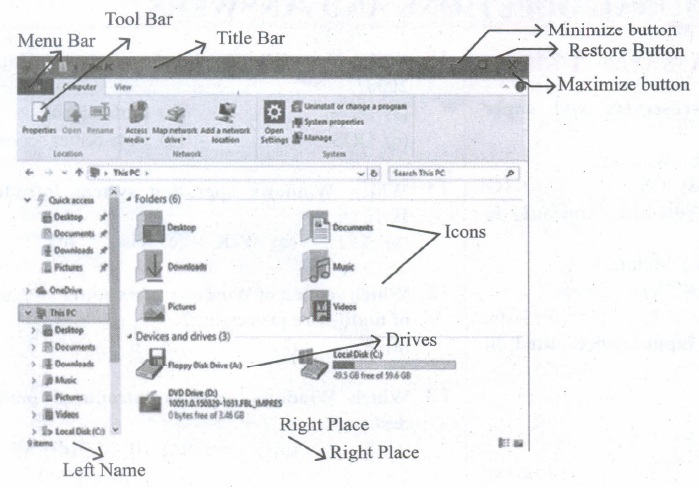
Observe the figure and mark all the window elements, Identify the version of the Windows Os.
39.
Explain File Management.
40.
Explain the classification of Microprocessor based on Instruction set?
41.
What the Sixth generation computers could be defined as the era of intelligent computers?
42.
How to create and storing data in mail merge.
43.
Write the steps to create autotext for a word.
1.
(b)
2
2.
(a)
Firewall
3.
(a)
Detailed Tool Tip Information
4.
(b)
Rehearse Timing
5.
(c)
List
6.
(c)
White
7.
(d)
All the above
8.
(c)
double click
9.
(a)
Graphics User Interface (GUI)
10.
(c)
Instruction Set
11.
(c)
4
12.
(b)
Mouse
13.
(d)
OpenOffice Impress
14.
(c)
Table ⟶ Table properties
15.
(c)
Table ⟶ Table properties
16.
1. The big growth of the web has led to an information leading to a situation where it has become very difficult to find relevant information in the web. Search engines are used for this purpose and the Tamil Search engine described here searches Tamil web pages upon an user query.
2. There are many search engines, but only a few of them are frequently in use.
3. In the top ten search engines, Google, Bing and Yahoo take first three places respectively. Google and Bing provide searching facilities in Tamil.
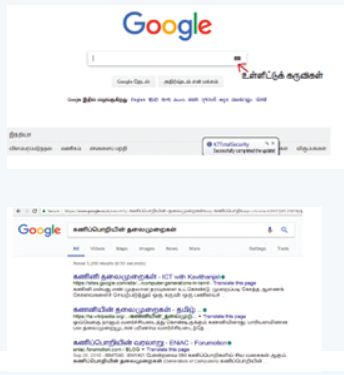
which means you can search everything through Tamil.
17.
(i) Auto Recovery is a key feature of Microsoft Word that enables you to retrieve documents if your computer crashes. Auto Recovery allows Word to save your file while you work on it so that you can recover it later.
(ii) You can type any integer from 1 to 120 in the seconds box. This box controls the amount of time that passes between saves. You will enter the path and folder name of the directory where you want the Auto-Recover files to sit in the Auto-Recover file location box.
18.
19.
The Keyboard Shortcuts to
(i) Cut → Ctrl + x
(ii) Copy → Ctrl + c
(iii) Paste → Ctrl + v
20.
A process or set of rules to be followed in calculations or other problem-solving operations, especially by a computer.
21.
A command which is given to a computer to perform an operation on data is called an instruction
22.
Given 4 A 8 C
Convert each digit 0100 1010 1000 1100
= 1001010100011002
23.
The control unit controls the flow of data between the CPU, memory and I/O devices. It also controls the entire operation of a computer.
24.
OpenOffice Writer - Word Processor to create text documents
(i) OpenOffice Calc - Spreadsheet to create worksheets.
(ii) OpenOffice Base - Database.
(iii) OpenOffice Impress - Presentation software.
(iv) OpenOffice Draw - Drawing Software.
(v) OpenOffice Formula - Create formula and equations.
25.
1. E-Mails provides faster and easy mean of communication. One can send message to any person at any place of world by just one click.
2. Its effective and cheap means of communication because single message can be sent to multiple people at same time.
3. E-mail is not just only for textual message. One can send any kind of multimedia within mail.
4. It is secure and reliable method to deliver our message.
5. To write an email there is no need of any kind of paper thus it is environment friendly.
6. Email allows the exchange of information, removes global barriers, keep communication costs low and allow business people the flexibility to access their messages from anywhere in the world.
26.
(i) Normal view is the main view for creating individual slides.
(ii) There are two ways to place a slide in the Slide Design area of the Normal view: clicking the slide thumbnail in the Slides pane or using the Navigator. To open the Navigator, click the Navigator button in the Standard Toolbar or press Ctrl + Shift + F5 and select a slide by scrolling down the Navigator list until you find the one that you want and then double-click it.
27.
A function is a predefined calculation entered in a cell to help to analyze or manipulate data in a spreadsheet. These functions simplify help to create the formulas needed to get the expected results
28.
The drives are segregated because
(i) Save space and increase performance.
(ii) To include other Operating systems, isolate programs and keep files tidy.
(iii) It might help to isolate operating systems or programs from other user.
29.
Word size determines the amount of RAM that can be accessed by a at one time and the total number of pins on the microprocessor. Total number of input and output pins in turn determines the architecture of the microprocessor.
30.
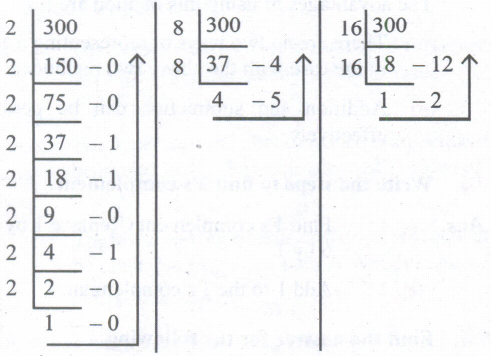 (300)10 \(\rightarrow \)(100101100)2 \(\rightarrow \) (454)8 \(\rightarrow \) (12C)16
31.
Impact printers:
(i) These printers print with striking of hammers or pins on ribbon. These printers can print on multipart (using carbon papers) by using mechanical pressure.
For example, Dot Matrix printers and Line matrix printers are impact printers.
(ii) A Dot matrix printer that prints using a fixed number of pins or wires.
(iii) Line matrix printers use a fixed print head for printing.
32.
(i) one standard letter can be send to all without having to manually add each name and address.
(ii) The letter can be personalized - it looks like the letter has been written to the individual person.
(iii) It is a very fast method to produce hundred of personalized letter.
33.
Clicking on Transparency icon helps  to adjust the clarity of the picture in %.
34.
1. Mobile:
(i) Many cell phone and smartphone providers offer voice plans with Internet access.
(ii) Mobile Internet connections provide good speeds and allow you to access the Internet.
2. DSL:
(i) DSL, which stands for Digital Subscriber Line, uses existing 2-wire copper telephone line connected to one's home so service is delivered at the same time as landline telephone service.
(ii) Customers can still place calls while surfing the Internet.
3. Satellite:
(i) In certain areas where broadband connection is not yet offered, a satellite Internet option may be available
(ii) Similar to wireless access, satellite connection utilizes a modem.
4. Cable:
(i) Cable Internet connection is a form of broadband access.
(ii) Through use of a cable modem, users can access the Internet over cable TV lines.
(iii) Cable modems can provide extremely fast access to the Internet.
5. Wireless:
(i) Radio frequency bands are used in place of telephone or cable networks.
(ii) One of the greatest advantages of wireless Internet connections is the "always-on" connection that can be accessed from any location that falls within network coverage.
(iii) Wireless connections are made possible through the use of a modem, which picks up Internet signals and sends them to other devices.
35.
Different types of computer networks are:
1. LAN(Local Area Network):
(i) The local area network is a network which is designed to operate over a small physical area such as an office, factory or a group of buildings. LAN are widely used in variety of applications.
(ii) In LAN all the machines are connected to a single cable. Different topologies such as Bus, Ring, Star, Tree, etc. are used for LANs.
(iii) The size of LAN is usually small. The various devices in LAN are connected to central devices called Hub or Switch using a cable.
(iv) A LAN is usually a privately owned and links the devices in a single office, building or campus of up to few kilometres in size.
(v) The data rate for LAN can now range from 4 to 16 Mbps.
2. MAN(Metropolitan Area Network):
(i) A MAN is basically a bigger version of LAN. It is designed to extend over the entire city. MANs extend beyond 100 KM.
(ii) The MAN can be in the form of a single network such as a cable network or it can be a combination of multiple LANs.
(iii) A MAN may be wholly owned and operated by a private company or it may be a service provided by a public company, such as local telephone company(telco).
3. WAN(Wide area network):
(i) When a network spans a large distance or when the computers to be connected to each other are at wide separated locations a local area network cannot be used. For such situation, a Wide area Network(WAN) must be installed.
(ii) The communication between different users of WAN is established using leased telephone lines or satellite links and similar channels.
(iii) A WAN provides a long-distance transmission of data, voice image and video information over large geographical areas that may comprise a country, a continent or even the whole world.
(iv) WANs may use public, leased or private communication devices, and can spread over a wide geographical area. WAN that is wholly owned and used by a single company is often called as enterprise network.
(v) In most WANs the network contains a large number of cables or telephone lines each one connecting a pair of routers.
4. PAN (Personal area network):
(i) A personal area network, or PAN, is a computer network that enables communication between computer devices.
(ii) PANs can be wired, such as USB or FireWire, or they can be wireless, such as infrared, ZigBee, Bluetooth and ultra-wide band (UWB).
(iii) The range of a PAN typically is a few meters. Examples of wireless PAN (WPAN) are devices include cell phone, headsets, wireless keyboards, wireless mice, printers, bar code scanners and game consoles.
(iv) Hence computer network are classified into four types based on the size, distance and the structure namely: LAN (Local Area Network), MAN (Metropolitan Area Network), WAN (Wide Area Network) and PAN (Personal Area Network).
36.
1. Presentation is help a sales person to promote his / her products, explain the short presentation.
2. Presentation will give visual video, pictures to understand a better of products.
3. Presentation help sales person to present prospect challenges is easier.
4. By using presentation, sales person can make audience understand easier and he can get more feedback.
5. Sales person can explain with physical demonstration by shocking animations. It makes the audience to concentrate.
6. If we wish to get some information on every page, either on top or bottom of the page, we need to use header or footer as per the requirement.
37.
Creating and formatting charts :
(i) Select the cells that contain the data that you want to present in your chart.
(ii) Click the Insert → Chart option or click Insert Chart icon  on the Standard toolbar.
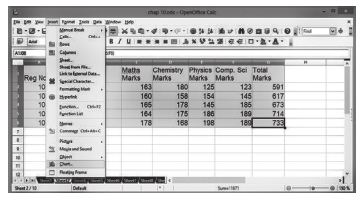
(iii) The Chart Wizard has three main part:
1. List of steps involved in setting up the chart, List of chart types, and The options for each chart type.
2. At any time you can go back to a previous step and change selections.
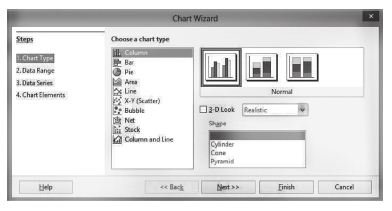
(iv) Choose a Chart type and its option type. Then click Next button.
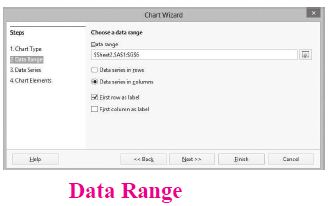
(v) In step 2, Data Range, manually correct any mistakes made in selecting the data. Click one of the options for data series in rows or in columns. Check whether the data range has labels in the first row or in the first column or both. Then click the finish button, or click Next to change some more details of the chart.
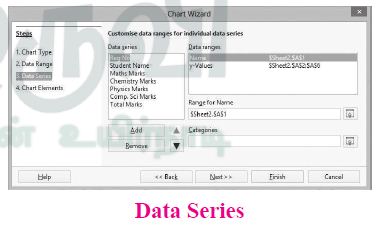
(vi) In the Data Series list box contains a list of all data series in the current chart.
1. To organize the data series, select an entry in the list
2. Click Add to add another data series below the selected entry. The new data series has the same type as the selected entry.
3. Click Remove to remove the selected entry from the Data Series list.
4. Use the Up and Down arrow buttons to move the selected entry in the list up or down. This does not change the order in the data source table, but changes only the arrangement in the chart.
5. Then click Next button.
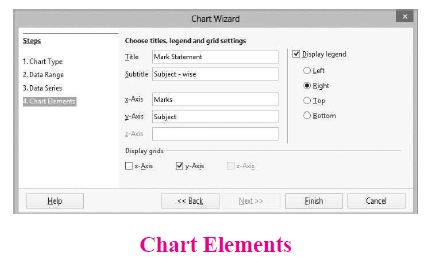
(vii) On the Chart Elements page, chart a title and, if desired, a subtitle. Use a title that draws the viewer's attention to the purpose of the chart: Then click Finish to create chart.
38.
39.
(i) File management is an important function of OS which handles the data storage techniques. The operating System manages the files, folders and directory systems on a computer.
(ii) Any type of data in a computer is stored in the form of files and directories/folders through File Allocation Table (FAT).
(iii) The FAT stores general information about files like filename, type (text or binary), size, starting address and access mode (sequential/indexed/indexed-sequential/direct/relative).
(iv) The file manager of the operating system helps to create, edit, copy, allocate memory to the files and also. updates the FAT.
(v) The OS also takes care of the files that are opened with proper access rights to read or edit them. There are few other file management techniques available like Next Generation File System (NTFS) and ext2 (Linux).
40.
(i) The size of the instruction set is another important consideration while categorizing microprocessors.
(ii) Initially, microprocessors had very small instruction sets because complex hardware was expensive as well as difficult to build.
(iii) As technology had developed to overcome these issues, more and more complex instructions were added to increase the functionality of the microprocessor,
(iv) Let us learn more about the two types of microprocessors which are based on their instruction sets.
(v) RISC stands for Reduced Instruction Set Computers. They have a small set of highly optimized instructions.
(vi) Complex instructions are also implemented using simpler instructions, thus reducing the size of the instruction set.
(vii) Examples of RISC processors are Intel P6, Pentium IV, AMD K6 and K7.
(viii) CISC stands for Complex Instruction Set Computers. They support hundreds of instructions. Computers supporting CISC can accomplish a wide variety of tasks, making them ideal for personal computers.
(ix) Examples of CISC processors are Intel 386 & 486, Pentium, Pentium II and III, and Motorola 68000.
41.
(i) The Sixth Generation, computers could be defined as the era of intelligent computers, based on Artificial Neural Networks. This generation gave a start to parallel computing.
(ii) One of the most dramatic changes in the sixth generation will be the explosive growth of wide is a component of artificial intelligence
(iii) Robotics is a branch of engineering that involves the conception, design, manufacture, and operation of robots.
(iv) This field overlaps with electronics, computer science, artificial intelligence, mechatronics, nanotechnology and bioengineering.
(v) Artificial neural networks (ANNs) are computing systems inspired by the biological neural networks that constitute animal brains.
(vi) Such systems learn (progressively improve performance on) tasks by considering examples, generally without task-specific programming.
(vii) An ANN is based on a collection of connected units or nodes called Artificial Neurons (analogous to biological neurons in an animal brain).
(viii) Each connection (synapse) between neurons can transmit a signal from one to another. The receiving neuron can process the signal(s) and then signal neurons connected to it.
(ix) Parallel computing is a type of computation in which many calculations or the execution of processes are carried out simultaneously.
(x) Large problems can often be divided into smaller ones, which can then be solved at the same time. There are several different forms of parallel computing: bit-level, instruction-level, data, and task parallelism.
(xi) Parallelism has been employed for many years, mainly in high-performance computing, but interest in it has grown lately due to the physical constraints preventing frequency scaling.
(xii) As power consumption by computers has become a concern in recent years, parallel computing has become the dominant paradigm in computer architecture, mainly in the form of multi-core processors.
42.
(i) A data source is a database containing the name and address or records of other information from which a mailing list may be derived. Printing the mailing labels and envelopes does not require data source facilities
(ii) OpenOffice Mail merge can access a wide variety of data sources, including spreadsheets, text files and databases such as MySQL, Adabas, and ODBC.
(iii) The following example uses a spreadsheet with the following column (field) headers; Title, First name, Last name, Address, State/County, Country, Post Code, Gender, and Points. The mail merge wizard. The following steps perform mail merge operation.
Step 1: Choose Mail Merge
Tools -> Mail Merge
Step 2: Select starting document
This step has four options:
Use the current document.
(i) Create a new document.
(ii) Use a template.
(iii) Use an existing document.
(iv) Choose "Create a new document" option.
(v) Click Next Button.
Step 3: Select document type
This step has two options:
(i) Letter
(ii) E-mail Message
(iii) Choose "Letter" as option - to send letters to a group of recipients.
(iv) Click Next button.
43.
To assign AutoText shortcut to some text, the steps are as follows:
(i) Select the text and it is highlighted.
(ii) Select Edit ⟶ Auto Text (or press Ctrl+F3).
(iii) In the Name text box, type the shortcut. Writer will automatically show one letter shortcut In the Shortcut text box.
(iv) Click the Auto Text button on the right and select New (text only) from the menu.
(v) Click Close to return to your document.
(vi) Once the entry is created, to insert the auto text into the document, place the insertion point where the text is to be inserted and click Ctrl+F3.
(vii) Select the name from the list of entries and click Insert button or type the shortcut and press F3.
(viii) The auto text is inserted into your text.

11th Standard Syllabus & Materials
11th Standard
TN 11th Tamil பீடு பெற நில் - செய்யுள் - காவடிச்சிந்து Important Questions And Answers Study Material - QB365 Set A
NEW11th Standard
TN 11th Tamil பீடு பெற நில் - உரைநடை - மலை இடப்பெயர்கள் : ஓர் ஆய்வு Important Questions And Answers Study Material - QB365 Set A
NEW11th Standard
TN 11th Tamil மாமழை போற்றுதும் - துணைப்பாடம் - யானை டாக்டர் Important Questions And Answers Study Material - QB365 Set A
NEW11th Standard
TN 11th Tamil மாமழை போற்றுதும் - செய்யுள் - ஐங்குறுநூறு Important Questions And Answers Study Material - QB365 Set A



Tamilnadu Stateboard 11th Standard Subjects

Maths

Commerce

Economics

Biology

Business Maths and Statistics

Accountancy

Computer Science

Physics

Chemistry
Maths
Biology
Economics
Physics
Chemistry

History
Business Maths and Statistics

Computer Science
Accountancy
Computer Applications
History
Computer Technology
Commerce
Computer Applications
Computer Technology

Tamil

English

French
Tamilnadu Stateboard Standards
