
 100% FREE ACCESS
11th Standard Syllabus & Materials
11th Standard
TN 11th Tamil இயற்கை வேளாண்மை,சுற்றுச்சூழல் -செய்யுள் - மனோன்மணீயம் Important Questions And Answers Study Material - QB365 Set A
NEW11th Standard
TN 11th Tamil என்னுயிர் என்பேன் -துணைப்பாடம் - இசைத்தமிழர் இருவர் Important Questions And Answers Study Material - QB365 Set A
NEW11th Standard
TN 11th Tamil மொழி கலை -செய்யுள் - ஒவ்வொரு புல்லையும் Important Questions And Answers Study Material - QB365 Set A
NEW11th Standard
TN 11th Tamil பீடு பெற நில் - இலக்கணம் - பகுபத உறுப்புகள் Important Questions And Answers Study Material - QB365 Set A
NEW11th Standard
TN 11th Tamil பீடு பெற நில் - துணைப்பாடம் - வாடிவாசல் Important Questions And Answers Study Material - QB365 Set A
NEW11th Standard
TN 11th Tamil பீடு பெற நில் - செய்யுள் - குறுந்தொகை Important Questions And Answers Study Material - QB365 Set A

Published on: 26/02/2019
Plus One Third Revision Test Question 2019
Download Tamil Nadu 11th Standard Computer Applications question papers, model tests, one-mark questions, important questions, and public exam papers in PDF format. Free study materials and answer keys for TN State Board students.
Questions + Answers key
Take MCQ Computer Applications Test
1.
_______function is used to find the length of the given string.
parselnt( )
parseFloat( )
length( )
All the above
2.
_________ is the attribute of < Marquee > tag.
Direction
Height and Width
Behaviour
All the above
3.
How many types of values returned by type of operator?
3
5
4
2
4.
In India, 42% of users mostly used language in india?
Tamil
Kannada
Malayalam
Telugu
5.
In which loop the condition is evaluated, before executing a statement?
While
Do while
Break
Continue
6.
The declaration should be terminated by
(:)
(;)
(.)
(,)
7.
Read the following statement and choose the correct statement(s):
(I) Link in HTML is used to create hyperlinks to web content.
(II) HREF is abbreviated as Hypertext Markup File
I is correct
II is correct
I and II is correct
Both are wrong
8.
How many levels of heading tags are available in HTML?
6
4
8
3
9.
Which of the following OS is not based on Linux?
Ubuntu
Redhat
CentOs
BSD
10.
Which of the following is a CISC processor?
Intel P6
AMD K6
Pentium III
Pentium IV
11.
The NOR gate circuit is an........
OR gate followed by an inverter
inverter followed by OR gate
NOR gate followed by an inverter
XOR gate followed by an inverter
12.
Expand POST
Post on Self Test
Power on Software Test
Power on Self Test
Power on Self Text
13.
Which menu contains the Slide Transition option?
Slide Show
View
Tools
Format
14.
How many options are shown in sort range dialog box?
2
3
More than 3
Only one
15.
The shortcut key used for showing the field contents of a label is_______.
Ctrl + F9
Ctrl + F11
Ctrl + F13
Ctrl + F10
16.
Who is called black hat or dark side hacker? Why?
17.
What is the use of < style > tag?
18.
Write a short note on
(i) < strong >
(ii) < em >
19.
What is the role of ICANN?
20.
What are the different Operating Systems used in computer?
21.
Define Silicon Chip.
22.
Distinguish between data and information
23.
Define the following
(i) Text Operator
(ii) Rows and Columns of spreadsheet.
24.
Name the types of paragraph alignment in Open office writer.
25.
How will you insert an image in a HTML document?
26.
Difference between the increment and Decrement operator.
27.
28.
Explain the attributes available with < body > tag.
29.
What is meant by distributed computing?
30.
Differentiate PROM and EPROM
31.
Complete the sequence of following binary numbers: 100, 101, 110,____,_____, ______,______
32.
How many types of views are provided by Impress to its users?
33.
Write the steps followed to customize the width and spacing of the columns a page in writer.
34.
Explain all the attributes of < IMG > tag with suitable HTML code.
35.
Explain about the popup dialog boxes in JavaScript.
36.
Explain the working of do while loop in Javascript with an example?
37.
Compare the different geographical types of Network
38.
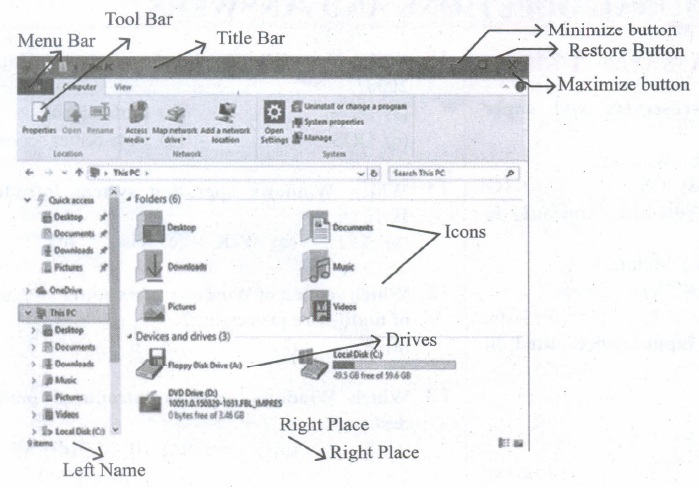
Observe the figure and mark all the window elements, Identify the version of the Windows Os.
39.
Explain the classification of proprietary licensed OS.
40.
Define the following. (a) Bus (b) Data bus (c) Address bus (d) Control Bus
41.
Explain the basic components of a computer with a neat diagram.
42.
Explain how a presentation can help a sales person to promote his/her products.
43.
Explain the parts of OpenOffice Calc Status bar.
1.
(c)
length( )
2.
(d)
All the above
3.
(b)
5
4.
(a)
Tamil
5.
(a)
While
6.
(b)
(;)
7.
(a)
I is correct
8.
(a)
6
9.
(d)
BSD
10.
(c)
Pentium III
11.
(a)
OR gate followed by an inverter
12.
(c)
Power on Self Test
13.
(a)
Slide Show
14.
(b)
3
15.
(a)
Ctrl + F9
16.
(i) A cracker (also called a black hat or dark side hacker) is a malicious or criminal hacker.
(ii) A cracker is someone who breaks into someone else's computer system, often on a network, by passing passwords or licenses in computer programs.
17.
A style tag is used to change the default characteristics of a particular tag in the entire web document wherever that tag is used. The < style > tag controls the presentation styles of a particular HTML document. If you want to use a particular tag with the same style applied in one HTML document to another is not possible.
Thus, the < style > tags are called as "Page-Level Styles" or "Internal Style Sheets".
18.
(i) < strong > Important text :The < strong > tag is a phrase tag. It is used to define important text. This tag displays the text as bold.
(ii) < em > Exphasized text : The < em > tag is used to emphasize the text. That means, when this tag used the text will be in italics.
19.
(i) The responsibility to promote global information exchange through the internet technology.
(ii) Internet Corporation for Assigned Names and Numbers(ICANN) administers the domain name registration.
(iii) It helps to avoid a name which is already registered.
20.
The different types of operating system uscd in the computer:
(i) Single User and Single Task Operating Systems
(ii) Multi User Operating Systems
(iii) Multi Pocessing Operating Systems
(iv) Distributed Operating Systems
(v) Prominent Operating Systems
21.
Silicon chip is an integrated , a set of electronic circuits on one small flat piece of semiconductor material, silicon
22.
| Data | Information |
| Data is defined as an unprocessed collection of raw facts, suitable for communication, interpretation or processing. | Information is a collection of facts from which conclusions may be drawn. |
| (Eg) 134, 16, 'Kavitha', 'C' | (Eg) Kavitha is 16 years old. |
23.
(i) Text Operator : In Calc, "&" is a text operator which is used to combine two or more text. Joining two different texts is also known as "Text Concatenation". An expression using the text operator has the following
syntax: text reference1 & text reference2.
(ii) Rows and Columns of spreadsheet : A row is a horizontal group of values within a table. It contains values for multiple fields, which are defined by columns. The rows are numbered from 1,2, 3.... OpenOffice Calc version 4.1.5 contains 10,48,576 rows.
A column is a vertical group of values within a table. It contains values from a single field in multiple rows. Each column is labelled as A, B, C, D ..... AA, AB, AC ....It contains 1024 columns.
24.
There are four types of alignment available in Open office Writer - left-alignment, Right-alignment, Center-alignment, and Justify-alignment.
25.
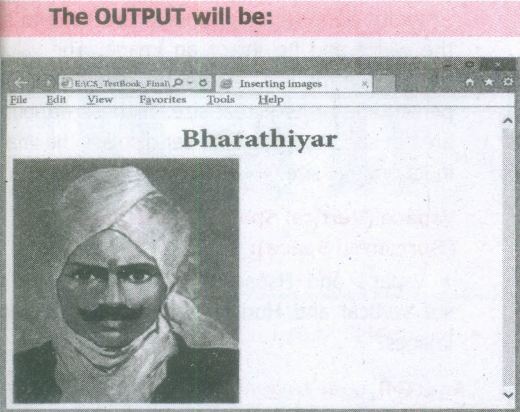
Inserting Images with HTML document
The < IMG > tag along with the attribute src (Source) is used to add images in HTML document.
General format:
< img src = image_name_with_extension > (OR)
< img src = URL >
Ex:
< img src = image1.gif >
Src attribute is the main attribute used to specify the filename of the image to be inserted.
If the image is not in the current working folder, image file name should clearly specify with the path of the file or URL, where the file is available.
Ex:
< img src = "D:\images\animals\cat.jpeg" >
An HTMLcode to insert an inline image:
< html >
< head >
< title > Inserting Images < /title >
< /head >
< body >
< h1 align = center > Bharathiyar< /h1 >
< img src = bharathiyar.gif >
< /body >
< /html >
26.
| Increment Operator | Decrement Operator |
| The ++ operator increments its single operand. | The -- operator decrements its single operand |
| Its converts its operand to a number, adds 1 to that number, and assigns the incremented value back into the Operand | Its converts its operand to a number, subtracts 1 to that number, and assigns the decremented value back into the operand |
| Post increment: var m=3, n=m++; Pre increment: var m=3, n=++; |
Post decrement: var m=3, n=m--; Pre decrement: var m=3, n=m--; |
27.
28.
The <body> tag defines the documents body. The contents of an HTML page reside within the <body> tag. <body> tag contains several attributes.
(i) Background Colour: bgcolor = color:
By default all the browsers display the text on white background. However, the background color of the browser can be changed by using bgcolor tag.
The tag to change background colour:
<body bgcolor = color_name/color_code>
<body bgcolor = yellow>
(ii) Body text Colour: text = color: The default text colour of body section is "black; it is often called as automatic color, text attribute within body tag is used to change the text colour.
The tag to change body text colour:
<body text = color_name/color_code>
<body text = #FFFF00>
(iii) Background image: background = image:
An image or picture can be applied as background to a webpage. When you insert an image as background, the text will be displayed on top of the image. Background images can be a texture or bitmap or even a photo.
The tag to apply an image as background:
<body background = "image_name_with_extenstion">
<body background = "E:\Images\ flower01.gif">
(iv) Setting Margins:margin = value : The margin refers the blank area from left or top edge of the browser window. Generally there is no default margin setting in any bowser. If you want to leave some space as margin to left or top; leftmargin or topmargin attributes will be used respectively.
The tag to specify the left and top margin:
<body leftmargin = value topmargin = value>
<body leftmargin = 50 topmargin = 50>
29.
(i) Distributed computing is a field of computer science that studies distributed systems.
(ii) A distributed system is a model in which components located on networked computers communicate and coordinate their actions by passing messages.
(iii) The components interact with each other in order to achieve a common goal.
30.
| PROM | EPROM |
| (i) Programmable Read Only Memory | Erasable Programmable Read Only Memory |
| (ii) It is also a non volatile memory on which data can be written only one. | It is also a non-volatile memory and a special type of memory. |
| (iii) PROM burner is used to write data to a PROM chip | Which serves as a PROM, but the content can be erased using ultraviolet rays |
31.
100 , 101 , 110, 111, 1000, 1001, 1010
32.
There are 5 types of views are provided by Impress.
They are
(i) Normal view: Normal view is the main view for creating individual slides.
(ii) Outline view : Outline view shows topic titles, bulleted lists and numbered lists for each slide in outline format.
(iii) Notes view: Notes view lets you add notes to each slide that are not seen when the presentation is shown.
(iv) Slide Sorter view : Slide Sorter view shows a thumbnail of each slide in order.
(v) Handout view : Handout view lets you print your slides for a handout.
33.
To customize the width and spacing of the columns, follow these steps:
(i) In the Width and spacing area, clear the Auto Width check box.
(ii) On the Width line, enter a width for each column.
(iii) On the Spacing line, enter the amount of space that you want between each pair of columns.
34.
Attributes of < img > tag:
Other than src, the < img > tag has many attributes the enable to control how the image is presented on the page.
Alt (Alternative Text)
The alt attribute within < img > tag is used to describe the image, so that some text is conveyed even when the image cannot be displayed.
Ex:
< img src = bharathiyar.gif alt = "National Poet of India" >
Width and Height:
Width and Height attributes are used to set the width and height of an image. The values of these attributes should be either pixels or percentage of its actual size. If these attributes are not specified, the browser displays the image in its original size.
Vspace (Vertical Space) and Hspace (Horizontal Space):
Vspace and Hspace attributes are used to set Vertical and Horizontal space between the images.
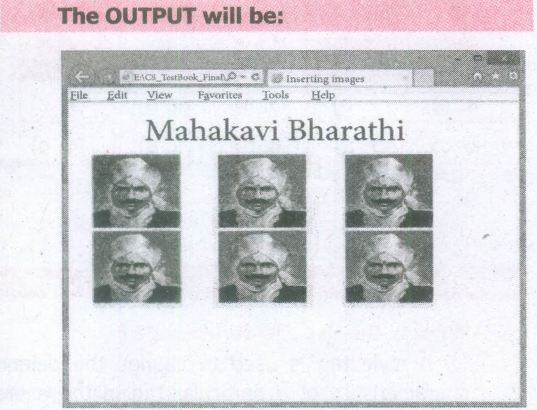
An HTML code to demonstrate < img > attributes:
< html >
< head >
< title > Inserting Images < /title >
< /head >
< body >
< h1 align = center > Mahakavi Bharathi
< /h1 >
< img src = bharathiyar.gif alt = "National
Poet of' India" Width = 20% Height = 25% vpace = 20 Hspace = 20 >
< img src = bharathiyar.gif alt = "National
Poet of India" Width = 20% Height = 25% vpace = 20 Hspace = 20 >
< img src = bharathiyar.gif alt = "National
Poet of India" Width = 20% Height = 25% vpace = 20 Hspace = 20 > < br >
< img src = bharathiyar.gif alt = "National
Poet of 'India" Width = 20% Height = 25% vpace = 20 Hspace = 20 >
< img src = bharathiyar.gif alt = "National
Poet of India" Width = 20% Height = 25% vpace = 20 Hspace = 20 >
< img src = bharathiyar.gif alt = "National
Poet of India" Width = 20% Height = 25% vpace = 20 Hspace = 20 > < br >
< /body >
< /html >
35.
JavaScript supports three important types of dialog boxes. Dialog boxes are also called as Popup Boxes. These dialog boxes can be used to raise an alert, or to get confirmation on any input or to have a kind of input from the users.JavaScrípt supports three kind of popup boxes: Alert box, Confirm box, and Promnpt box.
Alert Dialog Box: An alert dialog box is mostly used to give a warning message to the users. For example, if one input field requires to enter some text but the user does not provide any input, then as a part of validation, you can use an alert box to give a warning message. Alert box gives only one button "OK" to select and proceed.
The syntax of alert box is
alert("Message");
(or) Window.alert ("Message");
Example:
alert("Name is compulsory entry);
(or) window.alert("Name is compulsory entry");
Confirm Dialog Box : A confirmation dialog box is mostly used to take user's consent on any option. It displays a dialog box with two buttons: OK and Cancel. If the user clicks on the OK button, the confirm() will return true. If the user clicks on the Cancel button, then confirm() returns false.
The syntax of confirm dialog box is
confirm("message");
(or)
window.confirm("message");
Example :
confirm("Hai Do you want to continue:");
(or)
window.confirm(“Hai Do you want to continue:");
Prompt Dialog Box: The prompt dialog box is very useful when the user want to pop-up a text box to get user input. Thus, it enables you to interact with the user. The user needs to fill in the text box field and then click OK.
The prompt dialog box is displayed using a method called prompt()which takes two parameters :
(i) a label which you want to display in the text box and (ii) a default string to display in the text box. This dialog box has two buttons: OK and Carncel. If the user clicks the OK button, the prompt() will return the entered value from the text box. If the user clicks the Cancel button, the prompt() returns null. The Sntax of prompt dialog box is,
Prompt("Message","default Value");
(or)
window.prompt("sometext","defaultText");
Example:
prompt("Enter Your Name:"Name");
(or)
window.prompt("Enter Your Name:"Name");
36.
The do ..while loop is like a while loop, except that the loop expression is tested at the end of the loop rather than at the beginning. This means that the body of the loop is always executed a,t least once. The syntax is:
do
{
body of the loop
} while (expression);
An important difference between while and do ..
while statement is in the do ..while loop
body of the loop always executed at least once before the condition can be executed. In a while loop, first condition will be evaluated and then only based on the result of the condition the body of the loop will be executed or not.
Using do ..while loop
< Html >
< Head >
< Title >Program - To test do ..while statement in
JavaScript < /Title >
< /Head >
< Body >
< script language="javascript" type="text/ javascript" >
document.write("< h2 > Using do ..while
Statement < /h2 >");
var no2=0; do
{
document. write(no2+"");
no2=no2+2;
}while(no2< = 10);
< /script >
< /Body >
< /Html >
37.
Depending upon geographical area covered by a network, it is classified as:
(i) Local Area Network (LAN)
(ii) Metropolitan Area Network (MAN)
(iii) Wide Area Network (WAN)
(iv) Personal Area Network (PAN)
(v) Campus Area Network (CAN)
(iv) Wireless Local Area Network (W-LAN)
(i) Local Area Network (LAN)
.JPG)
| Range | Upto 10 km |
| Location | Refers to same office, same building, same company and in same school |
| Speed | Upto 10-100 Mbps |
| Advantage | Low Cost, Resource Sharing, Security |
| Disadvantage | Area Covered Limited When Number of nodes increases,Performance Decreases |
(ii) Metropolitan Area Network (MAN)
.JPG)
| Range | 10 to 15 Miles |
| Location | MAN is a network designed to extend over an entire city. |
| Speed | Upto 5 - 10 Mbps |
| Advantage | Wider than LAN. |
| Disadvantage | Data rate is slow compared toLAN Cost higher than LAN. |
(iii) Wide Area Network (WAN)
.JPG)
| Range | Above 1000 Kms |
| Location | It Span entire countries and continents. |
| Speed | Upto 256 Kbpsto 2 Mbps. |
| Advantage | Large geographical Areaz |
| Disadvantage | 1. Complicated and Complex. High Cost. 2. Requires high Performance. Devices. 3. Low security. Cost higher than LAN. |
(iv) Personal Area Network (PAN)
.JPG)
| Range | Upto 100 meters |
| Location | Used for shorter distance, controlled by a single person within a single building |
| Speed | Up to 250 Kbps. |
| Advantage | 1. Efficient, Cost effective and convenient. 2. Controlled by a single person Hotspot may connect upto 8 devices. |
| Disadvantage | 1. Shorter distance upto 10 meters only. 2. Data rate is low compared to other network. |
(v) Campus Area Network (CAN)
.JPG)
| Range | Upto 5 Kms |
| Location | Larger than LAN, but smaller than MAN. University, school or small business, enterprise |
| Speed | 40 KB/s TO 1 MB/s |
| Advantage | Cost effective, Wired or Wired Network, High Bandwith Multidepartmental Network access |
| Disadvantage | Difficult to manage |
(iv) Wireless Local Area Network (W-LAN)
.JPG)
| Range | Upto 50 Kms |
| Location | Ranges from a single room to an entire campus Uses Wifi or Bluetooth, Radio waves |
| Speed | 1 Mbps to 54 Mbps. |
| Advantage | Portable Installation is quick and easy |
| Disadvantage | Low Bandwith due to interference |
38.
39.
Microsoft Windows is a family of proprietary operating systems designed by Microsoft Corporation and primarily targeted to Intel architecture-based computers. Windows comes as pre-loaded on most of the new personal computers and laptops.
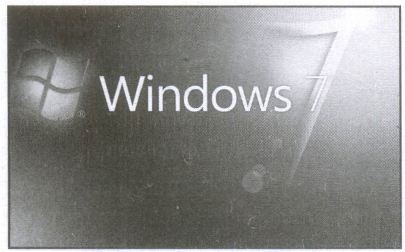
Microsoft Windows Home Screen
iOS - iPhone OS
iOS (formerly iPhone OS) is a mobile operating system created and developed by Apple Inc. exclusively for its hardware. It is the operating system that presently powers many of the company's mobile devices, including the iPhone, iPad and iPod Touch. It is the second most popular mobile operating system globally after Android.
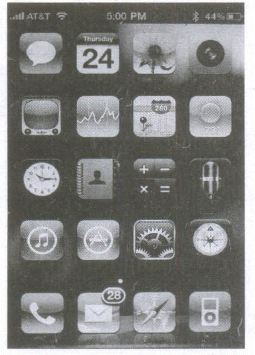
iPhone Home Screen
40.
(a) Bus:
A bus is a collection of wires used for communication between the internal components of a computer.
(b) Data bus:
(i) Data busis a collection of wires to carry data in bits.
(ii) A data bus is used to transfer data between the memory and the CPU.
(iii) The data bus is bidirectional.
(c) Address bus:
(i) Address bus is a collection of wires to carry data in bits.
(ii) The address bus is used to point a memory location.
(iii) The address bus is unidirectional.
(d) Control bus:
(i) Control bus is a control line/collection of wires to control the operation/functions.
(ii) The control bus controls both read and write operations.
41.
Components of a Computer :
The computer is the combination of hardware and software. Hardware is the physical component of a computer like motherboard, memory devices, monitor, keyboard etc., while software is the set of programs or instructions. Both hardware and software together make the computer system to function. Every task given to a computer follows an Input-process - output cycle (IPO cycle).
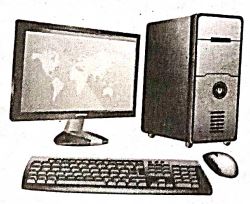
(i) Input unit: Input unit is used to feed any form of data to the computer, which can be stored in the memory unit for further processing.
Example : keyboard, mouse etc.
(i) Central Processing Unit : CPU is the major component which interprets and executes software instructions. It also control the operation of all other components such as memory, input and output units.
(iii) Arithmetic and Logic Unit : The ALU is a part of the CPU where various computing functions are performed on data. The ALU performs arithmetic operations such as addition, subtraction, multiplication, division and logical operations.
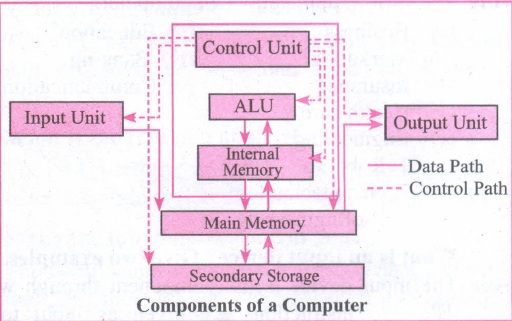
(iv) Control Unit : The control unit controls the flow of data between the CPU memory and I/o devices. It also controls the entire operation of a computer.
(v) Output Unit: An output unit is any hardware component that convey information to users in an understandable form. Example : Monitor, Printer etc.
(vi) Memory Unit: The Memory Unit is of two types which are primary memory and secondary memory. The primary memory is used to temporarily store the programs and data when the instructions are ready to execute. The secondary memory is used to store the data permanently. The Primary Memory is volatile, that is,the content is lost when the power supply is switched off. The Random Access Memory (RAM) is an example of a main memory. The Secondary memory is non volatile, that is, the content is available even after the power supply is switched off. Hard disk, CD-ROM and DVD ROM are examples of secondary memory.
42.
Presentation is helpful for a sales person to promote his/her products effectively.
(i) Presentation will give visual video, pictures to understand a goodness of the product.
(ii) By using presentation, sales person can make audience to understand easier and he can get more response from the people.
(iii) Presentation help sales person to present prospect challenges easier.
(iv) Sales person can explain with physical demonstration by shocking animations. It helps to increase the sales.
43.
Sheets count: Shows current serial number of the sheet / total number of sheets available.
Page Style: Shows the page style of the current sheet. To make changes, just double-click on "Default" and it will show you the "Page Style" dialog box, which is used to change the margin, orientation, paper size, inserting header, footer, border style etc.,
Selection Mode: Shows the selection mode of the current sheet. There are three modes available to select the cells of a worksheet. They are, Standard (STD), Extend (EXT) and Add (ADD).
Unsaved Changes: An asterisk ( * ) symbol indicates the changes made in the worksheet that are not yet saved. If you saved your changes, it will disappear.
Cell information: Shows the sum of the values of selected cells.
Zoom slider: used to increase or decrease the view scale (zoom). The default zooming scale is 100%.

11th Standard Syllabus & Materials
11th Standard
TN 11th Tamil பீடு பெற நில் - செய்யுள் - காவடிச்சிந்து Important Questions And Answers Study Material - QB365 Set A
NEW11th Standard
TN 11th Tamil பீடு பெற நில் - உரைநடை - மலை இடப்பெயர்கள் : ஓர் ஆய்வு Important Questions And Answers Study Material - QB365 Set A
NEW11th Standard
TN 11th Tamil மாமழை போற்றுதும் - துணைப்பாடம் - யானை டாக்டர் Important Questions And Answers Study Material - QB365 Set A
NEW11th Standard
TN 11th Tamil மாமழை போற்றுதும் - செய்யுள் - ஐங்குறுநூறு Important Questions And Answers Study Material - QB365 Set A



Tamilnadu Stateboard 11th Standard Subjects

Maths

Commerce

Economics

Biology

Business Maths and Statistics

Accountancy

Computer Science

Physics

Chemistry
Maths
Biology
Economics
Physics
Chemistry

History
Business Maths and Statistics

Computer Science
Accountancy
Computer Applications
History
Computer Technology
Commerce
Computer Applications
Computer Technology

Tamil

English

French
Tamilnadu Stateboard Standards
