
 100% FREE ACCESS
11th Standard Syllabus & Materials
11th Standard
TN 11th Tamil இயற்கை வேளாண்மை,சுற்றுச்சூழல் -செய்யுள் - மனோன்மணீயம் Important Questions And Answers Study Material - QB365 Set A
NEW11th Standard
TN 11th Tamil என்னுயிர் என்பேன் -துணைப்பாடம் - இசைத்தமிழர் இருவர் Important Questions And Answers Study Material - QB365 Set A
NEW11th Standard
TN 11th Tamil மொழி கலை -செய்யுள் - ஒவ்வொரு புல்லையும் Important Questions And Answers Study Material - QB365 Set A
NEW11th Standard
TN 11th Tamil பீடு பெற நில் - இலக்கணம் - பகுபத உறுப்புகள் Important Questions And Answers Study Material - QB365 Set A
NEW11th Standard
TN 11th Tamil பீடு பெற நில் - துணைப்பாடம் - வாடிவாசல் Important Questions And Answers Study Material - QB365 Set A
NEW11th Standard
TN 11th Tamil பீடு பெற நில் - செய்யுள் - குறுந்தொகை Important Questions And Answers Study Material - QB365 Set A

Published on: 01/08/2019
Download Tamil Nadu 11th Standard Computer Applications question papers, model tests, one-mark questions, important questions, and public exam papers in PDF format. Free study materials and answer keys for TN State Board students.
Questions + Answers key
Take MCQ Computer Applications Test
1.
Which of the following device identifies the location when address is placed in the memory address register?
locator
encoder
decoder
multiplexed
2.
Expansion for ASCII
American School Code for Information Interchange
American Standard Code for Information Interchange
All Standard Code for Information Interchange
American Society Code for Information Interchange
3.
Which of the following device used to draw lines on a computer device?
Track ball
OCR
BCR
Light pen
4.
How many types of pointing device are there?
2
3
1
Many
5.
A set of instructions given to the computer is called_________.
Information
Data
Input
Program
6.
The expansion of VLSI is ________.
Verified logical scale integrated circuits
Very logical small integer circuits
Very large scale integrated circuits
Volatile large scale integrated circuits
7.
Expand ANN _____
Artical Neural Network
Artificial Neurons Network
Artificial Neural Network
Artificial Network Neurons
8.
Which component used in third generation computers?
Vacuum Tube
Transistors
IC
Microprocessor
9.
Identify the output device _____
Keyboard
Memory
Monitor
Mouse
10.
First generation computers used ______.
Vacuum tubes
Transistors
Integrated circuits
Microprocessors
11.
List down the differences in security for Windows 7, Windows 8 and Windows 10 operating system.
12.
What are the different Operating Systems used in computer?
13.
List the encoding systems that represents characters in memory.
14.
Name the Third generation computers.
15.
Distinguish Primary and Secondary memory.
16.
Why do we need OS?
17.
What is the use of System Bus?
18.
Complete the Table
1) 0 + _ = 0
2) _ + 0 = 1
3) 1+ 1 = _
4) 0 + 1 = _
19.
Write the advantages of fingerprint scanner.
20.
What are the characteristics of a computer?
21.
Explain the procedure of shutting down or logging of computer.
22.
Explain the versions of Windows Operating System.
23.
Discuss the various generations of computers.
1.
(c)
decoder
2.
(b)
American Standard Code for Information Interchange
3.
(d)
Light pen
4.
(a)
2
5.
(d)
Program
6.
(c)
Very large scale integrated circuits
7.
(c)
Artificial Neural Network
8.
(c)
IC
9.
(c)
Monitor
10.
(a)
Vacuum tubes
11.
Windows 7 - Ordinary password security while logging
Windows 8 - Ordinary password security while logging.
Windows 10 - Windows Hello, one of the security which lets you log-in using a fingerprint, face or iris scan instead of a password.
12.
The different types of operating system uscd in the computer:
(i) Single User and Single Task Operating Systems
(ii) Multi User Operating Systems
(iii) Multi Pocessing Operating Systems
(iv) Distributed Operating Systems
(v) Prominent Operating Systems
13.
1. BCD - Binary Coded Decimal.
2. EBCDIC - Extended Binary Coded Decimal Interchange Code.
3. ASCII - American Standard Code for Information Interchange,
4. Unicode.
5. ISCII - Indian Standard Code for Information Interchange
14.
IBM 360 Series, Honeywell 6000 series.
15.
| Primary Memory | Secondary memory |
| It is used to temporarily store the programs and data when the instructions are ready to execute. | It is used to store the data permanently. |
| It is volatile, the content is lost when the power supply is Switched off. Eg. RAM |
It is non-volatile, the content is available even after the power supply is Switched off. Eg. ROM,CD-ROM, DVD ROM. |
16.
(i) An OS is required to access and use the hardware resources.
(ii) It provides a stable, consistent way for applications to deal with the hardware.
(iii) An OS prepares the computer for taking instructions from the user and converts into machine code and gives into the CPU for execution.
(iv) as only co-ordinates and controls all the activities of a computer system.
17.
(i) The address bus is used to point a memory location.
(ii) A decoder, a digital circuit is used to point to the specific memory location where the word can be located.
(iii) The address register is connected with the address bus, which provides the address of the instruction.
(iv) A data bus is used to transfer data between the memory and the CPU.
(v) The data bus is bidirectional and the address bus is unidirectional.
(vi) The control bus controls both read and write operations.
(vii) The system bus is a bunch of wires which is the collection of address bus, data bus and control bus that serves as communication channels between the microprocessor and other devices.
18.
1) 0 + 0 = 0
2) 1 + 0 = 1
3) 1+ 1 = 1
4) 0 + 1 = 1
19.
Fingerprint scanner :
Fingerprint Scanners is a fingerprint recognition device used for computer security equipped with the fingerprint recognition module feature that uses biometric technology. Fingerprint Reader/Scanner is very safe and convenient device for security instead of password, that is vulnerable to fraud and is hard to remember.
20.
(i) Computer is the powerful machine.
(ii) It can perform large number of tasks
(iii) The main capacities of computer are work length, speed accuracy, diligence, versatility memory and automation and lots of more tasks.
21.
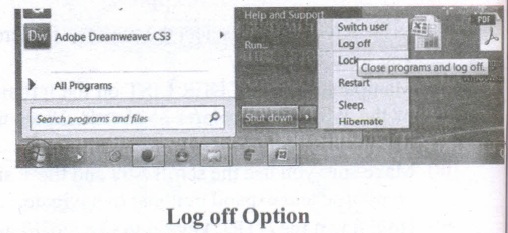
Log Off:
To log off from our computer:
(i) Click on the start button.
(ii) Select log off.
(iii) If any open programs asked to be closed then Windows force them to shut down. Any unsaved information will be last.
Shut Down:
To shut down our computer:
(i) Click on the start button.
(ii) Select shut down.
(iii) Then see the shut down windows dialog box opens.
(iv) If any open programs asked to be closed then Windows, force them to shut down. Any unsaved information will be lost.
22.
| S.No | Versions | Year | Specific features |
| 1. | Windows 1.x | 1985 | 1. Introduction of GUI in 16 - bit. processor 2. Mouse was introduced as an input device |
| 2. | Windows 2.x | 1987 | 1. Supports to minimize or maximize windows. 2. Control panel feature was introduced with various system settings and customising options. |
| 3. | Windows 3.x | 1992 | 1. Introduced the concept of multitasking. 2. Supported 256 colours which brought a more modern, colourful look to the interface. |
| 4. | Windows 95 | 1995 | 1. Introduced Start button, the taskbar, Windows Explorer and Start menu. 2. Introduced 32 - bit processor and focused more on multitasking. |
| 5. | Windows 98 | 1998 | 1. Integration of the Web browser (Internet Explorer) with the Operating System. 2. DOS gaming began to disappear as Windows based games improved. 3. Plug and play feature was introduced. |
| 6. | Windows NT | Designed to act as servers in network. | |
| 7. | Windows Me | 2000 | It introduced automated system diagnostics and recovery tools. |
| 8. | Windows 2000 | 2000 | 1. Served as an Operating System for business desktop and laptop systems. 2. Four versions of Windows 2000 were released: Professional (for business desktop and laptop systems), Server (both a Web server and an office server), Advanced Server (for line-of-business applications) and Data Centre Server (for high traffic computer networks). |
| 9. | Windows XP | 2001 | 1. Introduced 64-bit Processor. 2. Improved Windows appearance with themes and offered a stable version |
| 10. | Windows Vista | 2006 | Updated the look and feel of Windows |
| 11. | Windows 7 | 2009 | Booting time was improved, introduced new user interfaces like Aero Peek, pinning programs to taskbar, handwriting recognition etc. and Internet Explorer 8. |
| 12. | Windows 8 | 2012 | 1. Windows 8 is faster than previous versions of Windows. 2. Start button was removed 3. Windows 8 takes better advantage of multi-core processing, solid state drives (SSD), touch screens and other alternate input methods. 4. Served as common platform for mobile and computer. |
| 13. | Windows 10 | 2015 | 1. Start Button was added again. 2. Multiple desktop. 3. Central Notification Center for App notification and quick actions. 4. Cortana voice activated personal assistant. |
23.
| S.No | Generation | Period | Main Component used | Merits/ Demerits |
| 1 | First Generation | 1940 - 1956 | Vaccum tubes | 1. Big in size 2. Consumed more power 3. Malfunction due to over heat 4. Machine Language was used |
| First Generation Computer - ENIAC, EDVAC, UNIVAC 1 ENIAC weighed about 27 tons, size 8 feet x 100 feet x 3 feet and consumed around 150 watts of power |
||||
| 2 | Second Generation | 1956-1964 | Transistors | 1. Smaller compared to First Generation 2. Generated Less Heat 3. Consumed less power compared to first generation 4. Punched cards were used 5. First operating system was developed - Batch Processing and Multiprogramming Operating System 6. Machine language as well as Assembly language was used. |
| Second Generation Computers - IBM 1401, IBM 1620, UNIVAC 1108 | ||||
| 3 | Third Generation | 1964-1971 | Integrated Circuits (IC) | 1. Computers were smaller, faster and more reliable 2. Consumed less power. 3. High-Level Languages were used |
| Third Generation Computers -IBM ·360 series, Honeywell 6000 series | ||||
| 4 | Fourth Generation | 1971-1980 | Microprocessor Very Large Scale Integrated Circuits (VLSI) |
1. Smaller and Faster 2. Microcomputer series such as IBM and APPLE were developed 3. portable Computers were introduced |
| 5 | Fifth Generation | 1980-till date | Ultra Large Scale Integration (ULSI) | 1. Parallel, Processing 2. Super conductors 3. Computers size was drastically reduced. 4. Can recognize Images and Graphics 5. Introduction of Artificial Intelligence and Expert Systems 6. Able to solve high complex problems including decision making and logical reasoning |
| 6 | Sixth Generation | In future |  |
1. Parallel and Distributed computing 2. Computers have become smarter faster and smaller 3. Development of robotics 4. Natural Language Processing 5. Development of Voice Recognition Software. |

11th Standard Syllabus & Materials
11th Standard
TN 11th Tamil பீடு பெற நில் - செய்யுள் - காவடிச்சிந்து Important Questions And Answers Study Material - QB365 Set A
NEW11th Standard
TN 11th Tamil பீடு பெற நில் - உரைநடை - மலை இடப்பெயர்கள் : ஓர் ஆய்வு Important Questions And Answers Study Material - QB365 Set A
NEW11th Standard
TN 11th Tamil மாமழை போற்றுதும் - துணைப்பாடம் - யானை டாக்டர் Important Questions And Answers Study Material - QB365 Set A
NEW11th Standard
TN 11th Tamil மாமழை போற்றுதும் - செய்யுள் - ஐங்குறுநூறு Important Questions And Answers Study Material - QB365 Set A



Tamilnadu Stateboard 11th Standard Subjects

Maths

Commerce

Economics

Biology

Business Maths and Statistics

Accountancy

Computer Science

Physics

Chemistry
Maths
Biology
Economics
Physics
Chemistry

History
Business Maths and Statistics

Computer Science
Accountancy
Computer Applications
History
Computer Technology
Commerce
Computer Applications
Computer Technology

Tamil

English

French
Tamilnadu Stateboard Standards
